

TL;DR:
Need an old lady voice changer for gaming, funny recordings, or realistic grandma voiceovers? Here are 6 tools worth trying:
- MagicMic: Real-time voice changing for gaming and chats.
- Voicemod: Grandma voice filters for Discord and streaming.
- Clownfish: Free Windows voice changer with manual pitch adjustment.
- TopMediai: Online AI voice conversion for audio recordings.
- ElevenLabs: Realistic AI elderly female voices.
- FineVoice: Grandma voiceovers for storytelling and videos.
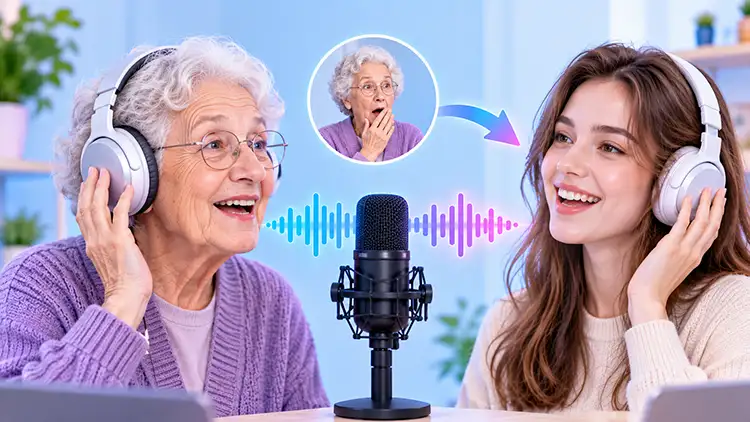
Ever wanted to sound like a funny grandma or surprise your friends with an unexpectedly old-fashioned voice? An old lady voice changer makes it easy to turn your normal voice into an elderly woman's voice, whether you're joking around on Discord, recording TikTok videos, playing games, or creating funny voiceovers.
In this guide, we'll explore 6 options, including free desktop apps and online AI voice changers, to help you find the right tool for your next grandma-voice experiment!
- 1. iMyFone MagicMic - Best Old Lady Voice Changer for Real-Time Voice Chats
- 2. Voicemod - Best for an Old Lady Voice Changer in Gaming
- 3. Clownfish Voice Changer - Best Free Old Woman Voice Changer for Windows
- 4. TopMediai Online Voice Changer - Best for Free Online Old Lady Voice Conversion
- 5. ElevenLabs - Best AI Elderly Female Voice Changer for Realistic Results
- 6. FineVoice - Best Grandma Voice Changer Online for Character Voiceovers
Quick Comparison: 6 Old Lady Voice Changers
| Tool | Platform | Voice Changing Method | Real-Time Voice Changing | Free Availability | Best For |
|---|---|---|---|---|---|
| iMyFone MagicMic | Windows, Mac, Mobile | AI voice effects, voice conversion, and sound effects | Yes (desktop) | Limited free effects | Real-time gaming, voice chats, and funny recordings |
| Voicemod | Windows, Mac | Real-time voice filters and community-created effects | Yes | Free voices and features; some options require payment | Gaming, streaming, and Discord conversations |
| Clownfish Voice Changer | Windows | Pitch adjustment and microphone effects | Yes | Completely free for basic features | Windows users who want a free voice changer |
| TopMediai Online Voice Changer | Web browser | AI voice conversion and audio recording | No | Free access with usage limits | Converting short recordings into an old lady voice |
| ElevenLabs | Web browser | AI voice conversion and elderly female voice generation | No | Free access with credit limits | Creating realistic elderly female voiceovers |
| FineVoice | Web browser | AI voice conversion and text-to-speech | No | Free access with feature and usage limits | Grandma-style character voices and storytelling |
1. iMyFone MagicMic - Best Old Lady Voice Changer for Real-Time Voice Chats
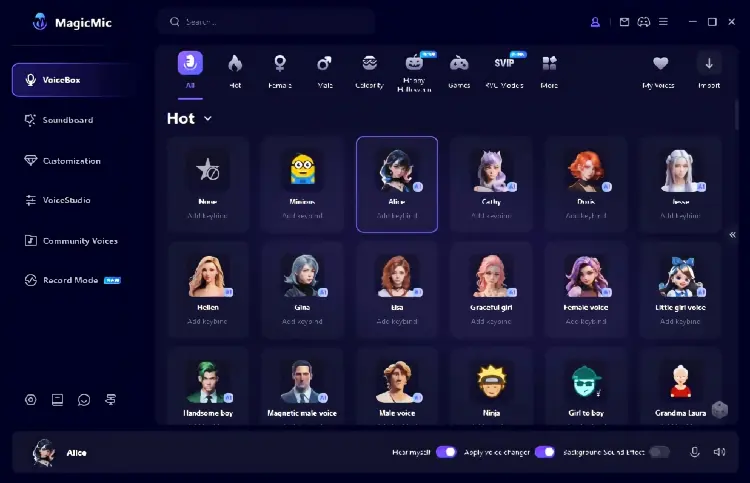
If you're looking for an old lady voice changer app that you can use during gaming sessions, voice chats, or live streams, iMyFone MagicMic is a convenient option to consider. It combines real-time voice changing, AI voice effects, audio file conversion, and sound effects in one application.
MagicMic offers hundreds of voice effects, including various character voices and gender transformations. If you want to try an old lady voice during gaming chats, live streams, or voice calls, you can browse its voice library for Grandma, Old Woman, or similar elderly female voice effects.
Key Features:
- Offer hundreds of AI voice effects and sound effects, with availability depending on the version.
- Support real-time voice changing on Windows and Mac.
- Allow you to record your voice and apply different voice filters.
- Support audio file voice conversion.
- Provide voice customization and a soundboard for gaming and entertainment.
- Support noise reduction to help improve voice clarity.
- Support real-time voice changing for gaming, streaming, and online conversations.
- Provide multiple female and character-style voice effects for creating an elderly female voice.
- Combine voice conversion, recording, and sound effects in one application.
- Offer both desktop and mobile versions.
- Beginner-friendly interface with selectable voice effects.
- Not every voice effect is available in the free version.
- The mobile version does not provide the same real-time microphone functionality as the desktop version.
- Some filters may sound more like exaggerated cartoon characters than realistic elderly women.
- Requires installation for desktop real-time voice changing.
Best For: Users who want an old woman voice changer for real-time gaming, Discord conversations, and funny voice recordings.
2. Voicemod - Best for an Old Lady Voice Changer in Gaming
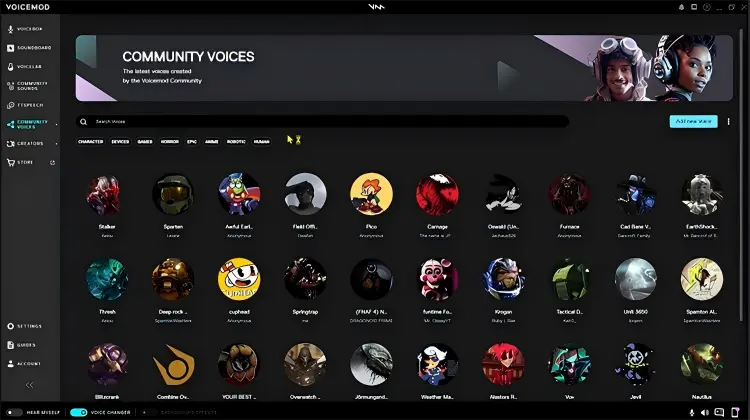
Voicemod is a real-time voice changer designed for gamers, streamers, and voice chat users. It offers a variety of voice filters, including community-created Old Lady Voice Changer effects that transform microphone input into a voice with the characteristics of an elderly woman.
Unlike online tools that require you to record and upload audio first, Voicemod uses a virtual microphone to transmit your processed voice to Discord, games, and other applications that support microphone input.
Key Features:
- Offer community-created Old Lady voice effects.
- Support real-time microphone voice changing.
- Provide various voice filters and sound effects.
- Support virtual microphone and hotkey configurations.
- Suitable for gaming, streaming, and voice chats.
- Include built-in microphone noise reduction and voice enhancement features.
- Change your voice in real time during voice chats.
- Provide ready-made Old Lady voice effects to try.
- Support custom and community-created voices.
- Require downloading and installing desktop software.
- Actual voice quality depends on microphone quality and system settings.
- Require software installation and microphone configuration on a computer.
- Some voices and advanced features may require a paid subscription.
Best For: Gamers, streamers, and Discord users who want a dedicated old lady voice filter for live conversations.
3. Clownfish Voice Changer - Best Free Old Woman Voice Changer for Windows
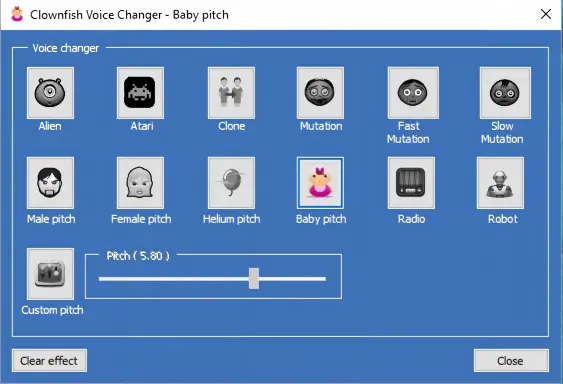
Clownfish Voice Changer is a good option if you want a free old lady voice changer for Windows. It modifies microphone audio system-wide and works with apps like Discord, Skype, Steam, and TeamSpeak. Its built-in effects include Female Pitch, Baby Pitch, Robot, and Custom Pitch, but there is no dedicated grandma or old lady preset.
To create an elderly female voice, you can adjust the pitch and tone manually or use compatible VST plugins for further customization. However, pitch changes alone may sound artificial, so additional audio processing may be needed to achieve a more natural grandma voice. (Clownfish Voice Changer is not working?)
Key Features:
- Provide real-time microphone voice changing.
- Include Female Pitch, Baby Pitch, Helium Pitch, Robot, and Custom Pitch effects.
- Support system-wide microphone integration.
- Offer a sound player and sound effects.
- Support VST plugins for additional audio customization.
- Work with popular voice communication applications.
- Completely free to use without a subscription for its basic voice-changing features.
- Lightweight and relatively simple to operate.
- Apply voice effects across compatible Windows applications.
- Allow custom pitch adjustments instead of relying only on presets.
- Support VST plugins for users who want more control over audio effects.
- Does not include a dedicated old lady or grandma voice preset.
- Require manual adjustments to create an elderly female voice.
- Pitch shifting alone can make the voice sound artificial.
- Windows-focused, so it is not a suitable native solution for macOS or mobile devices.
- Microphone integration and input-device settings may require troubleshooting.
Best For: Windows users who want a free old woman voice changer and don't mind manually adjusting voice effects.
4. TopMediai Online Voice Changer - Best for Free Online Old Lady Voice Conversion
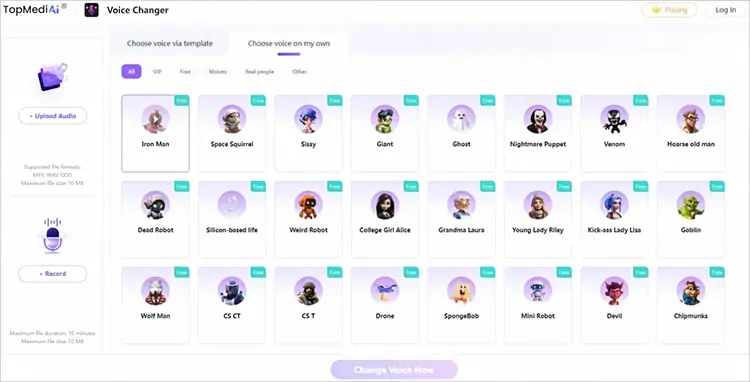
If you want to create an elderly female voice without installing software, TopMediai Online Voice Changer lets you do it directly in your browser. This old lady voice changer online supports MP3, WAV, and OGG uploads, as well as direct voice recording.
Its VoiceLab library offers over 1,000 voice options, making it easy to experiment with different grandma-style effects for funny clips, storytelling, and social media videos. Simply upload or record your audio, choose a voice filter, and convert it. You can then download the finished recording.
Key Features:
- Provide an online AI voice changer without requiring desktop installation.
- Support MP3, WAV, and OGG audio files.
- Offer more than 1,000 voice options through VoiceLab.
- Allow users to upload audio or record directly in the browser.
- Support downloading converted audio.
- Include voice effects for different creative and entertainment scenarios.
- No desktop software installation required.
- Support both audio uploads and direct voice recording.
- Offer a wide range of voice filters.
- Compatible with browsers on Windows, Mac, and mobile devices.
- Not a traditional real-time microphone voice changer.
- Require browsing the voice library to find a suitable old lady effect.
- Maximum audio upload size is 10 MB.
- Browser recording is limited to 10 minutes.
Best For: Users who want a convenient online old lady voice changer for converting short audio recordings without installing software.
5. ElevenLabs - Best AI Elderly Female Voice Changer for Realistic Results
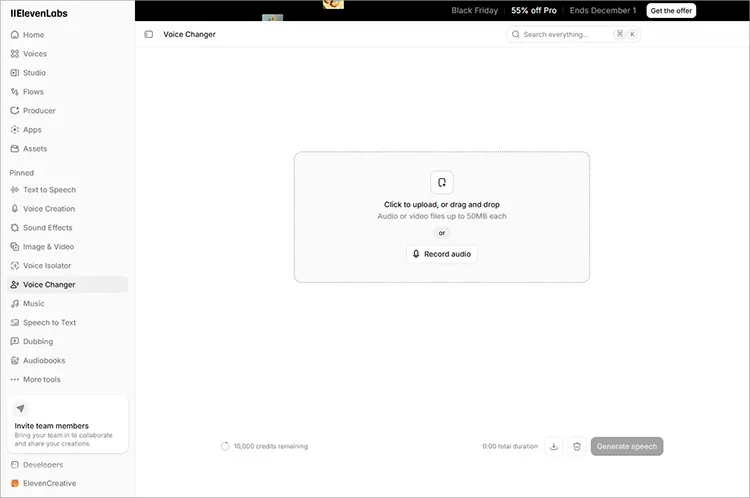
ElevenLabs is a good choice if you prefer natural-sounding elderly female voices over exaggerated effects. It offers dedicated elderly female voice changer and grandma voice changer online options, with voices such as Grandma Rachel, Regina, Edna, and Grandma Titina.
To use it, simply allow microphone access to record your voice or upload an existing audio file. Then select an elderly female voice and generate the converted audio. You can also adjust settings such as pitch, speed, and volume to customize the result.
Key Features:
- Provide dedicated elderly female and grandma voice changer pages.
- Offer hundreds of AI voice options.
- Include mature female voices with different tones, accents, and speaking styles.
- Support uploading audio files and recording through a microphone.
- Allow customization of pitch, speed, volume, and accents.
- Support multiple languages for elderly female voice generation.
- Offer dedicated AI elderly female and grandma voice options.
- Produce more expressive and natural-sounding speech than basic pitch-shifting effects.
- Provide different grandma personalities and speaking styles.
- Support multiple languages and accents.
- Allow users to record directly or upload existing audio.
- Free to start, making it possible to explore the service before purchasing a plan.
- Require an internet connection and online processing.
- Not designed primarily for real-time gaming or live microphone conversations.
- Some advanced features and higher usage limits may require a paid subscription.
- Generating and downloading longer audio projects may consume account credits.
- The output may not perfectly preserve every characteristic of the original speaker.
Best For: Content creators, storytellers, and video producers who want a realistic elderly female voice rather than a cartoon-style old lady effect.
6. FineVoice - Best Grandma Voice Changer Online for Character Voiceovers
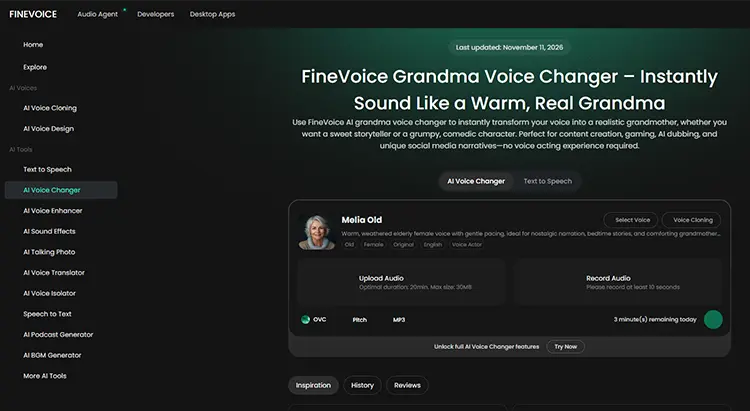
FineVoice is worth trying if you need an old lady voice changer online for free character voiceovers or entertaining audio. Its dedicated Grandma Voice Changer offers several elderly female voices, including Melia Old, which has a warm, gentle tone suitable for storytelling and narration. You can also explore other voices, such as Charlotte and Isolde Starwhisper, to create different female characters for videos, podcasts, and animations.
FineVoice supports both audio conversion and text-to-speech. You can upload an audio file, record your voice directly, or turn a written script into grandma-style speech.
Key Features:
- Provide a dedicated AI grandma voice changer.
- Include Melia Old, an elderly female English voice.
- Offer additional mature female and grandmother-style voice options.
- Support audio uploads and microphone recording.
- Provide text-to-speech functionality for generating dialogue from scripts.
- Allow users to explore different voice styles for storytelling and content creation.
- Include dedicated elderly female voice options rather than relying solely on pitch adjustment.
- Offer a warm and expressive grandma voice suitable for storytelling.
- Support both voice conversion and text-to-speech generation.
- Work online without requiring a desktop voice changer installation.
- Support relatively long audio uploads compared with some browser-based alternatives.
- Useful for character dubbing, social media videos, and creative projects.
- Require an internet connection for online processing.
- The maximum audio upload size is 30 MB.
- Recording must be at least 10 seconds long.
- Some advanced features and usage limits may require an upgraded plan.
- Not a direct replacement for a real-time microphone voice changer in gaming applications.
Best For: Users who want a grandma voice changer online for creating character dialogue, AI voiceovers, and storytelling audio.
Sum Up
Choosing the right old lady voice changer depends on how you plan to use it. MagicMic and Voicemod are worth considering for real-time voice effects, while Clownfish is a simple free option for experimenting with pitch on Windows. If you prefer browser-based tools, TopMediai and FineVoice let you create an elderly female voice from recordings, while ElevenLabs is a good choice for more natural-sounding AI voice conversion. Try a few options to see which one best matches the grandma voice you have in mind.
Related Articles
Female to Male Voice Changer Review: 7 Best Tools in 2026
10 Best Anime Voice Changer Tools for PC, Online & Mobile