


TL;DR:
Looking for the best Voicemod alternative? This guide compares 5 top voice changers for PC, Mac, Android, and iPhone, including AI voice tools, real-time voice changers, free non-AI options, and mobile apps. Discover which tool is best for gaming, streaming, Discord chats, content creation, or fun voice effects based on features, compatibility, and limitations.
Voicemod is one of the most popular real-time voice changers available today. With its wide range of AI voice effects, real-time voice transformation, and support for Discord, games, and streaming platforms, it has attracted a large number of users. However, Voicemod also has some limitations, such as requiring payment to unlock certain premium voices and offering limited features in the free version.
If you are looking for a Voicemod alternative, whether for gaming chats, live streaming, video creation, or exploring AI voice generation and voice cloning, there are many excellent options available. In this article, we'll introduce the five best Voicemod alternatives and compare their features, pros and cons, and ideal use cases.
- Part 1. Voicemod Overview: Why Look for an Alternative?
- Part 2. 5 Best Voicemod Alternative Tools
- 1. TopMediai Online Voice Changer - An AI Online Voicemod Alternative
- 2. iMyFone MagicMic - An AI-Powered Real-Time Voicemod Alternative
- 3. Clownfish Voice Changer - A Lightweight and Free Voicemod Alternative for Windows
- 4. MorphVOX - A Customizable Voicemod Alternative for Mac
- 5. MagicCall - A Mobile-Focused Voicemod Alternative for Fun Voice Effects
- Part 3. Which Voicemod Alternative Should You Choose?
- Part 4. FAQs on Voicemod Alternatives
Part 1. Voicemod Overview: Why Look for an Alternative?
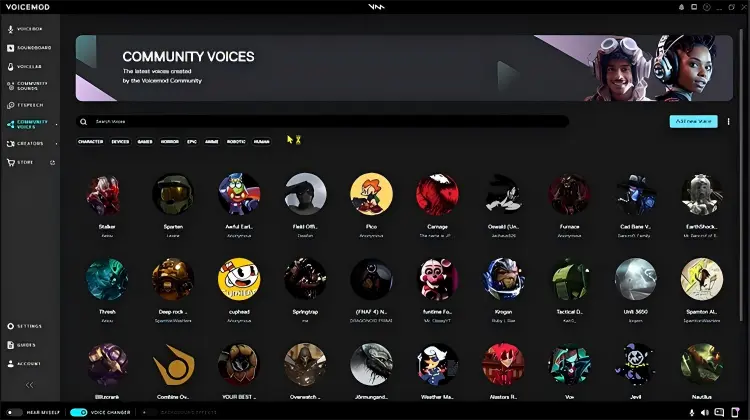
Voicemod is a real-time voice changer and soundboard designed mainly for gaming, streaming, voice chat, and online communication. It can work with applications such as Discord and streaming software, allowing users to route their microphone through virtual audio processing and apply voice effects while speaking.
Key features of Voicemod:
* Real-time voice changing, with support for platforms such as Discord, OBS, and Twitch.
* Built-in library of voice effects and sound effects.
* Support customizable voice settings.
* Provide a Soundboard feature for playing sound effects.
* Available for Windows and macOS.
However, some users look for Voicemod alternatives for the following reasons:
- The free version has many limitations, including a limited number of voice effects available each day.
- Some AI voices and advanced features require a subscription.
- Audio devices may not be recognized, or the voice changer may fail to activate.
- Virtual audio drivers may remain after uninstallation.
- Mandatory updates can be inconvenient.
- High RAM and system resource usage.
- Occasional crashes and software bugs.
- Slow customer support response times.
- Some users have reported account and community management issues.
Part 2. 5 Best Voicemod Alternative Tools
If you're looking for a suitable Voicemod alternative for Linux/Mac/Android, a Voicemod alternative open source, or a Voicemod alternative no AI, here are five alternatives worth trying.
| Tool | Platforms | Real-Time Voice Change | AI Voice Features | Free Version | Best Voicemod Alternative For | Why Choose It |
|---|---|---|---|---|---|---|
| TopMediai Online Voice Changer | Windows, Mac, Android, iPhone via browser | Limited | Yes | Free Trial / Limited | AI voice effects and online voice changing | Choose it if you want a browser-based Voicemod alternative with a large AI voice library and support for different languages and accents. |
| iMyFone MagicMic | Windows, Mac, Android, iOS | Yes on desktop | Yes | Yes, with limitations | Gaming, Discord, and real-time voice chat | Choose it if real-time voice changing is your priority and you need a tool that works with games, Discord, and streaming platforms. |
| Clownfish Voice Changer | Mainly Windows; Terminal Edition supports Mac/Linux | Yes | No / mainly traditional effects | Yes | Free and lightweight voice changing | Choose it if you want a simple, free Voicemod alternative without needing advanced AI voice features. |
| MorphVOX | Windows, Mac | Yes | Mainly traditional voice processing | Trial / Limited Free | Mac users and traditional voice changing | Choose it if you prefer classic desktop voice effects, voice customization, and gaming support over AI-generated voices. |
| MagicCall | Android, iPhone | Yes, during calls | Limited | Yes, with in-app purchases | Mobile phone-call voice changing | Choose it if you want a Voicemod alternative specifically for changing your voice during phone calls on Android or iPhone. |
1. TopMediai Online Voice Changer - An AI Online Voicemod Alternative
Best for: Users who want AI voice changing online without installing any software.
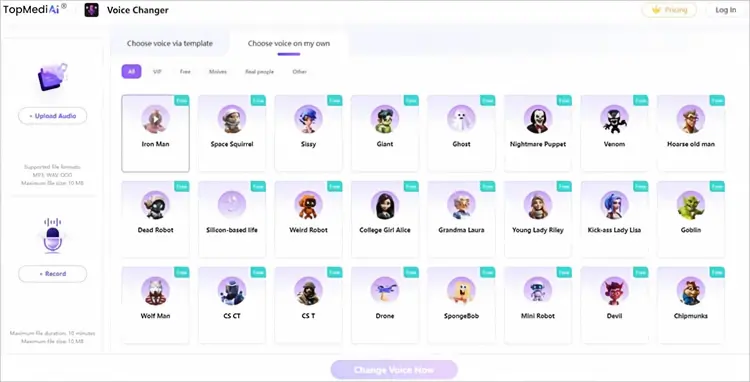
If you want a Voicemod alternative that doesn't require installing a desktop voice changer, TopMediai Online Voice Changer is a convenient option. It runs directly in a web browser and supports Windows, Mac, Android, and iPhone through compatible browsers.
It uses AI technology for voice conversion and allows you to upload or record audio. TopMediai also offers a large AI voice ecosystem that goes beyond basic voice effects. Its platform currently features over 3,200 AI voices across 190+ languages and accents, along with AI voice cloning, text-to-speech, dubbing, and other creative tools.
Unlike Voicemod, which focuses mainly on real-time processing on computers, TopMediai is better suited for quickly creating videos, short clips, social media content, and voice projects.
Key features of TopMediai Online Voice Changer:
* Support online AI voice changing without installing any software.
* Offer over 3,200 AI voices across 190+ languages and accents.
* Support MP3, WAV, and OGG uploads, as well as direct online audio recording.
* Let you preview the voice effect and download the processed audio.
* Suitable for YouTube, TikTok, gaming videos, and short-form content creation.
How to Use TopMediai Online Voice Changer:
-
Open TopMediai Online Voice Changer and choose to upload an audio file or record your voice directly on the website.
-
Select your preferred AI voice effect from the available voice options. After choosing a voice, click "Change Voice Now" to process your recording.
-
Wait for the voice conversion to finish, then preview the generated audio to check the effect. If you're satisfied with the result, download and save the changed voice.
Pros:
+ No installation required; works directly in a browser.
+ Simple upload/record → choose a voice → generate workflow.
+ Support Windows, Mac, Android, and iPhone.
+ Offer a wide range of natural-sounding AI voices.
+ Use no local computer resources.
Cons:
- Not suitable for true real-time voice changing in games or calls.
- Some advanced features may require payment or credits.
- Require a stable internet connection.
- The online voice changer has a 10 MB file size limit.
- Online recording is limited to 10 minutes per session.
2. iMyFone MagicMic - An AI-Powered Real-Time Voicemod Alternative
Best for: Users who want AI-powered real-time voice changing with RVC voices and customizable sound effects.
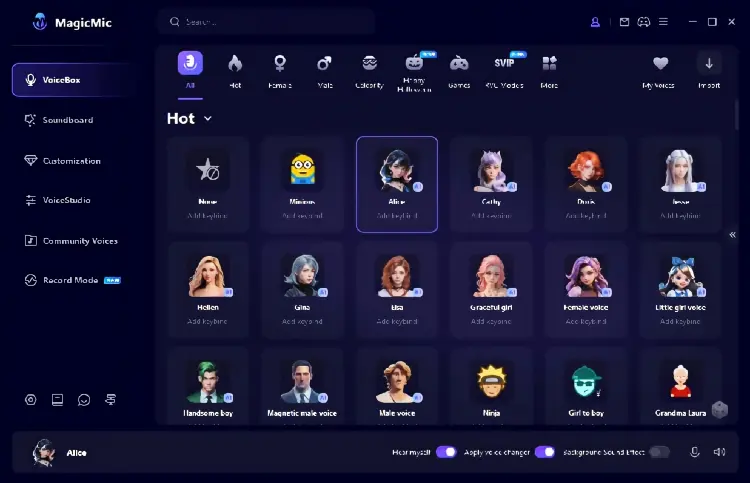
iMyFone MagicMic is a Voicemod alternative that offers a similar real-time voice-changing experience, making it suitable for users who want to change their voice on a computer. It supports platforms such as Discord, Skype, Zoom, and Twitch. MagicMic is available for Windows and Mac, while its mobile app supports both Android and iOS.
It provides a wide range of AI voices and sound effects, along with features such as RVC AI voice changing, voice cloning, a soundboard, voice changing for recordings, noise reduction, and voice customization. The Windows and Mac versions support real-time voice changing, while the Android and iOS versions are mainly designed for changing voices in recordings and audio files.
Pros:
+ Support real-time voice changing for gaming, streaming, and online chats.
+ Offer a wide range of AI voices, including character, anime, male, and female voices.
+ Support RVC and voice cloning for more personalized effects.
+ Include soundboard, recording, noise reduction, and voice customization.
+ Support Windows, Mac, Android, and iOS.
Cons:
- The free version has limited voices and features; full access requires payment.
- Mobile versions offer fewer features and mainly support voice changes for recordings and audio files.
- Advanced features and AI voices are mostly available in the paid version.
- Beginners may need some time to set up virtual audio devices and microphone settings.
3. Clownfish Voice Changer - A Lightweight and Free Voicemod Alternative for Windows
Best for: Users looking for the best free Voicemod alternative or a Voicemod alternative with no AI for lightweight, real-time voice effects on Windows.
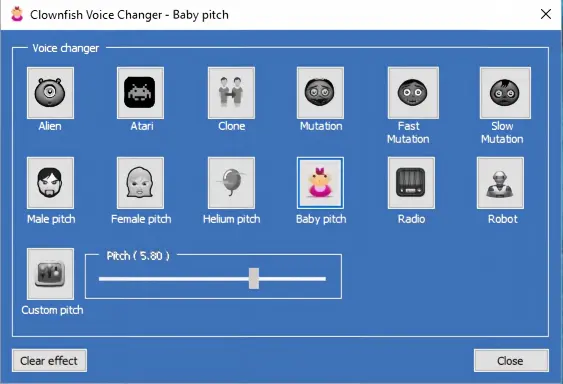
Clownfish Voice Changer is a free, lightweight voice changer for Windows that works at the system level, allowing you to apply voice effects to apps that use your microphone, including Discord, Zoom, Skype, and games. It offers classic effects such as Robot, Alien, Helium, Baby Pitch, Male/Female Pitch, and Custom Pitch, as well as soundboard and VST plugin support. Its simple setup and no-cost model make it a practical option for users looking for the best free Voicemod alternative for basic real-time voice changing.
Pros:
+ Completely free with no premium subscription required.
+ Lightweight and designed for real-time voice changing with low resource usage.
+ System-level integration works with many microphone-based applications.
+ Include classic voice effects, pitch adjustment, a soundboard, and VST support.
+ Suitable for basic gaming, Discord, and voice chats.
Cons:
- Focus mainly on classic voice effects rather than advanced AI voice transformation.
- The interface and features are relatively basic compared with newer AI voice changers.
- The main desktop app is primarily designed for Windows.
- Offer fewer realistic character and AI-generated voices.
4. MorphVOX - A Customizable Voicemod Alternative for Mac
Best for: Users looking for a customizable Voicemod alternative for Mac/Windows with real-time voice effects for gaming and voice chats.
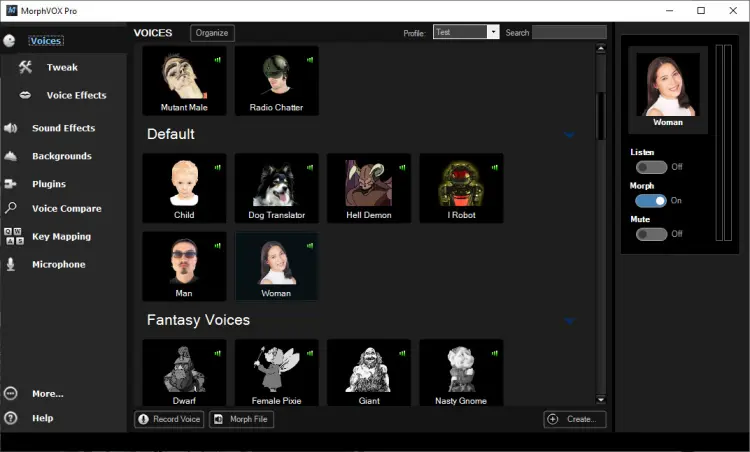
MorphVOX is a desktop voice changer designed for online gaming, voice chats, and audio projects, with support for both Windows and Mac through its Pro version. It offers voice morphing, background noise cancellation, voice packs, sound effects, background sounds, and voice customization, making it a practical Voicemod alternative for Mac users who want more control over their voice without relying on AI-based effects. It also integrates with apps such as Discord, Zoom, FaceTime, and other communication or recording software.
Pros:
+ MorphVOX Pro supports both Mac and Windows.
+ Support real-time voice changing for games and voice chats.
+ Include voice packs, sound effects, and background sounds.
+ Offer noise cancellation and detailed voice customization.
+ Use a virtual audio driver for integration with other apps.
Cons:
- The full-featured Pro version requires a paid license.
- Some advanced voices and voice packs may require additional purchases.
- The interface looks relatively outdated.
- Offer fewer AI-powered features than newer voice changers.
5. MagicCall - A Mobile-Focused Voicemod Alternative for Fun Voice Effects
Best for: Mobile users who want fun real-time voice effects for phone calls and pranks.
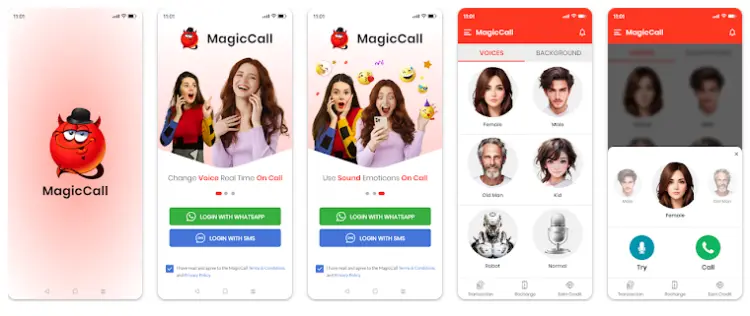
MagicCall is an entertainment-focused mobile app centered on real-time voice changing during phone calls. It lets users switch between male, female, child, grandpa, robot, and cartoon voices during calls. It also provides background sounds such as rain, traffic, and concerts, along with sound effects like kisses and applause. It is mainly designed for fun calls, pranks, and playful conversations.
MagicCall is currently available for both Android and iPhone. This makes MagicCall particularly relevant when someone searches for a Voicemod alternative for Android or wants a mobile voice changer specifically for phone calls.
Pros:
+ Available for Android and iPhone.
+ Change your voice in real time during phone calls.
+ Include male, female, child, cartoon, and robot voices.
+ Let users switch voices during calls.
+ Provide various background sounds.
+ Include sound effects and voice emojis.
+ Designed specifically for fun and entertainment during mobile calls.
Cons:
- Mainly focused on phone calls.
- Contain ads and in-app purchases.
- Not well suited for PC gaming or live streaming.
- Voice effects are more entertainment-focused than those of professional audio tools.
- Availability and calling features may vary depending on the device and region.
Part 3. Which Voicemod Alternative Should You Choose?
Overall, choosing the right Voicemod alternative depends mainly on your device and intended use.
- TopMediai Online Voice Changer is suitable for users who want online AI voice changing without installing software;
- iMyFone MagicMic is better suited for real-time AI voice changing on Windows or Mac for gaming, streaming, and voice chats;
- Clownfish Voice Changer is a good option for Windows users looking for a free, lightweight, non-AI voice changer;
- MorphVOX is better for users who want desktop voice changing on Mac or Windows with more customization options;
- MagicCall is more suitable for Android and iPhone users who want fun voice effects during phone calls.
Part 4. FAQs on Voicemod Alternatives
Q1. Are voice changers Legal?
Yes, voice changers are generally legal to use. However, they should not be used for fraud, impersonation, harassment, or other illegal activities. Always use voice-changing tools responsibly and follow applicable laws.
Q2. Can voice changers be detected?
In most cases, games and chat apps do not directly detect voice changers. However, some platforms may monitor unusual audio input or restrict voice-changing software, particularly in competitive environments. Check the platform's rules before using a voice changer.
Q3. Can I use a Voicemod alternative with Discord, games, or streaming software?
Yes. Many modern voice changers, including iMyFone MagicMic and Clownfish Voice Changer, are compatible with Discord, Twitch, Zoom, and popular games. Compatibility may vary by platform and device, so check the software requirements before installing.
Final Thoughts
Finding the right Voicemod alternative depends on your device, features, and intended use. Whether you need real-time voice changing, AI voice effects, free non-AI options, or mobile support, comparing compatibility, voice quality, features, and pricing can help you choose a solution that fits your needs.
Related Articles
VoiceChanger.io Review: Features, Pros, Cons & Best Alternative
6 Best Autotune Voice Changer Tools for Desktop, Online & Mobile
Scary Voice Changer: 8 Best Tools to Create Creepy AI Voices in 2026
Best Robot Voice Changer: 9 AI Tools to Create Robot Voices

