TL;DR:
Looking for the best autotune voice changer for singing, gaming, Discord, or streaming? This guide compares 6 popular options for PC, Mac, online use, iPhone, and Android.
- iMyFone MagicMic or Voicemod for real-time autotune voice effects on desktop.
- TopMediai Voice Changer or VoiceChanger.io for quick online voice changes.
- Autotune Voice Changer Tune In or Voloco for mobile singing and vocal recording.
Compare pitch correction, real-time effects, voice customization, Discord compatibility, and free-use limits to find the right autotune voice changer for your needs.
Looking for an autotune voice changer to change your voice, correct vocal pitch, or create an AI-style singing effect? The right tool depends on how you plan to use it. Some autotune voice changers are designed for real-time gaming and streaming, while others focus on singing, vocal recording, or quick online voice effects.
This guide compares the best autotune voice changers for PC, Mac, online, iPhone, and Android. We'll look at their main features, suitable use cases, and limitations so you can find an option that fits your needs.
The table below provides a quick comparison of the best autotune voice changers based on platform, key features, real-time effects, and ideal use cases.
| Autotune Voice Changer | Platform | Best For | Real-Time Autotune | Online / No Install | Singing & Vocal Recording | Discord / Gaming |
|---|---|---|---|---|---|---|
| iMyFone MagicMic | Windows, Mac | Gaming, Discord, streaming, live voice changing | Yes | No | Yes | Yes |
| Voicemod | Windows, Mac | Live autotune, Discord, gaming, streaming | Yes | No | Yes | Yes |
| TopMediai Voice Changer | Windows, Mac, Android, iPhone | Quick online voice effects and short recordings | Limited | Yes | Yes | Limited |
| VoiceChanger.io | Online | Funny voices, casual voice effects, memes | No | Yes | Basic | No |
| Autotune Voice Changer Tune In | iPhone | Singing, vocal recording, autotune effects | Yes | No | Yes | No |
| Voloco | Android, iPhone | Singing, rap, music creation, short videos | Yes | No | Yes | No |
Part 1. Best Autotune Voice Changer for PC/Mac
Desktop software is usually the better option if you need a real-time autotune voice changer for Discord, gaming, streaming, or live microphone use. Unlike browser-based tools that generally process an uploaded or recorded clip, desktop voice changers can route the processed microphone signal to other applications. The following are the top 2 autotune voice changers for PC or Mac.
1.iMyFone MagicMic
iMyFone MagicMic is a desktop AI voice changer for Windows and Mac that supports real-time voice transformation and works with applications such as Discord, Twitch, OBS, Zoom, and games. It offers a large collection of voice effects, sound effects, voice customization tools, and AI voice options.
For an autotune voice changer PC setup, MagicMic can be useful when your goal is not only pitch modification but also a more recognizable character or creative voice. Its voice customization tools allow you to adjust parameters such as pitch and other vocal characteristics, while its real-time mode is designed for live conversations, gaming, and streaming.
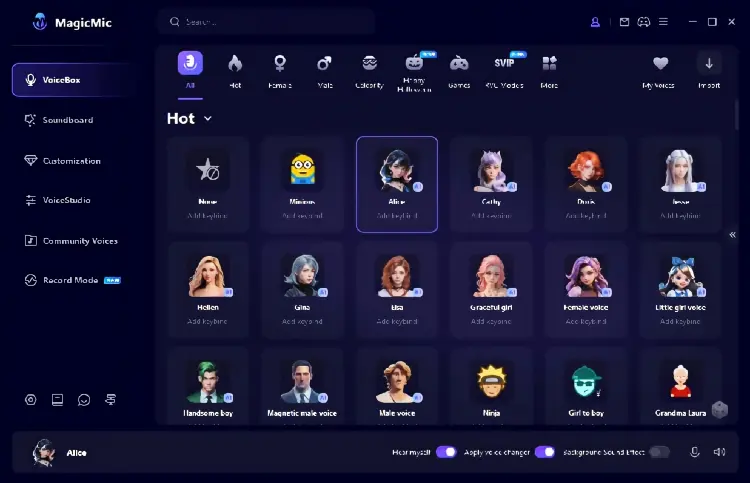
Key features:
- Real-time voice changing on Windows and Mac.
- Autotune and pitch-related voice effects.
- Voice customization.
- AI voice effects.
- Large sound-effect and soundboard library.
- Audio file and voice recording transformation.
- Hotkeys for quickly switching effects.
- Compatibility with Discord, Twitch, OBS, games, and other applications.
- Virtual audio device for routing the processed microphone.
Pros:
+ Support real-time voice changing on PC and Mac.
+ Suitable for Discord, gaming, streaming, and live chats.
+ Offer both voice-changing and soundboard features.
+ Provide voice customization instead of relying only on fixed presets.
+ Support a free version for users who want to test the software.
Cons:
- The free version has limited voices and functions.
- Setting up a virtual microphone may require additional configuration.
- The large number of effects can feel excessive if you only need basic pitch correction.
- The mobile version does not provide the same real-time functionality as the desktop version.
Best for: MagicMic is particularly suitable if you want an autotune microphone voice changer for gaming, Discord, livestreaming, or other desktop applications and also want access to funny and character-based voice effects.
2. Voicemod
Voicemod is one of the more directly relevant options when you specifically want a live autotune voice changer. Its Voicetune feature provides real-time pitch correction and pitch shifting, allowing you to hear the processed result while speaking or singing. It can also work as a virtual microphone, so the modified voice can be sent to Discord, games, streaming software, and other applications.
One useful aspect of Voicemod is that it separates subtle pitch correction from more obvious pitch-shifting effects. You can use pitch correction when you want your singing to stay closer to the selected key, or use pitch shifting for a more exaggerated voice. Voicelab also lets you create customized effects by combining Voicetune with other audio effects.
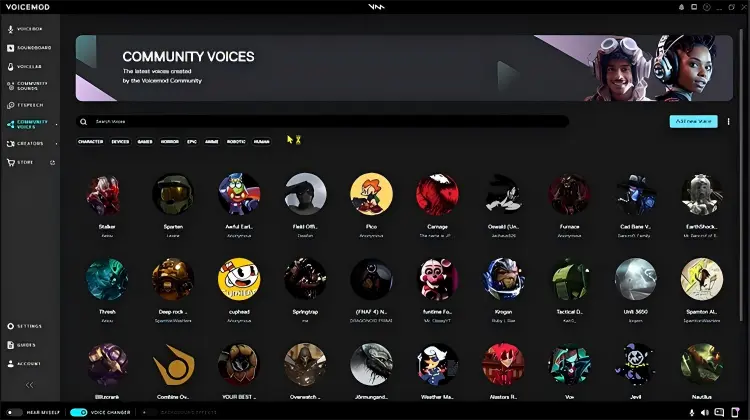
Key features:
- Real-time autotune.
- Pitch correction.
- Pitch shifting.
- Voicelab customization.
- Virtual microphone.
- Discord integration.
- Gaming and streaming support.
- Robot and creative voice effects.
- Soundboard.
- Keyboard shortcuts and customizable voices.
Pros:
+ Designed specifically for real-time voice effects.
+ Provide dedicated Voicetune functionality.
+ Work with Discord and in-game voice chat.
+ Can be used for both singing and speaking.
+ Support customized voice creation through Voicelab.
+ Offer free access to the platform, with additional features and voices available depending on the version.
Cons:
- Some advanced voices and features may require a paid plan.
- The desktop setup uses a virtual microphone, so users need to select the correct input device.
- Heavy effect combinations can make a voice sound intentionally artificial rather than naturally tuned.
- It is more useful for live communication and creative effects than for detailed professional vocal production.
Best for: Voicemod is a strong fit if your main goal is a real-time autotune voice changer for Discord, gaming, streaming, or singing while communicating online.
Part 2. Best Autotune Voice Changer Online Free
An online tool is convenient if you do not want to install desktop software. The following are the top 2 free online autotune voice changers.
1. Topmediai Voice Changer Online
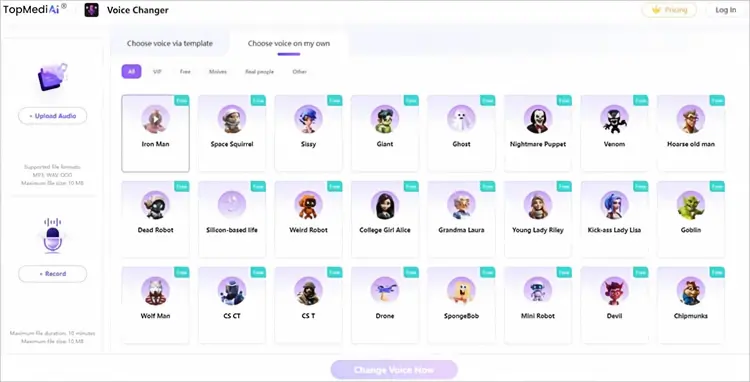
TopMediai Voice Changer Online is a browser-based voice-changing tool designed for users who want to modify recorded or uploaded audio without installing desktop software. Its workflow is straightforward: upload an audio file or record your voice, select a voice effect, generate the changed audio, and download the result.
The platform supports Windows, Mac, Android, and iPhone through a web browser, making it flexible when you need a free online autotune voice changer across different devices. Its focus is broader than traditional autotune alone, with AI voice effects designed for different creative applications.
Key features:
- Online voice changing.
- Upload audio or record directly.
- AI voice effects.
- Browser-based workflow.
- Work across Windows, Mac, Android, and iPhone browsers.
- Audio download after processing.
- No desktop installation required.
- Multiple creative voice effects.
Pros:
+ Easy to use directly in a browser.
+ No desktop installation is required.
+ Work across multiple operating systems and devices.
+ Suitable for short voice recordings and creative content.
+ Provide free online voice-changing functionality.
Cons:
- The online tool is not the best choice for live Discord voice changing.
- It is more focused on recorded/uploaded audio than a dedicated live microphone workflow.
- Advanced AI voice features may require credits or paid access.
- Users looking for precise professional vocal tuning may need a dedicated vocal-production tool.
Best for: TopMediai is suitable when you want a free online voice changer for short recordings and creative voice effects without installing software.
2. VoiceChanger.io
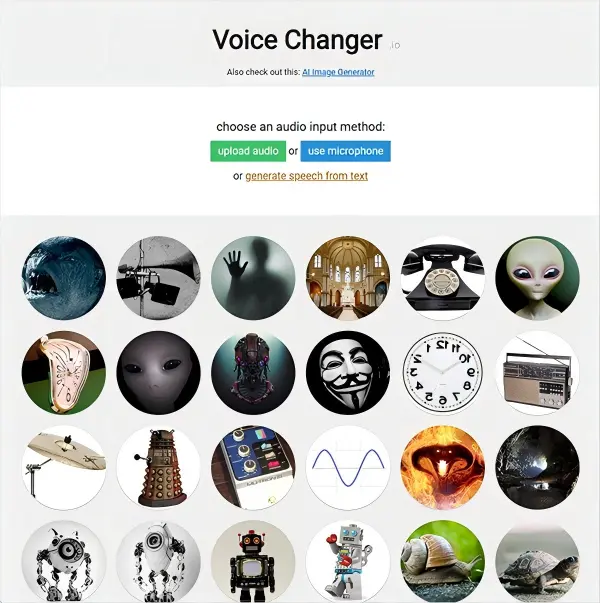
VoiceChanger.io is a simple browser-based voice changer that allows users to upload audio or record directly through a microphone. It offers a large collection of creative effects, including robot, monster, alien, deep voice, high voice, chipmunk, vibrato, echo, radio, and other unusual transformations.
Although it is sometimes described as an autotune voice changer online, its official interface is primarily built around individual voice effects rather than a dedicated professional pitch-correction system. For example, it provides pitch-related effects such as high voice, deep voice, chipmunk, and vibrato, but it does not present itself as a full live autotune microphone processor. That makes it more useful for casual experimentation, funny voice clips, memes, and creative audio effects than for someone looking for precise real-time vocal tuning.
Key features:
- Free browser-based voice changer.
- Microphone recording.
- Audio upload.
- Robot effects.
- Deep and high voice effects.
- Vibrato.
- Echo and reverb-style effects.
- Alien and monster voices.
- Custom Voice Maker.
- WAV audio download.
Pros:
+ Free to use.
+ No software installation is required.
+ Simple interface.
+ Offer many unusual and funny effects.
+ Support both audio uploads and microphone recording.
+ Allow users to create custom voice effects.
+ Generated audio can be downloaded for further use.
Cons:
- Not designed as a professional autotune solution.
- No dedicated real-time Discord microphone workflow.
- Limited control compared with desktop vocal processors.
- Some effects depend on how you perform the original voice.
- The website describes itself as a hobby project and says it is not updated regularly.
Best for: VoiceChanger.io is better for users who want a free online voice changer for funny clips, robot voices, pitch effects, memes, and casual experimentation rather than professional vocal correction.
Part 3. Best Autotune Voice Changer App
Mobile autotune apps are particularly useful for singers and creators who want to record vocals directly from a phone. Here are 2 popular autotune voice changer apps.
1. Autotune Voice Changer Tune In
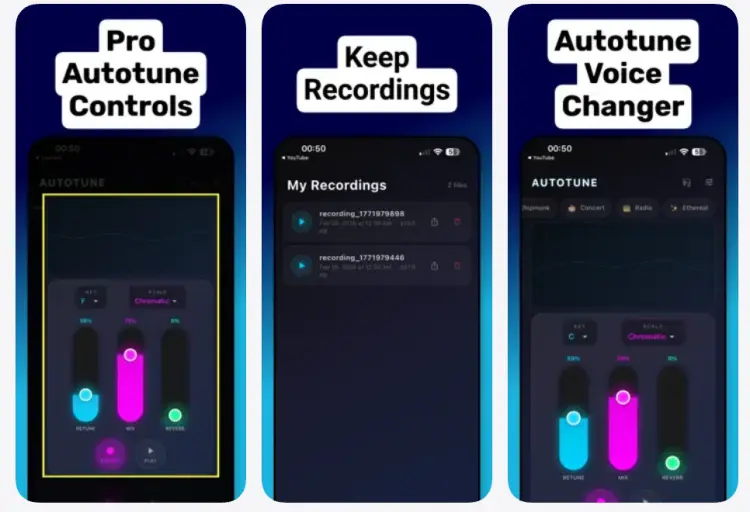
Autotune Voice Changer Tune In is an iPhone-focused vocal effects app designed around autotune recording and real-time monitoring. It provides presets such as Clean, Modern Rap, Robot, Deep Voice, Chipmunk, Concert Hall, Radio, and Ethereal, combining pitch correction with creative vocal effects.
The app includes Retune Speed, Dry/Wet Mix, Reverb, Echo, Distortion, and key and scale selectors. This makes it more focused on vocal experimentation than a simple funny voice changer. It also supports live monitoring when headphones are connected, allowing users to hear the processed voice while recording.
Key features:
- Real-time pitch correction.
- Autotune recording.
- Live monitoring.
- Retune Speed control.
- Dry/Wet Mix.
- Reverb and echo.
- Distortion.
- Key and scale selection.
- Harmonizer.
- Robot and funny voice effects.
- Recording library.
- Audio sharing.
Pros:
+ Designed specifically around autotune and vocal recording.
+ Provide real-time pitch correction.
+ Offer manual controls instead of only one-click presets.
+ Include both natural and creative effects.
+ Useful for singers, rappers, and content creators.
+ Support live monitoring through headphones.
Cons:
- Primarily designed for iPhone users.
- Contain in-app purchases.
- The free experience is limited compared with the complete paid feature set.
- It is more of a vocal recording tool than a desktop-style Discord voice changer.
- Users looking for extensive multitrack production may still need dedicated music software.
Best for: This app is a good option when you want an autotune voice changer for singing directly on an iPhone and want more control than a basic voice-effect app provides.
2. Voloco
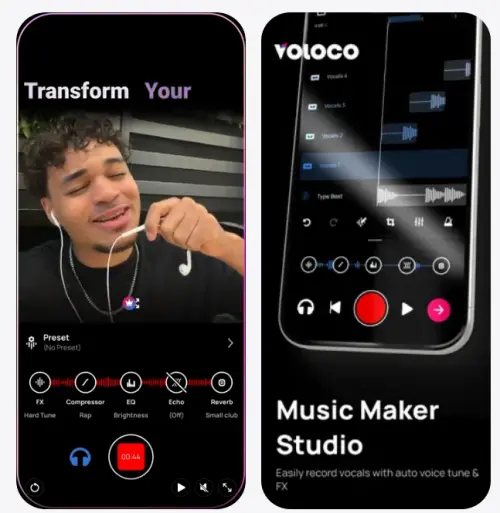
Voloco is a mobile vocal recording studio that combines automatic pitch correction, real-time vocal effects, recording, and audio editing. It is designed for singers, rappers, musicians, and content creators who want to record polished vocals directly from a mobile device.
The app offers more than 50 voice effects across 12 effect packs, including auto vocal tune, harmonies, vocoders, creative voice changers, and modern rap effects. It can automatically detect the key of a beat, helping vocals stay in tune when users sing or rap over music.
Voloco also goes beyond basic autotune. Users can import beats, separate vocals from existing audio or video, record video with vocal effects, and export vocals in WAV or AAC. This makes it more appropriate for music and content creation than a simple voice prank app.
Key features:
- Real-time auto vocal tuning.
- Pitch correction.
- 50+ voice effects.
- Harmonies.
- Vocoder effects.
- Vocal recording.
- Video recording.
- Background noise removal.
- Beat detection.
- Imported beats.
- Vocal separation.
- WAV and AAC export.
- Auto Mix.
- Auto Master.
- Auto Lyrics.
Pros:
+ Combine Auto-Tune with a complete mobile vocal workflow.
+ Support real-time vocal effects.
+ Suitable for singing and rapping.
+ Include a large collection of vocal effects.
+ Can automatically detect the key of a beat.
+ Support both audio and video recording.
+ Offer additional mixing and mastering features.
Cons:
- The full feature set includes in-app purchases.
- Some advanced effects are not available in the basic free experience.
- It is primarily a mobile vocal studio rather than a desktop Discord voice changer.
- Users who want highly detailed manual autotune parameters may find its preset-based workflow less flexible than professional desktop software.
Best for: Voloco is especially suitable if you need an autotune voice changer app for singing, rap, demos, TikTok-style videos, or mobile music creation.
Part 4. FAQs about Auto-Tune Voice Changer
Q1. What effect does Auto-Tune have on your voice?
Auto-Tune is a pitch correction tool that adjusts the pitch of a vocal performance to help it sound more accurate and consistent. Depending on the settings, it can subtly correct off-key notes or create the distinctive robotic vocal effect often heard in modern music.
Q2. Is Auto-Tune used in live performances?
Yes. Auto-Tune can be used during live performances to provide real-time pitch correction. Singers may use it to help maintain more consistent pitch while performing, and stronger settings can also be used as a creative vocal effect.
Q3. What frequency does Auto-Tune use?
Auto-Tune does not work with one fixed frequency. It analyzes the pitch of the incoming vocal signal and adjusts notes toward the selected key and scale. The target frequencies therefore depend on the singer's voice, the musical key, and the correction settings.
Conclusion
Whether you need an autotune voice changer for singing, Discord, gaming, streaming, or creative content, the right tool can make real-time voice effects and pitch correction much easier.
- Desktop options such as iMyFone MagicMic and Voicemod are suitable for live autotune voice changer effects on PC/Mac.
- TopMediai Voice Changer and VoiceChanger.io offer convenient online solutions when you want a free online autotune voice changer without installing software.
- For mobile users, apps like Autotune Voice Changer Tune In and Voloco provide practical options for singing and vocal recording on the go.
If you are looking for the best autotune voice changer, compare real-time performance, voice effects, Discord compatibility, singing features, and free-use limitations to find the option that fits your needs.
Related Articles
Best Voice Changer for Zoom: 9 Top Tools for PC/Mac/Mobile/Online
Oddcast Text to Speech Review: Features, Pros & Cons, and Best Alternative
Scary Voice Changer: 8 Best Tools to Create Creepy AI Voices in 2026
Talk It Text to Speech: Check Pros and Cons, Get Alternatives