TL;DR:
Oddcast Text to Speech is a classic online TTS tool with a wide range of voices, languages, and interactive 3D characters. It is easy to use for quick voice generation, demos, and entertainment, but its voices can sound robotic, and its features feel limited compared with modern AI voice generators. If you want more natural voices, voice cloning, customization, and MP3/WAV export, TopMediai is a powerful Oddcast Text to Speech alternative worth trying.
If you are searching for a reliable text to speech service, you may have come across Oddcast Text to Speech. As one of the earlier online TTS tools, Oddcast allows users to convert written text into speech with different AI-generated voices and character-style speaking models, making it a unique option compared with many standard text-to-speech websites.
If you are not familiar with text to speech Oddcast and want to know whether it is still worth using, this article is for you. We will provide an in-depth Oddcast Text to Speech review, covering its key features, pros and cons, how to use it, and the best alternative for creating more natural AI voices. Let's explore whether Oddcast meets your voice generation needs.
Part 1. Oddcast Text to Speech Review
Oddcast Text to Speech is a web-based online text-to-speech service. It can convert input text into speech that simulates human-like pronunciation and supports multiple languages, accents, and virtual character voices.
1.1 Key Features of Oddcast Text to Speech
- Variety of Voices: Choose from a wide selection of male and female voices across different languages and accents.
- Easy to Use: Enter your text, select a voice, and generate speech quickly through a simple, intuitive interface.
- Real-Time Text-to-Speech: Convert text into audio instantly, making it easy to preview results and make quick adjustments.
- Flexible Integration: Embed generated audio into websites and multimedia projects to create more engaging user experiences.
- 3D Character Creation: Create lifelike 3D characters with synchronized lip movements and expressive emotional animations.
- Voice Interaction: Use voice commands to control characters and create more interactive experiences.
- Facial Tracking: Use a webcam to track head movements and facial expressions, allowing the 3D character to mirror your actions.
1.2 Pros and Cons of Oddcast Text to Speech
After testing Oddcast Text to Speech, it's clear that the platform has several useful features but also some noticeable limitations. Here's a quick look at what works well and where it falls short:
Pros:
+ Intuitive and easy-to-use workflow.
+ Wide selection of voices across different categories.
+ Instant voice playback with minimal delay.
+ Customizable options for web and multimedia projects.
+ Easy character switching with the dice icon.
+ Suitable for demos, educational content, and entertainment.
Cons:
- The interface feels outdated compared with modern tools.
- Generated voices can sound robotic and less natural.
- Limited advanced voice controls.
- The Oddcast TTS demo does not provide a direct MP3 download option
1.3 How to Use Oddcast Text to Speech
Using Oddcast Text to Speech online is quick and easy, with no downloads or sign-up required. It's a convenient option for creating voiceovers, testing scripts, or experimenting with character voices. With various language, voice, and sound effect options, you can customize the generated audio to match your needs.
Follow these simple steps to get started with Oddcast Text to Speech:
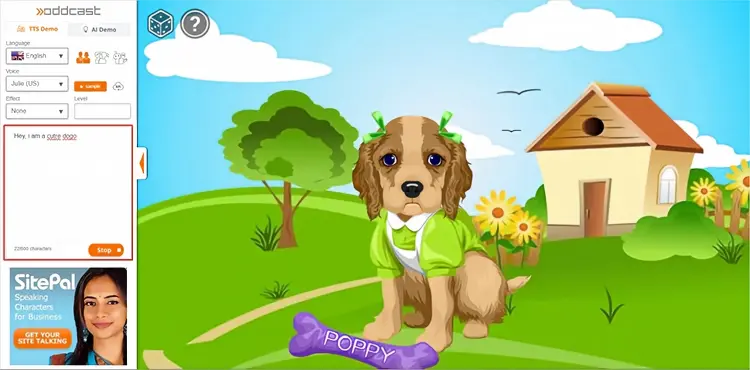
Step 1. Visit the Oddcast website and select either the "TTS Demo" or "AI Demo".
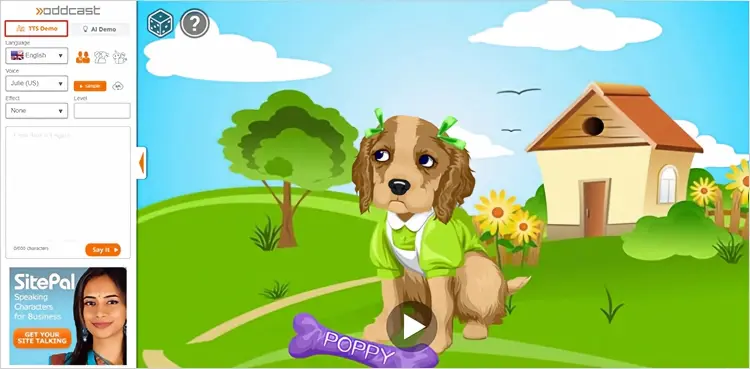
Step 2. In the TTS Demo, choose your preferred language, gender, and voice, then adjust the available sound effects to customize the audio.
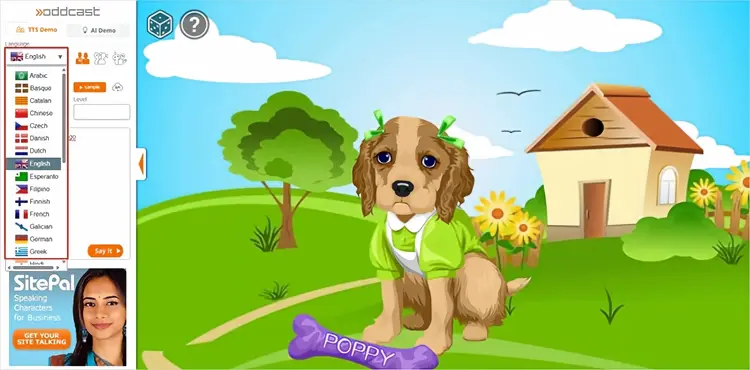
Step 3. Enter your text, with a limit of 600 characters, in the text box and click "Say It". Oddcast Text to Speech will instantly convert your text into speech and play the generated audio.
Part 2. Best Alternative to Oddcast Text to Speech
For users who need more realistic AI voices, advanced customization, and professional-quality audio generation, TopMediai is a more powerful alternative to Oddcast Text to Speech. Unlike traditional text-to-speech tools, TopMediai uses modern AI voice technology to create more natural and expressive speech. It is designed for content creators, marketers, educators, and businesses that require high-quality voice generation.
TopMediai stands out with an extensive library of over 3,200 AI voices across more than 190 languages. From different accents and speaking styles to a variety of voice options, it gives you the flexibility to create natural-sounding audio that fits your specific needs.
Key Features:
- 3,200+ AI Voices: Choose from thousands of voices in different styles and tones.
- 190+ Languages & Accents: Create multilingual content with various regional accents.
- AI Voice Cloning: Clone voices from audio samples for personalized voiceovers.
- Voice Customization: Adjust voice settings such as speed and pitch.
- MP3 & WAV Export: Export generated audio in MP3 or WAV format.
- AI Voice Changer: Transform your voice into different genders, tones, and characters.
- Speech-to-Speech: Convert voices while preserving the original tone and emotion.
- AI Voice Enhancer: Reduce background noise and improve audio clarity.
- AI Dubbing & Video Translation: Create multilingual voiceovers and translated videos.
Here is how to use TopMediai text to speech:
-
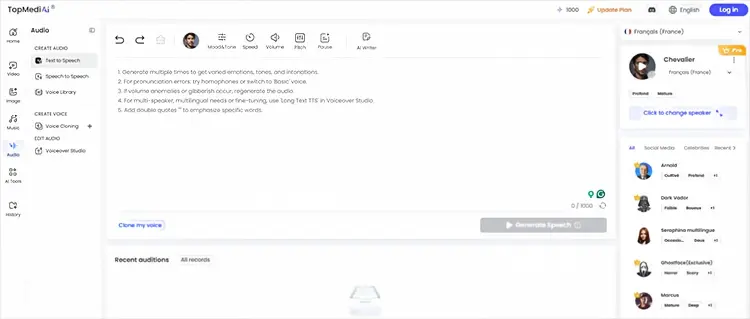
Visit the TopMediai Text to Speech dashboard and enter your text.
-
Select your preferred language and voice, then click "Audition" to generate the speech.
-
Preview your audio or download it from the "My Creations" section.
TopMediai vs Oddcast Text to Speech: Quick Comparison
| Feature | Oddcast Text to Speech | TopMediai |
|---|---|---|
| Voice quality | Basic synthetic voices | More natural AI voices |
| Voice cloning | No | Yes |
| Emotional expression | Limited | Advanced |
| Voice library | Basic | Extensive |
| Professional voiceover | Limited | Suitable |
| AI audio tools | Basic TTS | Multiple AI voice tools |
| Best for | Simple experiments | Content creation and business use |
Part 3. Frequently Asked Questions
Q1. How many languages and voices does Oddcast Text to Speech support?
Oddcast Text to Speech supports over 20 languages and offers 100+ AI voices, with a range of male and female options.
Q2. Does the Oddcast Text to Speech Demo offer a free trial?
Yes. Oddcast Text to Speech offers a 15-day free trial of its online API, allowing users to explore its full range of features without limitations.
Q3. How does Oddcast Text to Speech handle emojis?
Oddcast TTS does not convert emojis into speech. While emojis can appear in the text box, they are ignored during voice generation, which may affect the tone or meaning of creative content.
Q4. Which is better for YouTube videos: Oddcast or TopMediai?
For YouTube videos, TopMediai is generally the better choice because it provides more natural voices, better emotional delivery, and features designed for professional content production.
Final Words
Oddcast Text to Speech is a classic online text-to-speech tool that gained recognition in the early AI voice space with its multilingual support, diverse voice characters, and virtual character features. For users who need to quickly generate simple speech or create interactive characters, it can still be useful.
However, as AI voice technology has advanced rapidly, modern tools have surpassed Oddcast in voice naturalness, emotional expression, voice cloning, and content creation capabilities. If you need high-quality video voiceovers, commercial content, or professional-grade AI audio, consider newer AI text-to-speech tools such as TopMediai.
Related Articles
7 Best French Text to Speech Tools for Natural AI Voices
Best Robot Voice Changer: 9 AI Tools to Create Robot Voices
Best Voice Changer for Zoom: 9 Top Tools for PC/Mac/Mobile/Online
Talk It Text to Speech: Check Pros and Cons, Get Alternatives