


TL;DR:
Want to turn text into natural AI speech? This ChatGPT Text to Speech guide covers its Voice features, languages, free access, usage limits, and how to use it. For more voices, customization, and MP3/WAV downloads, explore TopMediai Text to Speech as an alternative.
ChatGPT can be used not only for text generation and Q&A, but also to convert written content into natural-sounding speech through its voice features. For users who want to listen to articles, learn languages, create content, or interact through voice, ChatGPT text-to-speech offers a convenient way to turn text into speech. This article will explain how ChatGPT text-to-speech works, how to use it, its key features, suitable use cases, and some AI text-to-speech tools that can serve as alternatives.
- Part 1. What Is ChatGPT Text-to-Speech?
- Part 2. How to Use ChatGPT Text-to-Speech?
- Part 3. The Pros and Cons of ChatGPT Text-to-Speech
- Part 4. ChatGPT Text to Speech Best Alternative - TopMediai Text to Speech
- Part 5. ChatGPT Text to Speech vs. TopMediai Text to Speech
- Part 6. FAQs on ChatGPT Text-to-Speech
Part 1. What Is ChatGPT Text-to-Speech?
ChatGPT text-to-speech usually refers to using ChatGPT's Voice feature to convert text into speech or to have real-time voice conversations with ChatGPT. Unlike traditional TTS tools, ChatGPT Voice can not only read aloud responses generated by ChatGPT but also support natural, two-way voice conversations.
Currently, ChatGPT Voice is available to both free and paid users. However, the specific voice models, features, and usage limits may vary depending on the plan, region, workspace settings, and account status. OpenAI currently lists Voice plans including Free, Go, Plus, and Pro, as well as eligible Business, Enterprise, Edu, and Healthcare workspaces.
ChatGPT text-to-speech can be used for:
- Reading articles and written content.
- Learning English or the pronunciation of other languages.
- Creating dialogues and audio content.
- Helping visually impaired users read text.
- Conducting voice-based Q&A.
- Practicing speaking and language communication.
1.1 What Features Does ChatGPT Text-to-Speech Offer?
1. Convert Text to Speech
ChatGPT can read its generated responses aloud through the Voice feature. You can enter a question or ask ChatGPT to generate a piece of content, then listen to the response through Voice. On accounts and devices that support Voice, ChatGPT can respond directly with spoken audio.
2. Support for Multiple Languages
ChatGPT Voice supports multilingual conversations. You can select a language in the Voice settings or ask ChatGPT to communicate in another language during a voice conversation. This can be especially useful for language learners who want to:
- Practice word pronunciation.
- Listen to sentences being read aloud.
- Have everyday conversations.
- Practice listening skills.
- Practice speaking.
3. Real-Time Voice Conversations
ChatGPT Voice is more than a simple TTS playback feature. Live Voice supports real-time, two-way voice conversations, allowing ChatGPT to listen to you and respond with spoken audio for a more natural and continuous conversation.
You can simply speak to ChatGPT, and it can recognize your voice, generate a response, and reply using voice. This is useful for language practice, brainstorming, everyday questions, and other conversational scenarios.
4. Choose from Different Voices
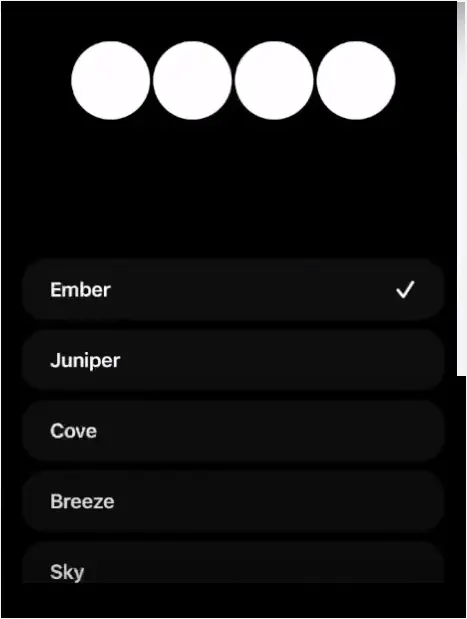
ChatGPT offers multiple Voice options, such as Arbor, Breeze, Cove, Ember, Juniper, Maple, Sol, Spruce, and Vale. Each voice has its own expressive style, allowing users to choose one based on their personal preferences.
Keep in mind that available Voice options may vary depending on your plan, region, app version, and account settings.
1.2 Is ChatGPT Text-to-Speech Free?
ChatGPT text-to-speech is available to both free and paid users, but the available voice models and usage limits vary by plan, as shown in the table below.
| ChatGPT Plan | Voice Availability | Voice Model / Usage |
|---|---|---|
| Free | Available | Limited access to GPT-Live-1 mini |
| Go | Available | Up to 3 hours of GPT-Live-1 mini per rolling 24-hour period |
| Plus | Available | Up to 3 hours of GPT-Live-1 per rolling 24-hour period |
| Pro ($100/month) | Available | Up to 15 hours of GPT-Live-1 |
| Pro ($200/month) | Available | Unlimited GPT-Live-1 usage |
| Business Standard | Available | Up to 3 hours of GPT-Live-1 |
| Business Premium | Available | Up to 15 hours of GPT-Live-1 |
Part 2. How to Use ChatGPT Text-to-Speech?
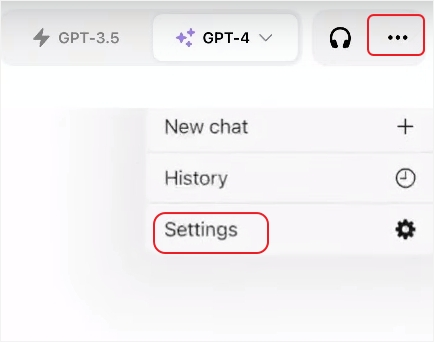
The specific interface for using ChatGPT text-to-speech may vary between the web version, desktop app, and mobile app. If you want to know how to use ChatGPT text-to-speech on your phone, you can generally follow these steps:
Step 1. Open the ChatGPT app on your phone, tap the "three-dot" menu in the top-right corner, and select "Settings".
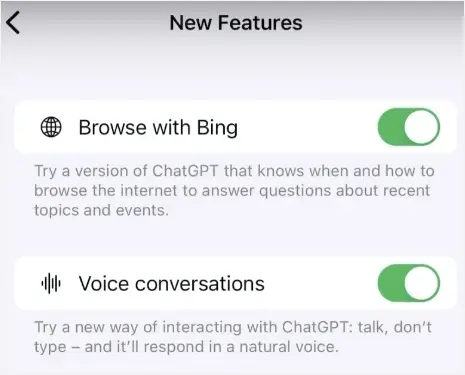
Step 2. Scroll down to "New Features" and turn on "Voice Conversations" to enable voice interactions with ChatGPT.
Step 3. Under the "Speech" section, tap "Voice" and select your preferred voice.
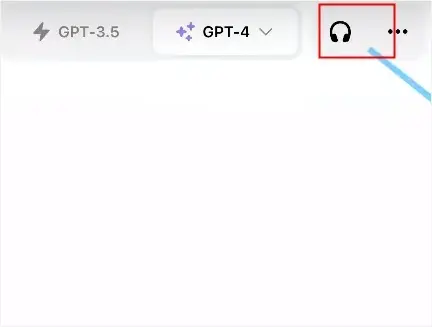
Step 4. Tap the "headphone" icon to connect to the voice assistant. Once connected, you can start speaking with ChatGPT.
Part 3. The Pros and Cons of ChatGPT Text-to-Speech
Pros:
+ Work directly with ChatGPT.
+ No need to install separate TTS software, making it easy to use.
+ Generate content and interact with it through voice immediately.
+ Support multiple languages.
+ Seamless integration of AI conversations and voice features.
+ Useful for language learning and accessibility.
+ You can switch between speaking and typing.
Cons:
- Limited audio export and post-production capabilities.
- Voice availability and usage limits depend on your account and platform.
- It is primarily designed for conversations rather than professional voice-over production.
- Voice customization is more limited than that of dedicated TTS platforms.
Part 4. ChatGPT Text to Speech Best Alternative - TopMediai Text to Speech
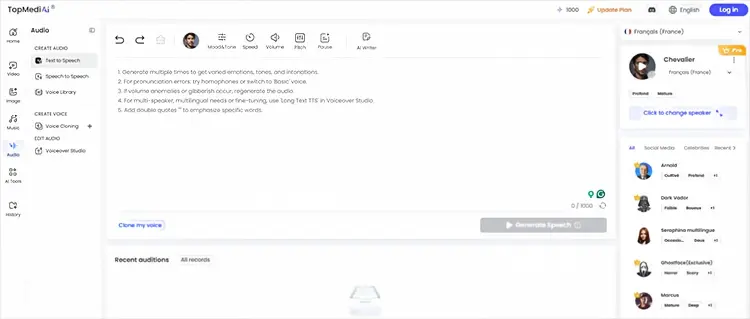
If you need more complete text-to-speech features, you can consider a dedicated AI TTS tool such as TopMediai Text to Speech. TopMediai offers a large selection of AI voices and languages, allowing you to convert text into speech for video voiceovers, social media content, online courses, and other content creation needs.
TopMediai supports more than 3,200 AI voices and over 190 languages and accents, including English, Spanish, French, German, Japanese, Mandarin, Cantonese, Taiwanese, Chinese, Korean, Arabic, and Hindi. It allows you to export generated audio in MP3 or WAV format and provides controls for adjusting settings such as speech speed and pitch.
Key features of TopMediai Text to Speech:
- Offer 3,200+ AI voices with different tones, styles, and speaking characteristics.
- Support 190+ languages and accents, including Mandarin, Cantonese, Taiwanese, English, Japanese, and Korean.
- Generate natural and expressive AI speech for videos, podcasts, courses, and social media.
- Let you adjust speech speed and pitch for more flexible voice customization.
- Support MP3 and WAV export for easy use in different projects.
- Work online without requiring additional TTS software installation.
How to Use TopMediai Text to Speech:
-
Open TopMediai Text to Speech in your browser. Type or paste the text you want to convert into the text box.
-
Select your preferred language and AI voice, then adjust settings such as speed and pitch if needed.
-
Click "Generate" to create the voice, preview the result, and download the audio when ready.
Part 5. ChatGPT Text to Speech vs. TopMediai Text to Speech
If you're comparing ChatGPT Text to Speech with TopMediai Text to Speech, the following table highlights their key differences in features, voice options, customization, and use cases.
| Feature | ChatGPT Text to Speech | TopMediai Text to Speech |
|---|---|---|
| Main Purpose | Real-time AI conversations and spoken responses | Text-to-speech and AI voice generation |
| AI Voices | Multiple voice options | 3,200+ AI voices |
| Languages & Accents | Supports multiple languages | 190+ languages and accents |
| Real-Time Conversation | Yes | No, mainly designed for generating voice from text |
| Voice Customization | More limited | Supports speed, pitch, and emotion adjustments |
| Audio Export | Limited compared with dedicated TTS tools | MP3 and WAV export |
| Voiceover Creation | Basic | Designed for videos, podcasts, courses, ads, and social media |
| Platform | Web, iOS, Android, and desktop | Online platform |
| Best For | AI conversations, language practice, and interactive voice use | Voiceovers, content creation, and downloadable audio |
Part 6. FAQs on ChatGPT Text-to-Speech
Q1. Does ChatGPT support text-to-speech?
Yes. ChatGPT has Voice functionality that lets users hear spoken responses and interact with ChatGPT using speech. The available Voice experience and limits depend on the user's account, platform, region, and other settings.
Q2. Is ChatGPT Text to Speech free to use?
Yes. ChatGPT Text to Speech, through the Voice feature, is available to free users. However, free users have limited Voice usage, while paid plans offer higher usage limits and access to additional Voice capabilities.
Q3. What languages does ChatGPT Text to Speech support?
ChatGPT supports 50+ languages for voice input and conversations, including Chinese, English, Japanese, Korean, Spanish, French, German, Italian, Portuguese, Arabic, Hindi, and Russian.
For ChatGPT Voice, you can select your preferred language under Settings → Voice → Language or ask ChatGPT to speak another language during a voice conversation.
Q4. Can ChatGPT text-to-speech download MP3?
ChatGPT Voice is designed primarily for real-time voice conversations and does not currently offer a direct MP3 download option. However, OpenAI's Text-to-Speech API can generate audio files in formats such as MP3, making it more suitable for users who need downloadable voice files.
Final Thoughts
ChatGPT text-to-speech is a convenient way to turn AI conversations into spoken interactions without installing traditional TTS software. It works especially well for hands-free conversations, learning, accessibility, and listening to ChatGPT's responses. However, users who need downloadable MP3/WAV audio, a larger voice library, or more voice customization may find a dedicated TTS platform more practical. For those use cases, TopMediai Text to Speech offers a straightforward workflow for generating and downloading AI voiceovers across a broad range of voices and languages.
Related Articles
Goku Text-to-Speech: 3 Best Tools for Goku Voice in 2026
Oddcast Text to Speech Review: Features, Pros & Cons, and Best Alternative
Talk It Text to Speech: Check Pros and Cons, Get Alternatives
Best Lecture Recorder for Students: 7 Best Picks for Class

