TL;DR:
Want to create a Goku AI voice for anime videos, memes, or fan projects? Explore the best Goku text-to-speech tools in 2026, including TopMediai, FakeYou, and Parrot AI. Compare their voice quality, features, pros, limitations, and use cases to find the right Goku voice generator for your creative needs.
Looking for a Goku text-to-speech tool to create Goku-style dialogue, anime voiceovers, meme videos, or fan content? AI voice generators can transform your scripts into a Goku-inspired voice without requiring you to record the audio yourself.
In this guide, we compare three popular Goku text-to-speech tools. We will explore their features, advantages, limitations, and suitable use cases to help you find the right Goku AI voice generator for your needs.
Note: AI character voices may involve copyright, publicity rights, or platform-specific usage restrictions. Before publishing or monetizing generated audio, review the tool's current terms of use and make sure you have the necessary rights for your intended purpose.
Part 1. What Is Goku Text-to-Speech?
Goku text-to-speech is an AI-powered voice generation technology that converts written text into a voice similar to Goku from the Dragon Ball series. Instead of recording your own voice or hiring a voice actor, you can enter text and let an AI model generate anime-style speech.
A typical Goku AI voice text-to-speech tool analyzes your input text and applies a trained voice model that imitates the tone, pitch, speaking style, and emotional expression associated with the character.

Users commonly use Goku text-to-speech AI tools for:
- Creating anime fan videos and YouTube content.
- Making funny voiceovers and memes.
- Generating gaming commentary.
- Producing TikTok or social media clips.
- Creating roleplay conversations.
- Experimenting with AI character voices.
Besides regular Goku text-to-speech, many users also search for Goku Black AI voice generator or Goku Black text-to-speech because Goku Black has a different personality and vocal style. A dedicated Goku Black AI voice text-to-speech model usually provides better results than using a standard Goku voice.
When choosing a Goku AI voice generator, users should consider voice quality, free limitations, customization options, generation speed, and whether the generated content can be used commercially.
Part 2. Top 3 Goku Text-to-Speech Tools
Here is a quick comparison of the best Goku text-to-speech tools:
| Tool | Platform | Free Option | Goku Voice | Best For |
|---|---|---|---|---|
| TopMediai | Online | Limited free use | Available | Users who want customizable Goku AI voices and more voice options |
| FakeYou | Online | Free | Available (model availability may vary) | Fans looking for free character-style AI voices |
| Parrot AI | Online / iOS | Free trial | Available | Creating quick Goku voice clips, memes, and social media videos |
1. TopMediai
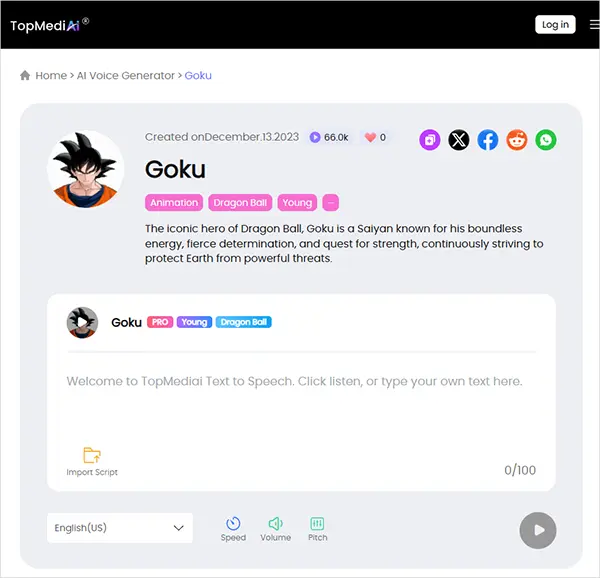
TopMediai Text to Speech is an online AI voice generator that provides a large collection of AI voices, including character-style voices such as Goku. It allows users to convert text into speech directly from a browser without installing additional software. For users searching for Goku text-to-speech AI or Goku AI voice generator text to speech, TopMediai provides a simple workflow: select a Goku voice, enter your script, adjust voice settings, and generate the audio.
Unlike many character voice websites that only focus on one type of voice, TopMediai also provides thousands of other AI voices, making it useful for creators who need multiple voices for videos, storytelling, or social media content.
It supports customization options such as speed, pitch, volume, pauses, and emphasis. These settings can help create different styles, such as a calm Goku voice, excited battle dialogue, or angry Goku text-to-speech effects.
Key Features:
* Offer various AI voices with different styles, accents, and tones for creating Goku-inspired dialogue and anime voiceovers.
* Adjust pitch, speed, and voice settings to make generated audio more expressive and dramatic.
* Convert scripts into AI voiceovers by entering text, selecting a voice, customizing settings, and generating audio.
* Support 190+ languages and accents for creating anime-style content for global audiences.
* Allow users to create customized voice styles for unique character voices and creative projects.
How to Use TopMediai for Goku Text-to-Speech:
-
Open TopMediai Text-to-Speech and enter your script or dialogue in the text box.
-
Search for "Goku" in the voice library, then choose your preferred Goku AI voice and customize settings like speed or pitch if needed.
-
Click "Generate Speech" to create the Goku-style AI voice, then preview and download the generated audio.
Pros:
+ Offer a dedicated Goku AI voice option.
+ Provide a simple browser-based text-to-speech workflow.
+ Support voice adjustments, including speed, pitch, and volume.
+ Include a large AI voice library beyond Goku voices.
+ Suitable for videos, games, social media, and creative projects.
+ Feature a clean and beginner-friendly interface.
Cons:
- Free usage is limited.
- Voice quality may vary depending on the selected AI model.
- Require a stable internet connection.
- Advanced features may require a paid plan.
Best for: Users who want an easy-to-use Goku AI voice generator with additional AI voice options and customization controls.
2. FakeYou
FakeYou is one of the most popular AI voice generator platforms for creating fictional character-style voices. It uses community-created AI voice models and allows users to convert text into voices inspired by famous characters, celebrities, and animation styles.
For fans looking for free Goku text-to-speech, FakeYou is often one of the first tools to try because it provides many free voice models. Users can enter text, select a character voice model, and generate AI speech directly through a browser.
FakeYou is especially popular among anime communities because it includes various fan-created voices. Users searching for Goku Black AI voice generator or Goku Black text-to-speech may find related voice models depending on availability.
However, because FakeYou relies heavily on community-generated models, voice quality and availability can change over time.
Key Features:
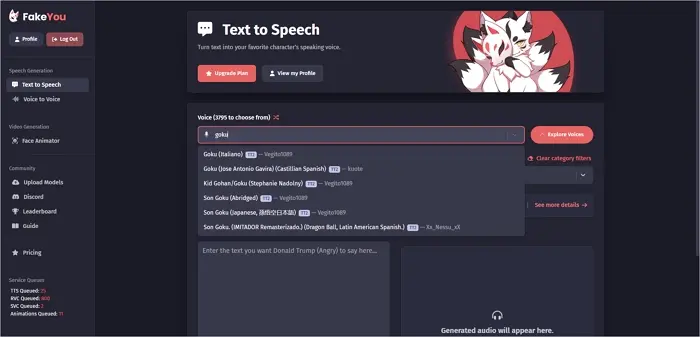
* Access 3,500+ community-created AI voices.
* Free online AI voice generation.
* Support anime and fictional character voices.
* Browser-based operation.
* Text-to-speech and voice generation options.
How to Generate Goku's Voice:
Step 1. Visit the FakeYou website and create an account.
Step 2. Open the "Text to Speech" tab, click the voice drop-down, and search for "Goku". Select your preferred Goku voice model.
Step 3. Click "Explore Voices" to browse available voice options and select your preferred language.
Step 4. Enter your text in the input box and click "Speak" to generate the voice. Preview the result, then share or download the audio file.
Pros:
+ Offer multiple Goku-related voice models.
+ Feature a large library of community-created character voices.
+ Provide a simple browser-based text-to-speech workflow.
+ Free to use.
+ Suitable for anime videos, memes, games, and fan-made content.
Cons:
- Voice quality varies between different models.
- Some Goku voices may be unavailable or change over time.
- Free users may face generation or queue limitations.
- Processing may be slower when the service is busy.
- Commercial use may be subject to voice, copyright, or platform restrictions.
Best for: Users who want to explore different character voices and experiment with free Goku-style AI voice generation.
3. Parrot AI
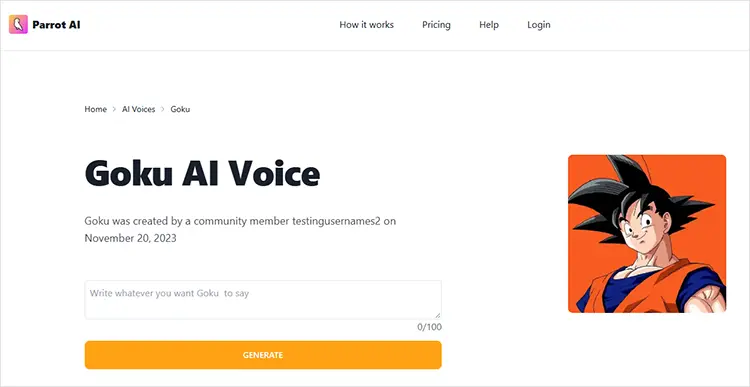
Parrot AI is an AI voice generator designed for creating voiceovers, videos, and other entertaining content with AI-generated character and celebrity-style voices. For users searching for Goku text-to-speech, Parrot AI provides a dedicated Goku AI Voice that can turn typed text into a Goku-style voice.
Parrot AI is particularly easy to use because the workflow is straightforward: select the Goku voice, enter your text, generate the voice, and download or share the result.
Key Features:
* Generate speech using a Goku-style AI voice.
* Enter custom text and convert it into an AI-generated voice.
* Browse 100+ AI voices, including Goku and other character-style voices.
* Select a voice, type your script, and generate the result directly in your browser.
* Create AI voice videos that can be downloaded and shared.
* Parrot AI also offers an iPhone/iPad app with voice and content-creation features.
* Some voices are created and shared by the Parrot AI community, giving users more options to explore.
How to Use Parrot AI for Goku Text-to-Speech:
Step 1. Visit the Parrot AI website and open its AI Voice Generator.
Step 2. Search for and select the "Goku AI Voice".
Step 3. Enter the dialogue you want Goku to say.
Step 4. Click "Generate" to create the AI voice.
Step 5. Preview the generated result and download or share the video/audio.
Pros:
+ Provide a dedicated Goku AI voice.
+ Very simple text-to-speech workflow.
+ Free to try.
+ Offer 100+ AI voices.
+ Support voice videos and social-media-friendly content.
+ Available through both the website and iOS app.
Cons:
- The free version limits text length.
- Longer content and additional features may require a paid plan.
- Voice quality can vary between available models.
- Some voices are community-created, so results may be inconsistent.
- It is more focused on short, entertaining voice and video content than professional long-form narration.
Best for: Users who want a quick and beginner-friendly way to create short Goku-style voice clips, memes, funny videos, anime-inspired content, and social media posts.
Part 3. Limitations of Goku Text-to-Speech Tools
Although AI voice technology has improved significantly, Goku text-to-speech tools still have some limitations.
1. Voice Accuracy Is Not Always Perfect
Some AI models can produce voices that sound similar to Goku, but they may not fully reproduce the original character performance, emotions, or acting style.
2. Character Voice Availability Changes
AI voice platforms frequently update their voice libraries. A specific Goku Black AI voice text-to-speech free model available today may not always remain available.
3. Commercial Usage Requires Attention
If you plan to use AI-generated Goku-style voices for monetized videos or commercial projects, check the platform's terms and voice usage policies before publishing.
Part 4. Frequently Asked Questions About Goku Text-to-Speech
Q1. Who is the current voice of Goku?
In the English dub, Goku is voiced by Sean Schemmel, while Masako Nozawa has provided Goku's voice in the original Japanese version. Both voice actors have played a major role in shaping Goku's recognizable voice across the Dragon Ball franchise.
Q2. Can I create Goku Black text-to-speech?
It depends on whether the platform currently provides a Goku Black or related voice model. Search the platform's current voice library for "Goku Black" rather than assuming the standard Goku model will produce the same character.
Q3. Can I make an angry Goku AI voice?
You can experiment with punctuation, pitch, speed, emphasis, and other available controls to make a Goku-style voice sound more energetic or aggressive. However, not every AI voice model supports detailed emotion control.
Q4. Can I use Goku AI voice for YouTube?
You can technically generate audio for video projects on platforms that permit it, but you should check the AI service's current terms and the rules applicable to copyrighted characters and recognizable voices. Commercial or monetized use may require additional consideration.
Conclusion
A Goku text-to-speech tool makes it easy to turn written scripts into fun, anime-style voice clips for videos, memes, and fan projects. Among the options covered, TopMediai is a convenient choice for generating Goku-style speech from text, with adjustable voice settings for creating more expressive results. Other tools such as FakeYou and Parrot AI are also worth exploring depending on the voice models and features you need.
Related Articles
5 Best Hindi Text to Speech Tools for Natural AI Voice Creation
Oddcast Text to Speech Review: Features, Pros & Cons, and Best Alternative
7 Best French Text to Speech Tools for Natural AI Voices
Talk It Text to Speech: Check Pros and Cons, Get Alternatives