TL;DR:
Looking for the best robot voice changer? Here are our top picks:
- TopMediai: Best for easy online AI robot voice generation.
- iMyFone MagicMic: Best for real-time robot voices in gaming and streaming.
- Voicemod: Best for gamers and live streamers who want fun real-time effects.
- Clownfish Voice Changer: Best free and lightweight option for Windows.
- Voice Changer: Best for quick and simple online robot voice effects.
- ElevenLabs: Best for realistic, high-quality AI robot and character voices.
- LingoJam: Best for free online voice effects and basic voice transformation.
- Voice Changer With Effects: Best for creating fun robot voices on mobile.
- Voice Changer Plus: Best for simple robot voice effects on iPhone and iPad.
Choose the tool that matches your needs and start creating your own robot voice today!
Want your voice to sound like a robot, AI assistant, mechanical character, or futuristic persona? A powerful robot voice changer can transform your voice in real time and apply robotic effects to games, Discord chats, live streams, videos, and voice calls. In this article, we will introduce 9 popular robot voice changers worth trying and compare their key features, supported platforms, use cases, pros, and cons, helping you quickly find the right robot voice changer for your needs.
Part 1. Top 9 Robot Voice Changers
The following are 9 popular robot voice changers you can try.
1. TopMediai
Best for: Online AI robot voice generation and beginners
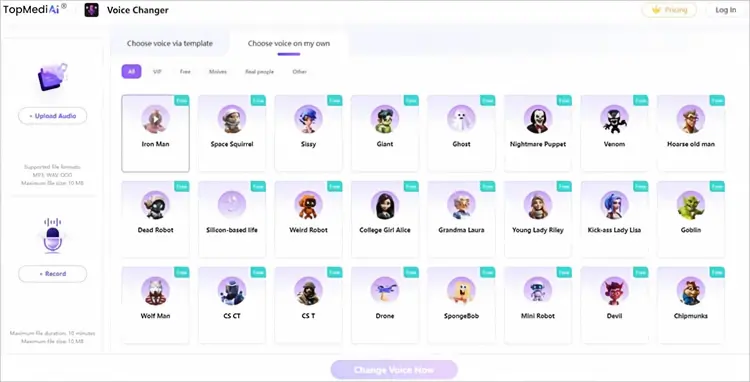
TopMediai Voice Changer Online is an easy-to-use AI-powered robot voice changer online tool that allows users to transform their voice without installing desktop software. It provides various voice effects, including robot, alien, monster, and other creative character voices.
Unlike traditional voice changers that only modify pitch, TopMediai uses AI voice processing technology to create more realistic voice transformations. Users can record their voice directly, upload audio files, or use text-to-speech features to generate robotic voices. It is suitable for content creators, gamers, social media users, and anyone who wants a quick way to create a robot voice.
Key Features:
* AI-powered voice transformation.
* Robot and character voice effects.
* Online voice changing without installation.
* Text-to-speech voice generation.
* Adjustable pitch, tone, and voice style.
* Support uploaded audio conversion.
Pros:
+ Easy-to-use interface suitable for beginners.
+ Work directly online without software installation.
+ Provide multiple robotic and creative voice effects.
+ Support both real-time recording and uploaded audio.
+ Useful for videos, social media, and voice projects.
Cons:
- Require an internet connection.
- Advanced features may require a paid plan.
- Real-time performance depends on network stability.
2. iMyFone MagicMic
Best for: Real-time robot voice changer for gaming and streaming
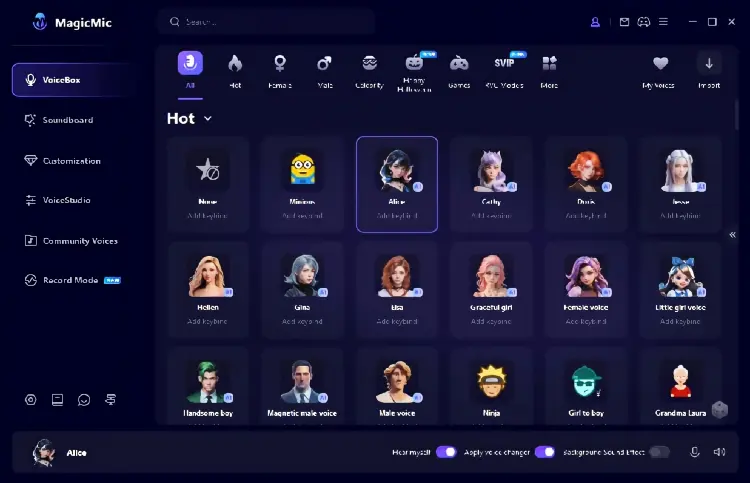
iMyFone MagicMic is a popular robot voice changer for PC and Mac designed for users who want real-time voice effects during gaming, live streaming, online meetings, and voice chats. It offers a large collection of voice filters, including robot, monster, alien, cartoon, and other character voices.
MagicMic works with popular platforms such as Discord, Zoom, online games, and streaming applications. Users can activate different voices instantly while speaking, making it a practical choice for gamers and creators who want to add fun effects during live communication.
The software also supports audio file conversion, allowing users to apply robot effects to previously recorded voices. With its combination of real-time voice changing and sound effects, MagicMic is suitable for both entertainment and content creation.
Key Features:
* Real-time AI voice changer.
* Robot voice and character effects.
* Voice effects library.
* Soundboard features.
* Support Discord, Zoom, games, and streaming platforms.
* Audio file voice conversion.
Pros:
+ Large selection of voice effects.
+ Work well for gaming and live chatting.
+ Support Windows and Mac.
+ Easy setup for beginners.
+ Include both voice changer and sound effects.
Cons:
- Some AI voices may sound artificial.
- Free version has feature limitations.
- Too many effects may feel overwhelming for new users.
3. Voicemod
Best for: Real-time robot voice effects for gamers and streamers
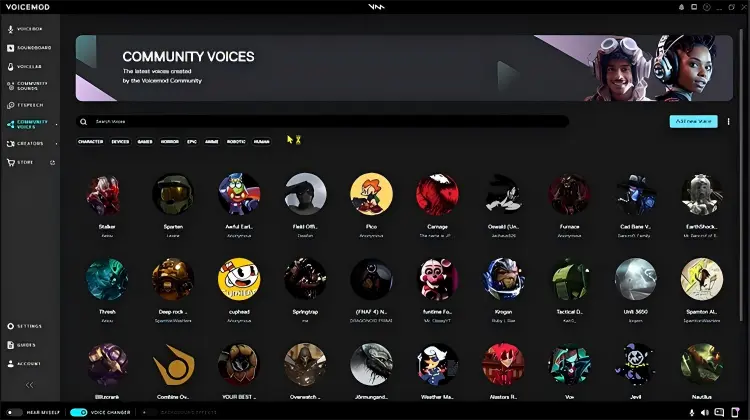
Voicemod is one of the most recognized real-time voice-changing applications for gaming, streaming, and online communication. It allows users to transform their microphone input into different voices instantly, including robotic, futuristic, AI, monster, and sci-fi effects.
As a powerful robot voice changer for PC, Voicemod integrates with popular apps such as Discord, Twitch, OBS Studio, and online games. Its virtual microphone system makes it easy for users to apply voice effects across different applications without complicated configuration.
Besides robot voices, Voicemod provides a soundboard feature where users can play audio clips, memes, and custom sounds during live conversations or streams. This makes it especially popular among gamers and content creators.
Key Features:
* Real-time robot voice changer.
* Large voice effect library.
* Virtual microphone support.
* Soundboard effects.
* Voice customization tools.
* Streaming platform integration.
Pros:
+ Excellent real-time voice-changing performance.
+ Work smoothly with Discord, OBS, and games.
+ Large collection of fun voice effects.
+ User-friendly interface.
+ Good choice for live streaming.
Cons:
- Many premium effects require payment.
- Free version has limited voices.
- Some effects may sound less natural than AI voice cloning tools.
4. Clownfish Voice Changer
Best for: Free and lightweight robot voice changer
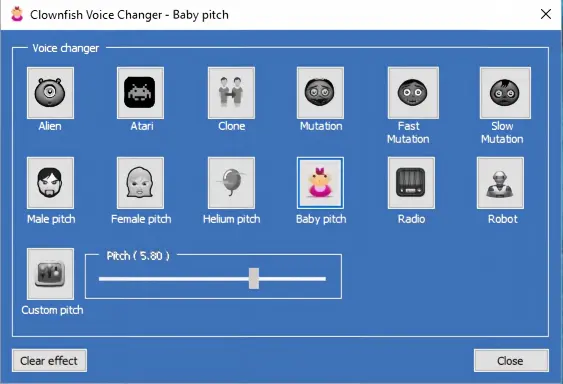
Clownfish Voice Changer is a free robot voice changer on Windows that allows users to modify their microphone voice across different applications. It provides several built-in effects, including robot, alien, male, female, and pitch-changing filters.
Unlike many modern AI-based tools, Clownfish focuses on simplicity and lightweight performance. It installs directly into the system microphone, allowing it to work with applications such as Discord, Skype, and other voice communication platforms.
For users looking for a basic and completely free robot voice changer, Clownfish is a practical option. However, its voice quality and customization options are more limited compared with newer AI-powered alternatives.
Key Features:
* Free real-time voice changer.
* Robot voice effect.
* System-wide microphone integration.
* Multiple voice filters.
* Low system resource usage.
Pros:
+ Completely free to use.
+ Lightweight and easy to install.
+ Work with many communication apps.
+ Suitable for beginners.
+ Does not require expensive hardware.
Cons:
- Voice quality is less realistic than AI tools.
- Limited customization options.
- Interface looks outdated.
- Available features are basic compared with premium competitors.
5. Voice Changer
Best for: Simple online robot voice transformation
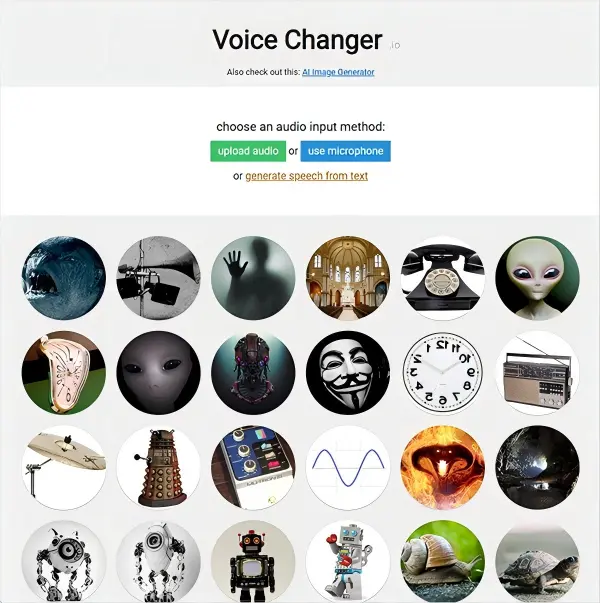
Voice Changer is a lightweight robot voice changer online tool designed for users who want to quickly add robotic and electronic effects to their recordings. Unlike professional voice-changing software, it focuses on simplicity and accessibility, allowing users to upload audio files or record their voices directly through a browser.
Although Voice Changer is easy to use, its functions are more limited compared with AI-powered voice generators. Users looking for highly realistic robot voices or professional voice-over production may need a more advanced solution.
Key Features:
* Online voice transformation.
* Robot and electronic voice effects.
* Audio upload support.
* Simple browser-based operation.
* Basic pitch and tone adjustments.
Pros:
+ No software installation required.
+ Very easy for beginners to use.
+ Quick voice effect generation.
+ Work well for short audio clips.
+ Suitable for casual entertainment.
Cons:
- Limited voice customization options.
- Effects may sound less realistic.
- No advanced AI voice cloning features.
- Not ideal for professional content creation.
6. ElevenLabs
Best for: High-quality AI robot voices and professional creators
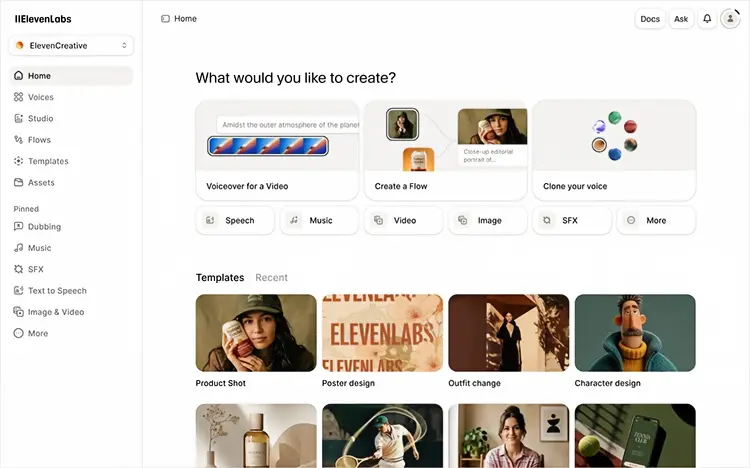
ElevenLabs Voice Changer is an advanced AI-powered voice transformation platform designed for creators who need realistic and expressive voice conversion. Instead of simply changing pitch or adding robotic filters, ElevenLabs uses AI technology to transform voices while preserving natural speech characteristics, including emotion, tone, and delivery.
For users looking to create a futuristic AI assistant voice, robotic character voice, or sci-fi narration, ElevenLabs provides much higher audio quality compared with traditional robot voice changers. It allows users to upload recordings or record audio directly, then convert them into different AI-generated voices from its voice library.
ElevenLabs is especially suitable for YouTube creators, game developers, audiobook producers, and businesses that need professional AI voices. However, it is designed more for AI voice conversion and voice creation rather than real-time voice chatting during games or calls.
Key Features:
* AI voice conversion technology.
* Natural speech preservation.
* Large AI voice library.
* Character and narration voices.
* Multilingual voice generation.
* Professional-quality audio output.
Pros:
+ Extremely realistic AI-generated voices.
+ Preserve emotion and speaking style.
+ Excellent for videos, games, and storytelling.
+ High-quality output compared with traditional filters.
+ Support multiple languages.
Cons:
- Not designed mainly for real-time gaming voice changing.
- Advanced features require a paid subscription.
- May be more complex for casual users.
- Require internet connection.
7. LingoJam
Best for: Free online robot voice effects
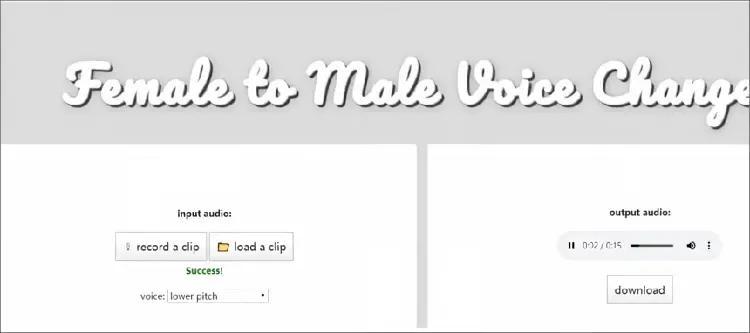
LingoJam is another online voice changer that can help you apply a robotic effect to your voice, transform a female voice into a male voice, or experiment with other voice modifications. The tool works by adjusting your voice's pitch and allowing you to choose from different available effects. Since it runs directly in your browser, there's no software to install.
Whether you want to sound like a chipmunk, robot, or another character, LingoJam provides a simple way to transform your voice. It can also be used for vocal training and voice therapy exercises, making it useful beyond casual voice effects.
Key Features:
* Record your voice in real time or upload an existing audio file.
* Adjust voice pitch to achieve different vocal effects.
* Choose from pre-made voice effects and masks.
* Support vocal training for certain voice therapy applications.
* Provide an online translation feature.
Pros:
+ Free online robotic voice changer.
+ Include an online translator for voice conversion.
+ Let you preview the transformed voice before saving.
Cons:
- Does not offer options for selecting the output file format.
- The user interface looks somewhat outdated.
- Require an active internet connection.
8. Voice Changer With Effects
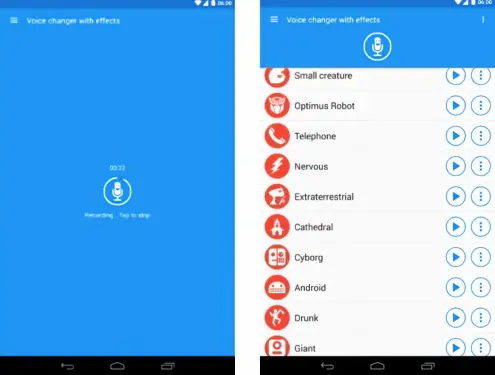
If you're a mobile user looking for a robot voice changer without relying on online tools or desktop software, Voice Changer With Effects is a convenient option to consider. This easy-to-use robot voice changer app lets you create robotic voices by recording your voice in real time or applying effects to pre-recorded audio. It offers a variety of fun voice effects, including Robot, Helium, Zombie, Alien, and Monster, making it easy to give your recordings a unique robotic or futuristic sound.
Key Features:
* More than 40 voice filters and effects for transforming your voice.
* Easily share created audio across different platforms.
* Apply robotic voice effects and create images with customized sound.
* Set transformed audio as a ringtone or notification sound.
* Convert text into speech with robotic voice effects.
Pros:
+ Trusted by millions of users.
+ Support both text-to-speech conversion and real-time voice transformation.
+ Offer a wide selection of voice filters and effects for creating robotic voices.
Cons:
- Contains in-app advertisements.
- Focus primarily on voice changing and does not include advanced audio or video editing features.
9. Voice Changer Plus
Best for: iPhone users looking for creative robot voices
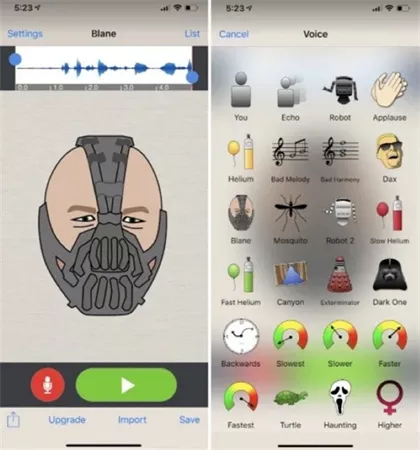
Voice Changer Plus is an iOS voice changer that makes it easy to transform your voice into something fun and unique. You can either choose from pre-recorded audio or use your device's microphone to record your voice directly. With around 50 voice effects available, the app offers plenty of options for creating creative and entertaining voice recordings.
Voice Changer Plus also includes basic audio editing tools, allowing you to trim recordings and remove unwanted sections. This makes it a convenient choice for iPhone and iPad users who want a simple way to create, edit, and share voice recordings with different effects.
Key Features:
* iPhone voice changer app.
* Robot and character effects.
* Voice recording.
* Audio playback and sharing.
* Simple editing tools.
Pros:
+ Easy to use for iPhone users.
+ Include many fun voice effects.
+ Quick recording and sharing.
+ Suitable for casual entertainment.
+ Beginner-friendly design.
Cons:
- Limited AI voice features.
- Mainly focused on fun effects.
- Less suitable for professional creators.
- Some advanced effects require payment.
Part 2. How to Choose the Best Robot Voice Changer?
Best Robot Voice Changer: Quick Comparison
| Tool | Platform | Real-Time Voice Change | Audio Upload | Best For | Price | ||
|---|---|---|---|---|---|---|---|
| TopMediai | Online, Windows, Mac, Android, iOS | ✓ | ✓ | Online AI voice generation | Free & Paid | ||
| iMyFone MagicMic | Windows, Mac, Android, iOS | ✓ | ✓ | Gaming & streaming | Free & Paid | ||
| Voicemod | Windows, Mac | ✓ | ✓ | Gaming & live streaming | Free & Paid | ||
| Clownfish Voice Changer | Windows | ✓ | ✗ | Free desktop voice changing | Free | ||
| Voice Changer | Online | ✗ | ✓ | Quick online voice effects | Free | ||
| ElevenLabs | Online, Windows, Mac, Linux, Android, iOS | Limited | ✓ | Professional AI voices | Free & Paid | ||
| LingoJam | Online | ✓ | ✓ | Free online voice effects | Free | ||
| Voice Changer With Effects | Android, iOS | ✓ | ✓ | Mobile voice effects | Free & Paid | ||
| Voice Changer Plus |
|
✓ | ✓ | iPhone/iPad users | Free & Paid |
Conclusion
The best robot voice changer depends on your specific needs.
- If you want a fast and beginner-friendly online tool, TopMediai and LingoJam are convenient choices.
- For gamers and streamers who need real-time voice effects, iMyFone MagicMic and Voicemod provide better performance.
- If your goal is creating realistic AI robot voices for videos, storytelling, or professional projects, ElevenLabs offers the most advanced voice transformation quality.
- For casual mobile entertainment, Voice Changer With Effects and Voice Changer Plus are simple and practical options.
Related Articles
7 Best French Text to Speech Tools for Natural AI Voices
Talk It Text to Speech: Check Pros and Cons, Get Alternatives
Best Lecture Recorder for Students: 7 Best Picks for Class
Best Video Recording Software 2026: Top 10 Tools Compared