TL;DR:
Looking for a simple way to change your voice online? This VoiceChanger.io review covers its key features, voice effects, pros, cons, and how to use it. Discover whether its browser-based voice tools are right for quick audio experiments, and explore TopMediai Online Voice Changer as an AI-powered alternative for more realistic voice transformation, voice cloning, and creative voice projects.
There are plenty of online voice changers available today, but not every tool offers the effects, ease of use, or audio quality you may expect. If you simply want to have fun with your voice or create audio for videos, games, and other projects, choosing the right tool can make a big difference.
That's why we're taking a closer look at VoiceChanger.io in this review. We'll explore its features, available voice effects, how it works, and its main advantages and limitations. We'll also introduce a flexible alternative to VoiceChanger.io for anyone looking for more advanced or AI-powered voice effects. Let's get started.
Part 1. What Is VoiceChanger.io?
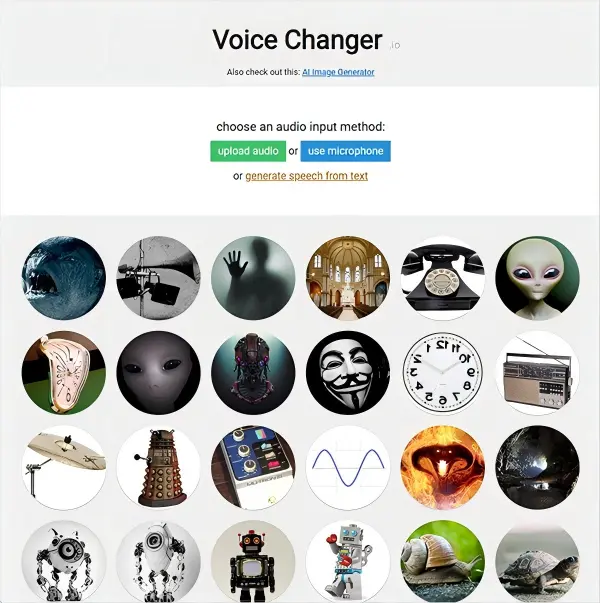
VoiceChanger.io is a free web-based online voice changer that allows users to modify their voices directly without registering an account or installing any software.
It supports multiple input methods:
- Upload an existing audio file.
- Record your voice directly using a microphone.
- Generate speech from text.
After providing the voice input, users can choose from different voice effects. The tool automatically processes the audio and generates a new version with the selected effect. You can then preview and download the result.
Part 2. Key Features of VoiceChanger.io
What can VoiceChanger.io do for you? The following are its main features.
1. Multiple Voice Effects
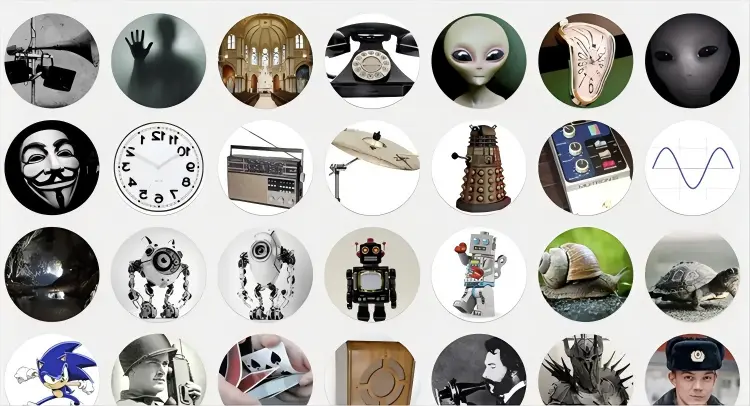
VoiceChanger.io provides a collection of ready-made effects for transforming ordinary recordings into unusual voices. Depending on the effect, you can create sounds such as:
- Monster.
- Robot.
- Alien.
- Demon.
- Bane-style voice.
- Dalek-style voice
- Deep voice.
- High-pitched voice.
- Echo and distorted effects.
- Other experimental voice effects.
This is useful for short creative projects where the goal is entertainment rather than realistic AI voice cloning.
2. Upload Existing Audio
You don't have to record directly on the website. VoiceChanger.io allows you to upload an existing audio clip and apply an effect to it. This is convenient when you have already recorded:
- A podcast clip.
- A voice message.
- A short narration.
- A gaming voice line.
- A social media audio clip.
You can process the recording instead of starting over.
3. Record With a Microphone
VoiceChanger.io can also use your computer's microphone to record a clip directly in the browser. You simply need to give the browser microphone permission when prompted. This removes the need to record the audio in another application first.
However, because the workflow is based around creating an audio clip, it should not be confused with a virtual microphone that changes your voice inside Zoom, Discord, or other live communication apps.
4. Text-to-Speech Input
The website also provides a text-to-speech option as an input method. This gives you another way to create audio without recording your own voice first. This can be useful for experimenting with effects when you don't want to use your real voice.
5. Custom Voice Maker
One of the more interesting features is VoiceChanger.io's Voice Maker. Instead of selecting only a preset, you can combine audio effects to create your own voice.
For example, the Voice Maker provides a Pitch Shift effect, and you can add effects from the available menu and reorder them. This gives users more control than simply clicking a preset.
6. Downloadable Audio
After processing, you can play the modified recording and save it for later use. The official website specifically notes that generated audio can be downloaded, including through the browser's save-audio option.
This makes VoiceChanger.io practical for creating standalone sound clips rather than changing your voice continuously during a conversation.
7. Free Commercial Use According to the Site
One useful detail that is easy to overlook is the site's stated usage policy. VoiceChanger.io says that generated audio clips can be used for any purpose, including commercial use, and that users do not have to credit the site.
Still, users should distinguish between the generated effect and the underlying content they provide. If your recording contains copyrighted music, someone else's voice, or other protected material, the site's statement about generated clips does not automatically give you rights to those underlying materials.
Part 3. How to Use VoiceChanger.io
Here's how to change your voice in VoiceChanger.io:
Step 1. Visit the VoiceChanger.io website in your browser. Upload an existing audio file or record your voice directly using a microphone. If you choose the recording option, make sure your microphone is properly connected and available.
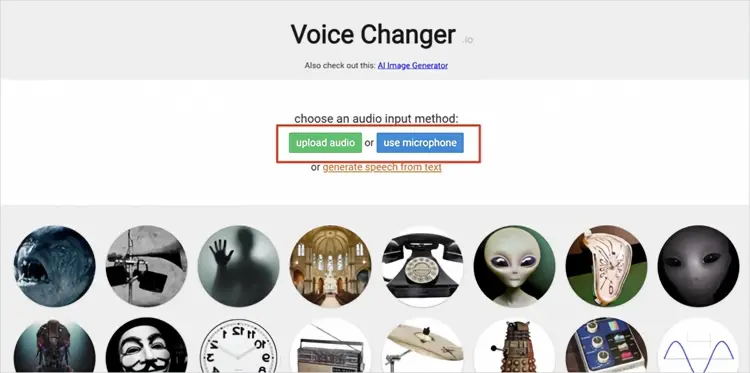
Step 2. Browse the available voice effects, such as robot, alien, chipmunk, and other voice styles. Select your preferred effect, and VoiceChanger.io will automatically apply it to your audio.
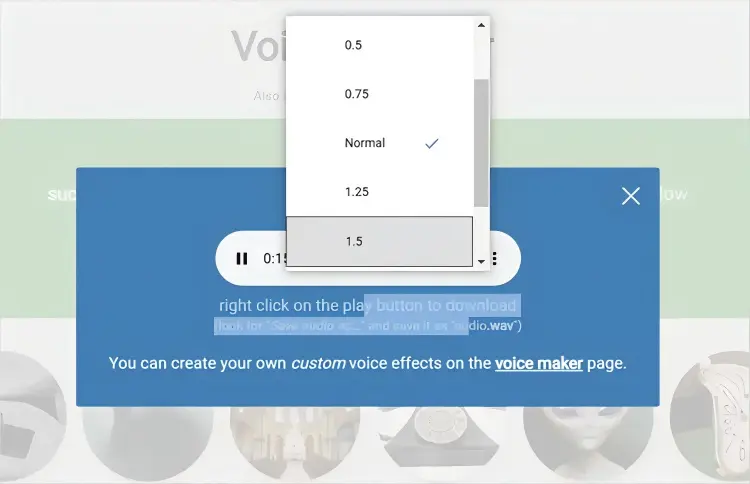
Step 3. To customize the result, click the three-dot menu and adjust the playback speed. You can slow the audio down to 0.5x or speed it up to 2x, giving you more control over the final voice effect.
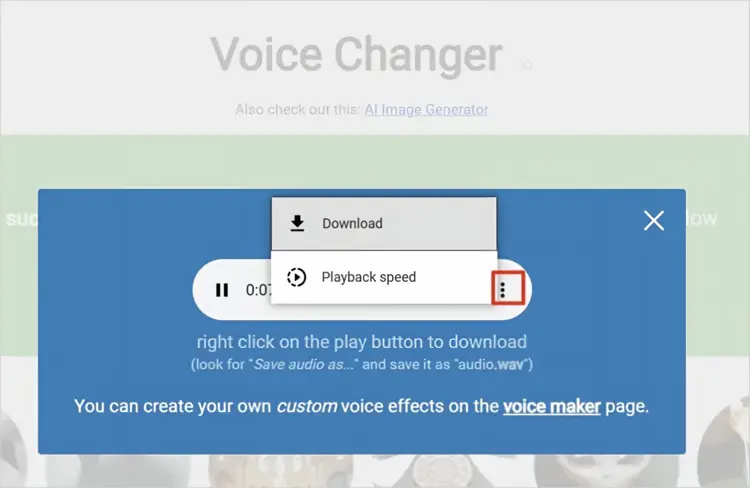
Step 4. Once you are satisfied with the result, open the three-dot menu and click the "Download" option to save the edited audio file. You can then use it for videos, games, social media content, or other creative projects.
Part 4. Pros and Cons of VoiceChanger.io
Pros:
+ User-friendly interface.
+ Free to use.
+ No download or installation required.
+ Work directly in a browser.
+ Offer a wide range of voice effects.
+ Support audio uploads and microphone recording.
Cons:
- Limited features in the free version.
- Some advanced effects require a premium subscription.
- Occasional stability issues may occur.
- Better suited to recorded audio than live voice communication.
- Not a full professional audio editor.
- The effect library is focused heavily on fun and experimental sounds.
- Some effects require you to imitate a particular accent or speaking style for better results.
- Echo-based effects can make speech harder to understand if you speak too quickly.
- The website describes itself as a hobby project and says it may not be updated regularly.
- Users looking for realistic AI voice transformation may find the traditional effects less flexible than newer AI-based tools.
Part 5. Best Online Alternative to VoiceChanger.io
Now you know that while VoiceChanger.io offers useful features and a variety of voice effects, it is still a hobby project and may not receive frequent updates. For users who need a more advanced and regularly improved voice-changing experience, we have introduced a reliable alternative worth considering.
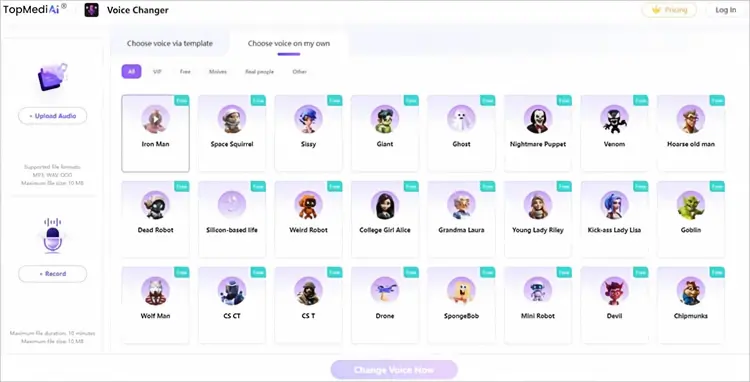
TopMediai Online Voice Changer offers a more AI-focused alternative. It allows users to upload audio files or record their voices, select voice effects, process the recordings, and download the results. It supports Windows, Mac, Android, and iPhone, and works directly through supported browsers.
TopMediai provides online voice-changing features along with other AI voice tools, including voice cloning and text-to-speech. Its text-to-speech platform currently lists more than 3,200 AI voices and supports over 190 languages and accents.
The highlights of TopMediai:
- Transform your voice with realistic AI voice effects, including different characters, tones, genders, and styles.
- Change voices online directly in a browser without installing additional software.
- Upload audio files or record your voice to apply AI voice effects quickly.
- Support popular audio formats such as MP3, WAV, and OGG for voice conversion.
- Provide a wide range of AI voice filters for gaming, videos, social media, podcasts, and creative projects.
- Generate natural-sounding voice outputs while maintaining clear audio quality.
- Work across Windows, Mac, Android, and iPhone devices through common web browsers.
- Offer a simple workflow: upload or record audio, choose a voice effect, and download the converted result.
- Use AI-powered voice transformation technology to modify voice characteristics while preserving realistic expressions.
- Allow users to create unique voice content without complex audio editing skills.
How to Use TopMediai Online Voice Changer?
-
Open TopMediai Online Voice Changer and upload an audio file or click the record option to record your voice directly. The tool supports common formats such as MP3, WAV, and OGG.
-
Select your preferred AI voice filter or voice effect from the available options. Click "Change Voice Now" to start the AI voice conversion process.
-
Preview the generated voice and check whether the converted effect meets your needs. Download and save the changed audio file for use in videos, games, social media, podcasts, or other creative projects.
Part 6. VoiceChanger.io vs. TopMediai
You can compare VoiceChanger.io and TopMediai Online Voice Changer based on their features, supported functions, and ideal use cases to find the right tool for your voice-changing needs.
| Feature | Voice Changer.io | TopMediai Online Voice Changer | |
|---|---|---|---|
| Online use | Yes | Yes | |
| Free option | Yes | Yes | |
| Upload audio | Yes | Yes | |
| Record voice | Yes | Yes | |
| Voice effects | Yes | Yes | |
| Custom effects | Yes | More AI-oriented options | |
| Text-to-speech | Yes | Yes | |
| AI voice tools | Limited | Yes | |
| Voice cloning | No | Yes | |
| Mobile browser support | Browser-based | Yes | |
| Best for | Fun voice effects and quick clips |
|
The choice depends on the type of project. VoiceChanger.io is focused on quick, simple voice effects, while TopMediai is more suitable when you want to combine voice changing with a broader set of AI voice-generation tools.
Part 7. FAQs About VoiceChanger.io
Q1. Is VoiceChanger.io free to use?
Yes. VoiceChanger.io is available as a free online voice changer. Its official website describes the service as free and does not require users to purchase a subscription for its basic voice-changing functionality.
Q2. Is VoiceChanger.io safe to use?
VoiceChanger.io is a browser-based tool, so you do not need to install a desktop application to use it. However, "safe" should not be interpreted as meaning that users should upload sensitive or private recordings without considering the site's data practices.
For personal or confidential recordings, avoid uploading information that you would not want processed by a third-party online service. You should also check the site's current privacy information before submitting sensitive audio.
Q3. Is VoiceChanger.io legit?
Yes, VoiceChanger.io is a legitimate online voice-changing tool that works directly in a browser. It allows users to apply various voice effects and transform their audio for entertainment, creative projects, and other casual uses.
Last Words
VoiceChanger.io remains a convenient option when you want a free, browser-based way to transform a short recording without installing software. Its straightforward interface, collection of creative effects, microphone recording, audio upload, and custom Voice Maker make it useful for casual voice experiments and short-form content. Its limitations become more noticeable when your requirements go beyond basic voice effects. It is not the ideal choice for users who need sophisticated AI voice generation, voice cloning, or a broader content-creation workflow.
If you only need a quick voice effect, VoiceChanger.io may be enough. If you want more AI-powered voice transformation and additional tools for creating voice content, TopMediai Online Voice Changer is worth considering as an alternative.
Related Articles
Best Robot Voice Changer: 9 AI Tools to Create Robot Voices
5 Best Hindi Text to Speech Tools for Natural AI Voice Creation
Oddcast Text to Speech Review: Features, Pros & Cons, and Best Alternative
Talk It Text to Speech: Check Pros and Cons, Get Alternatives