

TL;DR:
Looking for the best voice changer for Fortnite? These 6 tools offer real-time voice effects, AI-powered character voices, and soundboards to make gaming chats more entertaining.
- Voice Changer: Suitable for real-time voice changing and gaming effects.
- Voicemod: Best for customizable voice effects and soundboards.
- Voice.ai: Ideal for AI-powered voice transformations.
- Dubbing AI: Great for anime-style voices and funny character effects.
- EaseUS VoiceWave: Good for customizable voice filters.
- Clownfish Voice Changer: A free, lightweight option for Fortnite PC users.
Compare their features, pros, cons, and free options to find the right voice changer for Fortnite and give your gaming sessions a fun new twist.
Looking for a voice changer for Fortnite to prank your squad, sound like a different character, or add a funny voice to your gameplay? The right tool can help you transform your voice in real time, use AI-powered effects, or play custom sound clips during matches.
In this guide, we compare six options: Voice Changer, Voicemod, Voice.ai, EaseUS VoiceWave, Clownfish Voice Changer, and Dubbing AI. You'll find their key features, pros and cons, and compatibility considerations to help you choose a free voice changer for Fortnite on PC, mobile, or console.
Before exploring each tool in detail, take a look at this comparison table to quickly find the best voice changer for Fortnite based on its key features, pricing, and ideal use case.
| Tools | Key Features | Free Version | Best For |
|---|---|---|---|
| Voice Changer | Real-time voice effects, AI voices, soundboard | Limited free features | Real-time voice changing and gaming effects |
| Voicemod | Voice filters, AI voices, customizable soundboard | Yes, with limitations | Customizable effects and soundboard playback |
| Voice.ai | AI voice transformation, voice models, soundboard | Limited free access | AI-generated character voices |
| EaseUS VoiceWave | Real-time voice filters, presets, voice customization | Limited free features | Windows users who want customizable voice effects |
| Clownfish Voice Changer | System-level voice changing, pitch adjustment, basic effects | Yes, free to use | Simple, lightweight voice changing on Windows |
| Dubbing AI | 500+ AI voices, real-time effects, soundboard, noise reduction | Selected free voices | AI character voices and anime-style effects |
1. Voice Changer
Best for: Fortnite PC players who want a range of character voices and real-time effects.
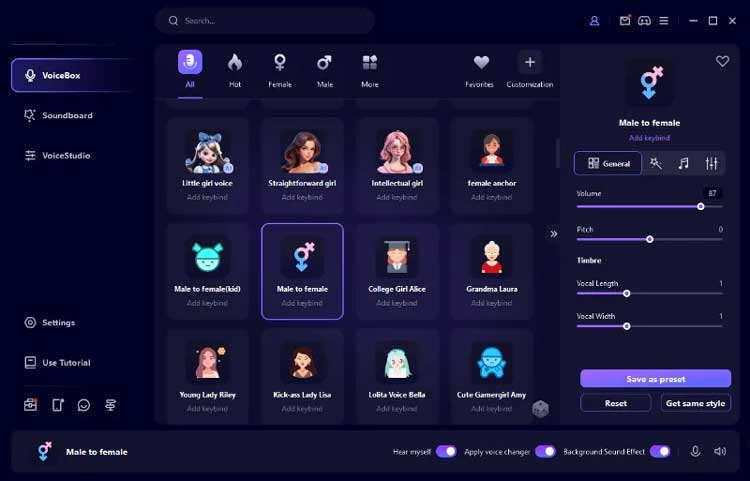
Voice Changer is a real-time voice changer designed for gamers and content creators. It works with applications that support microphone input, such as Fortnite and Discord. It offers a variety of preset voice effects, allowing users to quickly switch between different voices while gaming without complicated audio editing. For Fortnite players who enjoy experimenting with different character voices, Voice Changer is a worthwhile option to consider.
For Fortnite players on PC, it's worth considering if you want to surprise teammates, create a funny gaming persona, or try a girl voice changer for Fortnite without changing your actual voice.
Key Features:
- Offer a variety of AI voice-changing effects and preset sound effects.
- Support real-time microphone voice changing.
- Can transform your voice into different styles, including male, female, robot, and anime character voices.
- Support custom voice effects and audio settings (specific features may vary by version).
- Work with applications such as Discord and in-game voice chat.
- Include soundboard features, allowing users to add fun sound effects during voice interactions.
- Offer a wide range of voice effects, making it suitable for gaming and entertainment.
- Relatively easy to use, even for beginners.
- Support real-time voice changing without requiring pre-recorded audio.
- Suitable for gaming chats, live streaming, and voice content creation.
- Some voice effects and advanced features require a paid subscription.
- Actual voice-changing quality may depend on your microphone and computer performance.
- The virtual microphone must be configured correctly; otherwise, Fortnite may not recognize the modified voice.
2. Voicemod
Best for: Players who enjoy real-time voice changing, sound effects, and customizable voice effects.
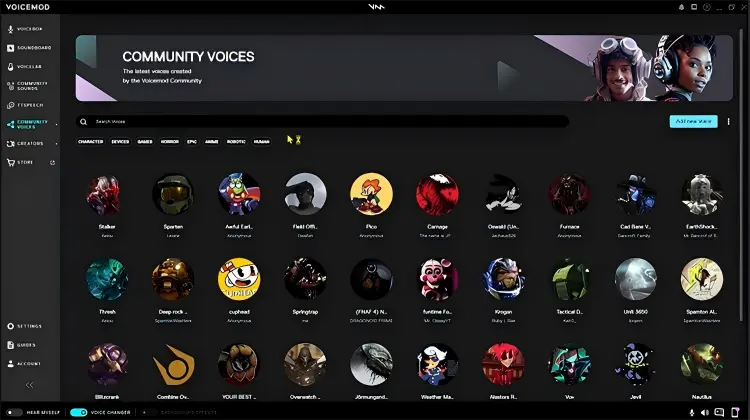
Voicemod is one of the most recognizable options for players searching for a voice changer for Fortnite. Its desktop app combines real-time voice effects, AI-powered voices, soundboards, and customizable audio filters. You can choose a character-style voice, adjust the sound, and trigger sound clips using keyboard shortcuts during gameplay. If you often play games with friends or want to add some funny effects to your live streams, this tool is worth trying.
Key Features:
- Offer different voice effects, including robot, monster, male, and female voices.
- Support real-time microphone voice changing.
- Include a built-in Soundboard for playing game sound effects and custom audio clips.
- Allow users to create and adjust voice effects.
- Provide a virtual microphone for connecting with applications such as Fortnite and Discord.
- Support various gaming and voice-chat scenarios.
- Feature an intuitive interface that is suitable for gamers.
- Combine real-time voice changing and soundboard playback effectively.
- Offer a variety of voice effects.
- Compatible with popular games and voice-chat applications.
- The free version has limitations on available voice effects and features.
- Some advanced voice effects require a subscription.
- Running a game, voice-chat application, and voice changer simultaneously may increase system resource usage.
- Some voice effects may require adjustments to achieve more natural-sounding output.
3. Voice.ai
Best for: PC players who want to experiment with AI-generated voices and custom sound clips.
Voice.ai is an AI-powered voice changer that focuses on AI voice transformation and offers a specific AI voice changer for Fortnite. Unlike traditional tools that simply adjust pitch, it uses AI models to change the overall sound of your voice, making it resemble the voices of different people or characters. If you want to try more personalized voice effects in Fortnite rather than simply raising or lowering your pitch, Voice.ai is worth exploring.
Voice.ai also includes a Soundboard feature that allows users to play audio clips using hotkeys. According to its Fortnite guide, users can add MP3 audio clips of up to 30 seconds and trigger them during gameplay.
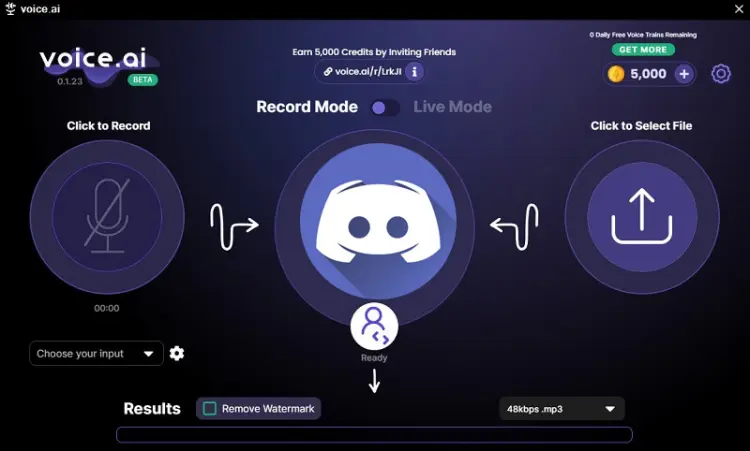
Key Features:
- Support real-time AI voice changing.
- Offer voice models based on different people and character styles.
- Support real-time microphone input.
- Provide voice model selection and related customization options.
- Can be used for in-game voice chat and content creation.
- AI voice effects offer plenty of creative possibilities.
- Allow users to experiment with a variety of voice styles.
- Goes beyond basic pitch adjustments to transform the overall sound of your voice.
- Suitable for users who enjoy exploring different AI-generated voices.
- AI voice processing may require considerable computer resources.
- Network conditions and hardware performance may affect the user experience.
- Some voice models or features may be subject to credit limits, usage quotas, or paid plans.
- Setup and configuration may be more complicated than with basic voice changers.
4. EaseUS VoiceWave
Best for: Windows users who want to use a variety of real-time voice effects in games and voice chats.
EaseUS VoiceWave is a Windows voice changer built for gaming, streaming, and online communication. It offers voice filters and customization features that can help you create a different sound while playing Fortnite. If you are looking for a girl voice changer for Fortnite, a deeper character voice, or a funny effect for your squad, VoiceWave is worth comparing with Voicemod. Its Voice Lab page is particularly relevant to players who want to explore voice effects rather than rely on a single preset.
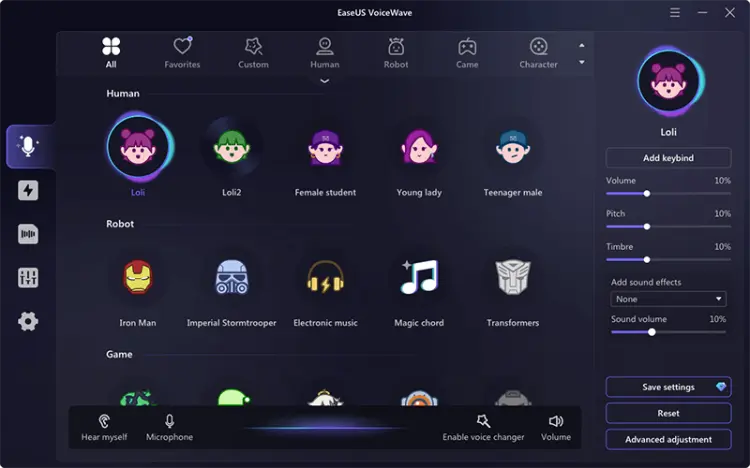
Key Features:
- Support real-time microphone voice changing.
- Offer a variety of voice presets and sound effects.
- Allow users to customize voice parameters.
- Work with games and voice chat applications.
- Provide voice testing and audio configuration options.
- Relatively easy-to-understand interface.
- Preset voice effects are suitable for everyday entertainment.
- Support real-time voice changing.
- Can be used in various voice chat scenarios.
- Primarily designed for Windows users.
- Free and premium features may differ.
- Some voice effects may require a paid subscription.
- Different games and microphone devices may require separate audio input and output adjustments.
5. Clownfish Voice Changer
Best for: Budget-conscious Windows users who want a simple, free voice changer for Fortnite.
Clownfish Voice Changer is a lightweight Windows utility that applies voice effects at the system microphone level. Instead of concentrating on a large library of modern AI-generated voices, it offers straightforward effects such as male, female, robot, alien, and pitch adjustments.
If you want a free voice changer for Fortnite PC without paying for a premium voice library, Clownfish is worth considering. Once installed and configured correctly, it can process microphone input for compatible applications.
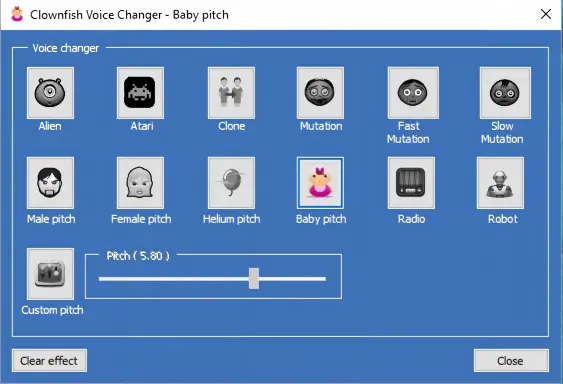
Key Features:
- Support system-level microphone voice changing.
- Offer a variety of basic voice effects.
- Support pitch adjustment.
- Provide virtual audio features and an audio player.
- Work with voice chat applications such as Discord.
- Free to use.
- Relatively lightweight software.
- Easy to operate and suitable for beginners.
- Does not require a complicated voice editing process.
- Offer fewer and less diverse voice effects than some paid alternatives.
- Has a relatively traditional interface.
- Primarily designed for Windows.
- Offer limited AI voice-changing capabilities and advanced customization options.
6. Dubbing AI
Best for: Fortnite PC players who want free AI voices, real-time effects, and a soundboard for fun team chats.
Dubbing AI is an AI-powered voice changer for Fortnite that lets PC gamers transform their microphone input into different character voices in real time. With 500+ AI voice effects, including anime-inspired characters, funny voices, and various vocal styles, it offers an entertaining way to customize your voice while chatting with teammates. If you're looking for a free Fortnite voice changer to experiment with different voices, Dubbing AI provides selected free voice options, although some effects require a paid subscription.
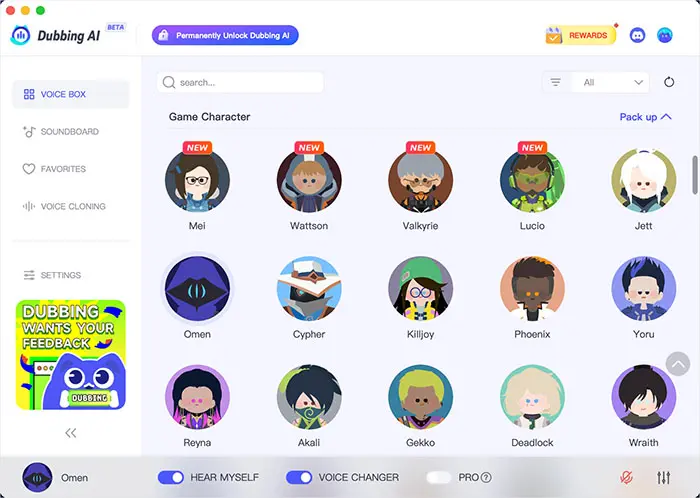
Key Features:
- 500+ AI voices, including anime, gaming, celebrity-inspired, and character voices.
- Real-time voice changing while playing Fortnite.
- Built-in soundboard with memes, funny effects, and anime sounds.
- Background noise reduction for clearer voice chats.
- Virtual microphone support for Fortnite and other compatible apps.
- Selected free voices, with the available options rotating periodically.
- Large selection of AI voice effects.
- Support real-time voice conversion.
- Built-in soundboard adds fun effects to team chats.
- Offer free voices without an upfront purchase.
- Easy to set up on PC.
- Compatible with Fortnite, Discord, OBS, and other platforms.
- Require desktop installation; no-download use is not supported.
- Some premium voices require a subscription.
- Free voice options are limited and may change over time.
- Require proper virtual microphone configuration.
- Direct support for Fortnite on Xbox and mobile is not established.
FAQs on Voice Changer for Fortnite
Q1. Does Fortnite have a built-in voice changer?
No. Fortnite supports voice chat but doesn't include a built-in real-time voice changer. To change your voice in-game, you need third-party software such as Voicemod or Voice.ai and set its virtual microphone as Fortnite's audio input.
Q2. Are there any free voice changers for Fortnite?
Yes. Clownfish Voice Changer is a free basic option for Windows users. Voicemod, Voice.ai, and EaseUS VoiceWave may also offer free trials or limited free features, although some voices and advanced features require payment.
Q3. Why is my Fortnite voice changer not working?
This is usually caused by incorrect microphone settings or virtual audio driver issues. Try these fixes:
- Select the correct physical microphone in your voice changer.
- Make sure its virtual microphone is enabled.
- Re-select the audio input device in Fortnite.
- Check Windows microphone privacy permissions.
- Restart Fortnite and the voice changer.
- Close other apps using your microphone.
- Update or reinstall the audio drivers.
Q4. Can you get banned for using a voice changer in Fortnite?
Using a third-party voice changer doesn't automatically mean you'll get banned, but compatibility with Epic Games' latest rules isn't guaranteed. Avoid tools that modify game files or interfere with gameplay, and never use voice effects to impersonate, harass, or scam other players. Check Epic Games' latest rules before use.
Q5. Can you use a Fortnite voice changer on PS5 or Xbox?
Most PC voice changers cannot be installed directly on PS5 or Xbox. You may need an external hardware voice changer, compatible audio interface, or PC-based audio routing setup. Compatibility depends on your console, headset, controller, and audio equipment.
Final Thought
Finding the best voice changer for Fortnite depends on your gaming platform, budget, and preferred voice effects. Whether you want an AI voice changer for Fortnite, a funny character voice, or a girl voice effect to surprise your teammates, tools like Voicemod, Voice.ai, Voice Changer, EaseUS VoiceWave, Clownfish, and Dubbing AI offer different options to explore. Voicemod is a versatile choice for real-time effects and soundboards; Voice.ai and Dubbing AI stand out for AI-powered voice transformations, while Clownfish is worth trying if you want a free voice changer for Fortnite on PC.
Compare their features, free versions, and device compatibility before downloading to find the right voice changer for Fortnite and make your next gaming session more entertaining.
Related Articles
5 Best Voice Changers for Xbox in 2026: Features, Pros & Cons
Female Voice Changer: 9 Best Tools for PC, Online & Mobile
5 Best Voicemod Alternative Tools for PC, Mac & Mobile Users
6 Best Autotune Voice Changer Tools for Desktop, Online & Mobile