

TL;DR:
Looking for the best voice changer for Xbox? We compare 5 popular tools to help you find the right option for fun voice effects and gaming chats.
- Best Overall: Voice Changer – Rich AI voice effects and soundboard.
- Best for Customization: EaseUS VoiceWave – Flexible voice filters and audio settings.
- Best for Direct Xbox Use: Voicemod – Supports console use with VMKey Pocket.
- Best for AI Voices: Voice.ai – AI voice effects and voice cloning.
- Best for Voice Variety: Dubbing AI – 500+ voice effects.
Note: Most software requires a Windows PC, while direct Xbox use may need extra hardware.
Want to surprise your friends with a funny robot voice, sound like your favorite game character, or simply have some fun with voice effects while playing Xbox? A voice changer for Xbox can make your gaming sessions a lot more entertaining. But which option should you choose?
In this guide, we'll introduce 5 popular tools, including Voice Changer, EaseUS VoiceWave, Voicemod, Voice.ai, and Dubbing AI. We'll compare their features, pros, and cons to help you find the best voice changer for Xbox, whether you're looking for a free option or a more flexible way to change your voice in real time.
Choosing the best voice changer for Xbox depends on your gaming setup, preferred voice effects, and budget. Here's a quick comparison of five popular tools to help you find the right one.
| Tools | Best For | Key Features | Xbox Compatibility |
|---|---|---|---|
| Voice Changer | Best Overall | AI voices, soundboard, real-time voice changing | PC-based |
| EaseUS VoiceWave | Customization | 2,000+ AI voices, voice filters, sound effects | PC + Xbox App |
| Voicemod | Direct Xbox Use | 200+ voice filters, soundboard, VMKey Pocket | Direct hardware / PC |
| Voice.ai | AI Voice Effects | AI voices, voice cloning, soundboard | PC-based |
| Dubbing AI | Voice Variety | 500+ AI voices, real-time voice changing | PC + Xbox App |
1. Voice Changer
If you are looking for the best voice changer for Xbox, Voice Changer is a great choice. It is an AI-powered voice-changing software designed for gamers, streamers, content creators, and people who enjoy adding fun effects to online conversations. It allows users to transform their voices in real time while gaming, chatting, or live streaming, with a large collection of AI voice filters, character voices, and sound effects. It also supports voice recording and audio file conversion, making it useful for creating entertaining voice clips. It works with popular platforms such as Discord, Zoom, Twitch, and various PC games.
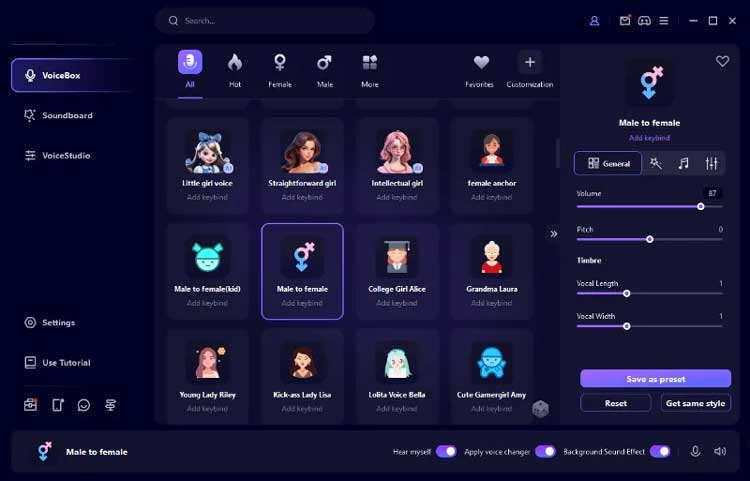
Key Features:
- Transform your microphone input into different voices in real time while gaming, streaming, or chatting.
- Choose from a wide range of AI-generated voices, including male, female, cartoon, anime, celebrity-style, and character voices.
- Play funny sound effects, memes, and audio clips during conversations or gameplay.
- Record your voice or import existing audio files to apply different voice effects.
- Adjust voice effects to create personalized voice styles.
- Reduce background noise to improve microphone audio quality.
- Support Windows, macOS, Android, and iOS.
- Offer a large collection of AI voice filters and entertaining sound effects.
- Support real-time voice changing on Windows and Mac.
- Work with popular gaming, streaming, and communication applications.
- Provide both microphone voice changing and recorded audio conversion.
- Easy-to-use interface makes it accessible to beginners.
- Offer limited free voices so users can try the software before purchasing.
- Many voice filters and sound effects require a paid subscription.
- Real-time voice changing is not available in the same way on mobile devices.
- Some applications require users to manually select MagicMic's virtual microphone.
- Audio quality and voice-changing performance may depend on microphone quality, computer performance, and network conditions.
2. EaseUS VoiceWave
EaseUS VoiceWave is an AI-powered voice changer for Xbox users who want to add fun voice effects to their gaming sessions and party chats. Designed for gamers, streamers, and online chat users, it lets you transform your microphone input into different voices in real time while playing games or talking with friends. Since VoiceWave runs on a PC rather than directly on Xbox, you'll need to connect your Xbox console to a computer through the Xbox app and configure VoiceWave's virtual microphone as the audio input. Once set up, you can experiment with hundreds of voice filters, soundboard effects, and customizable audio settings to make your Xbox gaming conversations more entertaining.
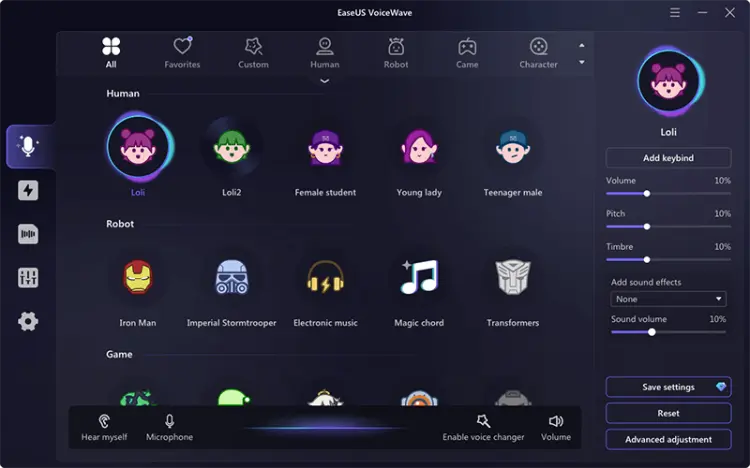
Key Features:
- Change your voice in real time while gaming, streaming, or chatting, with minimal audio delay.
- Choose from hundreds of AI voice filters, including male, female, anime, game character, celebrity-style, and other fun voices.
- Access over 100 sound effects, such as memes, funny audio clips, and gaming sounds, to make voice chats more entertaining.
- Customize your voice by adjusting pitch, timbre, high-pass and low-pass filters, and equalizer settings in the built-in Voice Laboratory.
- Explore a large AI voice library featuring over 2,000 voices, with new options added through regular updates.
- Use the virtual microphone to apply voice effects in supported games and communication platforms.
- Offer a wide selection of voice filters and sound effects for gaming and role-playing.
- Support real-time voice changing, making it suitable for live conversations and multiplayer games.
- Provide customizable audio controls for users who want to fine-tune their voices.
- Feature a relatively straightforward setup process with an intuitive interface.
- Support integration with various games and voice chat applications.
- Require a PC connection to use voice-changing features with Xbox consoles.
- Xbox setup involves additional configuration through the Xbox app and virtual microphone.
- Remote gameplay and voice chat may be affected by an unstable Wi-Fi connection.
- Some advanced voice effects and features may require a paid subscription.
3. Voicemod
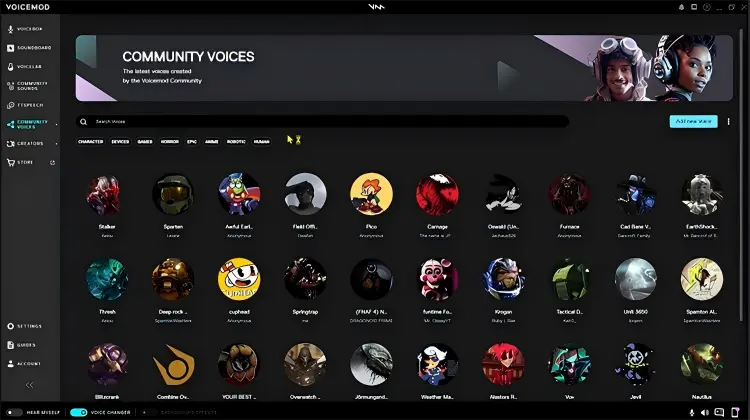
Voicemod is a real-time voice changer and soundboard tool designed for gamers, streamers, and online communication users. It allows users to transform their voices, apply fun audio effects, and play sound clips during gaming sessions and voice chats.
For anyone looking for a voice changer for Xbox, Voicemod offers two ways to change voices: using the VMKey Pocket hardware device with a smartphone for direct console use, or using the Voicemod desktop app with the Xbox app on a Windows PC. It supports Xbox Series X, Xbox Series S, and Xbox One through VMKey Pocket, making it possible to use voice effects and soundboards without relying on a traditional PC setup.
Key Features:
- Change your voice in real time while playing Xbox games or chatting with friends, with over 200 voice filters to choose from.
- Access more than 300,000 sound effects, including memes, funny clips, and gaming sounds, or create custom soundboards.
- Use VMKey Pocket to connect your smartphone, Xbox controller, and headset for voice changing directly on Xbox without a PC.
- Control voice filters and soundboard effects through the Voicemod mobile app while gaming.
- Customize voices by adjusting pitch and combining different audio effects with Voicelab.
- Integrate Voicemod with the Xbox app on Windows by selecting Voicemod Microphone as the audio input device.
- Offer real-time voice changing for Xbox Series X, Series S, and Xbox One through VMKey Pocket.
- Provide over 200 voice filters and more than 300,000 sounds for different gaming scenarios.
- Include a soundboard for playing memes, sound effects, and custom audio clips during voice chats.
- Support smartphone control, allowing users to switch voices and trigger sounds without interrupting gameplay.
- Offer PC integration for users who prefer playing and chatting through the Xbox app on Windows.
- Support voice customization, giving users more flexibility to create unique voice effects.
- Using Voicemod directly with an Xbox console requires the additional VMKey Pocket hardware device.
- VMKey Pocket requires a compatible smartphone running Android 10 or later or iOS 16 or later, and connects through USB-C.
- Unlocking the full collection of voices requires Voicemod PRO, adding to the overall cost.
- Initial setup involves connecting multiple devices, which may be less convenient for beginners.
- The PC-based method works with the Xbox app on Windows and should not be confused with directly installing Voicemod on an Xbox console.
4. Voice.ai
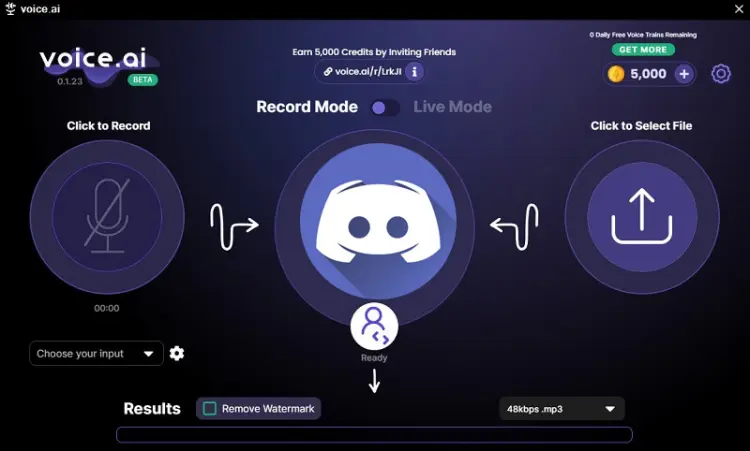
Voice.ai is an AI-powered voice changer that allows users to transform their voices into different styles for gaming, streaming, and online conversations. If you're looking for a voice changer for Xbox, Voice.ai is worth considering because it offers AI voice effects that can make your gaming chats more entertaining.
Unlike basic voice filters, Voice.ai focuses on AI voice transformation, allowing users to experiment with different voices and create a more personalized sound. However, Xbox users should pay attention to its setup requirements: the voice-changing process generally relies on a compatible PC and audio routing rather than working as a standalone app directly on an Xbox console.
Key Features:
- Transform your voice in real time while gaming, streaming, or chatting with friends using AI-powered voice effects.
- Explore a large library of community-created AI voices, including celebrity, streamer, and animated character styles.
- Create AI voice clones and personalized voice effects for gaming or content creation.
- Upload and play custom audio clips, memes, and sound effects through the built-in soundboard.
- Support multiple languages, making it suitable for communicating with international audiences.
- Record, save, download, and share modified audio, including prerecorded voice files.
- Offer a large collection of AI-generated and user-created voices.
- Support real-time voice changing for gaming and online conversations.
- Include voice cloning and a customizable soundboard.
- Allow users to record, download, and share modified audio.
- Have a free version for users who want to try AI voice-changing features.
- Require a Windows PC for the desktop voice changer, so it isn't a standalone Xbox console application.
- Setting it up for Xbox gaming may require additional configuration through Xbox Console Companion and compatible PC game streaming or gameplay arrangements.
- AI voice processing can introduce latency, particularly on less powerful computers.
5. Dubbing AI
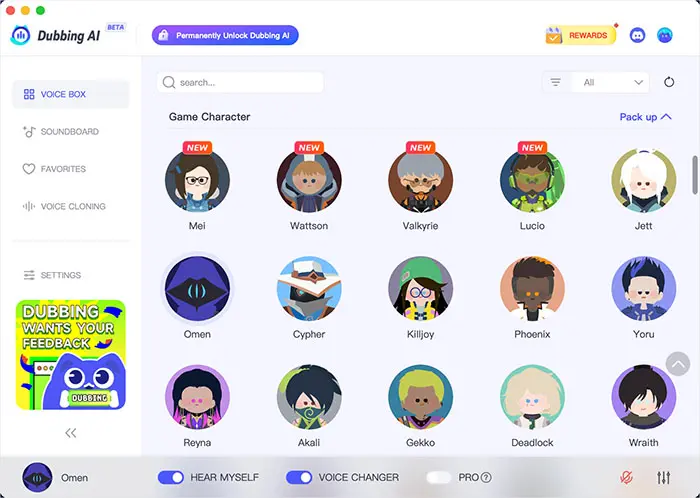
Want to sound like a completely different person when chatting with your gaming buddies? Dubbing AI makes that possible with a huge collection of AI voice effects. Whether you want a deeper voice, a funny character-inspired sound, or something totally unexpected, there are plenty of options to play around with.
For gamers searching for a voice changer for Xbox, Dubbing AI is an option worth checking out, especially if you use the Xbox App on your Windows PC. It lets you change your voice in real time, preview different effects, and switch between your favorite voices while gaming. Just remember that it works through a PC rather than directly on an Xbox console, so you'll need to configure your microphone before jumping into party chat.
Key Features:
- Choose from over 500 AI voice effects, including character-inspired and entertaining voices.
- Change your voice in real time while gaming or chatting with friends, with advertised latency below 300 ms.
- Use Dubbing AI with the Xbox App and Xbox Game Bar on Windows, as well as cross-platform games like Fortnite, Halo Infinite, and Forza Horizon.
- Set Dubbing AI Virtual Microphone as your default input device in Windows and configure it in the Xbox App.
- Preview voice effects, save favorites as presets, and switch between voices using hotkeys.
- Enjoy lightweight performance, with Dubbing AI claiming to use only 2–3% CPU resources. Actual usage may vary depending on your PC.
- Offer 500+ AI voices for different gaming and entertainment scenarios.
- Support real-time voice changing for Xbox Party Chat through the Xbox App on PC.
- Advertise low latency of under 300 ms.
- Compatible with Xbox Game Bar and various cross-platform games.
- Provide voice previews, presets, and hotkey switching.
- Require a Windows PC to process voice effects; it is not a standalone voice changer for Xbox consoles.
- Require additional microphone configuration in Windows and the Xbox App.
- The large voice library may take time to explore and find suitable effects.
- Actual latency and CPU usage may vary depending on hardware, network conditions, and audio settings.
FAQs About Voice Changer for Xbox
Q1. Is there a voice changer for Xbox?
Yes, but the available methods have limitations. Xbox does not offer a built-in, system-wide voice changer that transforms your microphone in real time. You can use compatible external hardware, such as Voicemod Key, or run voice-changing software on a PC and route its processed audio through a supported chat setup.
Q2. Can I use a voice changer on Xbox without a PC?
Yes, provided you use compatible hardware designed for console voice changing. Voicemod Key is one option that uses a smartphone, the Voicemod mobile app, a wired headset, and a compatible connection to the controller. This avoids the need to run the voice-changing software on a PC, but it still requires extra equipment.
Q3. Does Xbox support Discord voice chat?
Yes! Xbox supports Discord voice chat, allowing you to chat with friends while gaming. Simply link your Discord and Xbox accounts, then transfer or join a Discord voice channel through your Xbox console without needing to switch devices.
Wrapping Up
Finding the best voice changer for Xbox depends on how you play, what kind of voice effects you enjoy, and whether you're willing to use a PC or extra hardware. Among these five options, Voice Changer is our top recommendation thanks to its extensive collection of AI voice effects, fun soundboard features, and easy-to-use interface. EaseUS VoiceWave, Voicemod, Voice.ai, and Dubbing AI are also worth considering, especially if you want more voice customization or different ways to connect your gaming setup.
Just keep in mind that most software-based options require a PC, while direct console voice changing may need additional hardware. Choose the tool that best fits your setup, and you'll be ready to make your Xbox voice chats a lot more fun!
Related Articles
Female Voice Changer: 9 Best Tools for PC, Online & Mobile
5 Best Voicemod Alternative Tools for PC, Mac & Mobile Users
6 Best Autotune Voice Changer Tools for Desktop, Online & Mobile
Scary Voice Changer: 8 Best Tools to Create Creepy AI Voices in 2026