TL;DR:
Looking for the best female voice changer? Compare the 9 tools and choose the right female voice changer.
- Real-time voice changing for gaming and Discord: Try Voicemod, iMyFone MagicMic, or EaseUS VoiceWave.
- Customizable voice effects: Consider MorphVOX.
- Free basic voice changing: Start with Clownfish.
- AI female voice conversion and video voiceovers: Try online tools such as TopMediai.
- Quick online audio processing: Give Voicechanger.io a try.
- Mobile voice recording and entertainment: Voice Changer with Effects or Voice Changer Women.

TopMediai AI Music, Video & Voice Studio


Do you want to transform your voice into a more natural, softer female voice? Whether you're gaming, chatting on Discord, creating short videos, livestreaming, or recording voiceovers, a female voice changer can help you adjust your vocal tone to sound more feminine.
In this article, we'll introduce 9 female voice changer tools worth trying, covering Windows, Mac, mobile devices, and online platforms. Compare their features, voice-changing effects, and pricing to find the right tool for your needs.
Here is a quick guide to choosing the right one.
| Female Voice Changer | Platform | Best For | Real-Time Voice Changing | Free Option |
|---|---|---|---|---|
| iMyFone MagicMic | Windows, Mac, iOS, Android | AI voice effects, gaming, and soundboards | Yes, on supported desktop versions | Limited free features |
| Voicemod | Windows, Mac | Discord, gaming, and livestreaming | Yes | Yes, with limited effects |
| EaseUS VoiceWave | Windows | AI voice effects for games and chats | Yes | Limited free features |
| MorphVOX | Windows, Mac | Customizable voice effects | Yes | Free Junior edition |
| Clownfish Voice Changer | Windows | Free, basic voice changing | Yes | Yes |
| TopMediai Online Voice Changer | Web browser | AI female voice conversion and voiceovers | No, recording-based | Limited free usage |
| Voicechanger.io | Web browser | Quick, free online voice effects | No, recording-based | Yes |
| Voice Changer with Effects | Android | Recording and sharing fun voice clips | No | Yes, with ads and in-app purchases |
| Voice Changer Women | iPhone | Female voice effects for fun recordings | No | Yes, with in-app purchases |
Part 1. Best Female Voice Changer for Desktop
Desktop software is usually the better choice if you want a female voice changer for PC that works during live conversations. These tools can process microphone input and route the modified audio to compatible applications, including Discord, online games, and streaming software.
1. iMyFone MagicMic
Best for: Real-time voice effects, gaming, and soundboard features.
iMyFone MagicMic is an AI voice changer designed for users who want to experiment with different voices during gaming, streaming, and online conversations. It offers voice filters, sound effects, and soundboard-style features, making it useful for more than simply raising your voice pitch.
If you want a female voice changer for Discord, MagicMic is worth considering because it supports real-time voice-changing workflows on compatible desktop systems. You can select a female-sounding preset, test it with your microphone, and route the processed audio to a supported application. It also offers a way to transform prerecorded audio, which is useful if you want to create voice clips for videos or social media.
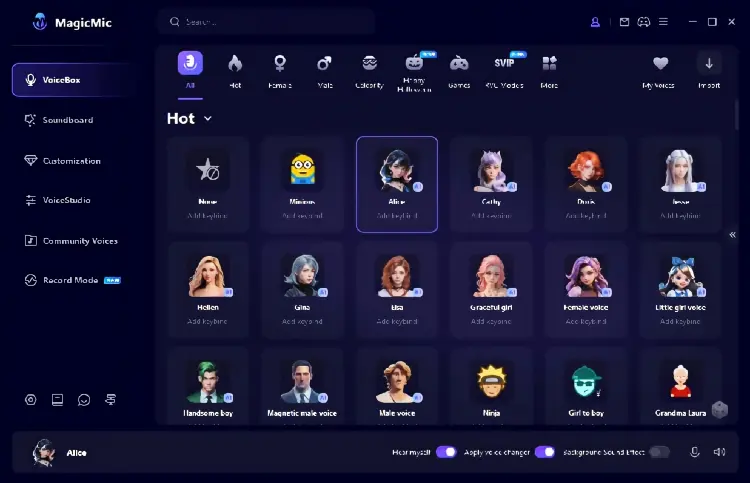
- Offer female voice filters and AI voice models for different voice styles.
- Support real-time voice changing for Discord, gaming, and livestreaming on desktop.
- Provide customizable voice settings to help you fine-tune the output.
- Include sound effects and noise reduction for a more flexible audio experience.
- Support Windows, Mac, iOS, and Android, although features vary by platform.
- The free version has limited access to voice filters and sound effects.
- Real-time voice changing is not available in the mobile versions.
- Some voice effects may sound artificial or fail to produce a convincing female voice, depending on your original voice and settings.
- You may need to configure the virtual audio device and microphone settings before using it with Discord or other applications.
2. Voicemod
Best for: Discord, gaming, and livestreaming.
Voicemod is a popular real-time voice changer for gamers, streamers, and online content creators. Its girl voice changer lets you transform your voice into a more feminine-sounding voice while speaking, making it a useful female voice changer for Discord, multiplayer games, and livestreams. Instead of recording and editing your voice beforehand, you can hear the effects as you speak.
Voicemod offers a variety of voice filters and AI-powered voices, along with a soundboard for adding audio effects during conversations. You can also use Voicelab to customize supported voice effects by adjusting pitch, tone, and other audio settings, helping you create a female voice that better matches your preferences. The software works through a virtual microphone, which you select as the input device in Discord or another compatible application.
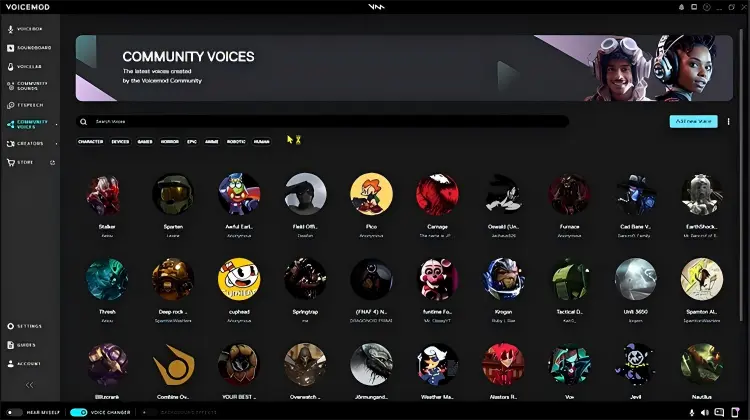
- Real-time voice changing makes it convenient for Discord calls, online games, and livestreams.
- Offer dedicated girl voice effects, making it suitable for users seeking a female voice changer.
- Provide a large library of voice effects and AI voices to explore different feminine-sounding styles.
- Include a soundboard and microphone enhancement features for a more engaging streaming experience.
- The free version lets you try voice-changing effects before paying for PRO.
- The free version has a limited, rotating selection of voice effects.
- Advanced voice customization through Voicelab requires the PRO version.
- Some effects may sound robotic or unnatural, depending on the selected filter, microphone quality, and original voice.
- Initial setup requires selecting the Voicemod virtual microphone in your communication app.
- AI voice performance may vary by language; the developer notes that English currently tends to produce the best results for its AI voices.
3. EaseUS VoiceWave
Best for: Windows users who want AI voice effects for games and chats.
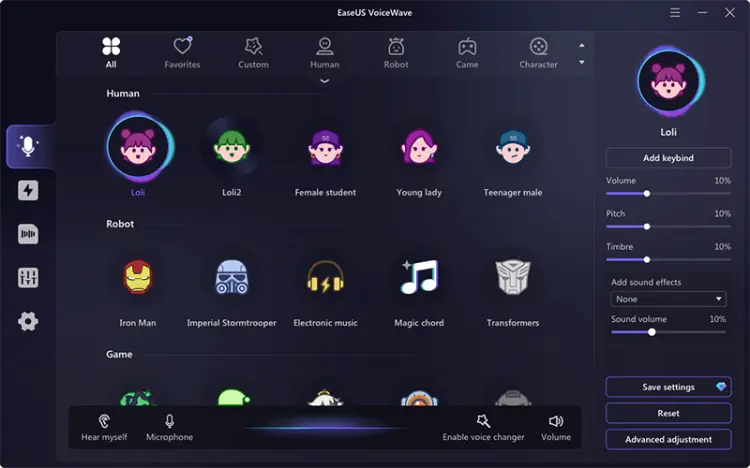
EaseUS VoiceWave is a real-time AI voice changer designed for gamers, streamers, and online chat users. If you want a female voice changer that can make your voice sound more feminine during live conversations, VoiceWave offers girl voice effects and male-to-female voice filters. You can use it with compatible applications such as Discord, Zoom, and online games to change your voice while speaking.
Beyond female voice filters, EaseUS VoiceWave includes more than 100 real-time voice effects, customizable voice settings, and background noise reduction. It also supports changing prerecorded audio and video files, so you can use it for voiceovers and content creation rather than live conversations alone.
- Offer dedicated female voice filters, making it suitable for users who want a more feminine-sounding voice.
- Support real-time voice changing for gaming, Discord chats, and livestreaming.
- Provide customizable voice effects, allowing you to experiment with different pitches and tones.
- Include noise reduction and prerecorded audio editing for greater flexibility.
- Primarily designed for Windows rather than macOS.
- The free version has limited access to voice effects and advanced features.
- Some female voice filters may sound artificial, depending on your original voice, microphone quality, and settings.
- Initial setup may require selecting VoiceWave's virtual microphone in Discord or other compatible applications.
- The desktop software requires installation and at least 7 GB of free disk space.
4. MorphVOX
Best for: Traditional voice changing with adjustable audio characteristics.
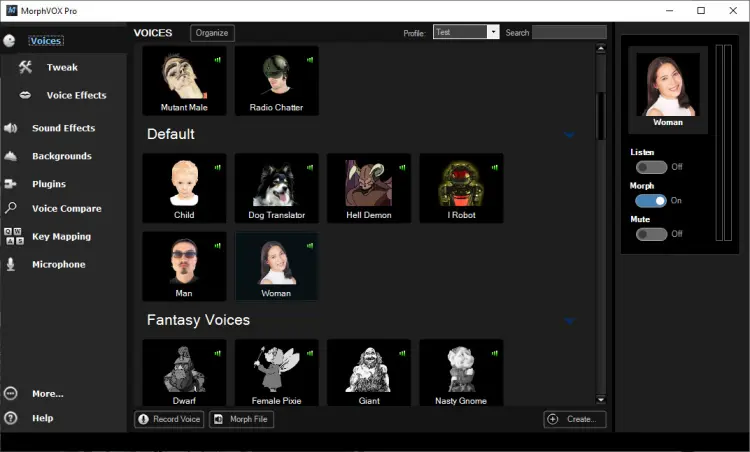
MorphVOX is a long-established desktop voice changer that offers a variety of voice presets and customization options. Users can choose suitable voice effects and adjust audio characteristics to meet their needs.
If the preset female voices don't match your expectations, you can experiment with different voice settings to achieve a more natural-sounding result. However, the actual voice conversion quality still depends on your original voice and parameter settings.
- Offer adjustable voice profiles and audio effects.
- Suitable for compatible games and voice-chat applications.
- Pro provides more customization than the basic edition.
- Can appeal to users who prefer traditional audio processing.
- A free Junior edition is available for basic experimentation.
- Achieving a convincing female voice may require manual tuning.
- Traditional processing can sound unnatural at extreme settings.
- The interface may feel dated compared with newer tools.
- The free edition has fewer features than MorphVOX Pro.
- Advanced AI voice conversion is not its main focus.
5. Clownfish Voice Changer
Best for: Users who want a completely free Windows voice changer.
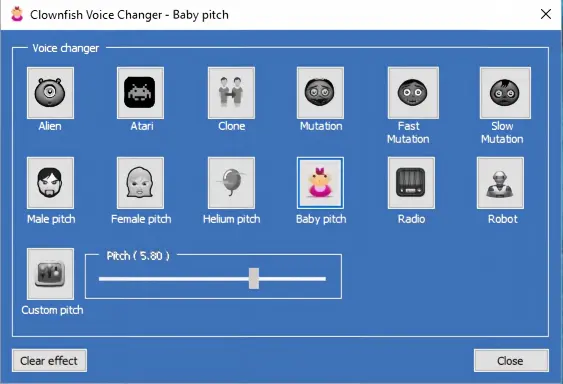
Clownfish Voice Changer is a lightweight voice-changing tool that typically processes audio through the system's audio input, allowing it to work with compatible voice applications after installation.
For users who want to try female voice effects for free, Clownfish is worth considering. However, it focuses more on traditional audio effects and cannot guarantee natural, realistic female voice conversion for every male voice.
- Free to use, making it suitable for users who want to try a female voice changer at no cost.
- Support real-time voice changing for compatible voice chat apps and games.
- Include a Female Pitch effect and custom pitch adjustment.
- Offer additional effects, a sound player, and VST plugin support.
- Lightweight and relatively simple to control from the system tray.
- Windows-focused, with no equivalent native macOS desktop experience.
- Voice effects are more basic than those of many AI-powered tools.
- Limited customization compared with more advanced software.
- A higher pitch alone may not produce a realistic female voice.
- The interface feels dated, and troubleshooting may require checking Windows audio settings.
Part 2. Best Female Voice Changer Online
An online female voice changer is convenient if you do not want to install desktop software. Most browser-based tools let you upload a recording, select a voice effect, and download the processed audio.
However, there is an important distinction: changing a recorded voice online is not the same as changing your voice live during a phone call or Discord conversation. Check whether a tool supports live microphone processing before choosing it for real-time communication.
1. TopMediai Online Voice Changer
Best for: AI voice effects and online audio transformation.
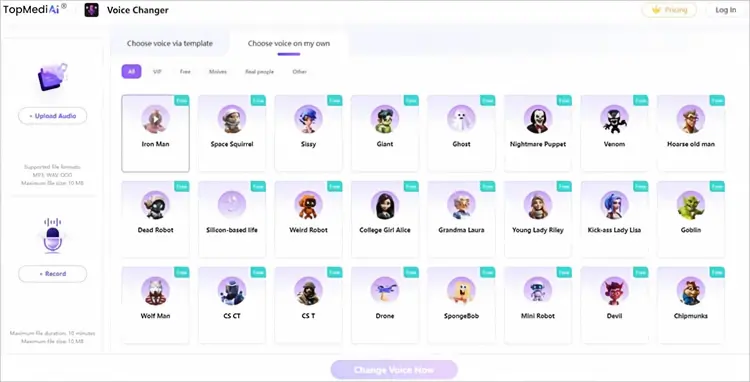
TopMediai Online Voice Changer is a browser-based AI voice changer that lets users transform existing audio recordings or record their voices directly online. For people looking for a female voice changer online, it offers a convenient way to experiment with different voice styles without installing desktop software. You can upload a recording, select a suitable female voice filter from the available options, generate the modified audio, and download the result. It works across major browsers and supports Windows, Mac, Android, and iPhone.
Unlike traditional pitch changers, TopMediai uses AI-powered voice effects to transform vocal characteristics. This makes it worth trying if you want a more varied female-sounding voice for voiceovers, social media content, or entertainment.
Key features of TopMediai Online Voice Changer:
- AI female voice effects: Choose from available voice filters to experiment with different female-sounding voices.
- Online voice conversion: Change your voice directly in a browser without installing a desktop application.
- Upload or record audio: Import an existing recording or record your voice through the website.
- Multiple audio formats: Supports MP3, WAV, and OGG files.
- Cross-platform compatibility: Use the tool on Windows, Mac, Android, or iPhone through a supported browser.
How to Use TopMediai Online Voice Changer:
-
Visit the TopMediai Online Voice Changer page. Click the "upload" option to import an audio file in MP3, WAV, or OGG format. Alternatively, click "Record" and allow microphone access to record your voice.
-
Browse the available voice effects and choose a female-sounding voice filter that matches your preferences. Click "Change Voice Now" to process your recording. Wait for the conversion to finish, then preview the result to check whether the voice sounds natural enough for your needs.
-
If you are satisfied with the result, click the "download" option to save the converted audio, where available. You can then use it for voiceovers, social media content, or other creative projects.
- No software installation is required, making it convenient for quick voice conversions.
- AI voice effects offer an alternative to basic pitch adjustment.
- Support both uploaded recordings and direct voice recording.
- Work across desktop and mobile browsers.
- The straightforward interface is beginner-friendly.
- The online tool has a maximum upload size of 10 MB and a recording limit of 10 minutes, according to its current page.
- It processes recordings rather than serving as a dedicated real-time voice changer for live calls.
- The naturalness of the female voice depends on the selected filter and original recording.
- Available voice filters and free usage may be subject to platform limitations.
2. Voicechanger.io
Best for: Quick, browser-based voice effects without desktop software.
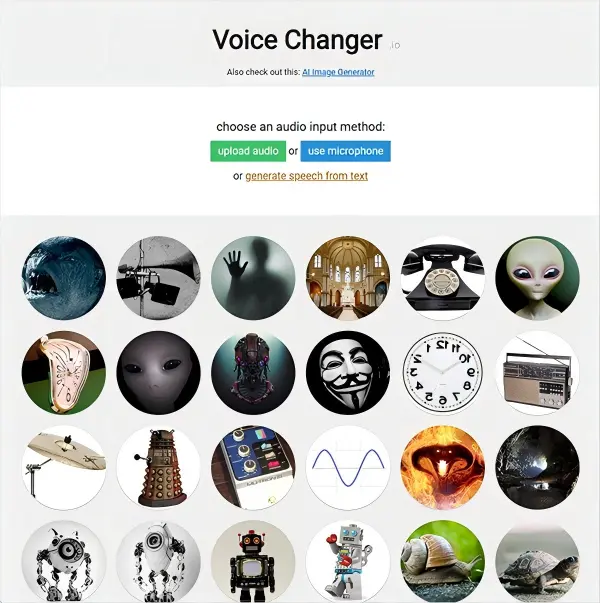
Voicechanger.io is a free, browser-based voice changer that lets users upload audio, record their voice through a microphone, or generate speech from text and apply different voice effects. For people searching for a free female voice changer online, it offers a simple way to experiment with a higher-pitched, girl-like voice without downloading software or paying for a subscription. Its High Voice Changer effect is particularly relevant for this purpose, while other presets let users create robotic, alien, monster, and distorted voices.
Unlike AI voice converters that recreate vocal characteristics, Voicechanger.io mainly applies traditional audio effects, including pitch changes and distortion. You can adjust the effect to explore different sounds, but raising the pitch alone may not produce a natural, realistic female voice. It is best suited for casual experimentation, fun recordings, and creative audio projects rather than professional voice conversion or live voice changing during calls.
- Completely free to use for basic voice effects.
- No software installation or account registration is needed to try the online tool.
- Offer several voice effects beyond female-sounding pitch changes.
- Support both uploaded audio and microphone recording.
- Simple interface makes it suitable for beginners and casual users.
- The High Voice Changer primarily changes pitch, so the result may sound artificial rather than like a natural female voice.
- It does not provide the same kind of advanced AI voice conversion as dedicated AI tools.
- It is designed mainly for processing recordings, not as a dedicated real-time voice changer for Discord calls or online games.
- The interface and effects are relatively basic compared with more advanced voice-changing software.
- The website notes that it is a hobby project and may not receive regular updates.
Part 3. Best Female Voice Changer App
A female voice changer app is useful if you primarily record voice messages, create funny audio clips, or share transformed recordings from your phone. The following are some female voice changer apps for Android and iPhone.
1. Voice Changer with Effects
Best for: Recording and sharing voice clips on Android.
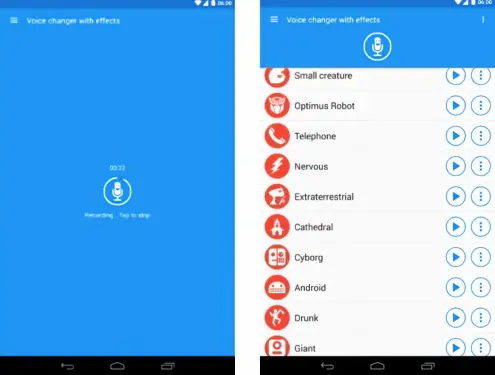
Voice Changer with Effects is a free Android voice-changing app developed by Baviux. It allows users to record their voices, apply audio effects, and save or share the modified recordings. For users searching for a female voice changer app for Android, it can be a simple option for experimenting with higher-pitched voices and playful vocal effects without needing desktop software.
The app offers more than 50 voice effects, including Helium, Robot, Monster, Alien, and Squirrel. You can also import existing audio files or generate a voice from text, giving you several ways to create customized audio clips. However, its main focus is applying effects to recorded audio rather than changing your voice live during calls or gameplay.
- Free to download and easy to use.
- Offer 50+ voice effects for creative recordings.
- Support audio recording, file imports, and text-to-speech.
- Let users save and share modified audio clips.
- Choose audio quality settings to suit different recording needs.
- Does not specifically offer realistic AI female voice conversion.
- Primarily processes recordings rather than changing voices in real time.
- Contain ads and in-app purchases.
- Offer limited advanced audio editing features.
2. Voice Changer Women
Best for: Users looking for a female-oriented voice-changing app.
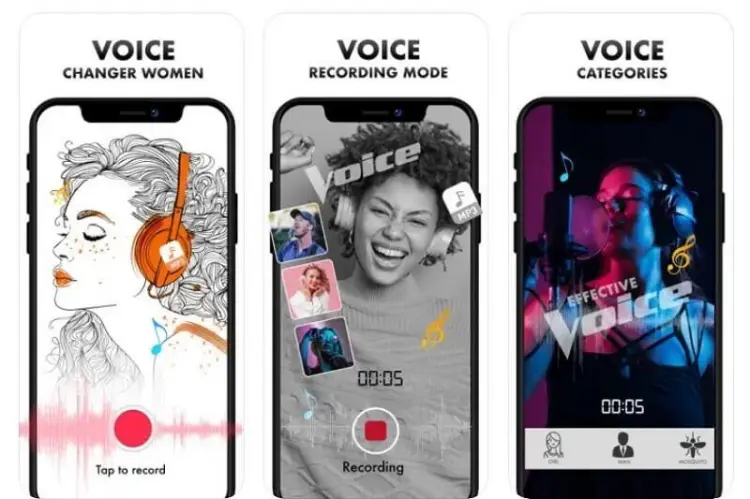
Voice Changer Women is an iPhone voice-changing app developed by Jai Parkash. It lets users record their voices and apply different voice effects to hear how they sound with different vocal styles. For people searching for a female voice changer app for iPhone, the app offers a Girl voice effect alongside other options, such as Man, Baby, Alien, Mosquito, Jigsaw, and Monster. It is primarily designed for fun recordings and prank-style audio rather than professional voice conversion.
- Offer a Girl voice effect for experimenting with a female-sounding voice.
- Include multiple voice effects for fun recordings and creative experiments.
- Let users record their voices and listen to the modified results.
- Free to download on the App Store.
- In-app purchases are required for some premium features and effects.
- The app has limited user ratings, with a 3.0 out of 5 rating on the US App Store at the time of checking.
- It does not specifically advertise AI-powered female voice conversion for realistic results.
- It focuses on recorded audio rather than live voice changing during calls or gameplay.
Conclusion
Choosing the best female voice changer depends on whether you need real-time voice changing, AI-powered voice conversion, or simple effects for recorded audio. Tools like MagicMic, Voicemod, and EaseUS VoiceWave are suitable for desktop voice chats and gaming, while TopMediai and Voicechanger.io offer convenient online options. For mobile users, Voice Changer with Effects and Voice Changer Women provide easy ways to create fun voice recordings. Compare their features, platform compatibility, and free-plan limitations to find the right female voice changer for your needs.
TopMediai AI Music, Video & Voice Studio
Related Articles
Ghostface Voice Changer Review: 7 Best Tools to Try in 2026
6 Best Autotune Voice Changer Tools for Desktop, Online & Mobile
Scary Voice Changer: 8 Best Tools to Create Creepy AI Voices in 2026