


TL;DR:
Looking for the best Ghostface voice changer in 2026? Compare 7 desktop, online, and iPhone tools to find the right option.
- Best Ghostface voice changer for Discord: iMyFone MagicMic or Voicemod.
- Best Ghostface voice changer for PC beginners: EaseUS VoiceWave.
- Best Ghostface voice changer online: TopMediai Online Voice Changer.
- Best free online option: Voice Changer.io.
- Best for quick browser-based effects: LingoJam.
- Best Ghostface voice changer app for iPhone: Scary Voice Changer & Recorder.
A good Ghostface voice changer can help you recreate the creepy, distorted voice associated with Ghostface from the Scream horror franchise. Whether you want to prank your friends, create Halloween videos, record scary audio, or change your voice during online games, there are several desktop programs, online tools, and mobile apps worth considering.
This Ghostface voice changer review compares seven options. We'll cover their features, advantages, disadvantages, and best use cases to help you find the best Ghostface voice changer for your needs.
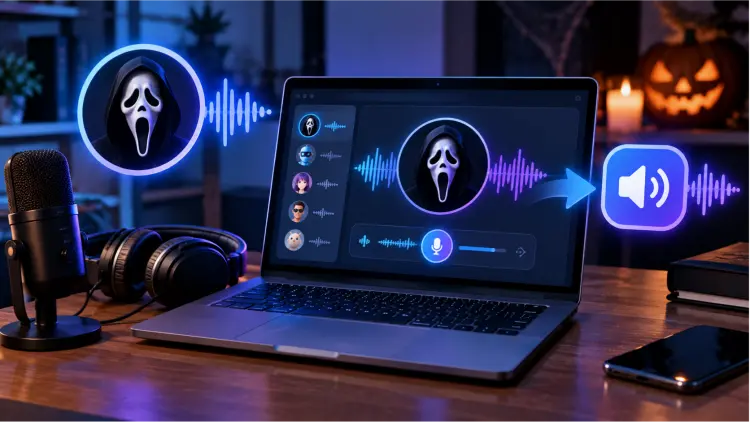
Part 1. Best Ghostface Voice Changer for Desktop
Desktop voice changers are ideal if you want to use a Ghostface-style voice during gaming, Discord calls, livestreams, or horror content creation. Compared with simple online tools, they generally offer more control over microphone input, voice effects, and sound settings. Here are three desktop options to consider.
1.1 iMyFone MagicMic
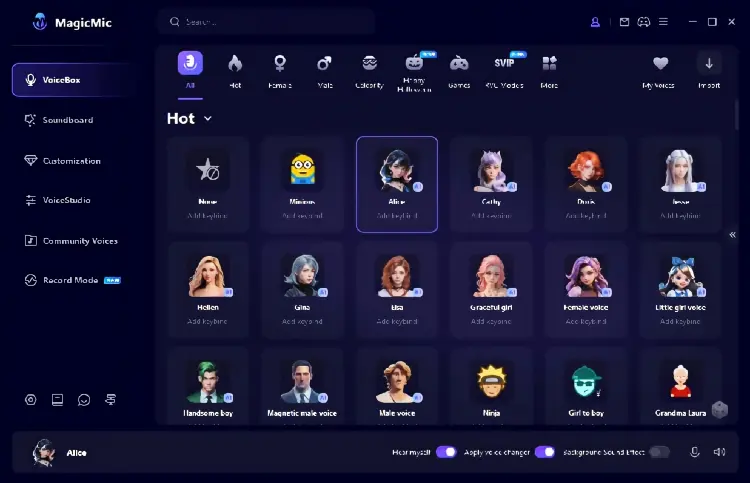
iMyFone MagicMic is a desktop voice changer designed for gamers, streamers, and content creators. It offers real-time voice changing, sound effects, a soundboard, and voice customization. You can use it to create a dark, distorted, or monster-like voice that fits the Ghostface character.
MagicMic supports real-time voice changing on its desktop versions, while its mobile version focuses on changing recorded voices and audio files. The available filters and features depend on your platform and plan.
If you want to create a recognizable Ghostface scream voice rather than simply lower your pitch, you can experiment with voice effects and combine them with eerie soundboard clips. However, the exact Ghostface effect may not be available in every version or voice library, so check the available effects before purchasing.
Pros:
+ Support real-time voice changing on desktop, making it suitable for gaming and live conversations.
+ Include voice filters and soundboard effects for creating horror-themed audio.
+ Offer additional options for changing recorded audio files.
+ Provide more flexibility than basic browser-based voice changers.
+ Useful for Halloween videos, horror role-playing, and streaming.
Cons:
- Some voice effects and advanced features require a paid plan.
- The exact Ghostface sound may require experimentation or custom voice adjustments.
- Setup can take extra time if your game or chat application uses the wrong microphone.
- Desktop real-time voice changing is not the same as applying effects to a recording on a phone.
Best for: Users who want a flexible Ghostface voice changer for PC gaming, Discord, livestreaming, and horror content.
1.2 EaseUS VoiceWave
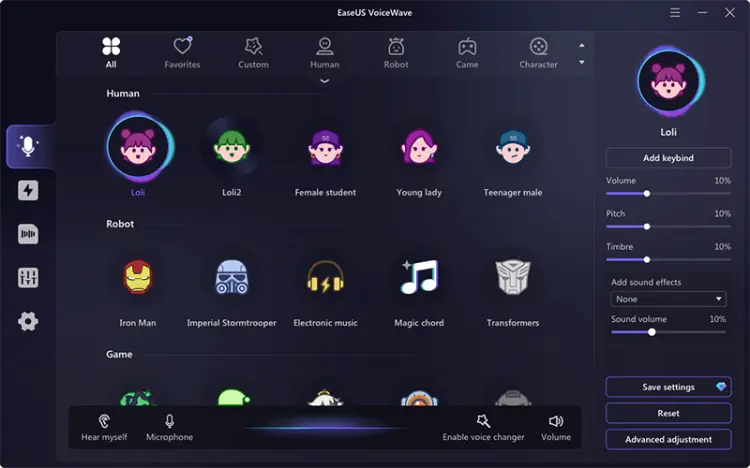
EaseUS VoiceWave is another desktop option worth trying, particularly because its official product page specifically lists a Ghostface voice effect. It supports real-time voice changing, audio and video voice modification, recording, and background noise reduction.
This makes VoiceWave a particularly relevant choice if you are searching for a Ghostface voice changer rather than a general scary voice filter. You can use the effect to give your microphone a horror-inspired sound while playing games, chatting with friends, or recording character dialogue.
VoiceWave also supports various games and messaging platforms. However, compatibility depends on your operating system, application settings, and the version of the software you use.
Pros:
+ Specifically lists a Ghostface voice effect on its official product page.
+ Support real-time voice changing for gaming and online conversations.
+ Offer more than 100 real-time voice effects, according to its product information.
+ Include audio recording, file modification, and noise reduction features.
+ Support a range of games and messaging applications.
Cons:
- Some voice filters and features are restricted to paid plans.
- Require installation and initial microphone configuration.
- Real-time performance may vary depending on your computer and application.
- The Ghostface filter may not sound exactly like the character in the Scream movies.
Best for: Users who want a desktop Ghostface voice changer with a specifically listed Ghostface effect and real-time microphone processing.
1.3 Voicemod
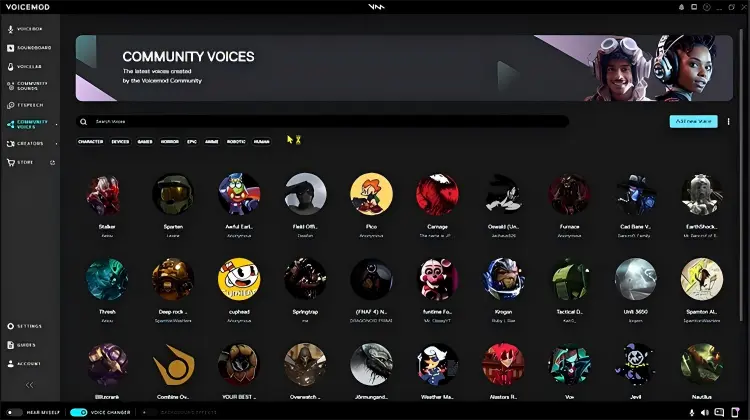
Voicemod is a popular option for gamers, streamers, and online creators who want to change their microphone sound in real time. It offers effects such as echo, distortion, pitch shifting, and radio-style processing, along with a soundboard. Its desktop software is available for Windows and macOS.
For a Ghostface-style voice, Voicemod can be useful if you want to experiment with a combination of low pitch, distortion, echo, and unsettling sound effects. You can also look for community-created horror or Ghostface-inspired effects where available.
One important distinction is that Voicemod's general voice effects are not necessarily an exact Ghostface voice preset. If you want a ready-made Ghostface filter, check the available effects before deciding whether it meets your needs.
Pros:
+ Support real-time microphone effects for games and online conversations.
+ Available for Windows and macOS.
+ Offer distortion, echo, pitch effects, and a soundboard.
+ Work with many applications that accept microphone input.
+ Free to download, with additional voice effects and features available depending on the plan.
Cons:
- The exact Ghostface effect may not be available as a standard preset.
- Creating a convincing horror voice may require some trial and error.
- Some effects and customization options may be limited on the free plan.
- Require software installation and microphone routing.
Best for: Gamers and streamers who want to build a custom Ghostface-style voice and use it in real-time conversations.
Part 2. Best Ghostface Voice Changer Online
If you don't want to install desktop software, an online Ghostface voice changer is a convenient alternative. Most browser-based tools let you record your voice or upload an existing audio file, apply an effect, and download the result.
However, online tools generally focus on recorded audio rather than live microphone processing. If you want other players to hear your changed voice in real time, a desktop application is usually a better fit.
2.1 TopMediai Online Voice Changer
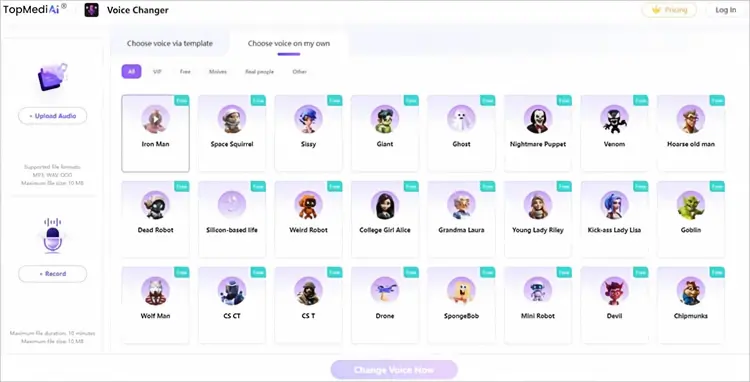
TopMediai Online Voice Changer is a browser-based AI voice tool that lets you transform recorded speech into different voices without installing desktop software. You can upload an existing audio file or record your voice directly in the browser, choose a suitable voice effect, and download the processed audio. It supports MP3, WAV, and OGG files, with a maximum upload size of 10 MB and a recording limit of 10 minutes.
For users looking for a Ghostface voice changer online, TopMediai is useful for creating scary dialogue, Halloween voice clips, horror videos, and social media content. You can explore its available voice effects to find a creepy, character-like voice for your project. However, the online tool does not guarantee an exact Ghostface preset, so check the available voices before using it for this purpose.
Key features of TopMediai Online Voice Changer:
- AI-powered voice changing: Transform recorded speech into different voice styles using AI voice effects.
- Audio upload and recording: Upload an existing recording or capture your voice directly in the browser.
- Multiple audio formats: Supports MP3, WAV, and OGG input files.
- Browser-based workflow: Use the tool on supported devices and browsers, including Windows, Mac, Android, and iPhone, without installing desktop software.
- Voice effect selection: Browse available voice filters and choose an effect suited to scary dialogue or Ghostface-inspired audio.
- Preview and download: Listen to the processed voice and download the result.
How to Use TopMediai Online Voice Changer:
-
Open the TopMediai Online Voice Changer. Upload an MP3, WAV, or OGG file, or record your voice directly in the browser.
-
Browse the available voice effects and select a suitable scary or character-inspired voice. Click "Change Voice Now" to process your audio.
-
Preview the result and download the modified recording if you're satisfied with it.
Pros:
- Run in a web browser without requiring desktop software installation.
- Support both audio uploads and direct voice recording.
- Accept MP3, WAV, and OGG files.
- Provide a straightforward workflow for transforming recorded dialogue.
- Useful for horror videos, voiceovers, social media content, and Halloween projects.
Cons:
- Uploads are limited to 10 MB, and recordings are limited to 10 minutes.
- Not primarily designed for real-time microphone changing during live conversations.
- Access to voice effects and usage allowances may depend on your account or plan.
- A suitable Ghostface-specific voice may not always be available.
Best for: Creators who want a Ghostface-style voice clip online without installing a desktop voice changer.
2.2 Voice Changer.io
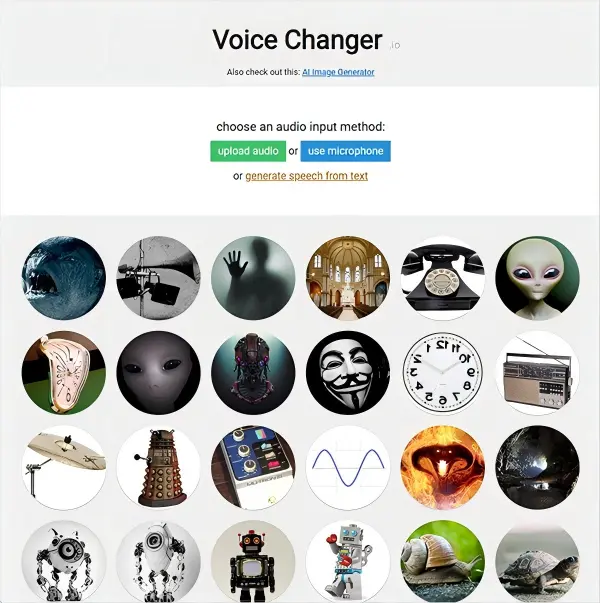
Voice Changer.io is a browser-based tool for experimenting with voice effects without installing a dedicated desktop application. It is useful for users who want to create a quick, distorted, robotic, or otherwise unusual recording.
If you are looking for a free Ghostface voice changer, this type of tool is a good place to start. Rather than relying on a specific licensed character voice, you can experiment with available effects and adjust the sound until it suits your horror project.
The main consideration is that a general voice changer does not necessarily reproduce Ghostface's characteristic voice automatically. The result depends on the available filters, your original recording, and the degree of distortion you apply.
Pros:
+ Browser-based access makes it convenient for quick experiments.
+ Suitable for users who do not want to install desktop software.
+ Useful for creating distorted voices and experimenting with horror effects.
+ A practical starting point for simple voice-changing tasks.
+ Can be used to prepare short audio clips for videos and social posts.
Cons:
- May not offer a dedicated Ghostface preset.
- Effect selection and customization may be less extensive than in desktop software.
- Not the best choice for dependable real-time voice changing in games.
- Audio quality depends on the original recording and the selected effect.
- Available recording, upload, and export options can vary, so check the current interface before starting.
Best for: Users looking for a simple online voice changer to experiment with free scary voice effects.
2.3 LingoJam
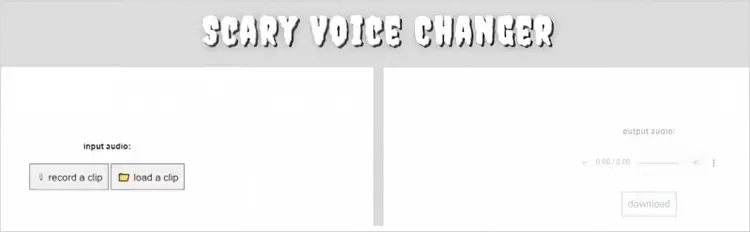
LingoJam Scary Voice Changer is a particularly relevant option for people searching for a free Ghostface voice changer online. Its Scary Voice Changer lets you record a clip or upload audio and apply spooky microphone effects in the browser. LingoJam describes the tool as free and requiring no software download.
This tool is aimed at creating frightening or unusual voices rather than faithfully reproducing one specific movie character. Nevertheless, it can be useful for horror-themed dialogue, Halloween pranks between consenting friends, short videos, and other creative projects.
Pros:
+ Free to use without installing dedicated software.
+ Allow you to record a clip or upload audio.
+ Simple interface suitable for beginners.
+ Designed specifically for spooky and creepy voice effects.
+ Useful for quick Halloween audio and horror-themed experiments.
Cons:
- Does not guarantee an exact Ghostface voice.
- Offer less control than a full desktop voice changer.
- Not intended as a dedicated real-time voice changer for live gaming or calls.
- May not provide the advanced export and editing features needed for professional audio production.
Best for: Beginners who want a free, browser-based scary voice effect for short recordings.
Part 3. Best Ghostface Voice Changer App
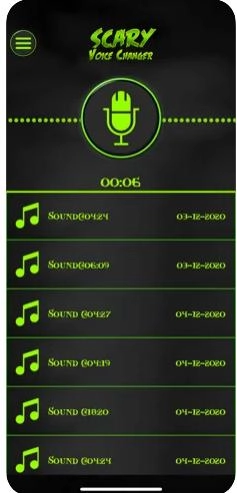
If you want to create a scary voice directly on your phone, Scary Voice Changer & Recorder is worth considering. It is an iPhone and iPad app designed to record speech, apply frightening voice effects, and share the resulting audio.
The app is listed on Apple's App Store as free with in-app purchases. Its listed features include multiple scary effects, recording playback, custom effect modification, speed and pitch adjustments, and options to rename, delete, and share recordings.
Although it is not marketed as an official Ghostface voice generator, its horror-oriented effects make it a reasonable option for creating a Ghostface-inspired voice on mobile. You can record a short line of dialogue and experiment with the available settings to make it sound darker, slower, or more unsettling.
Pros:
- Designed specifically for scary voice effects and recordings.
- Available for iPhone and iPad.
- Let you preview recordings before sharing them.
- Include speed and pitch adjustments for creating customized effects.
- Support managing and sharing recorded voices.
- Free to download, although in-app purchases are available.
Cons:
- Focus on recorded voice effects rather than desktop-style real-time microphone changing.
- Does not guarantee an exact Ghostface voice preset.
- Advanced features or content may require in-app purchases.
- The quality of the result depends on your recording and chosen settings.
- It is not a substitute for a desktop tool if you need live voice changing during PC gaming.
Best for: iPhone and iPad users who want to record scary dialogue and create Ghostface-inspired audio without using a computer.
Part 4. Which Ghostface Voice Changer Should You Choose?
Here's a comparison of 7 Ghostface voice changers.
| Tool | Platform | Voice-Changing Method | Free Availability | Suitability for Ghostface-Style Voices | Best For |
|---|---|---|---|---|---|
| iMyFone MagicMic | Windows, Mac | Real-time desktop voice changing and audio file processing | Free features available; some voices and features require payment | High: Offers scary and character-style effects to experiment with, but verify whether a dedicated preset is available | Gaming voice chats, Discord, and streaming |
| EaseUS VoiceWave | Primarily Windows | Real-time voice changing and audio processing | Free features available, with some limitations | High: Suitable for experimenting with deep, eerie voices | Beginners, gaming, and voice chats |
| Voicemod | Windows, Mac | Real-time voice changing | Free version available; sound effects and features may be limited | High: Horror effects and customizable sounds can help create a Ghostface-inspired atmosphere | Discord, gaming, and streaming |
| TopMediai Online Voice Changer | Web browser | Upload audio or record your voice, then process it | Free online access available; usage limits may vary | Medium: Useful for creating horror voice clips, but a dedicated Ghostface preset is not guaranteed | Horror videos and Halloween audio |
| Voice Changer.io | Web browser | Upload or record audio and apply voice effects | Basic features available for free | Medium: Good for quick voice experiments, but offers limited fine-tuning and is less suited to real-time voice chat | Creating short audio clips for free |
| LingoJam | Web browser | Browser-based voice transformation, depending on the specific tool | Generally free to use | Medium to low: Suitable for trying simple voice effects, with limited control over the final sound | Simple voice changing without installation |
| Scary Voice Changer & Recorder | iPhone | Voice recording and scary sound effects | Depends on the app's free features and in-app purchases | Medium: Useful for creating scary audio, but Discord real-time voice changing should not be assumed | iPhone users, pranks, and short audio clips |
Part 5. FAQs on Ghostface Voice Changer
Q1. Which Ghostface voice changer sounds closest to the original movie voice?
You can try EaseUS VoiceWave, which offers a dedicated Ghostface preset, or look for Ghostface-style voices in Voicemod's community sound library. The results depend on the preset quality, your original voice, microphone, and audio settings. No standard voice changer can guarantee an exact reproduction of the original movie voice.
Q2. Can you use a Ghostface voice changer on Discord?
Yes, as long as the tool supports real-time voice changing and can output the processed audio to Discord. Usually, you need to launch the voice changer first, then select its virtual microphone in Discord's voice settings.
If there is no sound, check microphone permissions, input device selection, audio routing, and mute settings.
Q3. Can a Ghostface voice changer change your voice in real time while gaming?
Yes. You can use real-time voice changers such as Voicemod or MagicMic. On a computer, you typically need to set the voice changer's virtual microphone as the game's input device. Compatibility depends on the game, operating system, and software settings.
Q4. What is the difference between a Ghostface voice changer and Ghostface text-to-speech?
A Ghostface voice changer transforms your own voice in real time or processes a recording to create a horror-style effect. Ghostface text-to-speech, on the other hand, converts typed text directly into speech.
If you want to speak in your own voice and interact with friends, choose a real-time voice changer. If you want to enter dialogue, generate a spooky narration, and save the audio, consider a text-to-speech tool.
Final Thoughts
Choosing the best Ghostface voice changer depends on whether you need real-time voice changing, recorded audio conversion, or mobile effects. EaseUS VoiceWave specifically lists a Ghostface effect, while MagicMic and Voicemod offer real-time voice changing. For online options, try TopMediai, Voice Changer.io, or LingoJam. iPhone and iPad users can explore Scary Voice Changer & Recorder.
Keep in mind that these tools may create Ghostface-style horror effects rather than reproduce the movie character's exact voice. Preview the effects before paying, and avoid using them to threaten or deceive others.
Related Articles
6 Best Autotune Voice Changer Tools for Desktop, Online & Mobile
Scary Voice Changer: 8 Best Tools to Create Creepy AI Voices in 2026
Best Robot Voice Changer: 9 AI Tools to Create Robot Voices
Best Voice Changer for Zoom: 9 Top Tools for PC/Mac/Mobile/Online

