TL;DR:
Looking for an honest EaseUS VoiceWave review? Discover its key features, pricing, pros and cons, and how to use it for real-time voice changing on Discord and in games. Compare EaseUS VoiceWave with iMyFone MagicMic and TopMediai to find the best voice changer for your needs, whether you want live voice effects or browser-based AI audio tools.

TopMediai AI Music, Video & Voice Studio


Looking for an honest EaseUS VoiceWave review? EaseUS VoiceWave is a real-time AI voice changer designed for gamers, streamers, and online chat users who want to modify their voices during live conversations. It offers voice effects, sound effects, and compatibility with various games and communication platforms. But is EaseUS VoiceWave worth buying? Is its free version good enough? Does it work reliably for Discord gaming chats? If you only need to change your voice occasionally, is the paid version really necessary?
In this EaseUS VoiceWave review, we'll evaluate its key features, pricing, pros and cons, setup process, and alternatives to help you decide whether EaseUS VoiceWave is the right choice for your needs.
Part 1. EaseUS VoiceWave Review
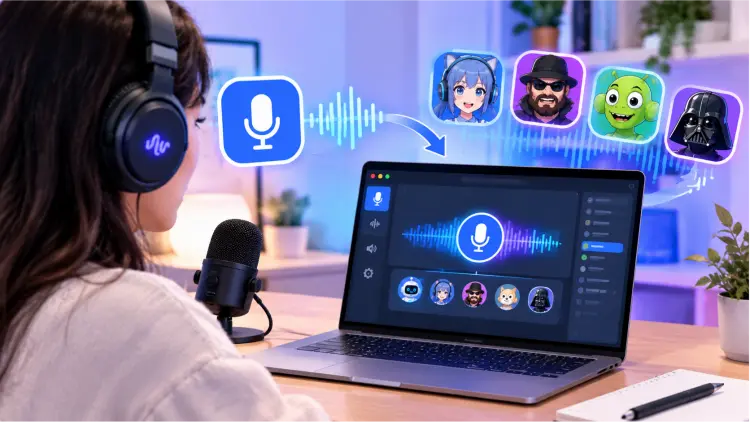
EaseUS VoiceWave is a real-time voice-changing tool developed by EaseUS. It processes microphone input and routes the modified audio to Discord, games, streaming software, and other applications that support microphone input through a virtual microphone. Unlike online tools that only let you upload recordings and generate voice-changed audio files, VoiceWave is primarily designed to change your voice during live conversations. You can choose preset voices, adjust voice parameters, or use the soundboard to play funny audio clips.
Its main use cases include:
- Discord voice chat: Use different voices during gaming sessions, community discussions, and conversations with friends.
- Online gaming: Role-play with different voices in games such as Roblox, Minecraft, and GTA V RP.
- Livestreaming and content creation: Add voice effects to livestreams or video content with software such as OBS.
- Video conferencing: Apply voice filters in applications that support microphone input, such as Zoom.
- Audio creation: Process recorded audio or video files and add voice-changing effects to creative content.
1.1 EaseUS VoiceWave Features
EaseUS VoiceWave combines real-time voice changing with sound effects and additional audio transformation tools. Here are its main features.
1. Real-Time Voice Changing
Modify your microphone voice in real time during supported voice chats, gaming sessions, and calls without recording audio in advance.
2. AI Voice Effects
Offers various voice styles, including male, female, robot, baby, and character-inspired voices. The available effects depend on the software version and voice library.
3. Soundboard
Play preset sound effects and funny audio clips for Discord chats, gaming interactions, and livestreams. Some versions support custom sounds or keyboard shortcuts.
4. Voice Parameter Adjustment
Use the available audio controls to customize voice effects and make the output sound better suited to your preferences.
5. Audio Input and Output Settings
Select your microphone and related audio devices, then route the modified voice to compatible applications through a virtual microphone.
6. Multi-Scenario Voice Applications
Use the software with Discord, online games, and other compatible voice applications. Actual compatibility depends on your operating system, application settings, and audio device configuration.
7. Pitch and Tone Adjustment
Adjust voice pitch, volume, and tone to create a more personalized voice-changing effect.
8. Background Noise Suppression
Reduce some environmental noise to improve audio clarity during real-time chats, gaming sessions, and recordings.
9. Voice Changing for Recordings and Audio Files
Record your voice, modify audio in existing audio or video files, and export the processed audio.
10. Custom Hotkeys
Assign keyboard shortcuts to voice effects or soundboard sounds for quick switching during gaming and livestreaming.
1.2 EaseUS VoiceWave Price
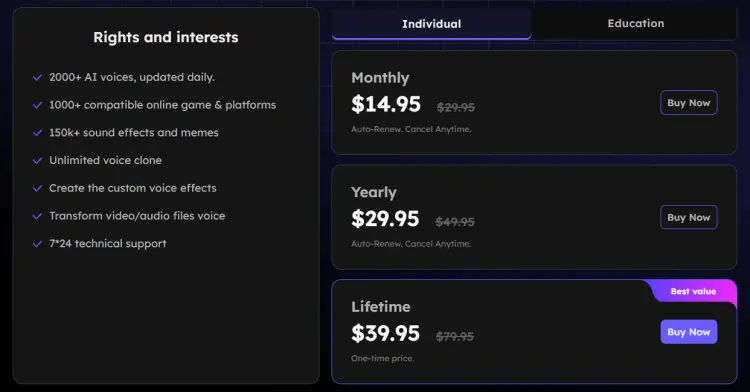
Is EaseUS VoiceWave free to use? Is the free version worth using? EaseUS VoiceWave offers a free option and paid plans. The free version is suitable for trying out basic voice-changing features, but if you need more voice effects, customization options, or access to the full voice library, you should check what each paid plan includes.
Based on the promotional prices currently displayed on the official purchase page, individual users can refer to the following plans:
1.3 EaseUS VoiceWave Pros & Cons
After reviewing its main features, EaseUS VoiceWave has several advantages for real-time voice changing, but it also has limitations to consider.
- Support real-time voice changing for Discord, online gaming, live streaming, and compatible voice chat applications.
- Offer a variety of AI voice effects, including male, female, robot, and character-inspired voices.
- Include a soundboard with sound effects and meme audio for gaming and live interactions.
- Provide noise reduction to help minimize background noise during voice chats and recordings.
- Support changing voices in existing audio and video files, making it useful for content creation.
- Offer customizable voice effects and shortcuts for a more personalized experience.
- Provide a free version or trial to let users try the software before purchasing.
- Only supports Windows 10 (64-bit) and Windows 11 for the desktop software.
- Some voice effects, AI features, and advanced tools require a paid subscription or license.
- Require installation and audio-device configuration to work properly with Discord and other applications.
- Voice quality and real-time performance may vary depending on hardware, microphone quality, and application settings.
- The software requires at least 7 GB of free disk space, which may be inconvenient for users with limited storage.
- Compatibility issues with virtual microphones or noise suppression settings may affect the transformed voice in some applications.
Part 2. How to Use EaseUS VoiceWave
For first-time users, the basic setup process for VoiceWave is relatively straightforward. The following steps use real-time voice changing in Discord as an example.
Step 1. Download and Install the Software
Visit the official EaseUS VoiceWave website, download the Windows installer, and follow the on-screen instructions to complete the installation.
Step 2. Select Your Microphone Input Device
Launch VoiceWave, select the physical microphone you are using, and make sure the input volume is set appropriately.
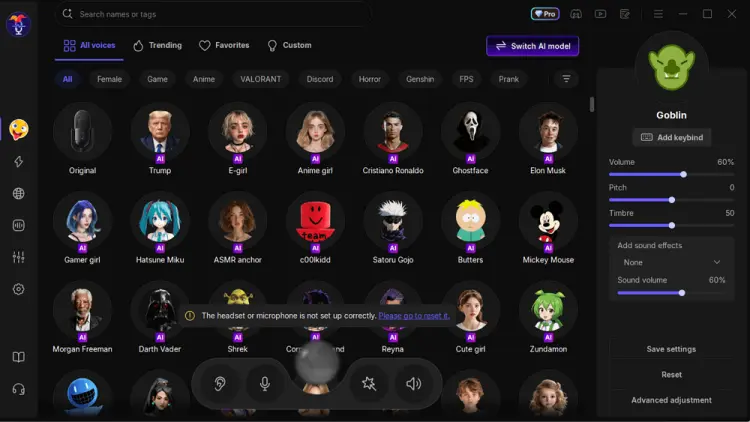
Step 3. Choose a Voice Effect
Choose your preferred voice from the voice library and enable the voice-changing feature. You can preview or test the effect first, then adjust the pitch and other parameters as needed.
Step 4. Set Up the Virtual Microphone in Discord
Open Discord and go to "User Settings" > "Voice & Video". Set the "Input Device" to "VoiceWave Microphone" or the corresponding virtual microphone device provided by the software.
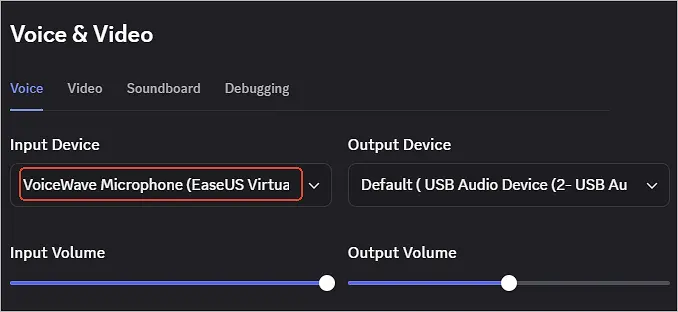
Note that Discord's output device should remain set to the headphones or speakers you actually use, rather than the voice changer's virtual microphone.
Step 5. Test Real-Time Voice Changing
Use Discord's microphone test feature or join a private voice channel to check the results. If other participants still hear your original voice or cannot hear you at all, check whether the correct input device is selected, VoiceWave's voice-changing feature is enabled, and Discord's noise suppression settings are not filtering out the processed voice too aggressively.
If problems persist, try restarting Discord, reselecting the input device, and temporarily adjusting Discord's noise suppression and echo cancellation settings.
Part 3. Best Alternative to EaseUS VoiceWave
EaseUS VoiceWave is worth considering for Windows users, but it isn't the only option. If VoiceWave's system compatibility, pricing, or feature limitations don't meet your needs, you can consider the following alternatives.
3.1 iMyFone MagicMic
iMyFone MagicMic is a voice changer designed for gamers, streamers, and voice chat users, making it a good alternative to EaseUS VoiceWave. It supports real-time voice changing on Windows and Mac desktops and offers AI voice effects, a soundboard, recorded audio voice changing, and voice customization. It is suitable for users who want more voice effects and fun sound effects. Compared with EaseUS VoiceWave, MagicMic's main advantages are its extensive library of voice filters and sound effects, along with its voice customization options.
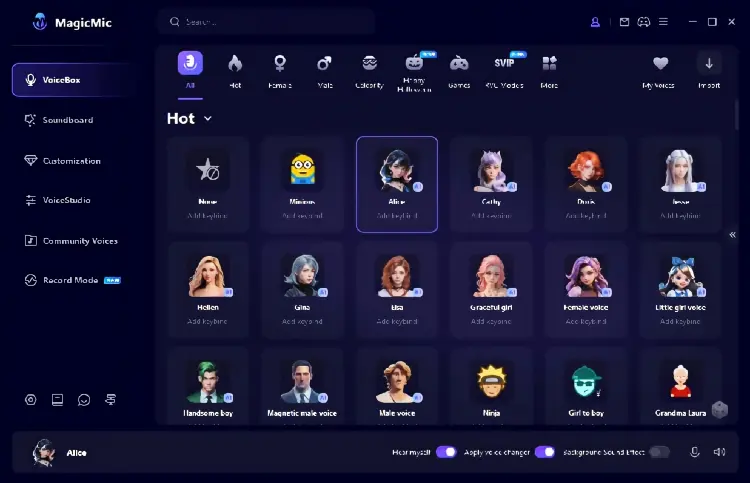
- Support real-time voice changing for Discord, gaming, streaming, and voice chats.
- Offer AI voice filters, including character, male, female, and funny voices.
- Include a soundboard with meme sounds and audio effects.
- Allow voice customization and RVC AI voice conversion, depending on the plan.
- Support voice changing for recordings and audio files.
- Available for Windows and Mac desktop users.
- The free version offers limited voices and sound effects.
- Full voice libraries and advanced features require a paid plan.
- Mobile apps mainly change prerecorded audio, not live microphone input.
- Some AI voices require higher hardware specifications.
- Require audio device setup for Discord and other apps.
- Voice quality and latency depend on your hardware, microphone, and settings.
3.2 TopMediai
TopMediai is a browser-based AI content creation platform that offers tools such as an online voice changer, text-to-speech, and AI voice cloning. As an alternative to EaseUS VoiceWave, it is better suited to users who want to modify recorded audio online, generate AI voices in different styles, or create voiceovers for videos and social media content.
However, TopMediai's online voice changer primarily works by converting uploaded or recorded audio, so it is not a direct replacement for EaseUS VoiceWave's desktop real-time microphone voice changing. If you need to change your voice during Discord gaming chats or live calls, be sure to distinguish TopMediai's online voice changer from its related desktop voice-changing software, MagicMic.
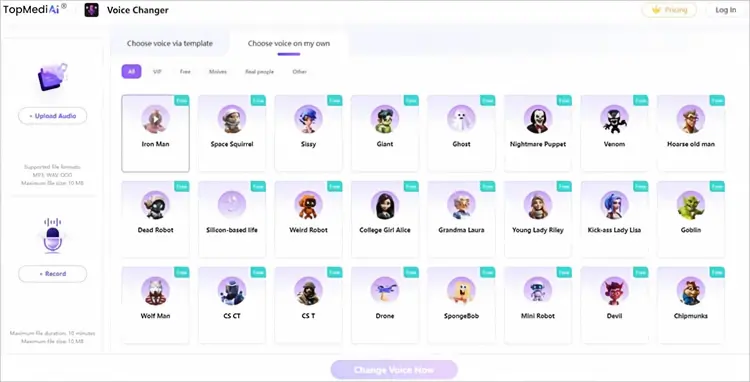
- Work in a browser on Windows, Mac, Android, and iPhone without installing desktop software.
- Support MP3, WAV, and OGG uploads, plus in-browser audio recording.
- Offer AI voice effects for character voices, funny clips, and custom audio.
- Include text-to-speech and AI voice cloning tools.
- Support 190+ languages and accents for text-to-speech.
- Offer free access to basic online voice changing.
- Does not support real-time microphone voice changing during Discord calls or games.
- Have a 10 MB audio upload limit.
- Support only MP3, WAV, and OGG uploads for online voice changing.
- Some advanced features require a paid plan or have usage limits.
- Free downloads and export options may be restricted.
- Require an internet connection.
EaseUS VoiceWave vs. MagicMic vs. TopMediai
The following table summarizes the main differences between these three tools.
| Feature | EaseUS VoiceWave | iMyFone MagicMic | TopMediai |
|---|---|---|---|
| Real-Time Voice Changing | ✓ | ✓ | — |
| AI Voice Effects | ✓ | ✓ | ✓ |
| AI Voice Cloning | Limited | Limited | ✓ |
| Audio File Voice Changing | ✓ | ✓ | ✓ |
| Built-in Soundboard | ✓ | ✓ | — |
| Browser-Based Access | — | — | ✓ |
| Free Version | Limited | Limited | Limited |
| Best For | Gaming, streaming, and voice chats | Gaming, live chats, and sound effects | AI voiceovers, voice cloning, and audio creation |
Part 4. FAQs on EaseUS VoiceWave
Q1. Is EaseUS VoiceWave safe to use?
EaseUS VoiceWave is a commercial product from EaseUS. To reduce security risks, download it from the official website rather than third-party sites. Keep the software updated and verify the installer before running it.
Q2. Is EaseUS VoiceWave legit?
Yes, EaseUS VoiceWave is a legitimate voice-changing tool offered by EaseUS. However, before purchasing, check its voice effects, pricing, system compatibility, and subscription terms to ensure they meet your needs.
Q3. Is EaseUS VoiceWave free?
EaseUS VoiceWave offers a free download or trial, but some voice effects and advanced features require a paid license. Check the current trial limitations before purchasing.
Q4. How do I fix EaseUS VoiceWave not working?
If EaseUS VoiceWave isn't changing your voice or other people cannot hear the effect, try these troubleshooting steps:
- Confirm that your physical microphone is selected in EaseUS VoiceWave.
- Select the VoiceWave virtual microphone as the input device in Discord or your target application.
- Check microphone permissions and input volume in Windows.
- Disable or adjust noise suppression if it removes the modified voice.
- Restart both applications after changing audio settings.
- Update the software and check that your computer meets the minimum system requirements.
If the problem persists, consult the official EaseUS VoiceWave support center for troubleshooting guidance.
Final Verdict
Overall, EaseUS VoiceWave is a useful real-time voice changer for Windows users who want to modify their voices during Discord chats, gaming sessions, and online calls. It offers various AI voice effects and sound effects, but its paid features and limited platform support may not suit everyone. If you're looking for more real-time voice-changing options, iMyFone MagicMic is a worthwhile alternative, while TopMediai is better suited to browser-based voice transformation and AI audio creation. Compare their features and pricing to find the tool that best meets your needs.
Related Articles
5 Best Voicemod Alternative Tools for PC, Mac & Mobile Users
VoiceChanger.io Review: Features, Pros, Cons & Best Alternative
Female Voice Changer: 9 Best Tools for PC, Online & Mobile
Scary Voice Changer: 8 Best Tools to Create Creepy AI Voices in 2026