

TL;DR:
Looking for the best female-to-male voice changer? Here are 7 tools worth trying, including AI-powered voice changers, free online converters, and Android apps. Compare their features, advantages, and limitations to find the right option for natural-sounding male voices.
- Best for real-time calls: iMyFone MagicMic, Voicemod, EaseUS VoiceWave.
- Best AI female-to-male voice changer online: TopMediai.
- Best free online options: Voicechanger.io, LingoJam.
- Best Android app: female-to-male Voice Converter.
Ever wondered what your voice would sound like if you were a guy? Whether you want to prank your friends, have fun in online games, create unique voiceovers, or simply experiment with a deeper voice, a female-to-male voice changer can make it happen in just a few clicks. The tricky part is finding one that actually sounds natural instead of making you sound like a robot! To save you time, we've rounded up 7 female-to-male voice changers, including free online tools, AI-powered converters, and real-time voice changer apps. Let's check out what each one offers and find the right tool for you!
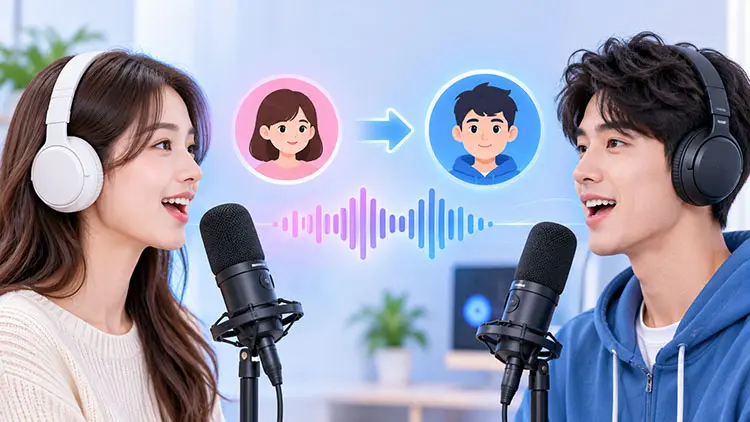
Choosing the best female-to-male voice changer depends on whether you want to modify your voice during a live conversation or convert an existing recording. Here is a quick comparison of the seven tools.
| Tool | Platform | Real-Time Voice Changing | Free Option | Best For |
|---|---|---|---|---|
| iMyFone MagicMic | Win/Mac/Mobile | Yes (desktop) | Limited | Gaming and live calls |
| Voicemod | Desktop/Mobile | Yes | Yes, limited | Discord and streaming |
| EaseUS VoiceWave | Windows | Yes | Limited | AI voice customization |
| TopMediai | Online | No (online converter) | Limited | AI audio conversion |
| Voicechanger.io | Online | No | Yes | Free audio effects |
| LingoJam | Online | No | Yes | Simple pitch adjustment |
| Female To Male Voice Converter | Android | Not verified | Yes, ads | Mobile voice recordings |
1. iMyFone MagicMic
If you are looking for a realistic female-to-male voice changer that works during online conversations, gaming sessions, and live streams, iMyFone MagicMic is one of the options worth considering. It is an AI-powered voice-changing program designed for Windows and Mac users who want to transform their voices without recording and editing audio separately.
MagicMic offers various voice filters, including male, deep voice, anime, and character effects. You can choose a male voice or customize different vocal characteristics to achieve your preferred sound.
One of its biggest advantages is real-time voice changing. After configuring the virtual microphone, you can use MagicMic with applications such as Discord, Zoom, Google Meet, and online games. This makes it particularly useful if you want a female-to-male voice changer during calls rather than simply converting recorded audio.
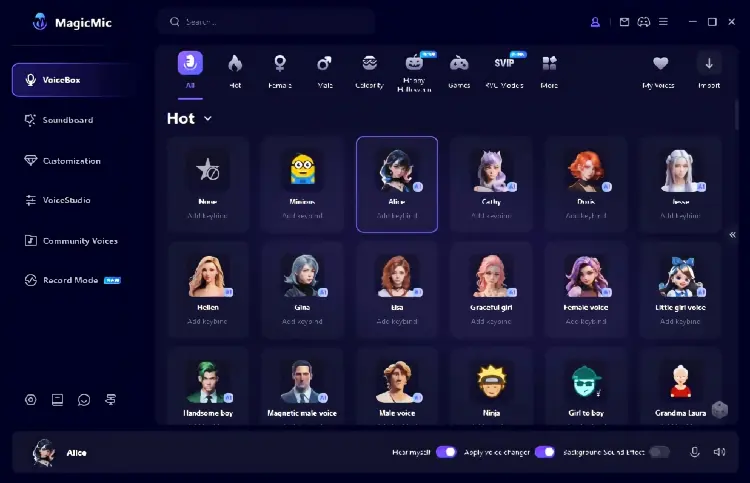
Key Features:
- Real-time female-to-male voice changing on desktop.
- Multiple male, deep voice, and character voice filters.
- AI-powered voice effects and voice customization.
- Compatible with Discord, Zoom, Google Meet, and supported games.
- Voice recording and audio file voice conversion.
- Built-in soundboard and sound effects.
- Windows, Mac, Android, and iOS support, with different features across platforms.
- Support real-time voice changing for gaming, streaming, and online calls.
- Offer various male and deep voice effects to experiment with.
- Allow users to customize their voices instead of relying entirely on preset filters.
- Support both live microphone input and recorded audio conversion.
- Work with many popular communication and gaming applications.
- Provide a free version for users who want to test its basic features.
- The desktop version requires installation and microphone configuration.
- Most advanced voice effects and customization options require a paid subscription.
- The mobile version does not offer the same real-time voice-changing capabilities as the desktop version.
- Some AI voice effects may require more system resources.
- The final voice quality depends on the selected filter, microphone quality, and speaking style.
Best for: Gamers, streamers, and users who want a realistic female-to-male voice changer during live conversations.
2. Voicemod
Voicemod is another popular choice for real-time female-to-male voice changing, especially for gamers and streamers. Unlike basic online converters, it lets you transform your voice directly through your microphone during live conversations.
It offers various voice presets, including male, robot, monster, and character effects. You can choose a deeper male voice or use Voicelab to adjust pitch, bass, treble, and other audio settings for a more personalized sound.
After setting Voicemod as your microphone input, you can use it with Discord, online games, Twitch, and other supported apps. It also includes a soundboard for playing audio clips and sound effects during chats or streams.
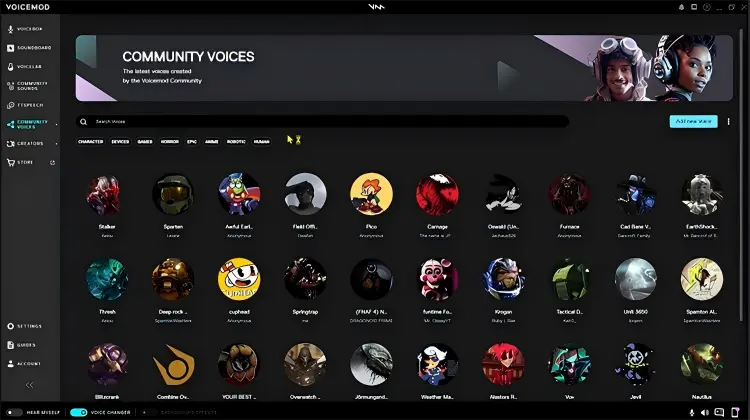
Key Features:
- Real-time voice transformation.
- Male, female, robotic, fantasy, and character voice presets.
- Voicelab for creating and customizing voice effects.
- Pitch, bass, and treble adjustments.
- Built-in soundboard with audio effects.
- Integration with Discord, streaming software, and supported games.
- Free and paid versions.
- Excellent for changing your voice during live gaming and online conversations.
- Offer a large selection of voice presets and community-created voices.
- Voicelab provides more control over voice customization.
- Real-time processing helps maintain natural conversation timing.
- Soundboard features add more entertainment options for streamers.
- The free version lets users try selected voice effects.
- Some voices and advanced customization features require a paid plan.
- Finding a suitable realistic male voice may require testing several presets.
- The initial setup can be confusing for beginners.
- Voice quality can vary depending on the selected effect and microphone.
- It is primarily a desktop voice-changing solution rather than a simple browser-based audio converter.
Best for: Users who want a female-to-male voice changer for Discord, gaming, Twitch, and other real-time communication activities.
3. EaseUS VoiceWave
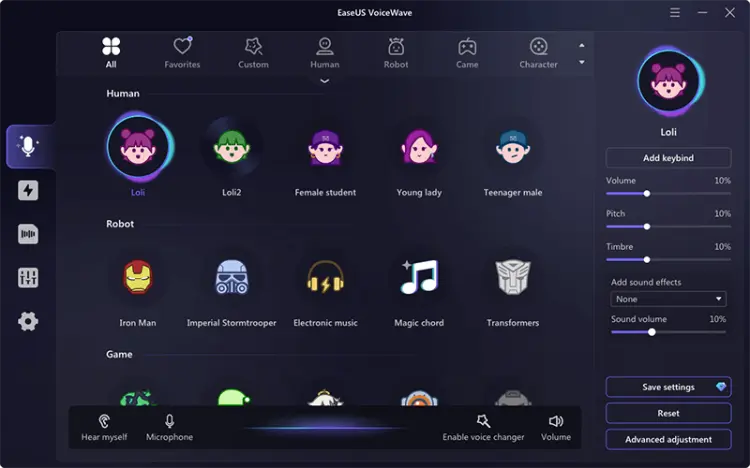
EaseUS VoiceWave is an AI voice changer for Windows that lets you transform your voice in real time. It offers various effects, including male, female, robot, anime, and character voices. To turn a female voice into a male one, simply choose a male or deep voice preset and apply it to your microphone. You can also adjust voice settings to customize the result.
Beyond voice changing, VoiceWave includes noise reduction, audio recording, a soundboard, and audio mixing tools. It works with supported apps such as Discord, Zoom, OBS, and games, allowing you to use modified voices during calls, gaming, or streaming. You can also edit prerecorded audio and video files, making it useful for content creators.
Key Features:
- Real-time AI voice changing during calls and gaming.
- Male, female, deep voice, robot, and character effects.
- Voice customization and pitch adjustment.
- Built-in audio recorder and audio file converter.
- Noise reduction for clearer voice output.
- Soundboard with hundreds of sound effects.
- Audio mixer for combining vocal tracks.
- Integration with Discord, Zoom, OBS, and supported games.
- Support real-time female-to-male voice changing.
- Offer various voice effects for different communication and entertainment scenarios.
- Include noise reduction to minimize unwanted background sounds.
- Allow users to modify both live microphone input and prerecorded audio.
- Soundboard and audio recording features provide additional creative possibilities.
- Offer a free version for trying basic voice-changing functions.
- Primarily designed for Windows users, so Mac users need another solution.
- Require software installation and microphone configuration.
- Advanced voice effects and additional features may require a paid license.
- Some voice filters may sound artificial rather than like a natural male speaker.
- The software requires sufficient system resources and storage space.
Best for: Windows users who want a customizable female-to-male voice changer for live calls, gaming, streaming, and audio editing.
4. TopMediai AI Voice Changer
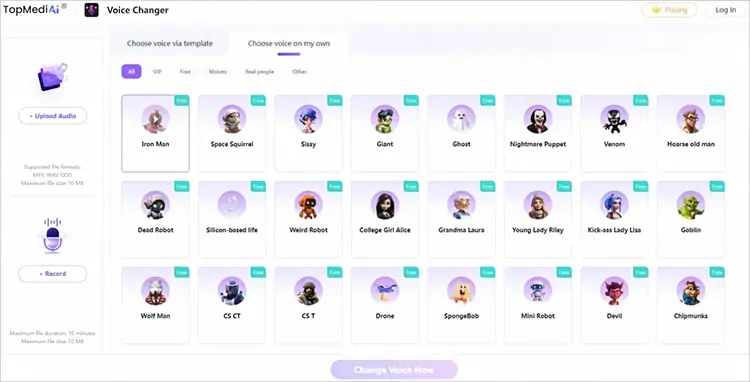
If you're looking for the best female-to-male voice changer online, TopMediai AI Voice Changer is worth trying. This browser-based AI tool allows you to transform female-sounding recordings into different masculine voice styles without installing desktop software. You can upload an existing audio file or record your voice directly on the website, then explore its VoiceLab library of over 1,000 AI voices and effects to find a suitable male-sounding voice.
Unlike basic pitch-shifting tools, TopMediai uses AI-powered voice effects to create different vocal characteristics. It's a convenient option for creating male voiceovers, modifying audio clips, making social media content, or simply experimenting with different voices.
Key Features:
- AI-powered online voice conversion.
- Female-to-male voice transformation using available voice models.
- More than 1,000 voice options in VoiceLab.
- Upload audio or record directly through a browser.
- Support MP3, WAV, and OGG formats.
- Preview and download converted audio.
- Compatible with Windows, Mac, Android, and iOS browsers.
- No desktop installation required for online conversion.
- Easy to use without downloading desktop software.
- Offer numerous AI voice options for experimenting with different male-sounding voices.
- Support direct microphone recording and audio uploads.
- Work on computers, tablets, and smartphones through a browser.
- Suitable for voiceovers, social media videos, and recorded audio projects.
- Provide a free online experience for trying voice conversion.
- The online converter is not designed for real-time female-to-male voice changing during calls.
- Free usage may have restrictions depending on the account and current service plan.
- The 10 MB upload limit may be inconvenient for longer or high-quality recordings.
- The 10-minute recording limit restricts longer conversion projects.
- The final result depends on the selected AI voice model and original recording quality.
- An internet connection is required to use the online service.
Best for: Content creators and casual users who want a free female-to-male voice changer online for recorded audio, voiceovers, and short videos.
5. Voicechanger.io
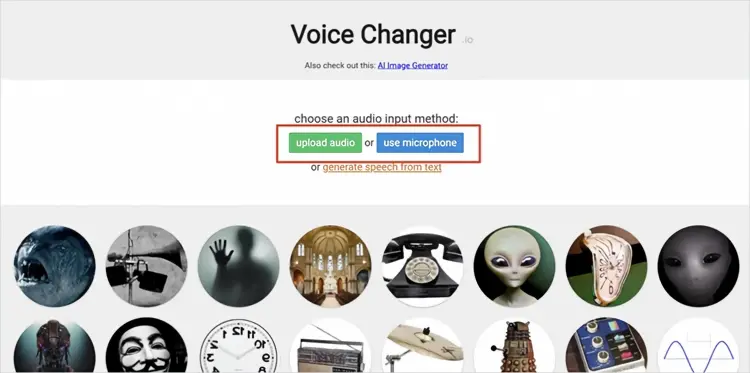
Voicechanger.io is a free browser-based tool for modifying recorded audio without downloading or installing software. If you're looking for a free female-to-male voice changer online, it is a convenient choice. You can upload an audio file or record your voice directly using a microphone.
The platform provides various voice effects, including deep voice, high pitch, robot, monster, and alien presets. To create a more masculine-sounding voice, you can experiment with its pitch and deep voice effects to lower your original voice. You can preview the results and download the modified audio for videos, social media, or personal projects.
Overall, it's worth considering if you're looking for the best free female-to-male voice changer for casual recordings rather than live communication.
Key Features:
- Free browser-based voice changer.
- Upload existing audio recordings.
- Record voice directly using a microphone.
- Deep voice, pitch, robot, monster, and other sound effects.
- Text-to-speech input option.
- Preview and download modified audio.
- No desktop software installation required.
- Completely free to use for basic voice effects.
- Simple interface suitable for beginners.
- Support both uploaded audio and microphone recordings.
- Provide multiple voice effects beyond basic gender-related changes.
- Allow users to preview and download modified audio.
- Work directly in a web browser.
- Does not provide a dedicated real-time virtual microphone for live calls.
- Basic pitch and sound effects may not create a realistic male voice.
- Offer less control over vocal characteristics than advanced AI voice changers.
- Not ideal for professional voiceovers requiring consistent voice quality.
- The interface and available effects may feel limited compared with desktop alternatives.
- Internet access is necessary to use the website.
Best for: People who need a free female-to-male voice changer online for casual recordings, funny audio clips, and simple voice experiments.
6. LingoJam Voice Changer
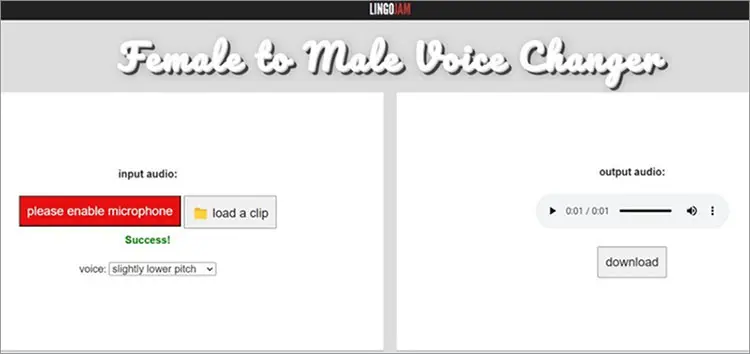
LingoJam Female to Male Voice Changer is a free online tool designed to lower the pitch of a female voice and make it sound deeper and more masculine. Unlike general-purpose voice changers, it focuses specifically on female-to-male voice conversion.
The tool is simple to use and requires no downloads or registration. Just record your voice or upload an existing audio clip, then select a pitch setting from the dropdown menu to adjust how deep your voice sounds. You can preview different results and compare them with your original recording.
However, LingoJam mainly relies on pitch shifting rather than advanced AI voice conversion. It can make a voice sound lower, but may not fully reproduce the natural characteristics of a male voice. Its customization options are also limited, making it more suitable for casual experimentation than professional voice conversion or real-time communication.
Key Features:
- Dedicated female-to-male voice conversion.
- Online pitch adjustment.
- Record audio directly through a browser.
- Upload existing audio recordings.
- Multiple pitch settings for different results.
- Free to use without software installation.
- Downloadable converted audio.
- Completely free and easy to access.
- Specifically designed for female-to-male voice conversion.
- Does not require account registration or desktop installation.
- Offer adjustable pitch settings for different voice results.
- Support both microphone recording and audio uploads.
- Useful for basic voice experiments and voice masculinization practice.
- Primarily relies on pitch adjustment rather than advanced AI voice reconstruction.
- Does not offer a dedicated real-time voice changer for live calls.
- Limited customization compared with professional voice-changing software.
- Lowering pitch too much may make the voice sound unnatural.
- Does not provide an extensive library of realistic male voice models.
- Not ideal for professional audio production or live streaming.
Best for: Beginners who want a simple, free female-to-male voice changer online without downloading additional software.
7. Female To Male Voice Converter
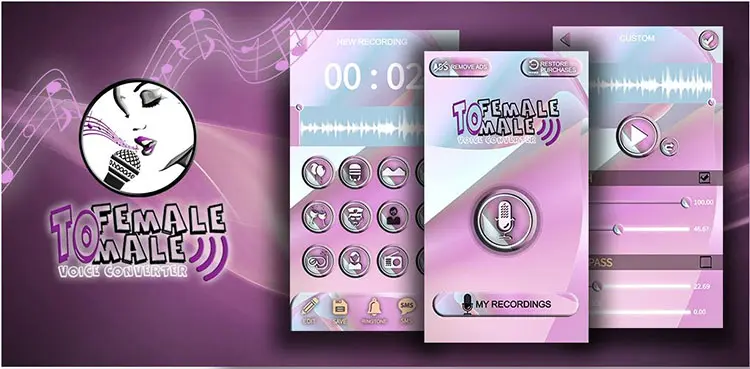
Female To Male Voice Converter is an Android female-to-male voice changer app developed by Xtreme Stereo Media. It lets users record their voices and apply different effects, including deeper, masculine-sounding tones. Other fun filters include balloon, space, snake, mouse, radio announcement, church echo, and monster voices.
The app is easy to use: simply record a voice clip, select an effect, and preview the result. You can then use the modified audio for fun recordings or share it with friends. No desktop software is required.
However, this app is designed for modifying recorded audio, not real-time voice conversion. It does not function as a female-to-male voice changer during calls, so you cannot rely on it to change your voice live on Discord, WhatsApp, or other calling apps. If you need live voice changing, consider a dedicated real-time voice changer instead.
Key Features:
- Female-to-male and male-to-female voice effects.
- Voice recording and audio modification.
- Multiple entertaining voice filters.
- Balloon, space, snake, mouse, and monster effects.
- Radio announcement and church echo effects.
- Android smartphone support.
- Free installation with advertisements.
- Easy to use directly on an Android smartphone.
- Specifically offers female-to-male and male-to-female voice effects.
- Allow users to record and modify voice clips.
- Include additional entertaining sound effects.
- Does not require a desktop computer.
- Free to download and try.
- Primarily designed for recorded audio rather than real-time voice changing during calls.
- The voice effects are more suitable for entertainment than professional voice conversion.
- Limited advanced customization compared with AI-powered desktop tools.
- Contain advertisements that may interrupt the user experience.
- Its Google Play rating suggests that user satisfaction may vary.
- The developer's data safety disclosures indicate potential privacy concerns.
Best for: Android users who want a simple female-to-male voice changer app for recording funny audio clips and experimenting with voice effects.
Sum Up
Choosing the right female-to-male voice changer depends on how you plan to use it. If you need real-time voice changing for gaming or online calls, MagicMic, Voicemod, and EaseUS VoiceWave offer more suitable desktop features. For converting recorded audio without installing software, TopMediai, Voicechanger.io, and LingoJam are convenient online options, while female-to-male Voice Converter provides basic voice effects on Android.
Keep in mind that simple pitch adjustment may not produce a natural male voice, and AI conversion results can vary depending on the original recording and selected voice model. Compare their features, free usage limits, and compatibility before choosing the tool that best fits your needs.
Related Articles
10 Best Anime Voice Changer Tools for PC, Online & Mobile
Female Voice Changer: 9 Best Tools for PC, Online & Mobile
5 Best Voicemod Alternative Tools for PC, Mac & Mobile Users
Scary Voice Changer: 8 Best Tools to Create Creepy AI Voices in 2026