

TL;DR:
Looking for the best male to female voice changer? These 8 tools offer AI voice conversion, free online effects, and mobile voice-changing options for gaming, streaming, and audio creation.
- Best Overall: MagicMic – Real-time AI voice changing.
- Best for Gaming: Voicemod – Live voice effects and soundboard.
- Best AI Effects: EaseUS VoiceWave – Multiple female voice styles.
- Best AI Voice Models: Voice.ai – AI voice conversion.
- Best Online Tool: TopMediai – 1,000+ voice options.
- Best Free Online Tool: LingoJam – Free pitch adjustment.
- Best Android App: Voice Changer Male To Female – 50+ voice effects.
- Best iPhone App: Vocalabs – AI gender voice conversion.
Want to make a male voice sound more feminine for gaming, live streaming, video production, or casual entertainment? A male to female voice changer can help you transform your voice without recording a completely new performance.
In this guide, we'll introduce 8 male to female voice changer tools for Windows, Mac, browsers, Android, and iPhone. We'll compare their features, explain their advantages and disadvantages, and help you find the best male to female voice changer for your needs, whether you want a free desktop program, an online solution, or a mobile app.
To help you find the best male to female voice changer, we've compared 8 popular tools for PC, online, and mobile use. The table below highlights their supported platforms, key features, free options, and best use cases, so you can quickly find the right tool for your needs.
| Tool | Platform | Voice Changing Method | Main Features | Free Option | Best For |
|---|---|---|---|---|---|
| iMyFone MagicMic | Windows, Mac | AI voice conversion | Real-time voice changing, female voice effects, soundboard | Limited free voices | Overall voice changing |
| Voicemod | Windows, Mac | AI voice effects and pitch adjustment | Live voice conversion, soundboard, voice customization | Free version available | Gaming and streaming |
| EaseUS VoiceWave | Windows | AI voice conversion | Female voice effects, real-time conversion, audio/video editing | Limited free features | Realistic AI effects |
| Voice.ai | Windows | AI voice conversion | AI voice models, real-time voice changing | Free download available | AI voice conversion |
| TopMediai | Online, Android, iPhone | AI voice conversion | 1,000+ voice options, audio upload and recording | Limited free usage | Online voice changing |
| LingoJam | Online | Pitch shifting | Pitch adjustment, audio recording and upload | Free | Basic online voice changing |
| Voice Changer Male To Female | Android | Pitch adjustment and voice effects | 50+ voice effects, noise reduction, text-to-speech | Free with ads and in-app purchases | Android voice effects |
| Vocalabs | iPhone | AI gender voice conversion | Male-to-female conversion, cartoon and anime effects | Free download with in-app purchases | iPhone voice changing |
Part 1. Best Male to Female Voice Changer for Desktop
If you want to change your voice while playing games, chatting with friends, or livestreaming, a desktop male to female voice changer is usually a better choice. Here are four options worth considering.
1. iMyFone MagicMic - Best Overall Male to Female Voice Changer
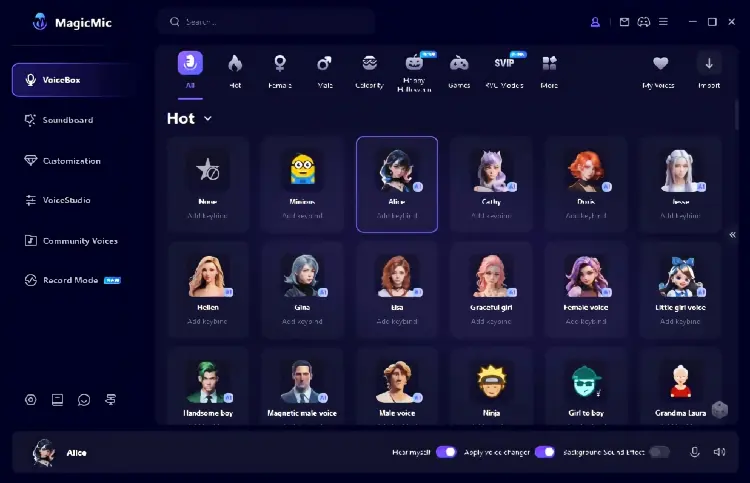
iMyFone MagicMic is an AI-powered voice changer that supports real-time voice conversion and audio-file editing. It offers various male-to-female voice effects, including natural female, cute girl, and anime-style voices, allowing you to choose an effect for gaming, online chats, or livestreaming.
Available for Windows and Mac, MagicMic can process microphone input and output the modified voice through a virtual audio device. You can select it as your microphone in compatible apps such as Discord, Zoom, and supported games.
MagicMic also supports voice recording and audio-file conversion, making it useful for creating voiceovers and gaming clips. Additional features include a soundboard, voice customization, and voice training tools.
- Support real-time male-to-female voice changing on Windows and Mac.
- Provide multiple female, girl, and character-style voice effects.
- Support microphone recording and existing audio-file conversion.
- Work with compatible games, streaming software, and communication applications.
- Include soundboards, voice customization, and voice training features.
- Offer a limited selection of free voices to try.
- Most voice effects and advanced features require a paid version.
- Real-time voice changing is not supported by its mobile apps.
- AI voice processing may require considerable computer resources.
- Some voice effects may sound artificial depending on the original voice and microphone quality.
Best For: Users who want an all-around male to female voice changer for PC gaming, Discord conversations, livestreaming, and audio production.
2. Voicemod - Best for Gaming and Live Streaming
Voicemod is a popular AI male to female voice changer for gamers, streamers, and voice chat users. It lets you transform your male voice into a more feminine-sounding voice in real time, making it useful for gaming, live streaming, and online communication.
Unlike basic voice changers that simply raise vocal pitch, Voicemod uses AI voice effects to modify your overall vocal character for a more natural-sounding result. You can select a female voice preset and use Voicemod's virtual microphone as the input device in your preferred game or communication app.
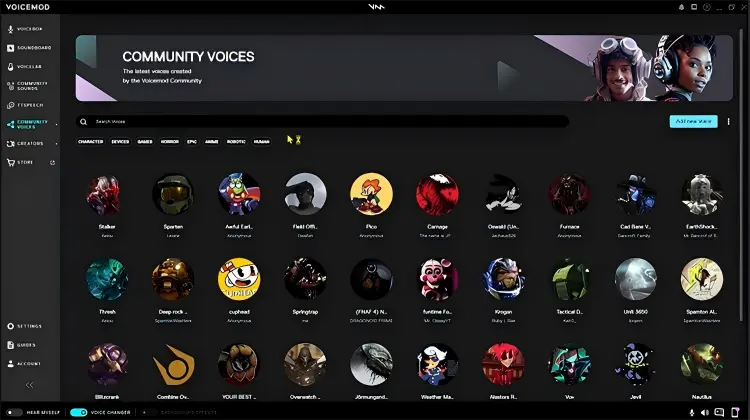
Voicemod also includes a large voice library, a soundboard, and voice customization options. You can explore community-created effects or adjust settings such as pitch, tone, bass, and treble to create your preferred female voice.
- Support real-time AI male-to-female voice conversion.
- Suitable for gaming, streaming, and online voice chats.
- Provide a large collection of AI and community-created voice effects.
- Offer soundboard and voice customization features.
- Allow users to adjust pitch, tone, bass, and treble.
- Has a free version for trying voice effects.
- Some popular voices and advanced features require a paid plan.
- Require desktop installation and microphone configuration for PC use.
- Voice quality varies depending on the selected effect and microphone input.
- Setting up the virtual microphone may be confusing for beginners.
Best For: Gamers and livestreamers who want to change their male voice to a female voice during real-time conversations.
3. EaseUS VoiceWave - Best for Realistic AI Female Voice Effects
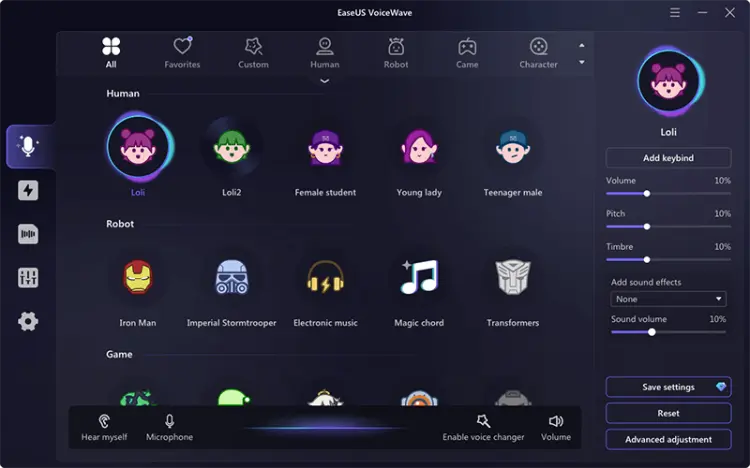
EaseUS VoiceWave is a Windows-based male to female voice changer that uses AI to transform your voice into different female styles, including natural female, girl, and e-girl voices. It supports real-time voice conversion, making it suitable for gaming, live streaming, and voice chats.
Unlike basic pitch filters, VoiceWave uses AI processing to change your overall vocal character. Simply select your microphone and headphones, open the Female category in the voice effects library, and choose your preferred voice. You can preview the result before using it.
VoiceWave also works with supported games and communication apps. For example, you can select the EaseUS virtual microphone as your input device in Discord to speak with a female voice.
Beyond real-time voice changing, VoiceWave can also modify existing audio and video files, making it useful for creating female-sounding voiceovers without recording everything again.
- Use AI-based processing for male-to-female voice conversion.
- Provide multiple female, girl, and e-girl voice effects.
- Support real-time voice changing on Windows.
- Compatible with supported games and voice communication applications.
- Can transform existing audio and video files.
- Provide microphone preview and voice customization options.
- Primarily designed for Windows users.
- Advanced features and additional voice effects require payment.
- Some AI effects may need a powerful computer for smooth processing.
- The resulting voice may not sound completely natural with every original recording.
Best For: Windows users who want an AI male to female voice changer for real-time communication and video voice editing.
4. Voice.ai - Best for AI Voice Conversion
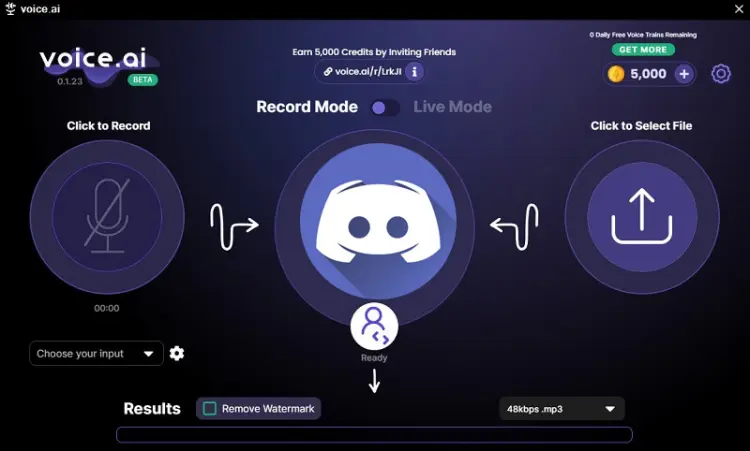
Voice.ai is an AI male to female voice changer that transforms your original voice into different female vocal styles. Instead of simply raising your pitch, it uses AI voice conversion to adjust your vocal characteristics, helping you create more natural-sounding female voices for gaming, livestreaming, and content creation.
Its Windows desktop app supports real-time voice changing. You can select an AI voice model, configure your microphone, and use the converted voice in compatible apps. It also provides community-created voice models, allowing you to explore different female voices beyond standard presets.
- Use AI voice conversion instead of relying only on basic pitch adjustment.
- Support real-time voice changing through its Windows desktop application.
- Provide different AI voice models to explore.
- Useful for gaming, online communication, and content creation.
- Offer a free download option.
- The desktop application is currently Windows-focused.
- The iOS experience differs from the desktop version.
- AI processing performance depends on your computer hardware.
- Some voice models and features may have usage restrictions.
- Voice conversion quality can vary between models.
Best For: Users who want to experiment with AI-powered female voice models and real-time voice conversion on Windows.
Part 2. Best Male to Female Voice Changer Online
If you don't want to install desktop software, an online male to female voice changer is a more convenient option. These browser-based tools generally allow you to record your voice or upload an existing audio file and apply different voice effects.
They are particularly suitable for casual voice experiments, short recordings, and video voiceovers. However, most browser-based tools process recorded audio rather than changing your microphone voice in real time during a live call. Here are two online options.
1. TopMediai Online Voice Changer - Best Male to Female Voice Changer Online
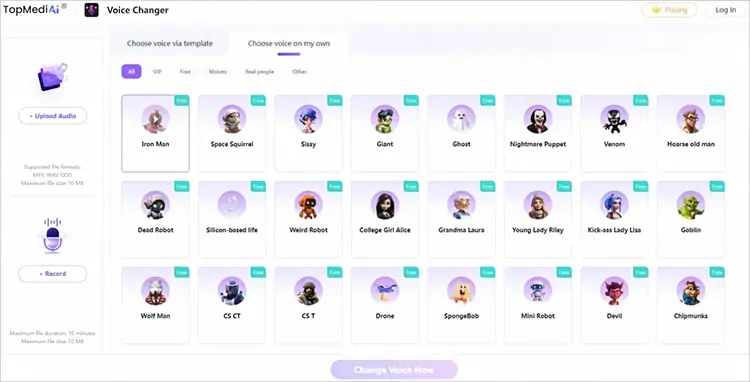
TopMediai Online Voice Changer is a convenient option if you're looking for the best male to female voice changer online without installing desktop software. It offers over 1,000 AI voice options through its VoiceLab library, allowing you to transform a male voice into different female styles for audio projects, social media, and entertainment.
To use it, simply upload an audio file or record your voice directly in the browser, choose a female voice effect, and start converting. You can preview the processed audio and download the result when it's ready.
- Work directly in a web browser without desktop installation.
- Provide more than 1,000 voice options through VoiceLab.
- Support MP3, WAV, and OGG audio formats.
- Allow users to upload audio or record through a microphone.
- Compatible with Windows, Mac, Android, and iPhone browsers.
- Useful for creating voiceovers and modifying existing recordings.
- Uploaded files are limited to 10 MB.
- Browser recording is limited to 10 minutes.
- Require an internet connection.
- Not designed as a full real-time virtual microphone for live calls.
- Free usage and available voice options may be subject to account limits.
Best For: Users who want a male to female voice changer online for free or a convenient browser-based tool for converting recorded audio.
2. LingoJam - Best Free Male to Female Voice Changer Online
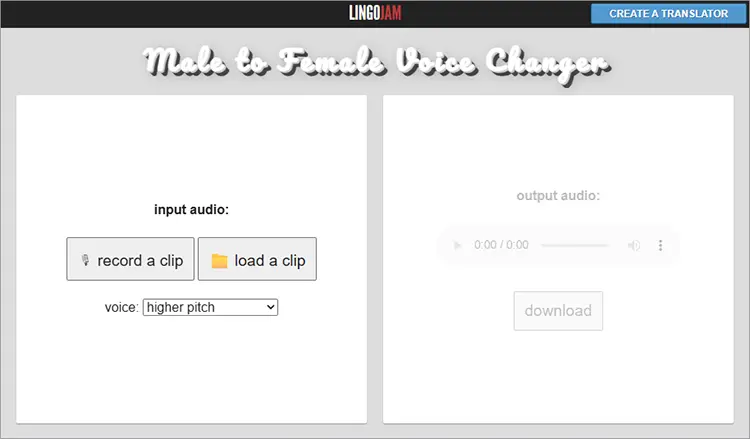
LingoJam Male to Female Voice Changer is a simple male to female voice changer online free tool that lets you raise the pitch of existing voice recordings directly in your browser. No software installation or account registration is required. Simply record your voice or upload an audio file, adjust the pitch using the dropdown menu, and preview the result.
Unlike AI-powered voice changers, LingoJam mainly changes vocal pitch rather than the entire voice character. It's suitable for basic voice experiments, creating simple female-style voice effects, and practicing how your voice sounds at different pitch levels.
- Completely free to use.
- No software installation or account registration required.
- Allow microphone recording and audio-file uploads.
- Provide adjustable pitch settings.
- Simple interface suitable for beginners.
- Useful for basic voice experiments and voice training practice.
- Mainly changes vocal pitch rather than the entire vocal character.
- Does not provide advanced AI gender conversion.
- Results may sound artificial when the pitch is increased significantly.
- Does not support real-time voice changing during calls.
- Offer fewer customization options than desktop AI voice changers.
Best For: Users looking for a simple, free male to female voice changer online without downloading additional software.
Part 3. Best Male to Female Voice Changer App
If you prefer changing your voice directly on your phone, a mobile male to female voice changer app can be more convenient than using a desktop program. Here are two options for Android and iPhone users.
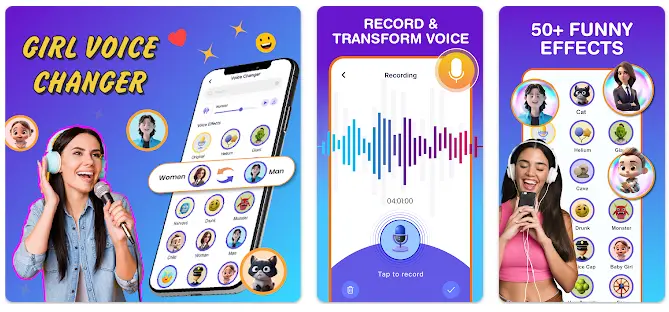
1. Voice Changer Male To Female - Best Android Male to Female Voice Changer App
Voice Changer Male To Female is an Android app for users looking to try different voice effects on their phones. It offers over 50 filters, including female, robotic, and cartoon voices, making it a convenient option for anyone searching for the best app for male to female voice changing.
You can record your voice or upload an existing audio clip, adjust the pitch, and apply different effects before saving or sharing the result. The app also includes text-to-speech functionality, allowing you to turn typed text into voice clips with various effects for social media, entertainment, or messaging.
- Offer more than 50 voice effects.
- Include male-to-female and other entertaining voice filters.
- Provide pitch adjustment and noise reduction.
- Support recording and selecting existing audio.
- Include text-to-voice functionality.
- Allow users to save and share modified recordings.
- Free to install on Android.
- Contain advertisements and in-app purchases.
- Primarily focuses on recorded audio and voice effects.
- Does not guarantee real-time voice changing in regular phone calls.
- Voice effects may sound artificial depending on the original recording.
- Not suitable for users who need advanced desktop-level AI customization.
Best For: Android users who want a convenient male to female voice changer mobile phone app for recording, editing, and sharing funny voice clips.
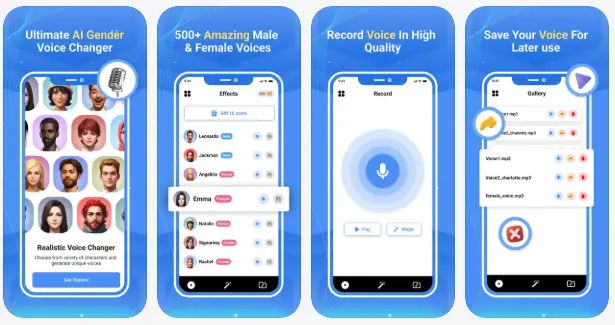
2. Voice changer gender: Vocalabs - Best iPhone Male to Female Voice Changer App
Vocalabs is an AI-powered male to female voice changer app for iPhone. It supports both male-to-female and female-to-male voice transformations, changing your overall vocal character rather than simply adjusting pitch.
The app also includes celebrity-inspired, cartoon, and anime voice effects, with new options added periodically. It advertises real-time voice conversion for live conversations and recordings, although compatibility with third-party calling apps may vary.
You can also create, save, and share transformed audio files, making Vocalabs useful for entertainment and social media content.
- Use AI-driven gender voice transformation.
- Support male-to-female and female-to-male voice effects.
- Include celebrity-inspired, cartoon, and anime-style voices.
- Advertise real-time voice conversion.
- Allow users to save and share transformed recordings.
- New voice effects are periodically added.
- Free to download on iPhone.
- Designed for iPhone rather than Android.
- Include in-app purchases.
- Some features may require payment.
- Real-time compatibility with third-party calling apps should be verified.
- Voice quality may vary depending on the selected AI effect.
Best For: iPhone users who want an AI-powered male to female voice changer app for voice experiments and audio creation.
Part 4. FAQs About Male to Female Voice Changers
Q1. Can I use a male to female voice changer during a call?
Yes, but compatibility depends on the calling platform. Desktop tools like MagicMic, Voicemod, and EaseUS VoiceWave support real-time microphone conversion through virtual microphones. However, they generally cannot modify regular cellular calls due to mobile operating system restrictions.
Q2. Is AI male to female voice conversion better than pitch changing?
Yes. AI voice changers can produce more natural results by adjusting vocal tone and timbre, while traditional pitch changers mainly raise voice frequency.
For more realistic male-to-female conversion, try AI-based tools like MagicMic, Voice.ai, or EaseUS VoiceWave.
Q3. Is Clownfish Voice Changer suitable for male to female voice changing?
Yes. Clownfish Voice Changer is another option for Windows users. It includes a Female Pitch effect and a custom pitch adjustment feature.
It works at the system level, allowing compatible applications such as Discord, Skype, and Steam to receive modified microphone audio. However, its female voice effect mainly relies on pitch adjustment rather than advanced AI gender conversion. Therefore, it may not sound as natural as dedicated AI voice changers.
Summary
Choosing the best male to female voice changer depends on how you plan to use it. For real-time voice conversion during gaming, streaming, or online conversations, MagicMic, Voicemod, and EaseUS VoiceWave offer more suitable desktop solutions with AI-powered effects. If you prefer changing recorded audio without installing software, TopMediai provides a convenient online option, while LingoJam is a simple free choice for basic pitch adjustment. Mobile users can also try Voice Changer Male To Female on Android or Vocalabs on iPhone.
Although AI voice changers can produce more convincing female-sounding voices than traditional pitch filters, results still vary depending on the original voice, audio quality, and selected effect. Compare their features, free usage limits, and compatibility before choosing the tool that best fits your needs.
Related Articles
5 Best Voice Changers for Xbox in 2026: Features, Pros & Cons
Female Voice Changer: 9 Best Tools for PC, Online & Mobile
5 Best Voicemod Alternative Tools for PC, Mac & Mobile Users