


TL;DR:
Looking for a reliable way to erase your iPhone data before selling or giving away your device? Apeaksoft iPhone Eraser offers three erasing levels and handy storage-cleanup tools, but its free trial has limitations. Here's what you should know:
- Key Features: Erases iOS data, removes junk files, uninstalls apps, deletes large files, and compresses photos.
- Pros: Three erasing levels, beginner-friendly interface, and multiple storage management tools.
- Cons: Requires a computer connection, and full data erasure requires a paid license.
- Best Alternative: iReaShare iPhone Data Eraser is worth trying if you want to focus on overwriting existing and deleted iPhone data.
If you're planning to sell your old iPhone, give away your iPad, or simply want to clear out unnecessary data from your device, a reliable iOS data eraser can come in handy. Apeaksoft iPhone Eraser is designed for exactly these needs. It not only wipes data from iPhone, iPad, and iPod touch but also offers features such as junk file cleanup, app uninstalling, large file removal, and photo compression.
But can it really protect your personal privacy? What limitations does the free version have? In this Apeaksoft iPhone Eraser review, we'll take an in-depth look at its features, user experience, pricing, pros, and cons to help you decide whether this software is worth trying.
- Part 1. What Is Apeaksoft iPhone Eraser?
- Part 2. Apeaksoft iPhone Eraser Review: Pros and Cons
- Part 3. How Much Does Apeaksoft iPhone Eraser Cost?
- Part 4. How to Use Apeaksoft iPhone Eraser?
- Part 5. Best Apeaksoft iPhone Eraser Alternative - iReaShare iPhone Data Eraser
- Part 6. Apeaksoft iPhone Eraser vs. iReaShare iPhone Data Eraser
- Part 7. FAQs About Apeaksoft iPhone Eraser
Part 1. What Is Apeaksoft iPhone Eraser?
Apeaksoft iPhone Eraser is a Windows and Mac desktop application developed to erase data and settings from iOS devices. It is mainly designed for users who want to protect their privacy before selling, donating, or recycling an old iPhone or iPad.
Unlike manually deleting files one by one, this software provides an all-in-one erasing function that can remove various types of personal information, including contacts, messages, photos, videos, call history, notes, and other device data.
It also includes a Free Up Space feature for everyday storage management. You can scan your device for unnecessary files, remove unwanted applications, delete large files, and compress or export photos.
Key Features of Apeaksoft iPhone Eraser:
1. Erase All iOS Data
Apeaksoft iPhone Eraser can wipe all content and settings from a connected iPhone, iPad, or iPod touch, including:
- Contacts, call history, and messages.
- Photos, videos, and music.
- Notes, calendars, and reminders.
- Browser history and personal files.
- Installed apps and related data.
2. Three Erasing Levels
Choose from three security levels based on your needs:
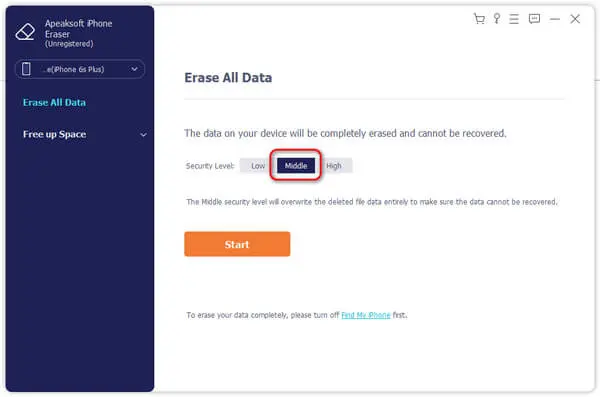
- Low: Overwrites data once for faster erasure.
- Middle: Overwrites data twice for a more thorough wipe.
- High: Overwrites data three times based on the DoD 5220.22-M standard.
3. Remove Junk Files
Scan and delete unnecessary files, such as image caches, iTunes caches, invalid files, and crash logs, to free up storage.
4. Uninstall Unwanted Apps
View installed third-party apps and remove unwanted ones directly from your computer.
5. Delete Large Files
Find large files taking up too much space, filter them by type or size, and delete those you no longer need.
6. Clean Up and Compress Photos
Export photos to your computer before deleting them from your iPhone, or compress them to save storage space while keeping backed-up originals.
Part 2. Apeaksoft iPhone Eraser Review: Pros and Cons
Is Apeaksoft iPhone Eraser a good choice for removing personal data and managing iPhone storage? To answer this question, let's look at its main advantages and limitations.
- Offer three data erasing levels: Low, Middle, and High.
- Include junk file cleanup, app uninstalling, large file deletion, and photo compression.
- Simple and beginner-friendly interface.
- Support iPhone, iPad, and iPod touch.
- Allow multiple iOS devices to be erased simultaneously.
- Require a Windows PC or Mac and a USB connection.
- Free trial has limited data erasing functionality.
- High-level erasure takes more time.
- Cannot selectively erase individual files with the main Erase All Data feature.
- Require the iPhone to be unlocked and trusted by the computer.
Part 3. How Much Does Apeaksoft iPhone Eraser Cost?
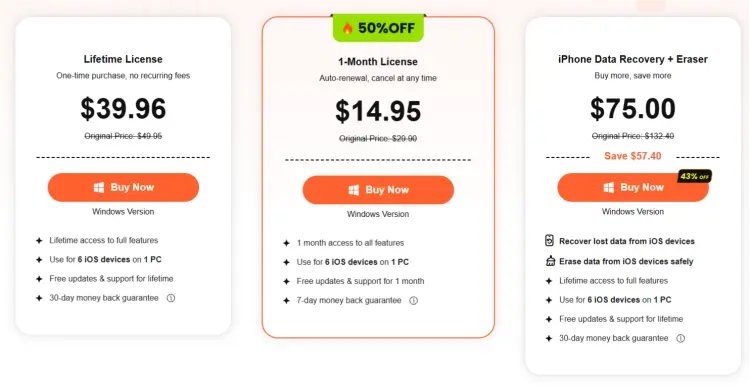
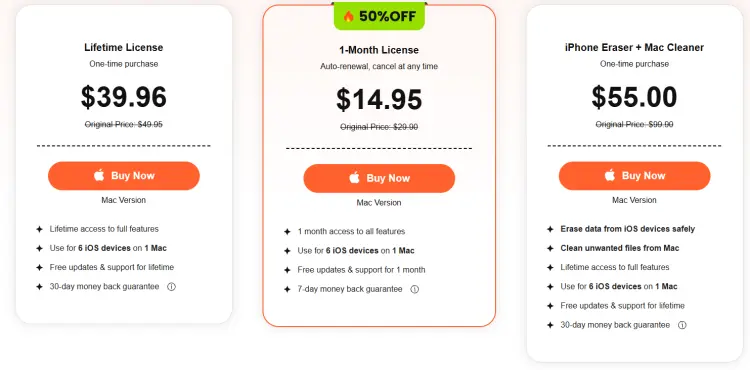
Apeaksoft iPhone Eraser offers a free trial, but its full data-erasing functionality requires a paid license. According to the official purchase page, its main pricing options include:
For Windows:
For Mac:
Is the Free Trial Enough?
The free version lets you try some functions, including scanning and previewing device data and certain cleanup operations. However, it has limitations on complete data erasure. If your main purpose is to wipe all personal information before selling your iPhone, you should check the paid-version requirements first.
Part 4. How to Use Apeaksoft iPhone Eraser?
Using Apeaksoft iPhone Eraser to wipe an iPhone is relatively straightforward. However, since the Erase All Data function permanently removes your information, make sure you've backed up everything important before proceeding. (How to back up your iPhone?)
Here is a step-by-step guide:
Step 1. Visit the official Apeaksoft website, download the appropriate Windows or Mac version, and install it on your computer. Launch the program after installation.
Step 2. Connect your iPhone to the computer via USB. Unlock your device and tap "Trust" when prompted.
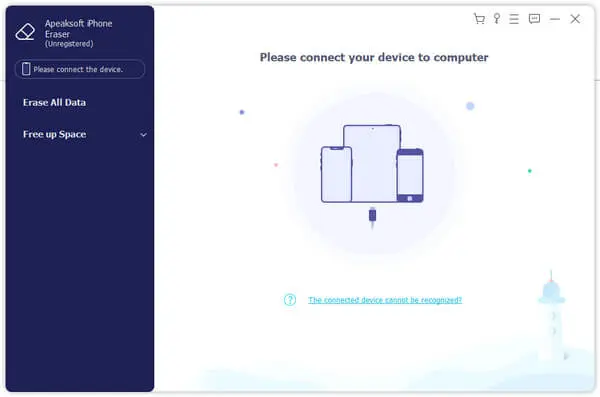
Step 3. Choose an erasing level: Low, Medium, or High. Then click "Start" to proceed.
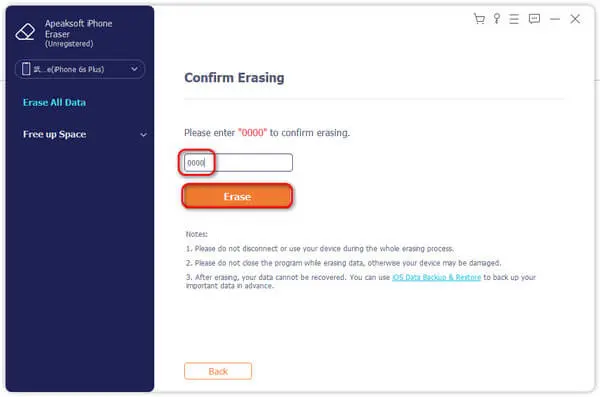
Step 4. Enter "0000" in the pop-up window and click "Erase" to confirm and wipe your iOS device.
Part 5. Best Apeaksoft iPhone Eraser Alternative - iReaShare iPhone Data Eraser
If Apeaksoft iPhone Eraser doesn't fully meet your requirements, iReaShare iPhone Data Eraser is another option worth considering. Unlike Apeaksoft, which combines data erasure with storage-cleanup utilities, iReaShare focuses primarily on wiping iOS data and overwriting existing and previously deleted files. This makes it particularly useful if your main concern is protecting personal information before selling, donating, or giving away your iPhone.
Key Features of iReaShare iPhone Data Eraser:
* Erase iOS contacts, messages, call history, photos, videos, music, installed apps, and more.
* Overwrite existing and deleted data for more thorough removal.
* Offer three erasing levels: Low, Medium, and High.
* Free up storage space on iOS devices, including iPhone Duo/18 Pro Max/18 Pro.
* Support a wide range of iOS versions, including iOS 27.
* Compatible with Windows & Mac.
Download for Win Download for Mac
Here is how to use iReaShare iPhone Data Eraser:
-
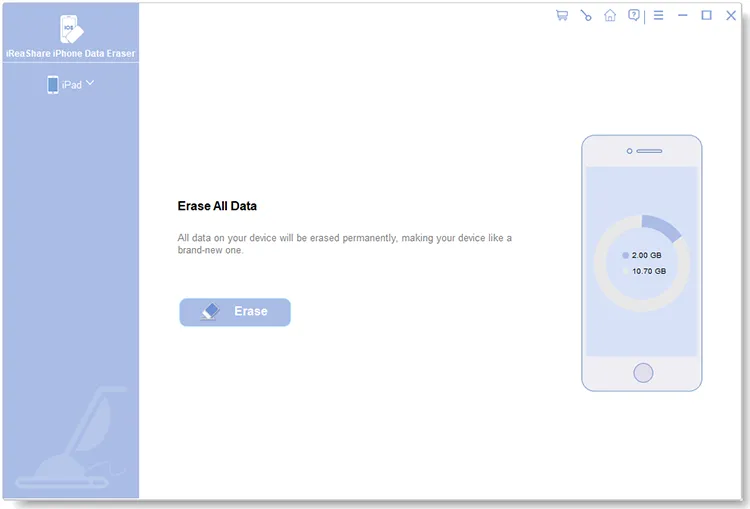
Download and install iReaShare iPhone Data Eraser on your PC/Mac, then launch the program. Connect your iPhone via USB and tap "Trust" if prompted. Once detected, click "Erase" to continue.
-
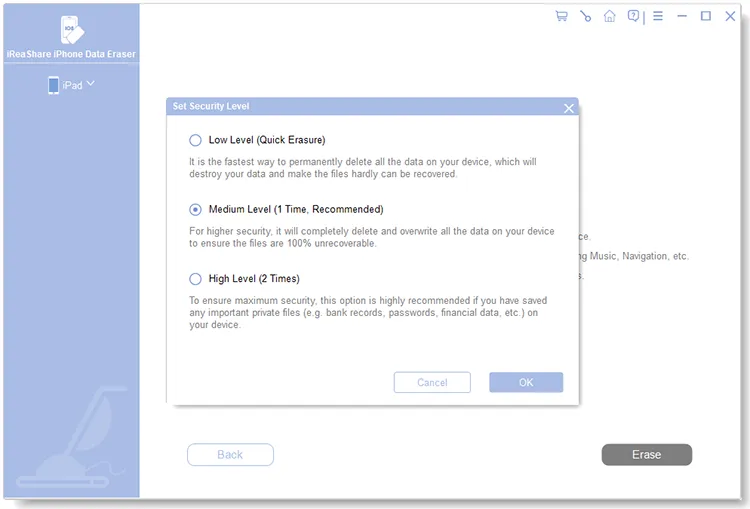
Select "Medium" as the erasing level, enter "delete" in the confirmation field, and click "Erase" > "OK" to begin.
-
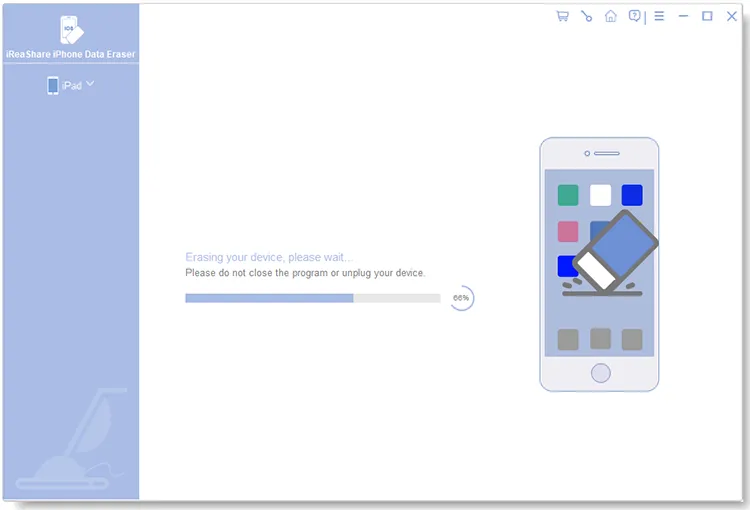
Your iPhone may restart during the process as the software overwrites your data. Keep the device connected until the erasure is complete.
Here is a video guide:
- Provide three different data-erasing levels.
- Focus on removing both existing and previously deleted data.
- Support various iOS devices.
- Offer a straightforward interface and relatively simple operation.
- Provide a free trial to explore the software.
- Doesn't provide the same range of junk-file cleanup and photo-compression tools as Apeaksoft.
- Doesn't offer selective file erasure through its main full-device wiping function.
- Require a computer and a USB connection to operate.
Part 6. Apeaksoft iPhone Eraser vs. iReaShare iPhone Data Eraser
How do these two tools compare? Here's a quick overview.
| Comparison | Apeaksoft iPhone Eraser | iReaShare iPhone Data Eraser |
|---|---|---|
| Supported OS | Windows and macOS | Windows and macOS (Mac version available) |
| Supported Devices | iPhone, iPad, iPod touch | iPhone, iPad, iPod touch |
| Data Erasure | Erases existing iOS data | Erases existing and deleted iOS data |
| Erasing Levels | Low, Middle, High | Low, Medium, High |
| Data Overwriting | 1, 2, or 3 times | Multiple overwriting levels; High level overwrites data twice |
| Junk File Cleanup | Yes | No |
| App Uninstallation | Yes | No |
| Large File Deletion | Yes | No |
| Photo Compression | Yes | No |
| Preview Before Deletion | Available for supported cleanup operations | Limited |
| Batch Erasure | Supports up to 6 iOS devices | Depends on license and version |
| Free Trial | Yes, with limitations | Yes |
| Best For | Erasing iOS data and freeing up storage space | Permanently wiping existing and deleted iOS data |
Which One Should You Choose?
Both programs can help you erase personal information from an iPhone, but they serve slightly different purposes.
Choose Apeaksoft iPhone Eraser if you want an all-in-one solution for wiping device data and managing storage. Its additional cleaning tools make it more versatile for everyday iOS maintenance.
On the other hand, choose iReaShare iPhone Data Eraser if your primary concern is thoroughly wiping existing and deleted data. Its dedicated erasing workflow and three security levels make it a practical alternative for users preparing their devices for resale or transfer.
Part 7. FAQs About Apeaksoft iPhone Eraser
Q1. Is Apeaksoft iPhone Eraser safe & legit?
Generally, Apeaksoft iPhone Eraser is a legitimate desktop application designed to erase iOS data and protect personal privacy. Its official website provides download links, product documentation, and customer support.
However, safety also depends on downloading the installer from the official website rather than unfamiliar third-party sources.
Q2. Is Apeaksoft iPhone Eraser free to use?
No. Apeaksoft iPhone Eraser offers a free trial, but the trial version has limited functionality.
You can use certain scanning and cleanup features, but complete data-erasing functionality requires a paid license. If you only want to try the software before purchasing, the free version is a convenient starting point.
Q3. Why isn't my device detected when connected?
- Make sure you have the latest version of iTunes (Windows) or Finder (Mac) installed.
- If iTunes recognizes your device, close it and reconnect your iPhone to the computer.
- Try using a different USB cable or port.
- Ensure your iOS device isn't in Recovery Mode or DFU Mode.
Q4. Can Apeaksoft iPhone Eraser erase a locked iOS device?
Not directly. If your iPhone or iPad is locked, Apeaksoft iPhone Eraser may not be able to detect it because the device must be unlocked and trusted by the computer before the software can access it. Unlock your device and tap "Trust This Computer" when prompted. Apeaksoft iPhone Eraser should then be able to recognize your device and proceed with data erasure.
Q5. Can erased data be recovered using data recovery tools?
No. Apeaksoft iPhone Eraser permanently wipes data and settings from your iOS device. It offers three erasure levels to help ensure that deleted data cannot be recovered using data recovery software.
Q6. Can Apeaksoft iPhone Eraser wipe data from a jailbroken device?
Yes. Apeaksoft iPhone Eraser supports data erasure on jailbroken iOS devices. After the erasing process, your device will remain jailbroken.
Q7. What are the main differences between the three erasing levels?
The three erasing levels differ in the number of times data is overwritten on your iOS device. The Low level performs one overwrite, while the Medium level performs two. The High level overwrites data three times, following the U.S. DoD 5220.22-M data sanitization standard for more thorough data erasure.
Conclusion
Overall, Apeaksoft iPhone Eraser is a useful tool for users who want to erase iOS data and free up storage space through one desktop application. Its three erasing levels, junk-file removal, app uninstallation, large-file deletion, and photo compression features make it a versatile option. However, its paid full version and computer connection requirements may not suit everyone.
If you're mainly looking for a dedicated solution to wipe existing and deleted iPhone data, iReaShare iPhone Data Eraser is another option worth trying. It offers three security levels and a straightforward erasing process, making it a practical alternative when protecting your privacy before selling or giving away an old iPhone is your priority.
Download for Win Download for Mac
Related Articles
Erase iPhone Data for Selling: Remove Your Data Permanently
Aiseesoft FoneEraser Review: Is It a Truly Reliable iOS Data Wiper?
How to Permanently Delete Files on iPhone Without Recovery (6 Ways)
How to Delete Everything on iPhone Effectively in 4 Ways (Secure Guide)