TL;DR:
Looking for the best podcast recording software in 2026? We reviewed 6 top tools for beginners, remote interviews, and professional creators, comparing features, pros, cons, and real use cases. From free options like Audacity to advanced solutions for high-quality audio and video podcasts, this guide helps you find the right recording software for your podcast workflow.
Podcast recording software is a tool that allows creators to capture, edit, and improve audio or video recordings for podcasts. Unlike traditional voice recorders, modern podcast software usually includes features such as multi-track recording, noise reduction, audio enhancement, remote interview support, and built-in editing tools.
The best podcast recording software can help creators produce professional-quality episodes without needing expensive studio equipment. Whether you are starting your first podcast, recording interviews with guests, or creating video podcasts for YouTube, choosing the right tool can significantly improve your workflow.
However, not every podcast recorder is suitable for every creator. Some programs focus on simple voice recording, while others provide advanced editing, cloud recording, and AI-powered features. Below, we compare the top podcast recording software options based on features, ease of use, and real-world use cases.
- Part 1. What Should You Look for in Podcast Recording Software?
- Part 2. 6 Best Podcast Recording Software in 2026
- 1. Screen Recorder – Best for Recording Audio and Video Podcasts
- 2. Audacity – Best Free Podcast Recording Software
- 3. Riverside – Best for Remote Podcast Interviews
- 4. Adobe Audition – Best Professional Podcast Editing Software
- 5. GarageBand – Best Podcast Recorder for Mac Users
- 6. Podcastle – Best AI Podcast Recording Software
- Part 3. How to Choose the Right Podcast Recording Software?
- Part 4. Common Problems When Recording Podcasts
- Part 5. Frequently Asked Questions
Part 1. What Should You Look for in Podcast Recording Software?
Before choosing a podcast recorder, consider the following factors:
- Audio Quality: A good podcast recorder should support high-quality audio formats and provide features such as noise reduction, microphone optimization, and volume adjustment.
- Multi-Track Recording: Multi-track recording allows you to record hosts, guests, music, and sound effects separately, making editing much easier.
- Remote Recording: If you interview guests online, choose software that supports remote recording while maintaining high audio quality.
- Editing Features: Basic editing tools like trimming, cutting, mixing, and audio enhancement can save time during post-production.
- Ease of Use: Beginners should avoid overly complicated software. A simple interface helps creators focus on content rather than technical settings.
Part 2. 6 Best Podcast Recording Software in 2026
Podcast Recording Software Comparison
| Software | Best For | Audio Recording | Video Recording | Remote Recording | Editing |
|---|---|---|---|---|---|
| Screen Recorder | Audio & video podcasts | ✓ | ✓ | ✓ | Basic |
| Audacity | Free podcast creation | ✓ | ✗ | ✗ | Advanced |
| Riverside | Remote interviews | ✓ | ✓ | ✓ | Basic |
| GarageBand | Mac beginners | ✓ | ✗ | ✗ | Medium |
| Adobe Audition | Professionals | ✓ | ✗ | ✗ | Advanced |
| Podcastle | AI-powered workflow | ✓ | ✓ | ✓ | Medium |
1. Screen Recorder – Best for Recording Audio and Video Podcasts
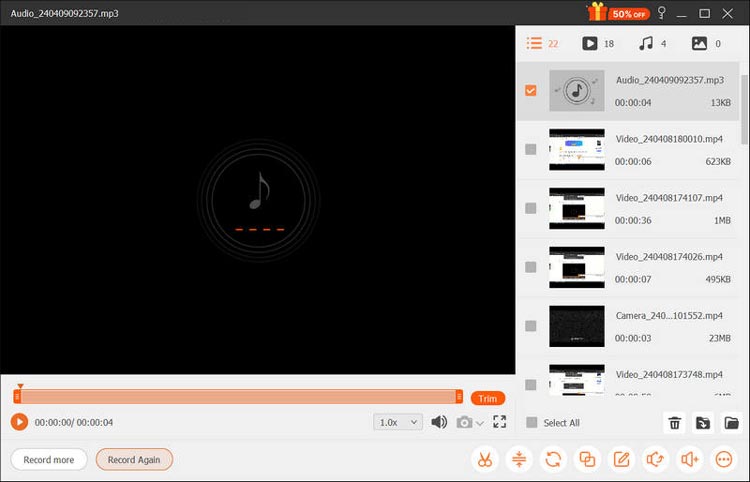
Screen Recorder is a versatile recording tool designed for creators who need to produce both audio podcasts and video podcasts. Unlike traditional audio-only recorders, it allows users to capture microphone sound, system audio, webcam footage, and screen activity simultaneously. This makes it a useful video podcast recording software solution for podcast interviews, online discussions, tutorials, and YouTube podcast videos.
With high-quality recording, real-time annotation, noise reduction, and flexible output settings, Screen Recorder provides a simple way for creators to produce professional content without the need for complex studio equipment.
Key features of Screen Recorder:
- Capture system audio and microphone input separately or simultaneously.
- AI noise reduction removes background sounds like keyboard clicks, fan noise, and environmental interference for clearer recordings.
- AI echo cancellation reduces echo and audio feedback for more natural sound quality.
- Support high-quality audio recording with FLAC and WAV formats, adjustable bitrate, sample rate, and audio channels.
- Record screens, webcams, windows, and mobile devices with up to 4K/8K resolution support.
- Include annotation and basic editing tools to improve recordings.
- Support Windows and Mac.
Download for Win Download for Mac
Here is how to use this podcast recording software for beginners:
-
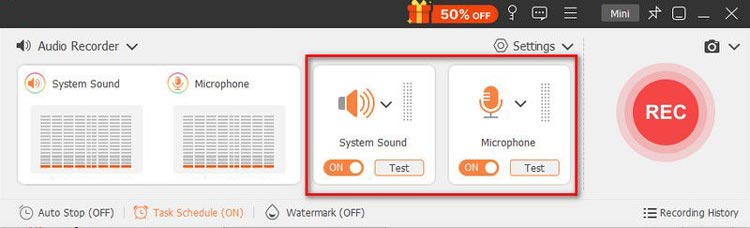
Launch Screen Recorder on your computer and select "Audio Recorder" from the main interface to access the audio recording mode. Choose your preferred audio source by enabling "System Sound", "Microphone", or both.
-
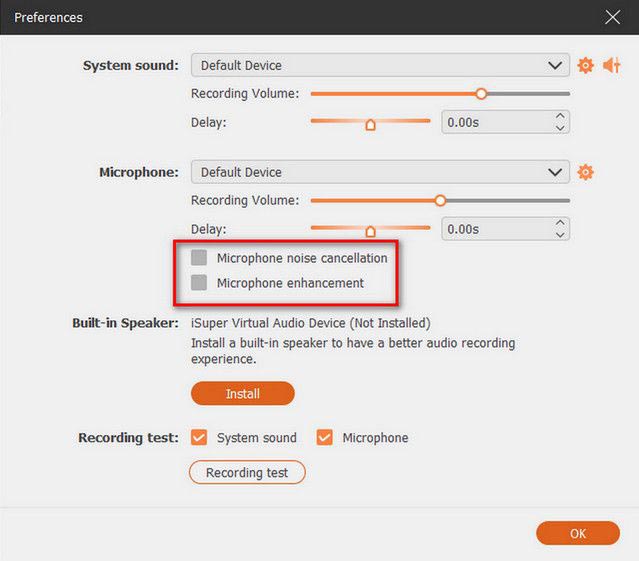
Before recording, enable "Microphone noise cancellation" and "Microphone enhancement" to reduce background noise, improve voice clarity, and minimize echo. You can also use the "Volume Mixer" option to adjust the volume of different audio sources.
-
Once the recording is finished, click the "Stop" button to open the preview window. Review the audio, then click "Export" to save the recording to your computer.
Pros:
* Support audio and video podcast recording.
* Record microphone and system sound separately.
* Include basic editing and enhancement tools.
* Easy for beginners to use.
* Support multiple output formats.
Cons:
* Not designed as a complete podcast production platform.
* Lack advanced podcast hosting features.
* Professional audio editors may need additional tools.
Best for:
Creators who need a simple solution for recording podcasts, online interviews, video podcasts, or tutorials.
2. Audacity – Best Free Podcast Recording Software
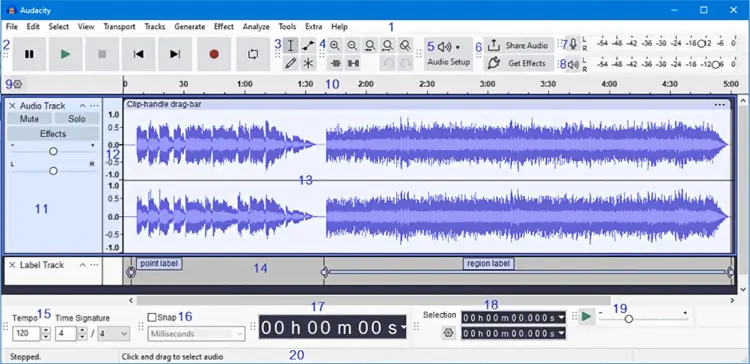
Audacity is one of the most popular free podcast recording and editing programs. It is open-source and provides powerful audio editing features without requiring a subscription. Users can record from microphones, edit multiple audio tracks, remove background noise, adjust volume, and export podcasts in different formats.
However, Audacity has a learning curve, especially for beginners who are unfamiliar with audio editing.
Pros:
* Completely free and open-source.
* Powerful audio editing features.
* Support multiple audio formats.
* Works on Windows, Mac, and Linux.
Cons:
* Interface looks outdated.
* Require time to learn advanced features.
* No built-in remote recording.
Best for:
Beginners and budget-conscious creators who need free podcast production software.
3. Riverside – Best for Remote Podcast Interviews
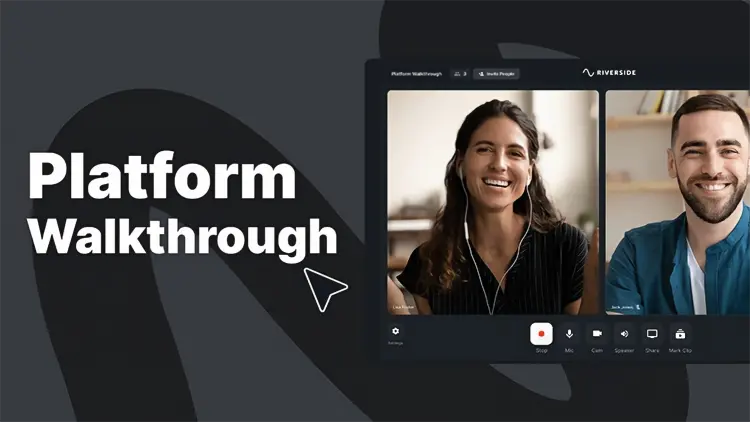
Riverside is designed for podcasters who frequently interview guests remotely. Unlike regular video meeting software, Riverside records high-quality local audio and video from each participant. This helps reduce quality issues caused by unstable internet connections. It is especially popular among professional podcasters, YouTubers, and content creators who need studio-quality remote interviews.
Pros:
* High-quality remote recording.
* Separate audio and video tracks.
* Support podcast interviews.
* Browser-based recording.
Cons:
* Paid plans are required for advanced features.
* More expensive than traditional recording software.
Best for:
Professional podcasters who regularly record remote interviews.
4. Adobe Audition – Best Professional Podcast Editing Software
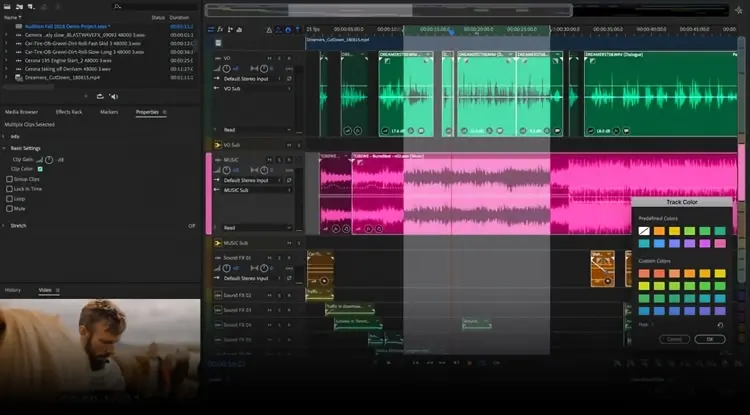
Adobe Audition is a professional audio production tool used by many broadcasters and experienced creators. It provides advanced features such as noise removal, audio restoration, multi-track editing, and detailed sound control.
However, beginners may find it overwhelming because of its complexity and subscription cost.
Pros:
* Professional audio editing features.
* Excellent noise reduction tools.
* Advanced multi-track workflow.
Cons:
* Expensive subscription.
* Steep learning curve.
Best for:
Professional podcasters and audio producers.
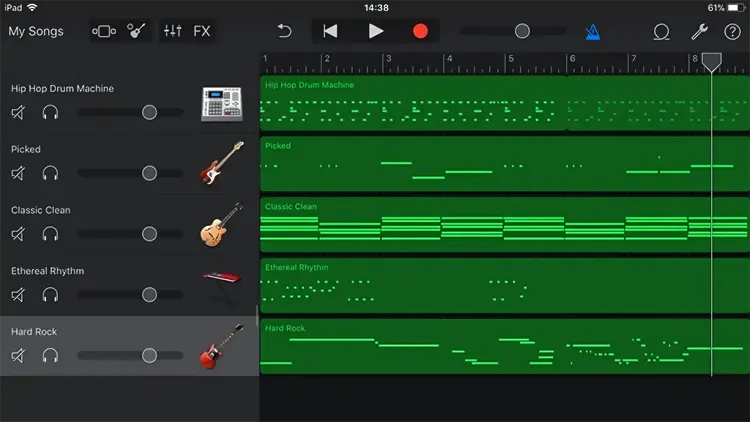
5. GarageBand – Best Podcast Recorder for Mac Users
GarageBand is Apple's free music and audio production software. Although mainly designed for music creation, it also works well for podcast recording. It provides built-in sound effects, audio editing tools, and support for external microphones.
Pros:
* Free for Mac and iPhone users.
* Beginner-friendly interface.
* Include audio effects and editing tools.
Cons:
* Only available in the Apple ecosystem.
* Limited podcast-specific features.
Best for:
Mac users who want a free and simple podcast recording solution.
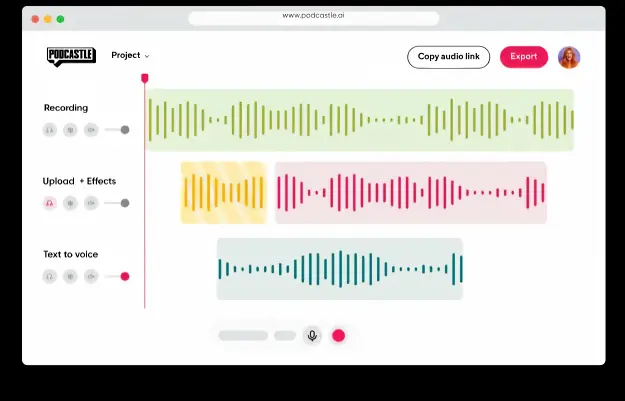
6. Podcastle – Best AI Podcast Recording Software
Podcastle combines podcast recording, editing, and AI-powered tools in one platform. It provides features like AI voice enhancement, transcription, and background noise removal. It is designed for creators who want to speed up podcast production using automation.
Pros:
* AI-powered editing tools.
* Support transcription.
* Simple online workflow.
Cons:
* Some advanced features require paid plans.
* Less control than professional audio editors.
Best for:
Creators who want faster AI-assisted podcast production.
Part 3. How to Choose the Right Podcast Recording Software?
The best podcast recorder depends on your goals:
- For beginners: Choose Audacity or GarageBand. They are free and provide enough tools for starting a podcast.
- For remote interviews: Riverside is a better choice because it focuses on high-quality online recording.
- For video podcasts: A screen recorder like Screen Recorder can capture webcam, microphone, and screen content together.
- For professional production: Adobe Audition provides the most advanced editing capabilities.
- For AI-powered workflows: Podcastle can help automate editing and improve efficiency.
Part 4. Common Problems When Recording Podcasts
1. Poor Audio Quality
Even expensive software cannot fix bad recording conditions. Use a quality microphone, reduce background noise, and record in a quiet environment.
2. Audio Delay During Remote Interviews
Internet connection problems can cause synchronization issues. Remote recording platforms that capture local tracks can reduce this problem.
3. Large Recording Files
High-quality audio and video recordings can quickly consume storage space. Consider compressing files or exporting them in optimized formats after recording.
Part 5. Frequently Asked Questions
Q1. What is the easiest podcast recording software for beginners?
Audacity, GarageBand, and Screen Recorder are good choices for beginners because they have simple workflows and require minimal setup.
Q2. Can I record a podcast without expensive equipment?
Yes. Many successful podcasts start with affordable microphones and free recording software. Good recording techniques often matter more than expensive equipment.
Q3. Can podcast recording software record video?
Yes. Some tools, such as Screen Recorder and Riverside, support video podcast recording with webcam and screen capture.
Q4. Is free podcast recording software enough?
Free software can handle basic podcast creation. However, creators who need remote interviews, advanced editing, or AI tools may benefit from paid solutions.
Final Thoughts
The best podcast recording software depends on your recording style, technical experience, and production goals. Free tools like Audacity and GarageBand are excellent starting points, while Riverside and Adobe Audition are better suited for professional creators.
For users who need a flexible tool to record both audio and video podcasts, online interviews, and screen-based content, Screen Recorder offers a practical balance between simplicity and functionality.
Before choosing software, consider your workflow first. The right tool should help you spend less time solving technical problems and more time creating great podcast content.
Related Articles
Screen Recorder for Mac: 12 Tools for Screen Recording on Mac
Game Recording Software: Select the Best One to Record Gameplay
Camtasia Screen Recording Software: Latest Review and Top 12 Alternatives
Snagit Screen Capture Software Review Guide and 15 Viable Alternatives