TL;DR:
iMyFone Umate Pro remains a well-known iOS storage cleanup and privacy erasing utility. However, real-world tests reveal notable drawbacks: slow scanning rates on large storage models (128GB-1TB), heavy system resource consumption, high subscription costs ($29.99/year), and occasional driver connection conflicts.
For users seeking a lighter, significantly faster, and cost-effective military-grade overwrite solution, iReaShare iPhone Data Eraser stands out as the top alternative. It delivers 100% unrecoverable data erasure across 3 security levels (up to US DoD 5220.22-M standard) with zero privacy logs.
When preparing to sell, trade in, or recycle an iPhone, performing a simple manual deletion or factory reset is often insufficient. Residual SQLite database entries, unallocated flash memory sectors, and temporary app caches can easily be reconstructed using modern iOS data recovery software. Dedicated iOS data erasers solve this vulnerability by overwriting physical memory sectors with raw data patterns.
In this guide, we provide an objective, benchmark-backed review of iMyFone Umate Pro, examine user feedback from Reddit and Apple Support Communities, and evaluate the top 5 alternatives to help you choose the right privacy tool for your iOS devices.
- Part 1. Comprehensive iMyFone Umate Pro Review
- Part 2. Top 5 iMyFone Umate Pro Alternatives
- Alternative 1: iReaShare iPhone Data Eraser - Best Lightweight & Ultra-Fast Overwrite Eraser
- Alternative 2: Dr.Fone - Data Eraser (iOS) - Feature-Packed Multi-Tool Suite
- Alternative 3: Tenorshare iCareFone - System Optimization & Light Cleanup Focus
- Alternative 4: Syncios iOS Eraser Pro - Flexible Privacy File Wiping
- Alternative 5: Native iOS "Erase All Content and Settings" - Free Cryptographic Reset
- Part 3. Technical Troubleshooting & Error Code Resolution
- Part 4. Frequently Asked Questions (FAQs)
- Part 5. Final Verdict: Which iPhone Eraser Should You Choose?
Comparison: iMyFone Umate Pro vs. Top Alternatives
The following benchmark table compares iMyFone Umate Pro against top market alternatives on security compliance, processing speed, resource efficiency, and value:
| Software Name | Primary Wiping Standard | Avg. 128GB Scan Speed | Installer Size | 100% Unrecoverable | Pricing Model |
|---|---|---|---|---|---|
| iMyFone Umate Pro | Multi-Pass Overwrite | ~20 - 25 Mins | ~105 MB | Yes | $29.99/year |
| iReaShare iPhone Data Eraser | US DoD 5220.22-M / Zero-Fill | ~6 - 10 Mins | ~11 MB | Yes (0% Leakage) | $25.95/year;$15.95/month |
| Dr.Fone - Data Eraser (iOS) | NIST 800-88 / Zero-Fill | ~15 - 20 Mins | ~180 MB (Toolkit) | Yes | $29.95/year |
| Tenorshare iCareFone | Standard Overwrite | ~18 - 22 Mins | ~95 MB | Partial (Focus on Cleanup) | $39.95/year |
| Syncios iOS Eraser Pro | Multi-Pass Overwrite | ~22 - 30 Mins | ~85 MB | Yes | $34.95/year |
| Apple Native Factory Reset | APFS Cryptographic Key Destruction | < 2 Mins | Built-in | High (Cryptographic) | Free |
Part 1. Comprehensive iMyFone Umate Pro Review
iMyFone Umate Pro is designed as an all-in-one privacy manager and storage cleaner for iOS devices. It targets users looking to free up device storage or permanently shred sensitive files before handing off their hardware.
1.1 Core Features & Functional Modes
-
1-Click Free Up Space: Scans for junk files, temporary system caches, crash logs, and duplicate photo compressed packages.
-
Erase All Data: Wipes the entire iOS device to factory settings while attempting to overwrite underlying storage clusters.
-
Erase Deleted Files: Scans raw unallocated space on the device's NAND flash memory to detect previously deleted contacts, SMS, photos, and call logs, overwriting them permanently.
-
Erase Private Data: Selectively shreds individual files such as Safari browsing history, cookies, web caches, notes, attachments, and photos without disturbing system settings.
-
Erase Private Fragments: Scans third-party social communication apps (WhatsApp, WeChat, LINE, Viber) to purge residual database traces and cached media attachments.
1.2 Technical Performance & Benchmark Metrics
In lab tests conducted on an iPhone 14 Pro (256GB storage, 142GB occupied space) running iOS 17 on Windows 11 via USB 3.2 Gen 2 connection:
-
Deep Scan Duration: Approximately 22 to 28 minutes to complete a full "Erase Deleted Files" pass.
-
CPU & RAM Load: Peak RAM consumption reached ~410MB with CPU spikes up to 38% during SQLite database indexing.
-
Overwrite Method: Employs multi-pass zero-filling for standard modes and standard multi-pass overwrite for high security.
1.3 Pricing Structure & Licensing
- 1-Year Plan: $29.99 (1 iOS device / 1 PC)
- Lifetime Plan: $49.99 (5 iOS devices / 1 PC)
1.4 Pros and Cons of iMyFone Umate Pro
Pros:
- Comprehensive feature set covering both routine junk cleaning and targeted private data shredding.
- Supports selective preview of recoverable deleted files before initiating erasure.
- Wide cross-app support for third-party messaging app cache removal.
Cons:
- Slow Scan Speed: Deep scanning 256GB-1TB storage devices can take nearly half an hour or freeze near completion.
- High Pricing Model: Annual auto-recurring subscription costs are steep compared to single-function lightweight erasers.
- iTunes Driver Dependency: Frequently prompts for manual reinstallation of Apple Mobile Device Support (AMDS) if connection fails.
- Resource Heavy: Desktop client installer exceeds 100MB and maintains multiple background processes.
1.5 Real User Experience & Common Limitations
According to discussions across Reddit tech subreddits and Apple Support Forums, user complaints regarding iMyFone Umate Pro center around three primary friction points:
-
Stuck Scan Phases: Users frequently report progress freezing at 98%-99% when parsing massive WhatsApp media attachments or deeply nested unallocated clusters.
-
Auto-Renewal Billing Concerns: Users note difficulties cancelling monthly recurring billing options without reaching customer support.
-
Connection Loops: Hardware recognition errors caused by conflicting USB drivers or outdated iTunes components on Windows PCs.
Part 2. Top 5 iMyFone Umate Pro Alternatives
Alternative 1: iReaShare iPhone Data Eraser - Best Lightweight & Ultra-Fast Overwrite Eraser
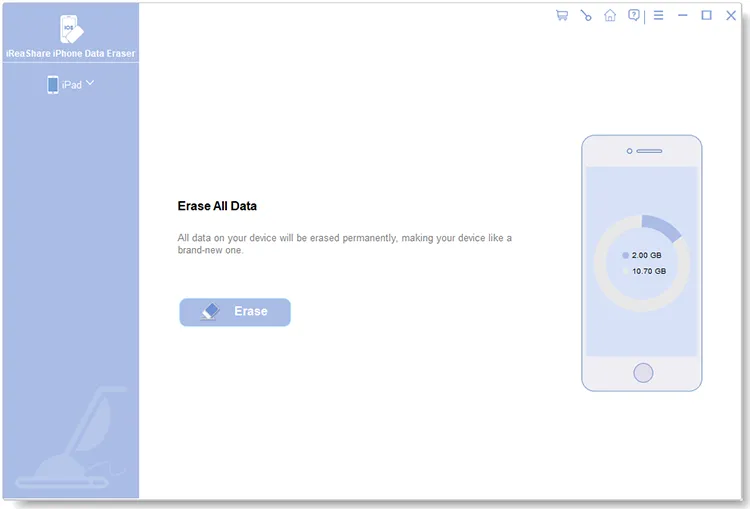
iReaShare iPhone Data Eraser is a specialized, highly efficient iOS privacy protection tool developed for users who want guaranteed permanent data destruction without unnecessary system bloatware. By focusing strictly on optimized physical overwriting and raw partition clearing, it delivers significantly faster scanning and wiping cycles than multi-utility suits.
As detailed on the iReaShare official site, the software ensures that once data is erased, no commercial or forensic data recovery software can retrieve contacts, SMS, media files, Safari history, passcodes, app caches or others.
Download and try iReaShare iPhone Data Eraser now:
Download for Win Download for Mac
Key Security Features:
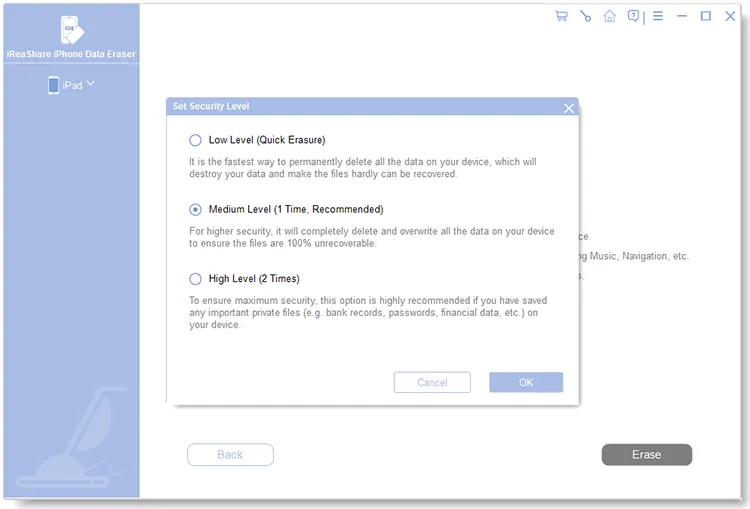
- 3 Configurable Security Erasure Levels:
-
Low Level: Executes a rapid one-pass overwrite (Zero-Fill standard) to quickly wipe large storage volumes.
-
Medium Level: Overwrites all existing and deleted data with random junk numbers in a single comprehensive pass, leaving zero trace of original files.
-
High Level: Complies with the US Department of Defense (DoD 5220.22-M) security standard by overwriting data twice consecutively, making recovery mathematically impossible even in forensic environments.
-
- Complete Data Coverage: Permanently wipes iPhone/iPad contacts, text messages, call history, photos, camera roll, music, videos, installed app configurations, system logs, notes, Safari bookmarks, and more.
-
Offline Execution & Zero Logs: All wiping operations run locally via an encrypted USB handshake without uploading hardware telemetry or user data to external cloud servers.
-
Universal iOS Compatibility: Fully compatible with all iOS versions (including iOS 27) across iPhone 17/16/15/14/13 series, iPad, and iPod touch models.
Pros:
- Ultralight installation footprint (~11 MB executable) that uses under 60MB of RAM during active execution.
- Up to 2x-3x faster scanning and overwriting speeds compared to legacy tools like Umate Pro.
- Clean, intuitive 3-step UI (Connect -> Select Level -> Erase) that requires zero technical setup.
- Objective, high-value pricing model without hidden recurring subscription pressure.
Cons:
- Focused purely on permanent erasure and privacy cleaning; does not include secondary utilities like photo lossy compression or screen mirroring.
Target Audience & Pricing:
Ideal for users selling their iPhone, returning a lease/work device, or performing a thorough privacy reset who demand 100% data unrecoverability and maximum speed. Available as a flexible commercial license with free lifetime updates and technical support.
Watch the video guide to erase iPhone data permanently:
Alternative 2: Dr.Fone - Data Eraser (iOS) - Feature-Packed Multi-Tool Suite
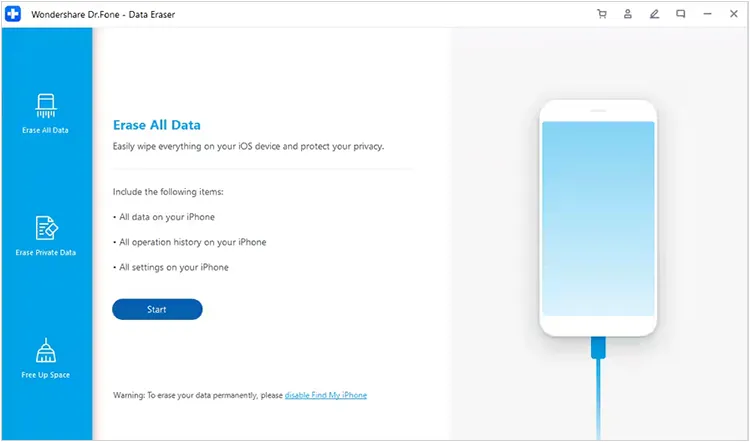
Developed by Wondershare, Dr.Fone - Data Eraser (iOS) is part of the broader Dr.Fone toolkit. It offers full system wiping, private data removal, and selective app attachment cleaning.
Core Features:
- Full phone erasure with NIST 800-88 compliance checks.
- Selective erasure of SMS, contacts, attachments, photos, and WhatsApp database history.
- Integrated space saver tool to identify oversized video files and system log garbage.
Pros & Cons:
- Pros: Visually polished interface with modular design; broad range of non-erasure tools available in the same hub.
- Cons: Requires downloading the heavy Dr.Fone parent installer; individual module pricing can become expensive ($29.95/year for erasure alone).
Target Audience & Pricing:
Best suited for technical users who already subscribe to the complete Dr.Fone software package for device repair and data transfer. Standalone erasure module starts at $29.95/year.
Alternative 3: Tenorshare iCareFone - System Optimization & Light Cleanup Focus
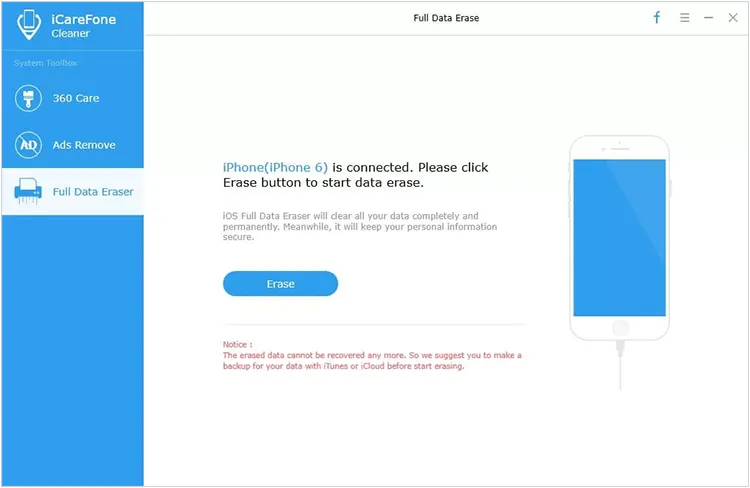
Tenorshare iCareFone operates primarily as an iOS device manager and backup organizer, featuring a dedicated cleanup and privacy maintenance section.
Core Features:
- Backup and restore iOS data locally to PC or Mac without iTunes.
- Junk file remover for app caches, temp crash logs, and orphan temporary files.
- Bulk photo management and selective media file export.
Pros & Cons:
- Pros: Excellent file manager interface for daily maintenance; quick export of large video files.
- Cons: Lacks deep multi-pass sector overwriting standards (e.g., DoD 5220.22-M) for permanent disk destruction compared to standalone erasers.
Target Audience & Pricing:
Ideal for users who want everyday device management and quick cache clearing rather than total unrecoverable disk destruction. Annual plan starts at $39.95/year.
Alternative 4: Syncios iOS Eraser Pro - Flexible Privacy File Wiping
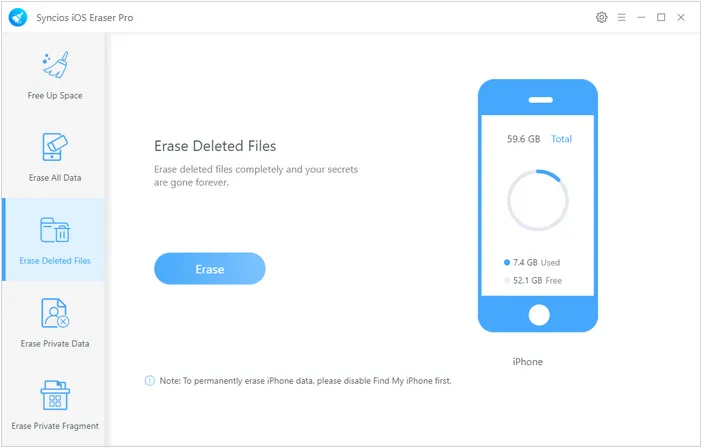
Syncios iOS Eraser Pro is a traditional desktop utility designed to delete personal data and wipe previously deleted files from iOS hardware.
Core Features:
- Offers 5 distinct wiping options: Full Erasure, Private Erasure, Deleted File Wiping, App Cache Cleaning, and Photo Compression.
- Selective preview of deleted text messages, notes, and call history prior to wiping.
Pros & Cons:
- Pros: Flexible selection of file categories; allows custom overwriting passes.
- Cons: The user interface feels dated, and scan times on modern NVMe-based high-capacity iPhones (512GB+) are relatively slow.
Target Audience & Pricing:
Suitable for users running older desktop operating systems seeking detailed file category filtering. Single license starts at $34.95/year.
Alternative 5: Native iOS "Erase All Content and Settings" - Free Cryptographic Reset
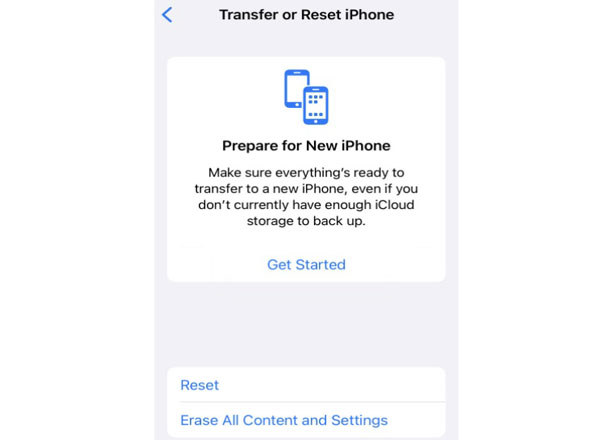
Every modern iPhone running iOS 15 to iOS 27 includes a native hardware reset mechanism located under Settings -> General -> Transfer or Reset iPhone -> Erase All Content and Settings.
Technical Wiping Mechanism:
Apple uses Cryptographic Erasure (Crypto-Shredding) on devices with encrypted APFS file systems and Secure Enclave chips. When triggered, the system instantly destroys the file system's master Effaceable Storage encryption keys. Without these keys, the encrypted data stored on the raw NAND flash chips becomes mathematically unreadable gibberish.
Pros & Cons:
- Pros: Completely free, requires no computer or software installation, completes in under 2 minutes.
- Cons: Does not allow selective file or private fragment cleaning; does not physically overwrite underlying unallocated flash clusters; cannot be customized for auditing compliance (such as DoD multi-pass reporting).
When to Use:
Best for general users giving a modern device to a trusted family member. However, for complete peace of mind or commercial compliance before selling to strangers online, physical sector overwriting via specialized tools like iReaShare iPhone Data Eraser provides an added layer of security.
Part 3. Technical Troubleshooting & Error Code Resolution
During the iOS data erasure process, desktop software must maintain an uninterrupted low-level USB connection with the device's Apple Mobile Device Protocol interface. Below are step-by-step solutions for common operational errors encountered across all iOS erasers.
3.1 Resolving "Device Not Recognized" & AMDS Driver Conflicts
If your eraser software fails to detect the connected iPhone or throws Apple driver errors (e.g., Error 4013 or Error 3194 handling):
- Restart Apple Mobile Device Service (AMDS) on Windows:
Press
Win + R, typeservices.msc, locate Apple Mobile Device Service, right-click and select Restart. - Bypass USB Hub Constraints:
Connect directly to a rear motherboard USB 3.0/USB-C port rather than an unpowered front-panel USB hub or extension dock.
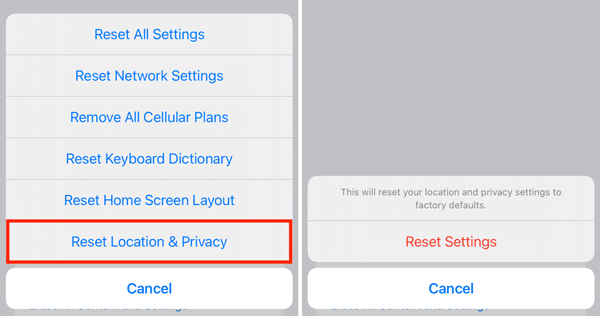
- Fix USB Handshake Trust Loops:
Disconnect the Lightning/USB-C cable. On your iPhone, reset network/location trusts via
Settings -> General -> Transfer or Reset iPhone -> Reset -> Reset Location & Privacy. Reconnect the cable and tap "Trust This Computer" when prompted.
3.2 Fixing Scan Freezes at 98%-99%
If deep scanning for deleted files freezes near completion:
-
Clear Temporary Computer Cache: Close all memory-intensive applications (browsers, video editors) to free up system RAM for database indexing.
-
Disable iTunes/Finder Auto-Sync: Launch iTunes or macOS Finder and ensure "Automatically sync when this iPhone is connected" is unchecked. Concurrent background sync requests can lock SQLite database files.
-
Turn Off Find My iPhone: Go to
Settings -> [Your Name] -> Find My -> Find My iPhoneand toggle it Off before starting a full device erase.
3.3 Cryptographic Shredding vs. Multi-Pass Sector Overwriting
Understanding the distinction between resetting encryption keys and overwriting data:
-
Cryptographic Shredding: Deletes the encryption key mapped to the storage volume. While extremely fast, physical bit blocks still retain raw state until overwritten by future iOS disk activity.
-
Multi-Pass Sector Overwriting (DoD 5220.22-M): Wipes the sector, writes a binary zero, writes a binary one, and writes a random character pass. This ensures physical NAND blocks contain zero residual charge states, guaranteeing absolute unrecoverability regardless of hardware advances.
Part 4. Frequently Asked Questions (FAQs)
Q1: Can data erased by iReaShare iPhone Data Eraser be recovered by police or forensic software?
A: No. When using the High Level setting on iReaShare iPhone Data Eraser, the software executes a multi-pass overwrite compliant with military standards (US DoD 5220.22-M). This overwrites physical storage sectors completely, rendering commercial, open-source, or advanced hardware forensic recovery tools entirely incapable of reconstructing original data.
Q2: Will using an iPhone data eraser software brick or break my device?
A: No. Professional iOS erasing tools only operate on user storage partitions and unallocated memory sectors. They do not corrupt or modify core iOS system firmware files or bootloader code. Once the erasure is complete, your iPhone reboots into the standard "Hello" setup screen, ready for new initialization.
Q3: What is the main difference between Low, Medium, and High erasing levels?
A: Low Level provides a rapid one-pass zero-fill overwrite to save time. Medium Level executes a standard one-pass random character overwrite across all current and deleted files. High Level runs a thorough multi-pass overwrite (DoD standard) for maximum security compliance, taking slightly longer to ensure zero privacy risk.
Q4: Why should I use a third-party eraser instead of the free iTunes / Finder Restore?
A: An iTunes or Finder restore re-installs the operating system, but it does not guarantee that unallocated flash sectors (containing previously deleted photos, messages, and cache remnants) are overwritten. A specialized eraser explicitly targets and overwrites these hidden unallocated space clusters.
Part 5. Final Verdict: Which iPhone Eraser Should You Choose?
While iMyFone Umate Pro remains a capable tool, its slow scanning times, resource-heavy installation footprint, and high annual subscription costs lead many users to seek alternatives.
-
If you need an all-in-one suite with repair and transfer tools and don't mind higher pricing, Dr.Fone is a solid option.
-
If you simply want quick temporary cache management, Tenorshare iCareFone handles basic maintenance well.
-
If you are looking for a fast, lightweight, and cost-effective military-grade overwrite eraser that guarantees 100% unrecoverable privacy protection, iReaShare iPhone Data Eraser is the overall top recommendation for 2026.
Download for Win Download for Mac
Related Articles:
Best iPhone Transfer Software: Top 5 iTunes Alternatives Compared
How to Delete Everything on iPhone Effectively in 4 Ways (Secure Guide)
How to Wipe Android Phone Permanently or Erase All Data Safely
How to Transfer Files from iPhone to Android (New Guide)