TL;DR:
To protect your privacy before selling, trading, or donating an Android phone, you should back up your data and completely wipe the device using one of two methods:
- iReaShare Android Data Eraser: A specialized software that thoroughly overwrites data, making it completely unrecoverable.
- Factory Reset: A built-in setting (Settings > System > Reset) that restores the device to its original state, though it is slightly less secure as it does not overwrite the data.
Pre-sale Checklist: Before parting with your phone, remember to log out of your Google Account, remove your SIM and SD cards, manually transfer unbacked-up files, and physically clean the device.
"How do I officially erase all data and wipe totally clean my Android phone?" This question was asked on Quora. If you also wonder about how to wipe an Android phone before selling or for other reasons, read this tutorial. It is a summary of fully erasing Android phones. Plus, it will tell you what you should do before selling your Android device, ensuring your information security.
Part 1: Why to Wipe Android Phone
As you want to trade, sell, or donate your Android phone, you don't want others to access your private data when using your old phone, especially when it falls into the wrong hands. In other words, wiping an Android phone can protect your personal information from leakage.
Aside from this, people often delete everything from their Android phone because they want to:
- Clear junk and boost speed.
- Resolve software glitches and bugs.
- Remove malware or spyware.
- Declutter the phone and organize it from scratch.
Besides, wiping data means that the data will be removed from your device forever, so it is very difficult or even impossible to recover. If you have important data that you want to keep, please back up your Android data prior to the data erasure.
Part 2: How to Wipe Android Phone via iReaShare Android Data Eraser
So, how can you completely wipe an Android phone? The first option is to use a reliable and expert erasing tool, like iReaShare Android Data Eraser. This software application enables you to delete everything on your phone efficiently, and fully overwrite the deleted data. It can erase all kinds of data, including contacts, call logs, SMS, MMS, photos, videos, songs, accounts, passwords, browser history, bookmarks, apps, etc.
Main features of this data eraser:
- Wipe Android phone completely and no data can be recovered.
- Provides 3 levels of erasing data for you, and the high level can overwrite data 3 times.
- Support the USB connection, which is stable and easy.
- Follow the read-only mode to keep your data safe.
- Support Android devices running Android 6.0 and later.
Download for Win Download for Mac
Here's how to fully erase an Android phone with Android Data Eraser:
Step 1: Install and run iReaShare Android Data Eraser on your computer, and then link your Android phone to the PC with USB.
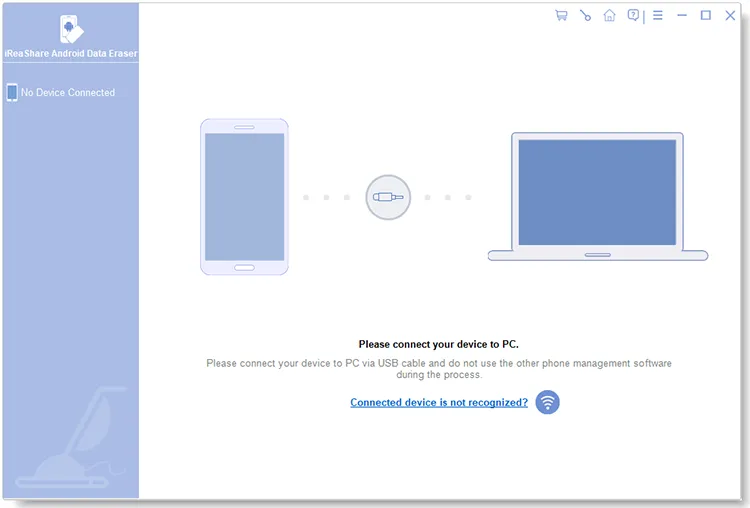
Step 2: Once connected, tap "Erase" to go on. Then click "Medium" to select a level, and type the "delete" word into the blank.
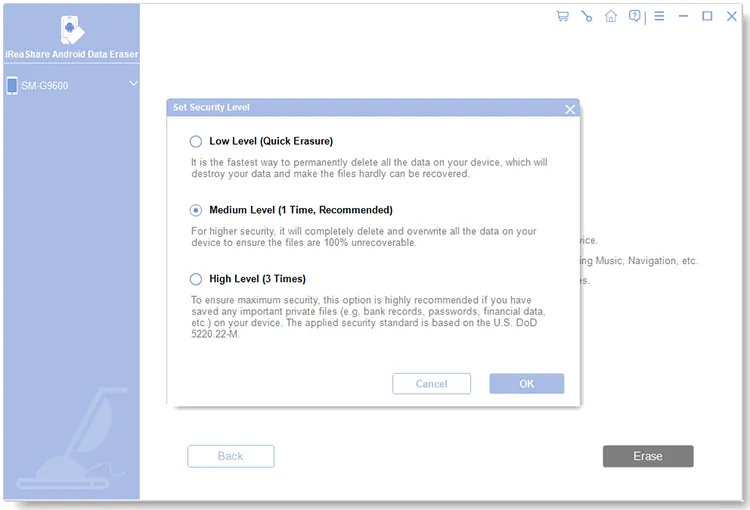
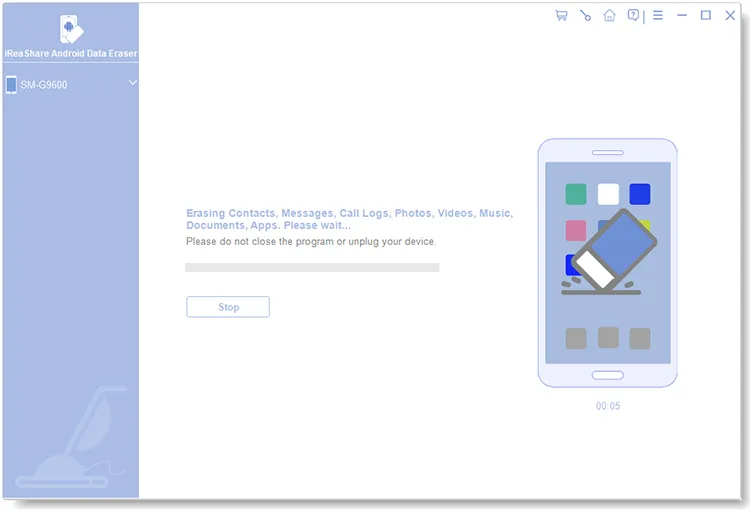
Step 3: At last, click "Erase" > "OK", and tap "Yes" on your Android phone. The process will start. All your Android data will be removed permanently.
Part 3: How to Erase Android Phone via Factory Reset
A factory reset can help you delete everything from an Android phone, and it's difficult to recover your data after resetting your phone. However, the possibility is higher than using a specialized tool because the factory reset cannot overwrite your deleted data. It only wipes all files from a device and restores the device to the factory status.
Here's how to completely wipe an Android phone with a factory reset:
Step 1: Unlock your Android phone and go to the Settings app.
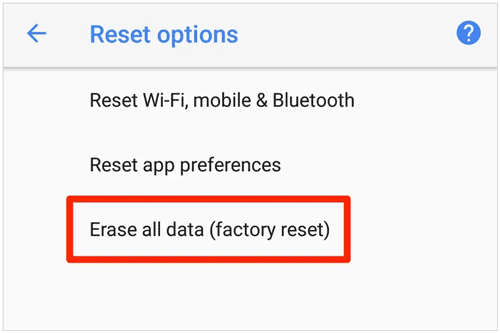
Step 2: Scroll down the screen, and tap "System" > "Reset" > "Erase all data (factory reset)".
Step 3: Enter your passcode to confirm the operation, and hit "Delete all" to begin to clean your Android phone.
Part 4: What Else to Do Before Selling Your Android Phone
In addition to backing up and erasing your data, what should you do before selling your Android phone? You can follow the steps below to check whether you missed something important:
> Make sure your Google Account is removed from your device, and that your device is no longer tied to your account. This phone will not be a trusted device on your list.
> Remove the SIM card and SD card from the phone.
> Transfer your data to your new phone. Please focus on the data that you cannot back up, such as private notes, etc. For these files, you need to transfer them manually, like by copying and pasting them.
> Wipe down the phone with a microfiber cloth to remove any dust, fingerprints, or smudges.
> Check the physical damage on your phone, and improve the appearance within reason.
FAQs About Wiping an Android Phone
Q1: Can data be recovered after a factory reset on Android?
For most modern devices running Android 6.0 or higher, standard recovery is incredibly difficult because of automatic full-disk encryption (scrambling your data so it is unreadable without a security key). A factory reset destroys these keys.
However, because the underlying data blocks aren't instantly overwritten, trace data can sometimes be recovered using advanced digital forensics. If you want 100% certainty before selling, using a specialized tool like iReaShare Android Data Eraser to completely overwrite the storage is the safest bet.
Q2: What happens if I don't remove my Google account before factory resetting?
If you don't manually sign out, Google's Factory Reset Protection (FRP)—a security feature designed to prevent thieves from wiping and using a stolen phone—will trigger. The next person who turns on the phone will be completely locked out unless they enter your exact Google email and password.
To avoid this headache for the buyer, always go to Settings > Accounts and remove your Google and brand accounts before doing a reset.
Q3: Does a factory reset erase everything on my SD card?
Usually, no. A standard factory reset only targets the phone's internal storage, leaving external microSD cards untouched unless you explicitly check a "Format SD Card" option during the process. To keep your private photos and files safe, the best practice is to physically remove both your SIM card and SD card before handing the phone over to a new owner.
Q4: How long does it take to completely wipe an Android phone?
A basic factory reset is relatively quick, generally taking between 5 to 15 minutes depending on your device's speed and how much data you have. However, a deep secure wipe that overwrites the storage multiple times can take 30 minutes to over an hour.
Because a sudden power loss can brick your phone (render it permanently unbootable), ensure your battery is charged to at least 70% or keep it plugged into a charger throughout the process.
Conclusion
Wiping Android phones is not difficult, but you still need functional methods, such as using iReaShare Android Data Eraser and the factory reset. If you want to wipe current and deleted data from your phone, Android Data Eraser will be better than the factory reset. It cleans data more thoroughly than the latter.
Download for Win Download for Mac