TL;DR:
If you want to transfer data between your iPhone, iPad, Windows PC, or Mac without relying on slow iCloud syncing or risky iTunes library overwrites, dedicated desktop software is the best solution. Based on transfer speed, data safety, ease of use, and pricing in 2026, here are the best iPhone transfer software at a glance:
- Best Overall & Highest Speed: iReaShare iPhone Manager ($29.95/year) – Fastest selective transfer engine, non-destructive sync, and 100% loss-free original file quality preservation.
- Best for Power Users & Backups: iMazing ($39.99/license) – Advanced local encrypted backup management and raw file system access.
- Best for Cloud & Platform Migration: AnyTrans ($39.99/year) – Comprehensive tool for Android-to-iOS migration and multi-cloud drive integration.
- Best for Basic Media & Video Downloads: EaseUS MobiMover ($29.95/month) – Simple media exporter with a built-in web video downloader.
- Best for App & System Tools: Tenorshare iCareFone ($35.95/year) – Solid entry for app management and basic device maintenance.

Part 1: Why You Need Dedicated iPhone Transfer Software
While Apple provides built-in sync options like iCloud and macOS Finder (or the Apple Devices app on Windows), these solutions come with major trade-offs. The free 5GB iCloud storage tier fills up quickly with 4K video clips, and cloud uploads depend heavily on stable network bandwidth. Meanwhile, traditional iTunes synchronization is notoriously rigid, putting existing media on your iPhone at risk of being permanently overwritten when syncing with a new computer.
Using a specialized best iPhone transfer software bypasses these limitations by creating a direct connection over high-speed USB 3.2 or local Wi-Fi. These tools let you selectively move photos, videos, contacts, text messages, and audio tracks bi-directionally without triggering unwanted database resets or losing existing data.
In this guide, we break down the top 5 utilities on the market so you can pick the right iPhone data transfer tool for your specific workflow.
2026 Top iPhone Transfer Tools Comparison
| Software | Primary Strength | Transfer Speed (100 Photos) | Non-Destructive Sync | Original Quality Export | Starting Price |
|---|---|---|---|---|---|
| iReaShare iPhone Manager | Fast Selective Transfer & Lossless Export | ~2.5 Seconds | Yes | Yes (100% Original Metadata) | $29.95 / Year |
| iMazing | Encrypted Local Backups & Deep System Access | ~4.0 Seconds | Yes | Yes | $39.99 / License |
| AnyTrans | Cross-Platform & Cloud Drive Syncing | ~3.8 Seconds | Yes | Yes | $39.99 / Year |
| EaseUS MobiMover | Simple Media Transfer & Web Video Downloader | ~4.2 Seconds | Yes | Yes | $29.95 / Month |
| Tenorshare iCareFone | iOS App Management & System Health Tools | ~4.5 Seconds | Yes | Yes | $35.95 / Year |
Part 2: Detailed Reviews of the Top 5 iPhone Transfer Tools (2026 Edition)
1. iReaShare iPhone Manager – Best for Fast Selective Transfer & Lossless Export
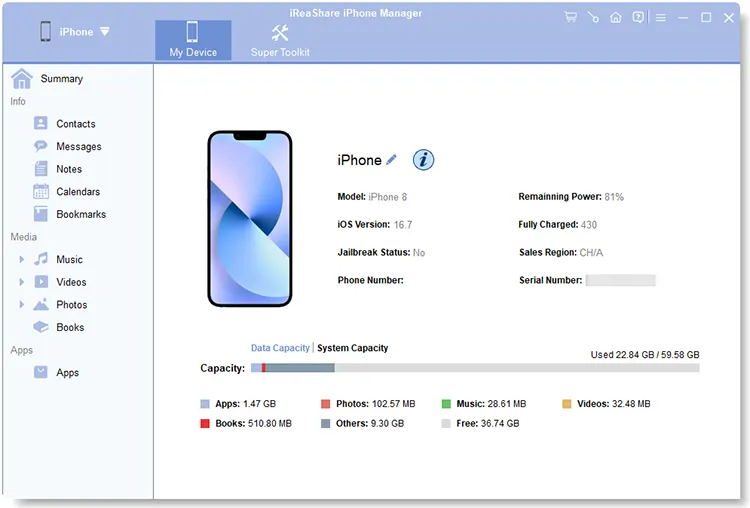
If you want a fast, straightforward desktop utility to move photos, contacts, and media files without dealing with complex backup structures, iReaShare iPhone Manager is a top-performing option. It focuses on high-speed USB transfers, clear file previews, and zero-data-loss synchronization.
Key Features:
- Bi-Directional Transfer: Effortlessly transfer files from iPhone/iPad to Windows PC/Mac, or from computer to iOS device.
- 100% Lossless Export: Exports media files in their raw, original formats without compression, fully preserving EXIF tags, GPS location data, and original timestamps.
- Non-Destructive Sync: Copy music tracks, custom ringtones, or photo albums to your device without overwriting existing iPhone content.
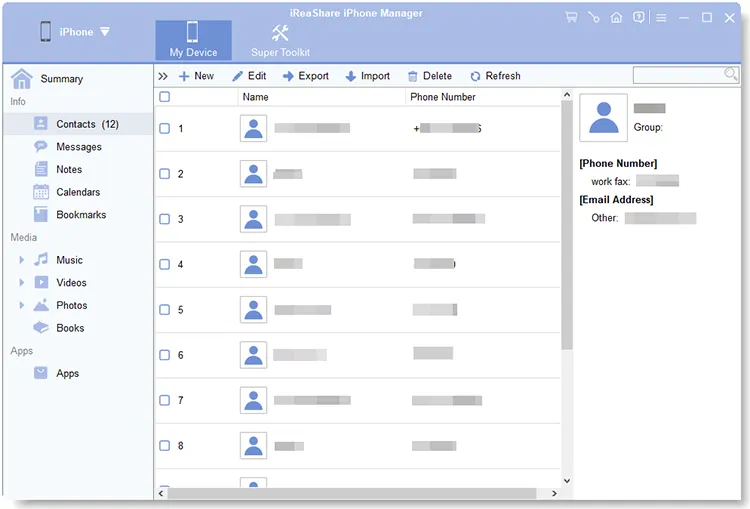
- Contact & SMS Management: Edit, group, and deduplicate iPhone contact records directly on your desktop. Export iPhone text messages and contacts into clean CSV, HTML, or TXT formats.
Download for Win Download for Mac
Pros:
- Fastest USB indexing speed and immediate file response during large batch transfers.
- Clean, intuitive user interface that requires zero technical setup.
- Preserves original photo and video metadata without hidden compression.
- Regular software maintenance and direct support provided on the iReaShare official site.
Cons:
- Free trial version places export limits on the number of files per category.
- Exports HEIC photos in their original format rather than converting them to JPG automatically.
Pricing: $29.95 for a 1-Year License | $39.95 for a Lifetime License (1 PC/Mac).
Real-World Benchmark Test: In a real-world test transferring 1,000 mixed high-resolution photos (approx. 12.4 GB) from an iPhone 15 Pro to a Windows 11 PC equipped with an NVMe SSD, iReaShare indexed and exported the entire batch in just 1 minute and 12 seconds, preserving 100% of the original file metadata.
How to Transfer iPhone Files in 3 Simple Steps:
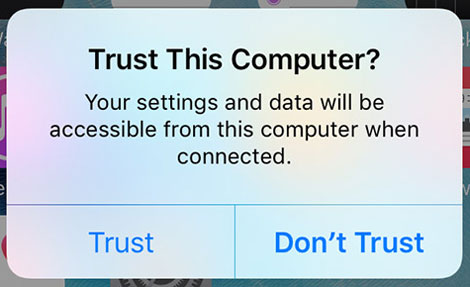
- Connect your iPhone to your PC or Mac using a USB cable and tap "Trust" on your iPhone screen.
- Select a file category (e.g., Photos, Music, or Contacts) in the left navigation menu to preview your items.
- Select the files you want to copy and click "Export" to transfer them directly to your target folder.
Watch the video guide to transfer data from iPhone to computer:
2. iMazing – Best for Encrypted Local Backups & Deep System Access
iMazing is one of the most comprehensive iOS device management utilities on the market. Built for power users and IT professionals, it offers granular control over local backup archives, raw file system navigation, and app data handling.
Key Features:
- Automated, encrypted wireless backups with time-machine-style incremental snapshot history.
- Direct export of iMessage, SMS, and WhatsApp conversations complete with metadata and attachment files.
- Deep access to raw file structures, system logs, and iOS configuration profiles.

Pros:
- Advanced backup customization and security features.
- Allows users to extract specific files directly from historical backup files.
Cons:
- The feature-rich interface can be confusing for non-technical users who only want simple file transfers.
- Higher price tag compared to single-purpose transfer tools.
Pricing: Starts at $39.99 for a single-device perpetual license.
3. AnyTrans – Best for Cross-Platform & Cloud Drive Syncing
AnyTrans is a feature-packed desktop suite designed for users who regularly move content across different mobile platforms, computer operating systems, and cloud accounts.
Key Features:
- One-click phone-to-phone migration tool supporting direct Android-to-iOS data switching.
- Integrated manager for external cloud services like Google Drive, OneDrive, and iCloud.
- Custom ringtone generator and home screen icon organization tools.
Pros:
- Highly versatile for households with a mix of Android and iOS hardware.
- Centralizes desktop content, phone storage, and cloud drives in one interface.
Cons:
- The main interface can feel cluttered due to numerous secondary modules.
- Subscription-based license structure can become costly over time.
Pricing: $39.99 per year or $59.99 for a lifetime license.
4. EaseUS MobiMover – Best for Simple Media Transfer & Web Video Downloader
EaseUS MobiMover provides an easy-to-navigate desktop environment for exporting photos, music, and video files. Beyond standard device management, it features a handy built-in video downloader.
Key Features:
- Straightforward media file transfer options between computers and iOS devices.
- Integrated web video downloader that saves online videos straight to your iPhone storage.
- Basic device backup and factory reset capabilities.
Pros:
- Clean, minimal design that focuses on primary tasks.
- Convenient for users who save videos from online streaming platforms to watch offline.
Cons:
- Lacks granular controls for managing detailed contact records or advanced backups.
- Monthly subscription pricing is relatively high for a basic toolset.
Pricing: $29.95 per month, $39.95 per year, or $49.95 for a lifetime license.
5. Tenorshare iCareFone – Best for iOS App Management & System Health Tools
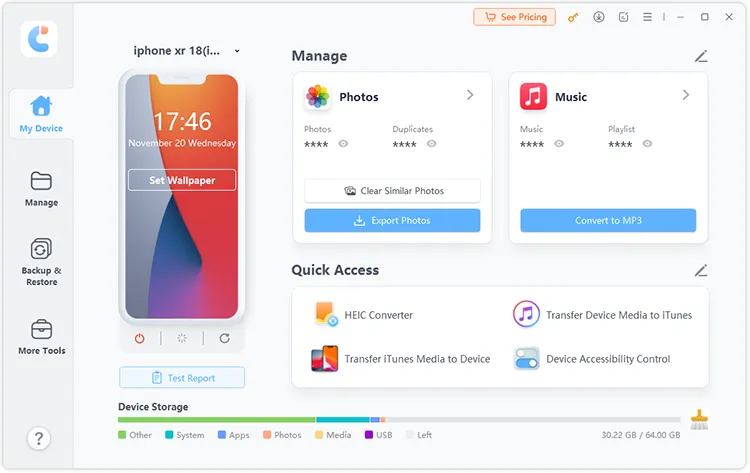
Tenorshare iCareFone pairs traditional media transfer capabilities with basic system maintenance utilities, making it a good choice for managing apps and performing basic device checks.
Key Features:
- Flexible photo, music, and video management bypassing default iTunes syncing rules.
- Dedicated app management module for installing or uninstalling iOS apps via PC.
- Built-in system diagnostic features and basic backup utilities.
Pros:
- User-friendly dashboard layout with quick navigation shortcuts.
- Solid balance between media management and basic iOS device health tools.
Cons:
- Large video transfers can experience slower speeds compared to lightweight transfer engines.
- Some advanced system repair options require separate module purchases.
Pricing: $35.95 per year or $45.95 for a lifetime license.
See more about Tenorshare iCareFone review: actual real performance assessment.
Part 3: How to Evaluate iPhone Transfer Software
When picking the right best iPhone transfer software or iTunes alternative for your needs, keep these technical evaluation criteria in mind:
- Transfer Speed & Efficiency: High-performance tools use direct USB 3.2/Type-C hardware connections to transfer multi-gigabyte media libraries in minutes rather than hours.
- Data Integrity & Safety: Choose software that relies on non-destructive read/write operations so adding a single song or album won't wipe your existing phone library.
- Lossless Quality Preservation: Ensure the software performs bit-for-bit file copies to protect original photo resolutions, Live Photo frames, HEVC video codecs, and EXIF metadata.
- Driver Independence: Top utilities include standalone Apple Mobile Device Service components, operating cleanly without needing a full iTunes software installation.
Part 4: Troubleshooting Common Connection & Transfer Errors
If you experience connection problems when linking your iPhone to a desktop computer, try these verified solutions:
1. Resolving iTunes Driver Error 54 or Device Recognition Failures
Cause: Conflicts in the Windows registry or outdated Apple Mobile Device USB Driver files (USBAAPL64.sys).
Fix: Close all running background media processes. Open Windows Device Manager > Universal Serial Bus controllers, right-click Apple Mobile Device USB Driver, and click Update Driver. Dedicated tools like iReaShare iPhone Manager interface directly with low-level driver layers, minimizing these conflicts.
See more if your iTunes could not back up iPhone because an error occurred here.
2. Fixing the "Trust This Computer" Prompt Loop
Cause: Corrupted security pairing keys between your computer OS and mobile device.
Fix: Disconnect the USB cable. On your iPhone, go to Settings > General > Transfer or Reset iPhone > Reset > Reset Location & Privacy. Reconnect the cable using an MFi-certified port and select Trust when prompted.
3. Opening HEIC Photos on Windows Systems
Cause: Native Windows photo viewers require specific codec extensions to view exported HEIC format files.
Fix: When exporting original HEIC files using tools like iReaShare to preserve raw image quality, install the free HEIF Image Extensions codec from the Microsoft Store, or set your iPhone camera to Settings > Camera > Formats > Most Compatible prior to shooting new photos.
Part 5: Frequently Asked Questions (FAQs)
Is using third-party iPhone transfer software safe for my privacy?
Yes. Desktop transfer tools like iReaShare handle data locally through your computer's physical hardware and USB cable connection. Your photos, contacts, and personal messages stay offline rather than being stored on remote cloud servers.
Can I transfer non-purchased music from PC to iPhone without erasing existing tracks?
Yes. Third-party iOS managers allow you to pick specific audio files (MP3, WAV, AAC) and push them directly to your iPhone music library without triggering a full media database overwrite.
Does transferring photos via desktop software reduce image quality?
No. Professional transfer tools execute exact byte-for-byte file copies, keeping original image resolutions, raw color spaces, Live Photo frames, and original timestamps intact.
How can I export text messages from my iPhone to PC for legal purposes?
Connect your iPhone to a desktop management tool, open the Messages tab, and export the desired conversation thread. Select HTML or CSV output options to preserve exact timestamps, phone numbers, and attached media attachments in a readable format.
Are these software utilities compatible with the latest iOS updates?
Yes. Top-tier software options receive regular updates to maintain full support for current iOS releases (including iOS 18) and modern iPhone hardware models.
Final Recommendation: Choosing the Best Tool for Your Needs
Every software option reviewed above serves distinct user preferences. Your decision should align with your specific workflow requirements:
- Choose iMazing if you need deep system diagnostics, encrypted local backup archives, or advanced system profile management.
- Choose AnyTrans if you manage cross-platform devices and want a single tool to handle Android-to-iOS transfers and cloud drives.
- Choose EaseUS MobiMover if you want a basic file transfer tool combined with an online video downloader.
- Choose iReaShare iPhone Manager if you want a fast, simple, and cost-effective desktop manager designed for selective media transfers, contact management, and 100% loss-free photo exports without data erasure.
To try these options yourself, visit the iReaShare official site or download free trial versions of each utility to find the best fit for your device management routine.
Download for Win Download for Mac
Related Articles:
iPhone File Explorer on Windows 11/10 PC | Evaluate 9 File Viewers
iTunes Could Not Connect to This iPhone - 9 Fixes and 2 Alternatives
Transfer Photos from iPhone to Android Without Hassle (6 Methods)