


"I am selling my phone and need a piece of software to erase the data permanently. I don't know which one is effective. So many eraser apps I found. If there is a free one, that would be ideal."
- From Reddit
When it is time to sell, donate, or recycle an Android device, you can factory reset your device. However, many people think highly of privacy, so they don't think a factory reset is enough. If you think so as well, you may need sophisticated Android data eraser software. This article is a comprehensive look at the 8 eraser apps for Android, helping you select the best one.

Take a quick look at these 8 Android data eraser apps:
| User Needs | Recommended Tools | Main Benefit |
|---|---|---|
| Users selling their phones who need a complete and military-grade wipe via PC. | iReaShare Android Data Eraser | Ensures 100% unrecoverable data erasure using deep overwriting standards. |
| Non-technical users looking for an all-in-one, easy-to-use desktop suite. | Dr.Fone - Data Eraser | Provides a simple "one-click" interface to wipe private social media and app data. |
| Users who need to specifically target "invisible" or hidden data residues. | TunesBro DroidWiper | Highly effective at scanning and destroying fragments left behind by standard deletes. |
| Privacy-conscious users who want to "shred" specific files directly on their device. | Shreddit - Data Eraser | Implements desktop-grade shredding patterns (like NIST 800-88) in a mobile app. |
| Users who have already deleted files and want to ensure the "free space" is sanitized. | Secure Eraser (By Mobile Safe) | Efficiently overwrites empty storage sectors to prevent forensic recovery of old files. |
| Power users wanting to stop data collection by removing pre-installed bloatware. | Universal Android Debloater (GUI) | Increases privacy and performance by removing system-level tracking without root. |
| Users looking for a quick, mobile-native way to clean specific categories (SMS/Logs). | Android Data Eraser App | Offers a convenient, selective cleaning process directly from the smartphone. |
| Advanced users seeking a lightweight, high-security tool with multiple wipe patterns. | SDelete | Provides professional-grade file shredding with support for both internal and SD storage. |
No. 1 iReaShare Android Data Eraser
iReaShare Android Data Eraser stands out for its high-level security standards. It is designed to wipe everything, from contacts and messages to private fragments of app data, passwords, searching history, etc. The tool uses a military-grade overwriting algorithm (the U.S. DoD 5220.22-M), ensuring that once the data is gone, it is unrecoverable by any known forensic tool.
Main features of iReaShare Android Data Eraser:
* Supports three security levels (Low, Medium, High).
* Uses the US DoD 5220.22-M standard.
* Wipes existing and previously deleted data.
* Covers private fragments like keyboard history and app logs.
* Wide compatibility (ranging from Android 6 to the latest).
Pros:
+ Extremely thorough.
+ The read-only mode ensures no data is leaked during the process.
+ Supports a wide range of brands (Samsung, Pixel, Xiaomi, Motorola, Vivo, OPPO, Tecno, etc).
+ Simple interface suitable for non-technical users.
+ No ads when using.
Cons:
- Requires a PC connection (not standalone mobile).
- Full erase only (no strong selective deletion flexibility).
- Paid software for full functionality.
Download iReaShare Android Data Eraser.
Download for Win Download for Mac
Here's how to use this Android data eraser:
-
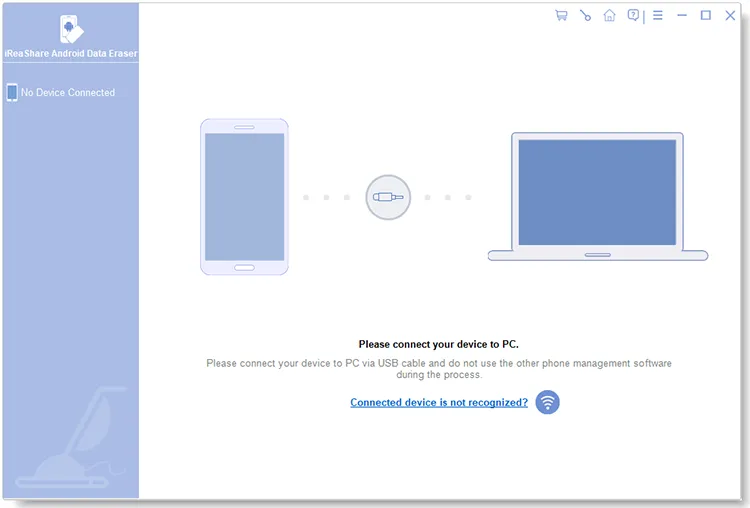
Install the Android data eraser software on your computer. Then launch it and connect your Android device to the computer with a USB cable.
-
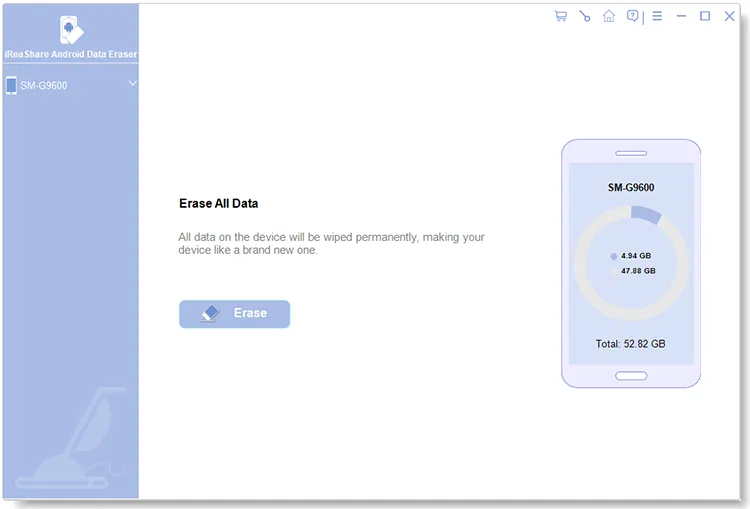
It will guide you to enable the USB debugging mode on your mobile device. Once done, the connection will be completed. Then click "Erase" to go on.
-
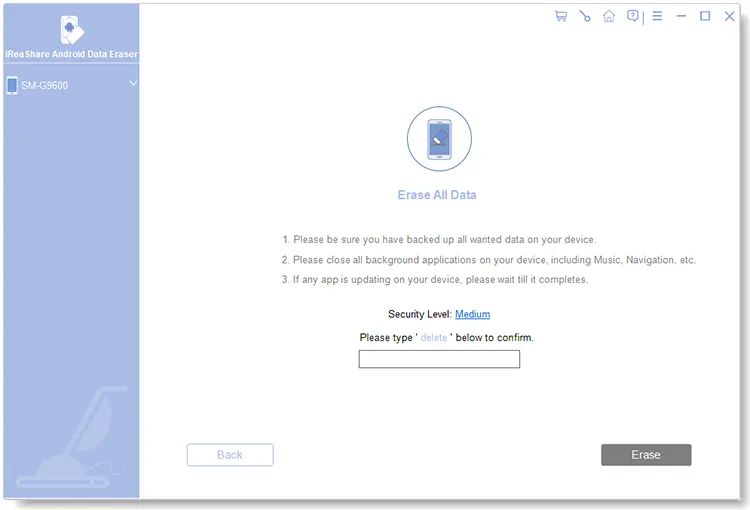
Tap "Medium" to select a security level, and then type "delete" into the box. Next, click "Erase" at the bottom and click "OK" for confirmation. The software will erase your device data thoroughly.
Here's the video guide for erasing Android data permanently:
Tips: If you fail to erase Android data when using the Android Data Eraser, don't worry, you can fix it with this guide.
No. 2 Dr.Fone - Data Eraser
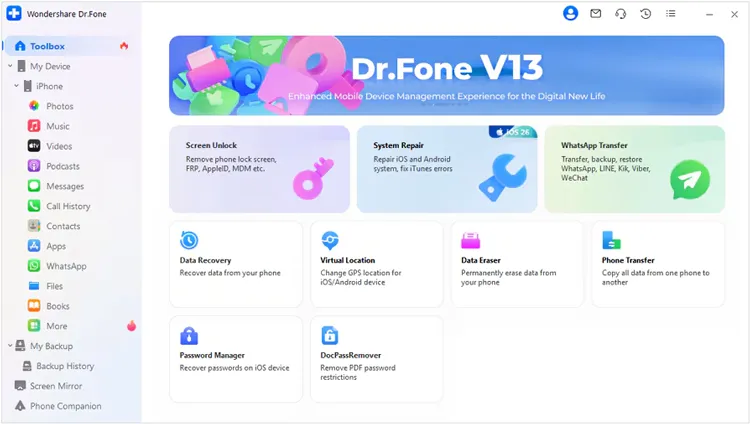
Dr.Fone - Data Eraser is part of the well-known Dr.Fone toolkit, widely recognized for mobile device management. This phone eraser provides a reliable way to permanently erase data, including contacts, messages, photos, and app data. It is particularly useful for users looking for an all-in-one solution, as it integrates seamlessly with other features like data recovery and system repair.
Main features:
* Permanent deletion with military-grade wiping.
* Prevents recovery by any forensic software.
* Supports almost all Android versions.
Pros:
+ Professional-grade tool with compliance reporting.
+ Supports resale workflows (proof of erasure).
+ Integrates well with other Dr.Fone repair and backup tools.
Cons:
- Pricing is per-module (can be expensive).
- Some advanced features skew toward iOS.
- Requires installation on a computer.
No. 3 TunesBro DroidWiper
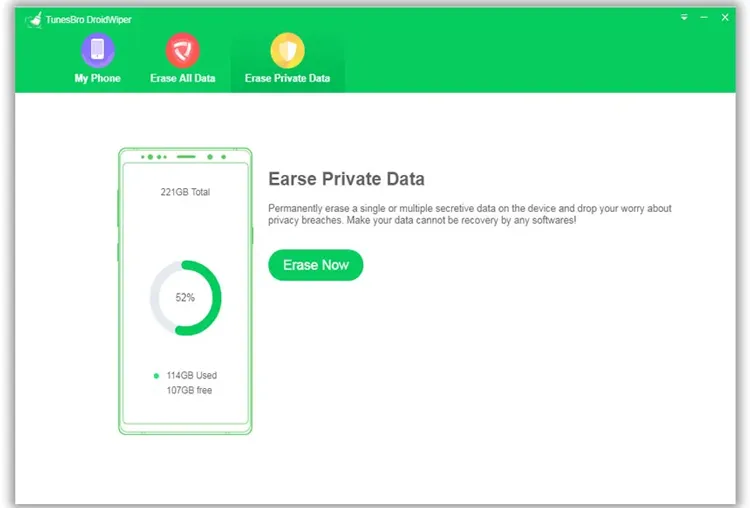
TunesBro DroidWiper specializes in deep-cleaning internal memory and SD cards. It features three different erasing levels, allowing users to choose the intensity of the overwrite process. It is highly effective at destroying "invisible" data leftovers that standard resets miss.
Main features:
* Three wiping modes (Erase All, Erase Private, Erase App Data).
* Supports 45+ file types.
* Allows data preview before the final wipe.
Pros:
+ Provides the simple "one-click erase" workflow.
+ Effective for resale preparation.
+ Affordable compared to competitors.
+ Excellent at clearing social media history.
Cons:
- The interface feels a bit dated.
- Occasional compatibility issues with newer flagship firmware.
- Paid license required.
No. 4 Shreddit - Data Eraser
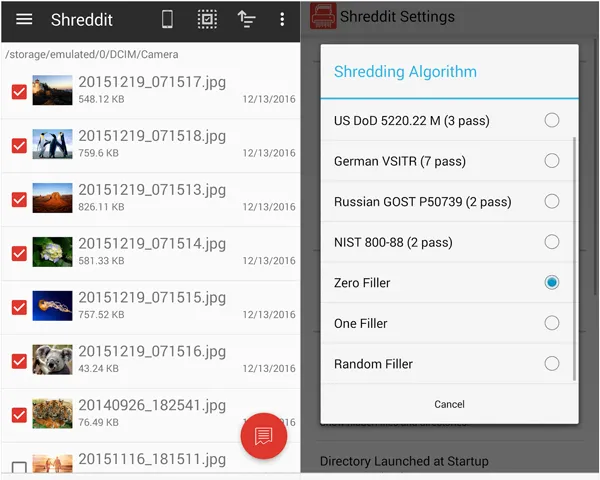
For those who prefer a mobile-first approach, Shreddit is an Android phone eraser app that implements data shredding patterns. It works by overwriting the empty space on your device, effectively "shredding" any files you previously deleted. It is a quick and efficient way to sanitize your storage on the go.
Main features:
* On-device file shredding (no PC needed).
* Implements British HMG IS5, US DoD 5220.22, and NIST 800-88 standards.
* Integrates with built-in file managers on Android.
* Offers empty space shredding.
Pros:
+ Operates directly on the device without a PC.
+ Zero background services (saves battery).
+ Convenient for quick file deletion.
+ Free to use.
Cons:
- Thumbnail previews can sometimes remain in the gallery after wiping (requires a media rescan).
- Security effectiveness depends on Android storage behavior.
- Less reliable than PC-based tools.
No. 5 Secure Eraser (By Mobile Safe)
Secure Eraser by Mobile Safe provides a balance between simplicity and effectiveness. It allows users to erase call logs, SMS, browsing history, and other personal data with ease. Its intuitive interface and quick processing make it suitable for users who want a no-frills solution for routine data cleanup.
Main features:
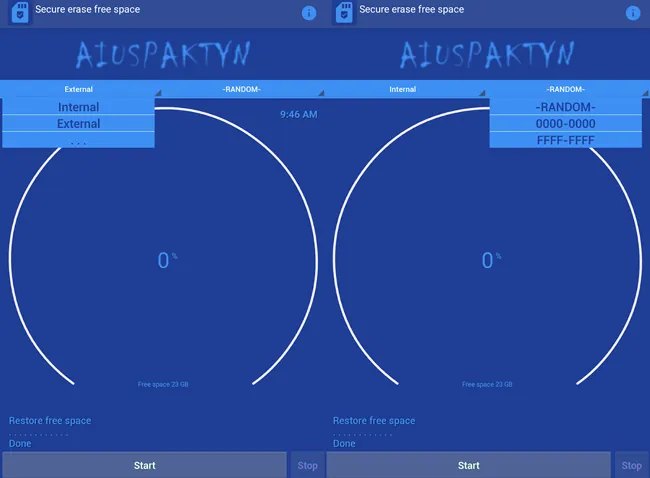
* Overwrites using Random Fill, Zero Fill, or F Fill.
* Specifically optimized for SSD/Flash storage health.
* Adheres to NIST SP 800-88 guidelines.
Pros:
+ Low system permissions required.
+ Effective for users who have already deleted files normally and want to ensure they stay gone.
+ Good for everyday privacy protection.
Cons:
- Primarily targets free space rather than existing system data.
- Not suitable for full device sanitization.
- Effectiveness varies across devices.
No. 6 Universal Android Debloater (GUI)
While primarily known for removing unwanted "bloatware" installed by manufacturers, this open-source tool is vital for privacy. By removing system-level tracking apps and unnecessary packages, it reduces the amount of data your phone collects in the first place, serving as a proactive erasure tool.
Main features:
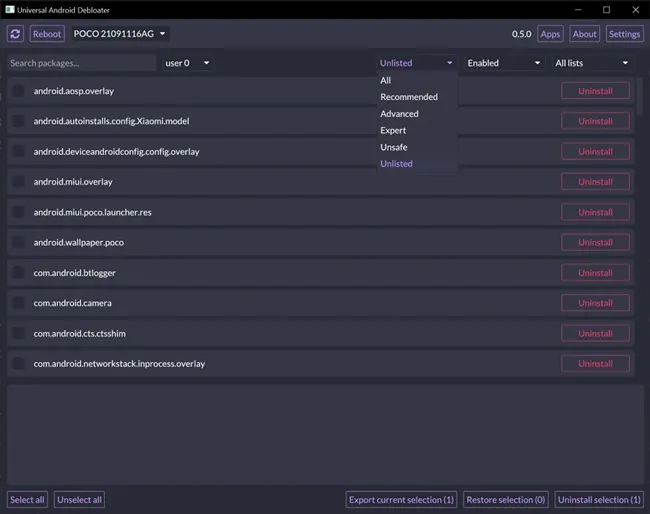
* Removes pre-installed system apps (bloatware).
* Based on open-source Rust-based code.
* Categorizes apps by "Recommended" or "Expert" risk levels.
* Improves privacy by limiting background data collection.
Pros:
+ No root required.
+ Significantly improves battery and privacy.
+ Completely free and transparent.
Cons:
- Not a traditional "file eraser" - it removes apps rather than shredding files.
- Risk of bootlooping if an essential system package is removed.
- Requires technical knowledge (ADB usage)
No. 7 Android Data Eraser App
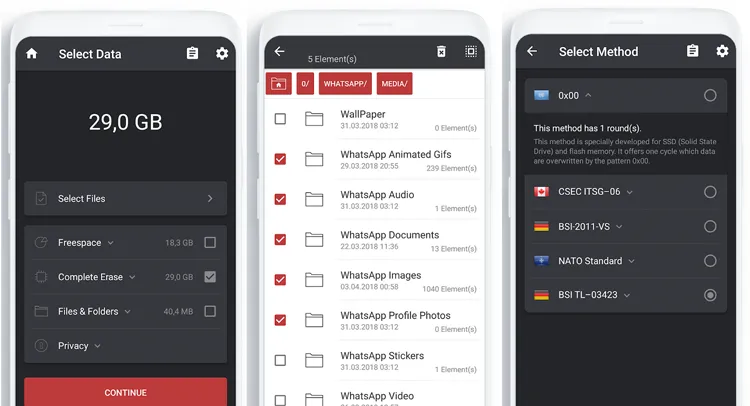
Android Data Eraser App, developed by cb innovations, is a versatile utility often found on the Play Store that focuses on specific file categories. It allows users to selectively wipe call logs, SMS, or specific folders with permanent deletion protocols. It is ideal for users who want to clean their phones without losing their entire OS configuration.
Main features:
* Overwrites storage blocks, making data recovery nearly impossible.
* Wipe free space without erasing existing files.
* Generates a report (erasure certificate) after the process.
* No root required.
Pros:
+ The interface is clean.
+ Follows strict European privacy principles.
+ Supports a wide range of Android versions and works on both internal storage and compatible SD cards.
Cons:
- The free version has a daily data limit (roughly 10MB per day for specific files).
- Requires the screen to stay on to continue the erasure process.
- Using high-security algorithms is CPU-intensive and can take a long time to complete on large drives.
No. 8 SDelete
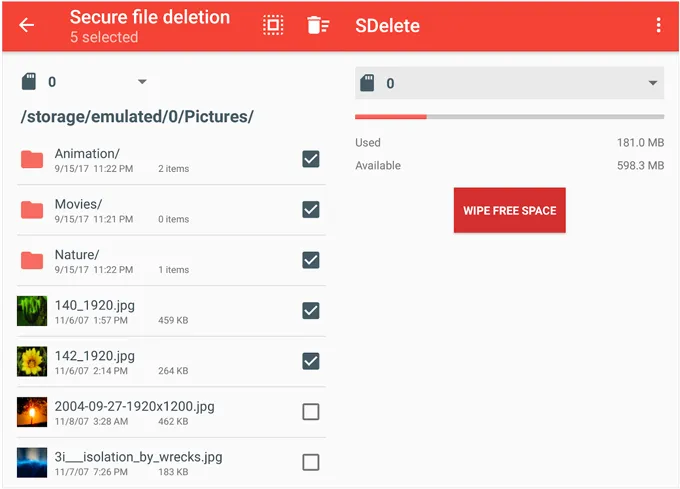
Inspired by the classic Windows utility, SDelete for Android is a command-line-style tool for power users. It follows Department of Defense (DoD) standards for secure file deletion. While it has a steeper learning curve, it offers some of the most mathematically secure erasure methods available.
Main features:
* Multiple shredding patterns.
* Automatic thumbnail deletion.
* Supports internal and SD card storage.
* The "Scrap" mode can erase content but leave the empty file.
Pros:
+ Very advanced security patterns.
+ Allows for the shredding of multiple folders simultaneously.
+ Supports the latest Android versions.
Cons:
- Can be slow on large storage volumes.
- Users have reported occasional crashes during "Free Space" wiping on certain hardware.
- Command-line usage (not beginner-friendly)
Conclusion
Choosing the right Android data eraser tool depends on your specific needs, technical expertise, and security requirements. For complete and professional-grade wiping, tools like iReaShare Android Data Eraser stands out. It can overwrite all the deleted data efficiently. Meanwhile, apps like Shreddit and Secure Eraser offer convenient on-device solutions for everyday use. Hope that you could find a suitable tool from this Android data eraser review.
Download for Win Download for Mac
Related Articles
How to Back Up Android Phone Before Factory Reset (No Data Loss)
How to Erase SanDisk SD Card: Remove All Data Permanently
How to Clear iPad to Sell Step by Step (4 Methods for Data Erasure)
How to Factory Reset Android Phones Readily | A Complete Tutorial