


"Hi, I'm new to Mac and wanted to transfer some .m4a files to my mom's phone. But she uses a Samsung. I tried using Android File Transfer, but it didn't recognise the device. Are there faster ways? Any advice would be appreciated. Thanks."
- From Reddit
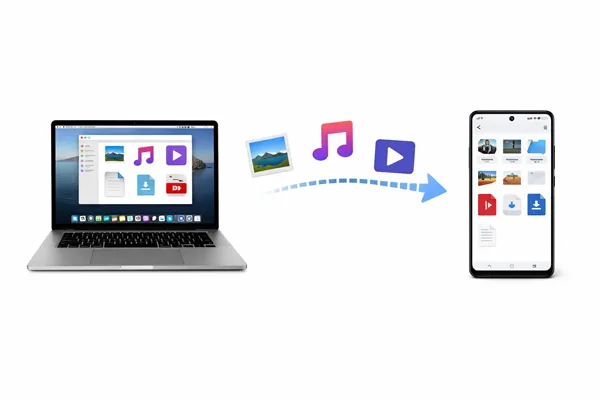
It isn't always as seamless as within the Apple ecosystem when you transfer files from Mac to Android, but there are several reliable tools and methods available. Continue to read this guide, and you will get 5 effective solutions to move your files with ease.
- Part 1: Transfer Files from Mac to Android via iReaShare Android Manager
- Part 2: Transfer Files from MacBook to Android via OpenMTP
- Part 3: Transfer Data from MacBook to Android via AirDroid
- Part 4: Move Files from Mac to Android Phone via Google Drive
- Part 5: Transfer Files from Mac to Android via Smart Switch (Samsung Only)
- Part 6: Q&A About Mac to Android File Transfer
Compare these 5 methods:
| Method | Pros | Cons |
|---|---|---|
| iReaShare Android Manager | 1. Comprehensive suite (SMS, photos, contacts, videos, etc). 2. Allows preview and selection. 3. Supports bi-directional transmission. 4. Compatible with most Android devices. |
1. Requires a paid license. 2. Not open-source. |
| OpenMTP | 1. Open-source and free. 2. Stable dual-pane interface. 3. Handles large batches well. |
1. Potential connection conflicts with other MTP tools. 2. Lacks Finder integration. |
| NearDrop | 1. Wireless convenience. 2. Utilizes native Quick Share protocol. 3. No cables. |
1. Dependent on Wi-Fi stability. 2. Slower for very large files. |
| Google Drive | 1. No software/hardware requirements. 2. Works cross-platform seamlessly. |
1. Limited by cloud storage quota. 2. Requires internet. 3. Slower for massive data. |
| Samsung Smart Switch | 1. Full device backups. 2. Official support for Samsung ecosystem. |
1. Exclusive to Samsung devices. 2. Can be "overkill" for simple file transfers. |
Part 1: Transfer Files from Mac to Android via iReaShare Android Manager
iReaShare Android Manager is a dedicated desktop application designed to handle data management for Android devices. It can help you transfer files from Mac to Android and vice versa. You can manage your Android data on your MacBook, such as editing contacts, sending text messages, installing/uninstalling apps, etc.
Main features of iReaShare Android Manager:
* Mac to Android file transfer is available.
* Transfer photos, videos, music, documents, and more, from Mac to Android with original formats and quality.
* Back up Android data to Mac at one go.
* Restore backup data from a computer to Android without data loss.
* Support the read-only mode, and no ads.
* Compatible with Android 6.0 and higher.
Download iReaShare Android Manager.
Download for Mac Download for Win
To transfer files from Mac to Android via iReaShare Android Manager:
-
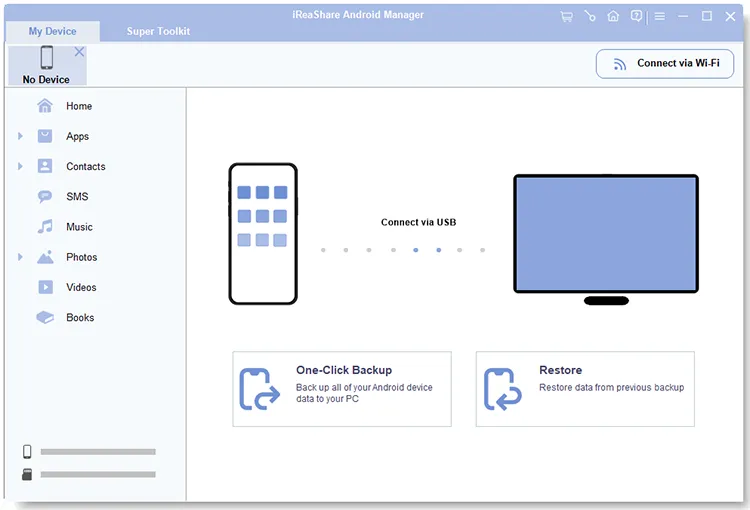
Install and launch the software on your Mac. Then connect your Android phone to Mac via a USB cable and enable USB debugging.
-
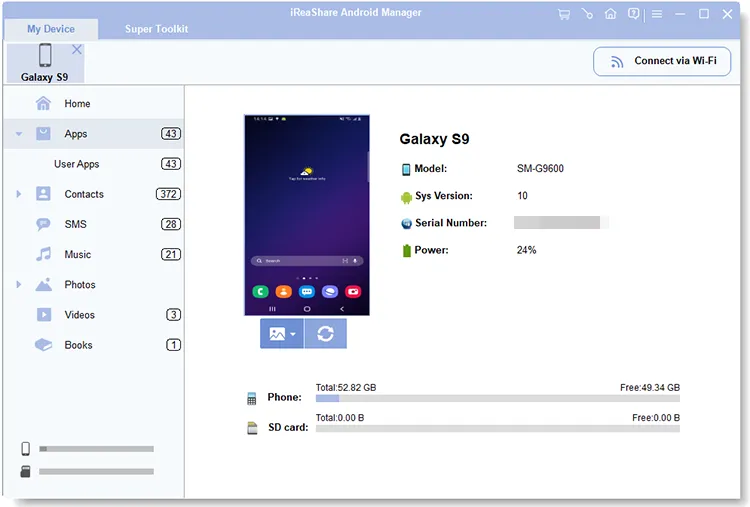
Once recognized, the software will display your device's information and data.
-
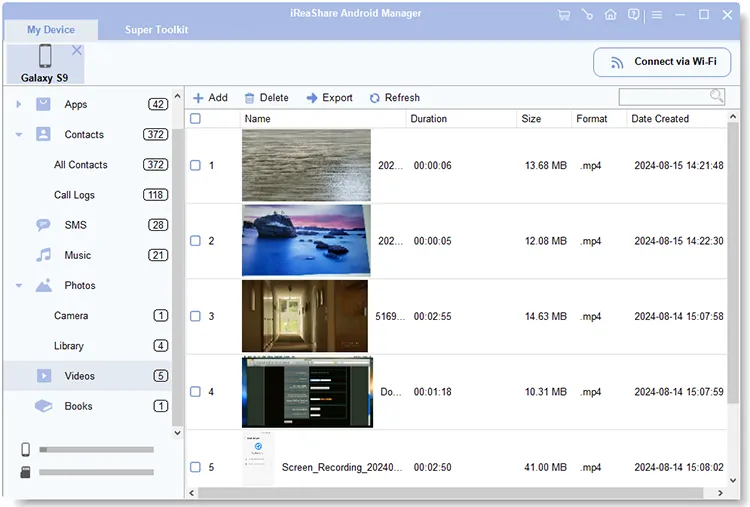
Choose a category, and click "Add" or "Import" to select files from your MacBook. Then import them to your Android device.
Part 2: Transfer Files from MacBook to Android via OpenMTP
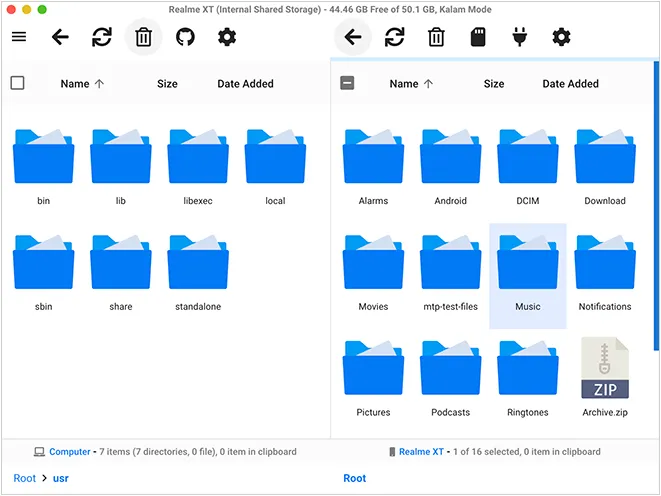
OpenMTP is an open-source, high-performance file transfer tool specifically built for macOS users to manage Android devices. You can use it to drag and drop files between Mac and Android devices without effort.
Start MacBook file transfer for Android with OpenMTP:
-
Download and open the OpenMTP app on your Mac. Then grant permissions.
-
Plug in your Android phone to Mac with USB. OpenMTP provides a dual-pane interface similar to a file explorer.
-
You can now drag and drop files from your Mac directly into the Android directory.
Part 3: Transfer Data from MacBook to Android via AirDroid
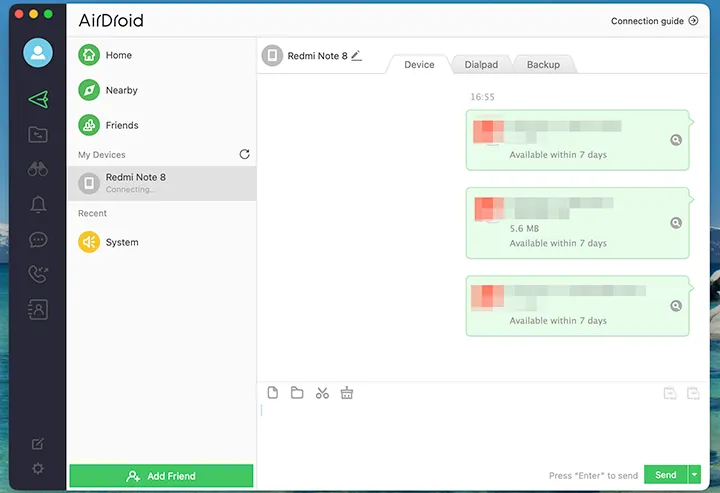
AirDroid is a robust solution if you want a wireless file transfer for your MacBook and Android phone. When both your devices are using the same Wi-Fi network, you can transfer unlimited files without any restrictions.
Here's the guide:
-
Download and install the AirDroid Personal app from the Google Play Store on your Android device.
-
Create an AirDroid account and sign in with the same account on both your Mac and your Android device. This links them together.
-
Launch the AirDroid desktop client on your Mac. In the desktop interface, choose your Android device. Click the "Folder" icon to select your files from Mac, and then send the files to your Android phone.
Part 4: Move Files from Mac to Android Phone via Google Drive
You can also use cloud storage to sync your files from Mac to Android. One useful tool is Google Drive, which provides 15 GB of free cloud storage space. If your files are over 15 GB, you can transfer them in two batches or more.
To transfer files from MacBook to Android via Google Drive:
-
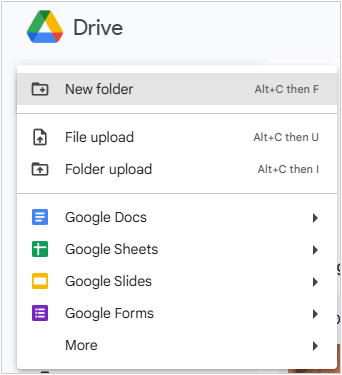
Open your web browser on your Mac and go to drive.google.com. Then upload the desired files to your Google Account.
-
Open the Google Drive app on your Android device, and log in to the same account.
-
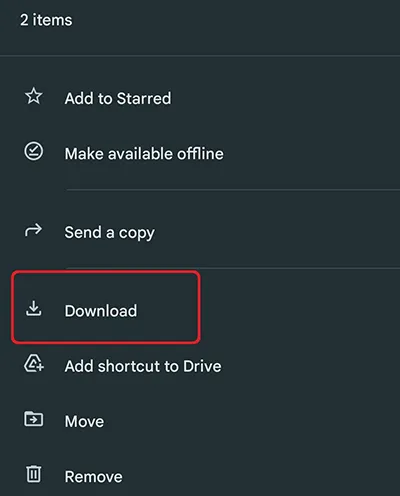
Locate the files, tap the three-dot menu next to them, and select "Download" to save them to your local Android storage.
Part 5: Transfer Files from Mac to Android via Smart Switch (Samsung Only)
If you use a Samsung Android phone, you can use Smart Switch to complete the MacBook file transfer for Android. The latest version of Smart Switch enables you to browse your Android folders and files on your computer, and transfer files with drag and drop.
Here are the steps:
-
Open Smart Switch on your Samsung phone. If you have uninstalled it, please reinstall the app from Samsung App Store.
-
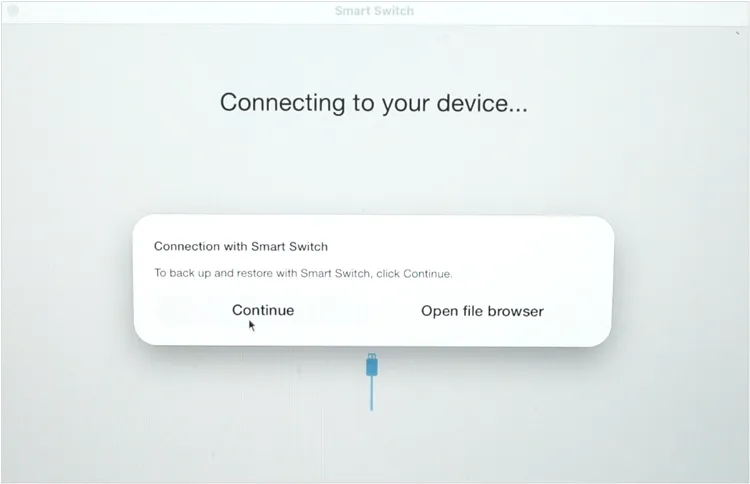
Download and install Samsung Smart Switch on your MacBook. Open it, and restart your Mac. Then connect your phone to Mac with a USB cable, and click "Allow" on the pop-up window.
-
Allow the Mac to access your phone data. Then choose "Open file browser", and drag and drop files from your Mac to a folder of your mobile phone.
Part 6: Q&A About Mac to Android File Transfer
Q1: Can I use AirDrop and Quick Share to send files from Mac to Android?
Yes, you can now transfer files between a Mac and certain Android devices using the native AirDrop protocol, thanks to a recent collaboration between Apple's ecosystem and Google's Quick Share. The supported Android devices include the Google Pixel 10 series and Samsung Galaxy S26 series, and OPPO Find X9 series will join in the future.
Q2: Is MacDroid free to use?
MacDroid follows a "freemium" model, meaning it has a free version with specific limitations. You can use MacDroid for free, but it only allows one-way transfers - from your Android device to your Mac. You cannot send files from your Mac to your Android device, nor can you edit Android files directly on the device using Mac apps.
Q3: Does Apple or Android roll out an alternative to Android File Transfer?
Google has not released an official replacement for the old "Android File Transfer" app for macOS. The classic utility has been officially discontinued, and Google has shifted its focus away from maintaining a dedicated desktop client for macOS, prioritizing wireless sharing methods like Quick Share and cloud-based solutions instead.
Conclusion
While transferring files from Mac to Android may not be as straightforward as within a single ecosystem, there are multiple reliable solutions available. You can directly use the comprehensive tool - iReaShare Android Manager, to transfer files between your Mac and Android devices. It also has practical features for data management. Besides, you can utilize free cloud storage space to sync files between devices wirelessly.
Evaluate your needs - frequency of transfer, file size, and hardware compatibility - to choose the tool that works best for your setup.
Download for Mac Download for Win
Related Articles
Solve Notes Not Syncing Between iPhone and Mac in 9 Ways
How to Back Up iPhone to Mac Without Data Loss (Proven)
How to Transfer Videos from Android to Mac in 5 Ways
Guide: AirDrop iPhone to Android Easily and 4 Alternatives