


"How do I transfer videos from my phone to my MacBook? It's such a pain. I connect my Android phone to my Mac via USB, but it doesn't work. Then I installed Android File Transfer, but it often fail to transfer large files via drag and drop. Anyone have recommendations?"
- From Reddit
Moving videos from the open ecosystem of Android to the sleek, closed environment of macOS can feel like trying to bridge two different worlds. Since Mac computers don't natively mount Android devices as external drives, you need specific tools to bridge the gap. Whether you like USB or wireless transfer, you can easily transfer videos from Android to Mac after reading this guide. Let's get started.
Take a quick look at these 5 methods:
| Method | Pros | Cons |
|---|---|---|
| 1. iReaShare Android Manager | 1. Visual interface. 2. Allows video previews. 3. Very stable for large batches. 4. Back up all videos to Mac at once. 5. USB and Wi-Fi connections are supported. |
1. Requires a license for full use. 2. Requires installing an app on Android for connection. |
| 2. OpenMTP | 1. Completely free and open-source. 2. High-speed data transfer. |
1. Basic user interface. 2. Requires a physical USB connection. |
| 3. Google Drive | 1. Wireless; accessible anywhere. 2. Provides a cloud backup copy. |
1. Slow for large 4K videos. 2. Limited free storage space (15GB). |
| 4. Link to Windows | 1. Syncs automatically in the background. 2. Good for Microsoft users. |
1. Difficult setup on macOS. 2. Requires a Microsoft/OneDrive account. |
| 5. LocalSend | 1. Fastest wireless method; works like AirDrop. 2. No internet data used. |
1. Both devices must stay on the same Wi-Fi. 2. Apps must be active. |
Part 1: How to Transfer Videos from Android to Mac via USB
USB transfers are the gold standard for large video files. They offer the highest speeds and the most stable connection, which is essential if you are moving 4K or high-frame-rate content.
1.1 Using iReaShare Android Manager
iReaShare Android Manager is a professional-grade tool designed specifically for users who want a structured way to manage their phone's data. Unlike basic file browsers, it categorizes your content, making it easy to find specific video albums. Then you can easily select and transfer your videos from your Android device to your Mac with original quality and formats.
Main features of iReaShare Android Manager:
* Easily transfer videos from Android to Mac via USB or Wi-Fi (USB transfer are more stable).
* Export other files from Android to Mac like photos, music, documents, and more.
* Back up Android contacts, text messages, call logs, apps, and media files to a computer at once.
* Allow you to manage your Android files on Mac, like deleting photos and videos, editing contacts, replying to SMS, etc.
* Support Android 6.0 or later and almost all Android devices, such as Samsung, OnePlus, Motorola, TCL, Google, Tecno, realme, OPPO, Xiaomi, etc.
Download iReaShare Android Manager.
Download for Mac Download for Win
Here's how to transfer videos from Android to Mac with this software via USB:
-
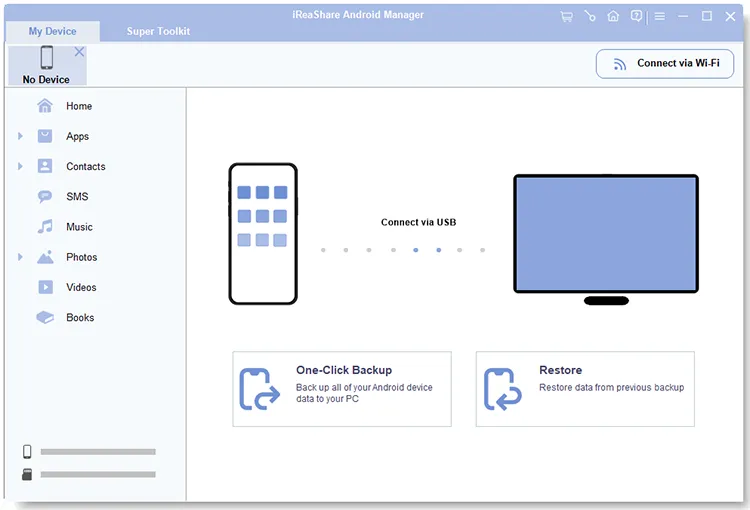
Install the iReaShare Android Manager software on your Mac and connect your Android via USB. If use want to transfer videos via Wi-Fi, please ensure both devices use the same network.
-
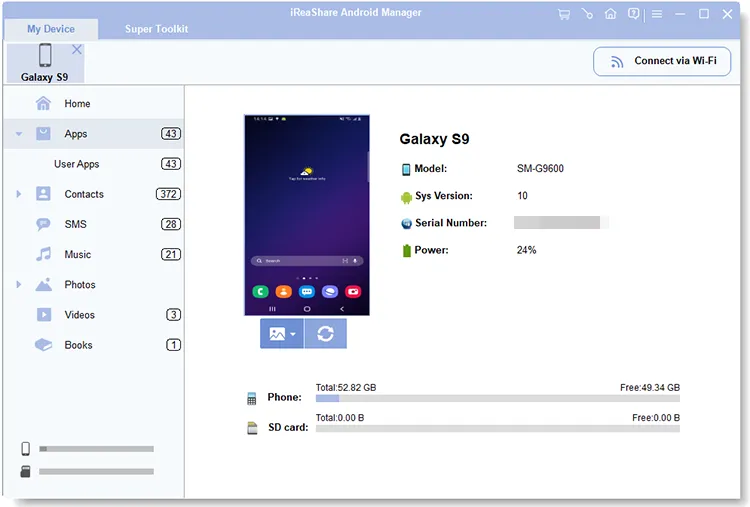
Enable USB debugging on Android. Then the software will recognize your phone quickly. Now, choose "Videos".
-
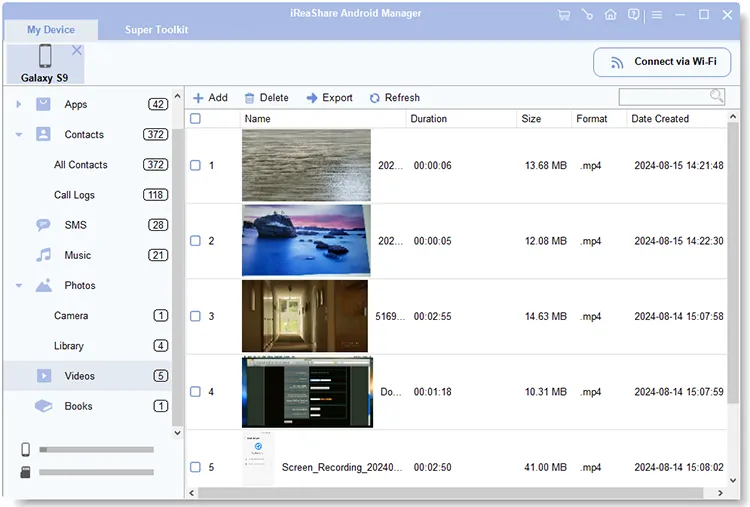
Preview and select your videos on the interface, and click "Export" to save them to your Mac computer.
1.2 Using OpenMTP
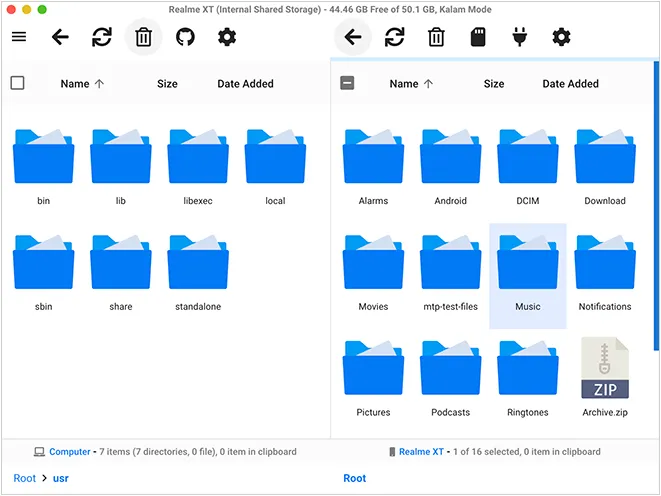
If you find the official "Android File Transfer" app from Google to be buggy or prone to crashing, OpenMTP is the best open-source alternative. It provides a reliable, dual-pane interface, so you can easily drag and drop your videos from Android to Mac or vice versa.
Here's how to use OpenMTP to transfer videos from Android to Mac via USB:
-
Download and install OpenMTP on your MacBook, and then connect your Android phone to the Mac via USB. Then choose "File transfer" for the USB setting.
-
Open the app on the computer. Your Android folders and files are on the right side, and the Mac folders on the left.
-
Now, navigate to your Android videos on the Mac, and drag and drop them to a Mac folder.
Part 2: How to Transfer Videos from Android to Mac Without USB
If you don't have a cable handy or only need to move a few clips, wireless methods are incredibly convenient.
2.1 Using Google Drive
Since almost every Android user has a Google account, Google Drive is the most accessible method. You can utilize the 15GB of free storage space to sync your videos between both devices.
To transfer videos from Android to Mac via Google Drive:
-
Install and open Google Drive on your Android device. Then log in to your Google Account.
-
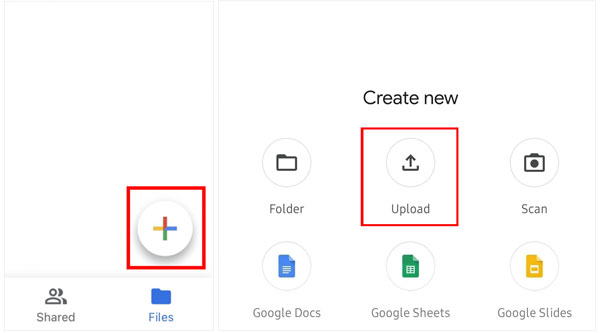
Tap "+" > "Upload" to select and upload your videos from your Android phone to the account.
-
Once done, access the web of Google Drive on your Mac, and sign in with the same Google Account. Then you will see your uploaded videos. You can download them to your Mac and then delete them from Google Drive.
2.2 Using OneDrive
Even though you cannot use Phone Link to transfer your videos from Android to Mac wirelessly, Microsoft's OneDrive can work for you. In case you run out of your Google Cloud storage, OneDrive will be a great alternative.
Here's how:
-
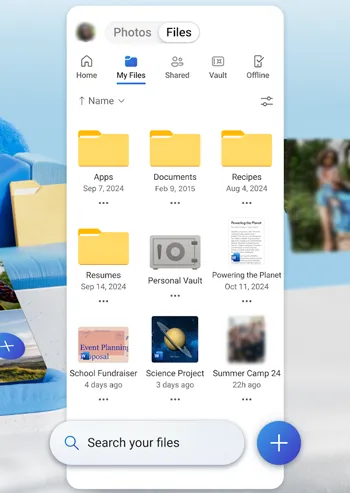
Install and open OneDrive on your Android phone. Then sign in with your Microsoft account. If you don't have one, please sign up.
-
Then click the "Plus" icon to opt for your desired videos from your mobile phone. After uploading your Android videos to OneDrive, please open the Safari browser on your Mac.
-
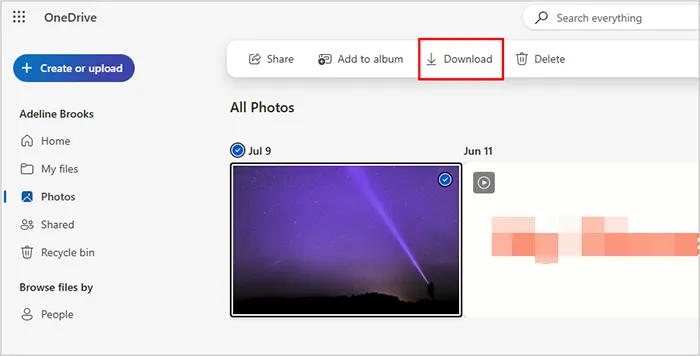
Log in to the same account. Then you will see your Android videos. Finally, download them if needed.
2.3 Using LocalSend
LocalSend is a rising star in the cross-platform community. It is an open-source tool that allows devices to share files over a local Wi-Fi network without using the cloud.
To use LocalSend to move videos from Android to Mac without a cable:
-
Install LocalSend on both your Android and your Mac. As long as they are on the same Wi-Fi, the devices will "see" each other.
-
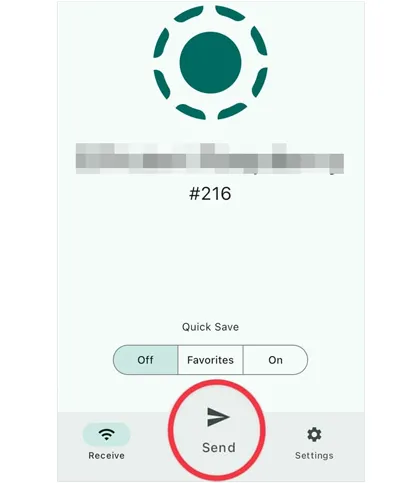
On the Android phone, click "Send" in the app. Then select "Media" and choose your videos.
-
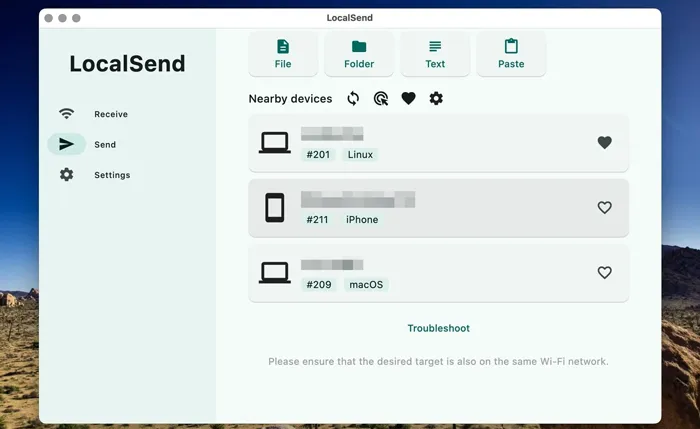
On Mac, click "Receive". There will be a notification asking to accept the incoming files. Please click "Accept" or "Approve".
Part 3: Q&A About Transferring Videos from Android to Mac
Q1: Can I transfer files from Android to Mac via Android File Transfer?
Yes, you can. Android File Transfer is the official free tool provided by Google. However, it hasn't been updated significantly in years and often fails to recognize newer Android versions or the latest macOS updates. If it works for you, it's a simple solution; if it doesn't, iReaShare Android Manager and OpenMTP is the recommended fix.
Q2: What is the best method to transfer videos or other large files from Android to Mac?
For large files (over 2GB), a USB connection (using iReaShare or OpenMTP) is the best method. Wireless transfers can be interrupted by Wi-Fi fluctuations, and cloud services may take a long time to upload and then download the same file.
Q3: Will the videos lose resolution when I send them from Android to Mac?
- USB/LocalSend: No. These methods move the "raw" file, so the quality remains identical.
- Google Drive: No, provided you download the file rather than just viewing the preview.
- Messaging Apps (WhatsApp/Telegram): Yes. Most messaging apps compress videos significantly unless you send them specifically as "Documents".
Conclusion
The "best" way to move your videos depends entirely on your situation. If you are a professional editor dealing with large 4K files, a USB connection with iReaShare Android Manager and OpenMTP is your most reliable bet. If you want to manage your Android files on Mac, the former will be more suitable. For wireless transfer, you can use the cloud storage of your accounts of Google and OneDrive, or leverage LocalSend.
Download for Mac Download for Win
Related Articles
How to Sync Android with Mac in 5 Effective Ways (Latest)
How to Move Videos to SD Card from Android: 5 Solutions
iPhone Won't Send Pictures to Android: Solve It with Ease
How to Transfer Videos from PC to Android in 7 Wired or Wireless Ways