TL;DR:
Want to make Elmo say something funny? Try these 7 best Elmo voice generator tools to turn text into playful character-style audio for memes, videos, and voice messages. Compare free options, voice quality, and features to find your favorite. We recommend TopMediai Text to Speech for its extensive AI voice library, customizable speech, and multilingual support.

TopMediai AI Music, Video & Voice Studio


If you're a fan of Elmo from Sesame Street or simply love making funny memes and entertaining videos, an Elmo voice generator is definitely worth a try! Imagine making Elmo say your favorite catchphrases, sending hilarious voice messages to friends, or creating playful audio to share with your family. With an Elmo voice generator, you can turn your own text into an Elmo-style voice without recording everything yourself. Sounds fun, right? Keep reading to discover the 7 best Elmo AI voice generators and find out how to create your own Elmo-inspired audio in just a few simple steps.
Part 1. 7 Best Elmo Voice Generators
If you are looking for a free Elmo voice generator online, here are seven tools to consider.
1. TopMediai Text to Speech
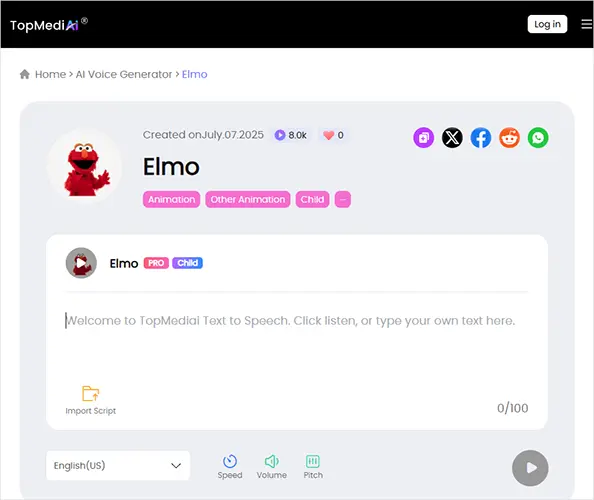
TopMediai Text to Speech is an online AI voice generator designed to convert written scripts into speech. If you're looking for an Elmo AI voice generator, you can use its dedicated Elmo voice model to turn text into audio. Simply enter or paste your script, adjust the speaking speed, volume, and pitch, and preview the generated voice to create fun, character-style audio for memes, videos, storytelling, and entertainment.
In addition, the tool offers a broader library of AI voices and supports multiple languages and accents. It's a convenient option for creators who want to experiment with Elmo-style speech without installing any software.
Key Features:
- Offer 3,200+ AI voices with a wide range of tones, speaking styles, and character-like vocal qualities.
- Support 190+ languages and accents, including English, Mandarin, Cantonese, and Taiwanese Mandarin.
- Allow users to adjust pitch and speaking speed to create a higher-pitched, playful voice for Elmo-inspired content.
- Convert text into spoken audio directly in the browser by simply typing or pasting a script.
- Provide voice previews so users can listen to samples before choosing a voice for their projects.
- Use AI voice cloning to create a personalized replica of your own voice.
How to Use TopMediai Text to Speech:
-
Visit the TopMediai Elmo voice page and open the text-to-speech tool.
-
Type or paste your script into the text box, then adjust the available settings, such as speaking speed, pitch, and volume, to create a playful, cartoon-like voice.
-
Generate the audio and listen to the result. If needed, revise your text or voice settings and try again. Download the audio if the option is available for your account, then use it in your videos, memes, or other creative projects.
- Offer diverse AI voices for cartoon-style and expressive narration.
- Provide pitch and speed controls for playful Elmo-inspired content.
- Support multiple languages and accents.
- Work online without desktop installation.
- Include AI voice cloning for personalized audio.
- No guaranteed official Elmo voice or exact character match.
- May require trial and error to find the right voice.
- Some features and downloads require a paid plan.
- Free usage is limited; check commercial-use permissions.
- Voice cloning does not grant rights to imitate copyrighted characters or use others' voices.
2. Fish Audio
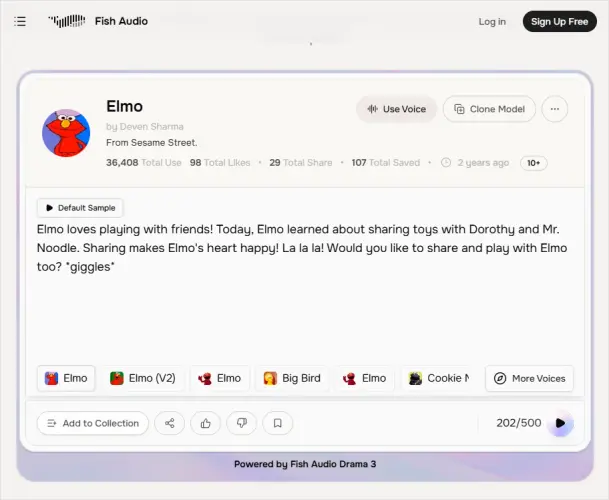
Fish Audio's Elmo AI Voice Generator is an online AI text-to-speech tool featuring a dedicated Elmo voice model inspired by the character from Sesame Street. It allows users to enter text and generate speech in Elmo's playful, high-pitched, cheerful character style. Users can try the voice with a sample, then open the advanced playground to adjust settings such as speed, pitch, and emotion, as well as download audio in MP3 or WAV format where available. It's suitable for creating entertaining voice clips, memes, character dialogue, and creative videos.
Key Features:
- Dedicated Elmo-inspired voice model.
- AI text-to-speech from custom scripts.
- Playful, cheerful, high-pitched voice style.
- Free demo for testing voice quality.
- Adjustable speed, pitch, and emotion.
- MP3 and WAV downloads, subject to account limits.
- Multilingual text support, depending on model performance.
- Dedicated Elmo voice model.
- Browser-based, with no software installation required.
- Preview voices before generating longer scripts.
- Customizable speech for more expressive results.
- Suitable for memes, short videos, and character dialogue.
- Usage limits and advanced features may require a subscription.
- Voice similarity may vary across scripts.
- Pronunciation and quality depend on the text and language.
- Download access and commercial-use rights may vary.
- Commercial projects should consider copyright and licensing restrictions.
3. Magic Hour
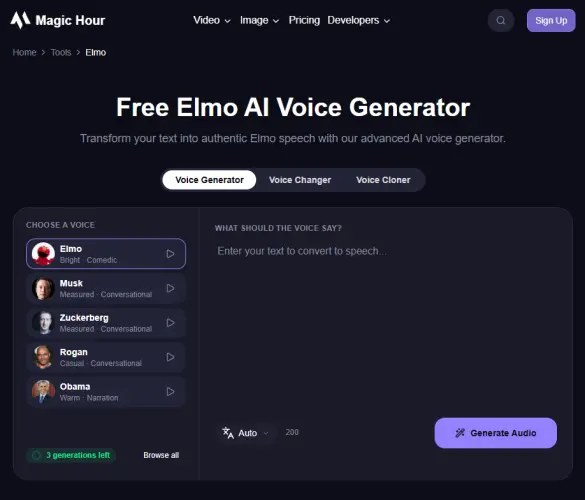
Magic Hour provides a dedicated Elmo AI voice generator page, making it a relevant option for people who want to create character-inspired audio without searching through a large general-purpose voice library.
You can start by opening the page, entering a short line of dialogue, and generating a preview. This approach is particularly convenient for creating short meme clips, funny messages, and voiceovers for social media videos.
Key Features:
- Dedicated Elmo Bright · Comedic voice preset.
- Text-to-speech generation from custom scripts.
- Browser-based access with no installation required.
- 400+ preset voices across 10 languages on the broader platform.
- Adjustable speech speed and voice style where available.
- Audio generation and downloads in supported formats.
- Up to three free generations daily; paid plans offer extra credits and premium features.
- Dedicated Elmo-style voice for character-themed audio.
- Simple workflow: enter text, generate, and preview.
- Free daily generations for testing.
- Large voice library for exploring different styles.
- Suitable for memes, short videos, greetings, and creative projects.
- Limited free usage; frequent use may require payment.
- Voice similarity and pronunciation may vary.
- Fewer customization options than specialized voice tools.
- Commercial use requires an eligible paid purchase and compliance with applicable rights.
- Copyright and licensing restrictions may apply to Elmo-inspired content.
4. FakeYou
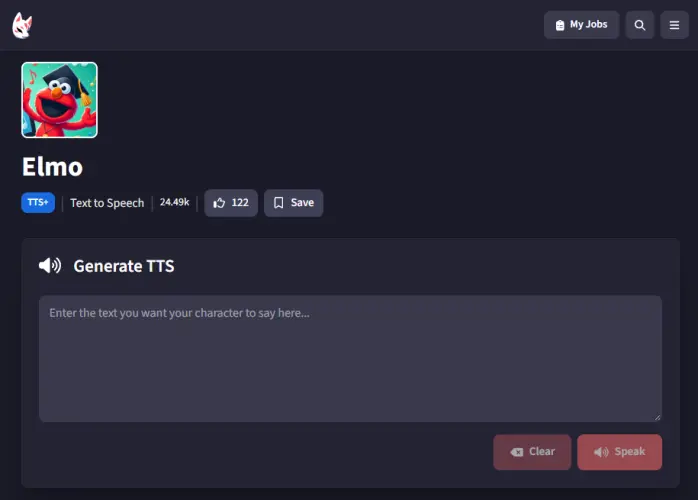
FakeYou is a community-based AI text-to-speech tool that allows users to generate speech using available character voice models and other voice models on the platform. It offers a dedicated Elmo voice model that Users can use to create playful character dialogue, funny voice clips, memes, and entertaining videos. FakeYou allows users to enter text, generate audio, and preview or download the results. Since its voice models are contributed by the community, the audio quality and availability of individual models may vary.
Key Features:
- Dedicated Elmo voice model for character-style speech.
- Text-to-speech conversion from custom scripts.
- Browser-based access with no installation required.
- Audio preview and download options, depending on access.
- Community voice library with thousands of character voices.
- Free basic generation with possible usage limits.
- Dedicated Elmo model for character-themed audio.
- Simple process: select a voice, enter text, and generate.
- Wide selection of cartoon and character voices.
- Suitable for memes, short videos, and funny dialogue.
- Work online without software installation.
- Voice output may not perfectly match Elmo's original voice.
- Audio quality and pronunciation vary by model.
- Generation speed and access may depend on server demand and account status.
- Some features may require a paid plan.
- Commercial use may require additional permissions.
5. NiceVoice
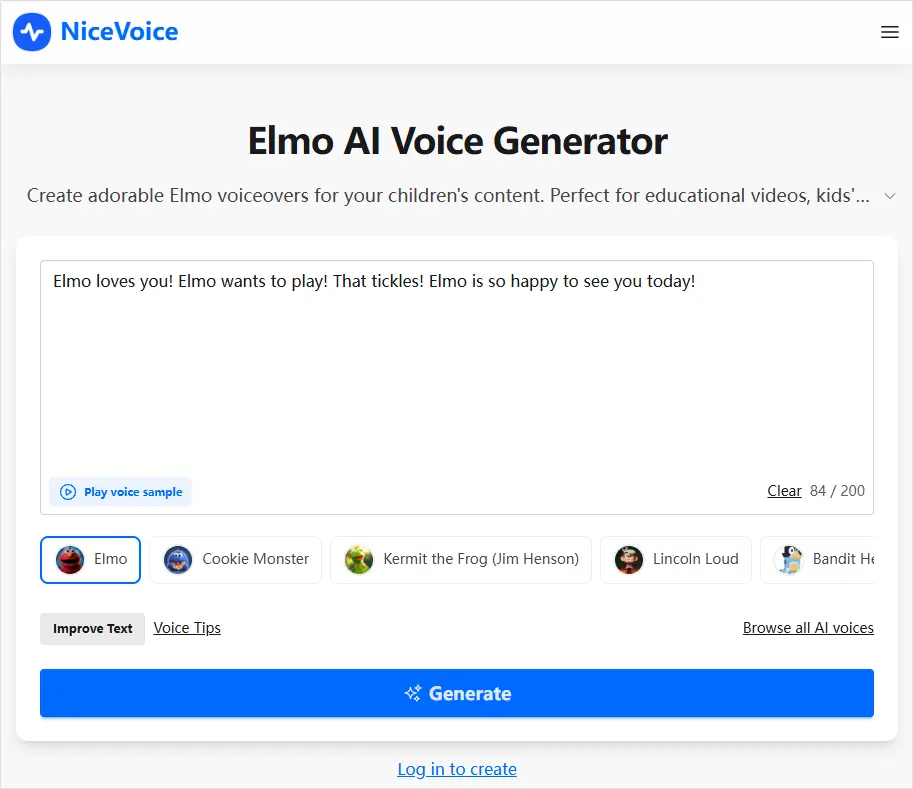
NiceVoice offers a dedicated page for generating Elmo-style speech online. For users who want to create short character dialogue without installing a desktop application, a voice-specific webpage can provide a convenient starting point.
To try it, open the Elmo generator page and follow the available instructions to enter your text and create a voice sample. Listen to the result before using it in a video or sharing it with others.
Key Features:
- A dedicated Elmo voice generator webpage.
- A browser-based workflow for experimenting with character speech.
- Text-driven audio generation, subject to the current page's functionality.
- A potential option for short-form content, memes, and playful voice messages.
- Dedicated Elmo voice generator for easy access.
- Simple, beginner-friendly workflow.
- Work online without installation.
- Free access for testing voice generation.
- Suitable for short clips, memes, and creative projects.
- Voice may not closely match Elmo's original sound.
- The free plan has daily and text-length limits.
- Advanced features may require payment.
- Voice quality and pronunciation may vary.
- Commercial use may require checking character rights and usage terms.
6. Komiko
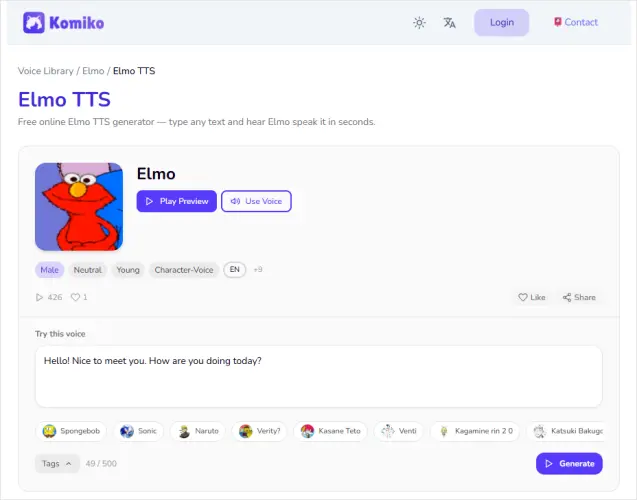
Komiko Elmo TTS is an online AI text-to-speech tool that converts written text into Elmo-style speech. It features a high-pitched, cheerful character voice and lets users preview the voice, enter custom dialogue, generate audio, and download the result in WAV format. It supports multiple languages, including English, Chinese, Japanese, and Korean, making it suitable for short videos, memes, fan dubs, character dialogue, and other creative projects.
Key Features:
- Dedicated Elmo-style text-to-speech voice.
- Custom script generation with voice preview.
- Support English, Chinese, Japanese, and Korean.
- WAV downloads for creative projects.
- Browser-based access with Komiko AI tools integration.
- Easy to generate Elmo-style voice clips.
- Preview audio before use.
- Support multiple languages and WAV downloads.
- No manual voice recording required.
- May not perfectly match Elmo's original voice.
- Pronunciation and audio quality may vary.
- Credits or usage limits may apply.
- Commercial use may be subject to character rights and platform terms.
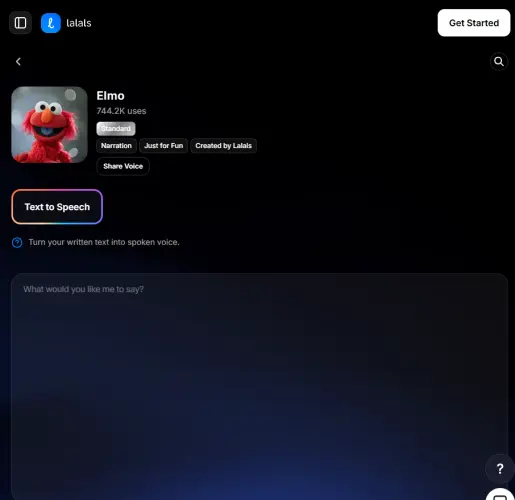
7. Lalals
Lalals is another option to explore if you are specifically searching for an Elmo AI voice generator. Its dedicated Elmo text-to-speech page makes it easier to investigate character-inspired speech generation without first navigating a general-purpose voice catalog.
The platform may suit users who want to create short audio lines for memes, social videos, or humorous character exchanges. As with other AI voice tools, the actual result depends on the voice model and the options currently available.
Key Features:
- A dedicated Elmo text-to-speech page.
- A workflow centered on converting written dialogue into speech.
- Online access for quick creative experiments.
- Potential use in social media clips, character skits, and meme audio.
- Easy to turn text into Elmo-style speech.
- Preview audio before downloading.
- Support multi-speaker conversations.
- Offer a free plan.
- Include additional AI audio tools.
- Voice may not fully match the original Elmo voice.
- The free plan has limited credits and features.
- WAV downloads may require a paid plan.
- Audio quality and generation speed may vary.
- Commercial use may be restricted by Lalals' terms.
Part 2. Comparison of 7 Elmo Voice Generators
Compare the 7 best Elmo voice generators below to find the right tool for your budget, voice quality, and creative needs.
| Tool | Dedicated Elmo Voice | Key Features | Free Access | Best For |
|---|---|---|---|---|
| TopMediai Text to Speech | Elmo voice model available; exact match not guaranteed | 3,200+ AI voices, 190+ languages and accents, pitch and speed controls, voice cloning | Limited free usage | Versatile voice generation, memes, videos, and multilingual content |
| Fish Audio | Yes, Elmo-inspired model | Text-to-speech, adjustable speed, pitch and emotion, MP3/WAV downloads | Free demo; limits may apply | Expressive Elmo-style speech and character dialogue |
| Magic Hour | Dedicated Elmo-style voice preset | Text-to-speech, voice previews, broad voice library, adjustable settings where available | Up to 3 free generations daily | Quick voice clips, memes, and social media videos |
| FakeYou | Yes, community-created model | Text-to-speech, community voice library, audio preview and download | Free basic generation; limits may apply | Cartoon voices, funny dialogue, and fan-made content |
| NiceVoice | Dedicated Elmo voice generator page | Browser-based voice generation, text input, character-style audio | Free access may have daily and text-length limits | Beginners creating short voice clips and memes |
| Komiko | Yes, Elmo-style TTS voice | Text-to-speech, audio preview, multilingual support, WAV downloads | Credits or usage limits may apply | Multilingual character dialogue, fan dubs, and short videos |
| Lalals | Dedicated Elmo TTS page | Text-to-speech, audio preview, multi-speaker conversations, additional AI audio tools | Free plan with limited credits and features | Social media clips, character skits, and meme audio |
Part 3. FAQs on Elmo Voice Generator
Q1. Who Is Elmo?
Elmo is a popular red, furry monster from the children's TV show Sesame Street. He is known for his high-pitched voice, cheerful laughter, and playful personality. Curious and energetic, Elmo often refers to himself in the third person. Since becoming part of Sesame Street in the 1980s, he has won the hearts of children and families with his humor, friendly nature, and positive attitude.
Q2. Who voices Elmo?
Kevin Clash began performing Elmo in 1984, giving the beloved Sesame Street character his signature high-pitched, cheerful voice. He voiced Elmo for decades, helping shape the character's personality and making him one of the show's most recognizable and popular figures.
Sum Up
Choosing the right Elmo voice generator can make creating funny memes, playful voice messages, and entertaining videos a whole lot easier. Tools like Fish Audio, FakeYou, Magic Hour, and Lalals are worth exploring if you're looking for an Elmo-style voice, while TopMediai Text to Speech is our recommended option if you want a versatile AI voice generator for different creative projects. You can start by trying a few free options, testing your favorite lines, and comparing the results to find a voice you like. So, why not give it a try and see what fun things you can make Elmo say?
TopMediai AI Music, Video & Voice Studio
Related Articles
Quandale Dingle Text-to-Speech: 4 Best Tools You Can't Miss
Goku Text-to-Speech: 3 Best Tools for Goku Voice in 2026
5 Best Hindi Text to Speech Tools for Natural AI Voice Creation