TL;DR:
FakeYou Text to Speech offers 3,500+ community-created voices for free, making it a fun choice for character voiceovers, memes, gaming, and creative projects. However, voice quality and generation speed can vary. If you need more consistent voices, multilingual support, and greater customization, TopMediai Text to Speech is a stronger alternative.

TopMediai AI Music, Video & Voice Studio


If you want to turn text into AI-generated speech with different character styles, FakeYou Text to Speech is a tool worth exploring. It offers a large collection of community-created voice models, allowing you to enter text, choose from different voices, and generate speech. It is well suited for funny voiceovers, video narration, meme audio, and other entertainment content.
This article will explain what FakeYou Text to Speech is, how to use it, whether it is free, what features it offers, and its main pros and cons, helping you decide whether FakeYou is the right TTS solution for your needs.
- Part 1. What Is FakeYou's Text to Speech?
- Part 2. What Can You Do with FakeYou Text to Speech?
- Part 3. How to Use FakeYou Text to Speech?
- Part 4. Is FakeYou Text to Speech Free?
- Part 5. What Are the Pros & Cons of FakeYou?
- Part 6. Best FakeYou Text to Speech Alternative
- Part 7. FAQs About FakeYou Text to Speech
Part 1. What Is FakeYou's Text to Speech?
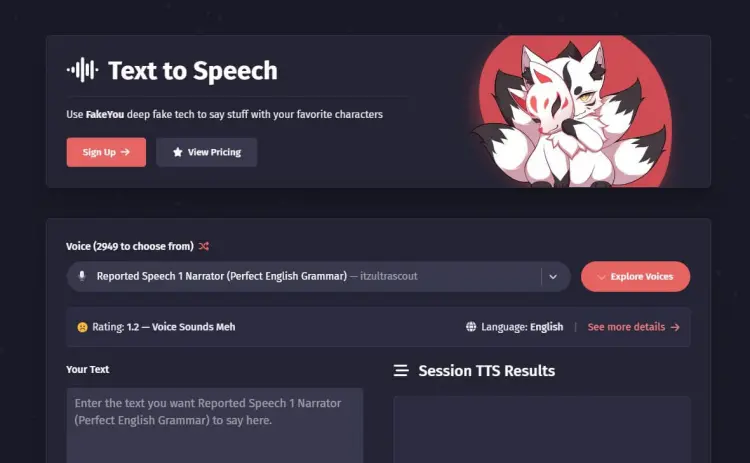
FakeYou Text to Speech is an online AI voice generator that lets you turn written text into speech using a large library of community-created voices. It currently offers more than 3,500 voices, covering a wide range of character styles, personalities, languages, and creative options.
Because the platform is community-driven, new voices are regularly added to its library. You can search for specific voices or explore different categories to find one that fits your project. Whether you're creating gaming content, social media clips, character dialogue, or other creative projects, FakeYou gives you plenty of voices to experiment with.
Part 2. What Can You Do with FakeYou Text to Speech?
FakeYou Text to Speech is mainly used to convert written text into AI-generated speech. The final voice style and quality can vary depending on the model you choose.
1. Convert Text to AI Speech
FakeYou's basic function is text-to-speech conversion. You can enter a sentence, dialogue, or longer text and choose an available voice model to generate the audio.
Common uses include:
- YouTube video voiceovers.
- TikTok and short-form video narration.
- Gaming video voiceovers.
- Memes and funny audio.
- Animated character-style voices.
- Social media content.
- Simple voice testing.
For users who don't want to record their own voice, FakeYou provides a quick way to generate playable audio.
2. Choose Different Voice Models
One of FakeYou's main features is its large selection of voice models.
You can search the voice library for a suitable voice and then use it to generate your text. Different models can vary significantly in tone, speed, pronunciation, and delivery.
Because FakeYou's voice library is largely community-driven, some models may sound better than others, while certain voices may have less natural pronunciation.
3. Create Character-Style Voiceovers
If you're looking to create entertaining content rather than formal narration, FakeYou can be a more appealing option. For example, you can generate lines for characters in short videos or create memes, gaming dialogue, and parody-style audio.
This variety is one of the key differences between FakeYou and many conventional TTS tools.
Part 3. How to Use FakeYou Text to Speech?
The basic process of using FakeYou Text to Speech is straightforward and can usually be completed by following the steps below.
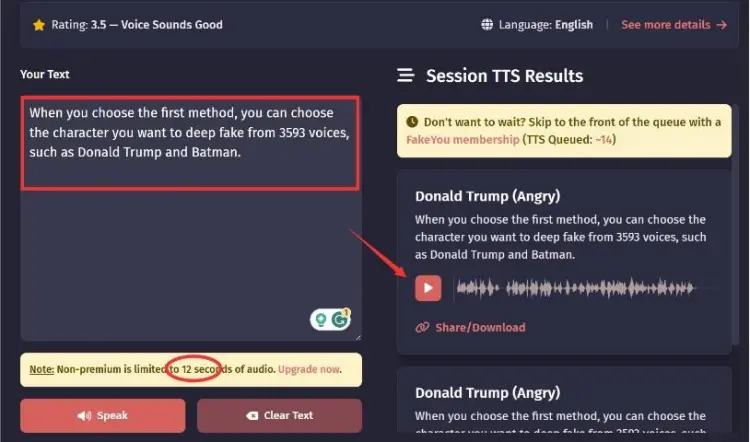
Step 1. Open the FakeYou Text to Speech page and browse or search for a voice you want to use.
Step 2. Select a voice model from the library. Since voice quality can vary, you may want to try several options.
Step 3. Enter or paste the text you want to convert. Clear punctuation can help create more natural pauses.
Step 4. Click "Speak" to generate the audio. Processing time may vary depending on the selected voice and current demand.
Step 5. Preview the generated audio. If you're not satisfied with the result, try another voice or adjust the text and punctuation.
Part 4. Is FakeYou Text to Speech Free?
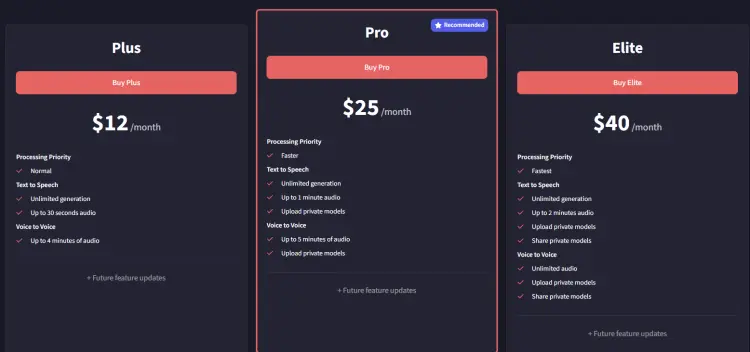
Yes. FakeYou offers a free way to use its text-to-speech service, but free access comes with limitations. FakeYou's pricing page states that its features are free to use, while premium plans provide faster processing and additional capabilities. The current paid plans include Plus, Pro, and Elite:
Part 5. What Are the Pros & Cons of FakeYou?
Understanding the pros and cons of FakeYou can help you decide whether it is suitable for your project.
- Large library with 3,500+ community-created voices.
- Wide selection of character-style voices.
- Web-based and easy to access.
- Offer free text-to-speech generation.
- Support voice search and filtering.
- Community-created models are regularly added and updated.
- Include other AI voice features, such as voice conversion and voice cloning.
- Strong entertainment focus, especially for character voiceovers, memes, gaming, and creative projects.
- Provide API access for developers.
- Voice quality can vary significantly between models.
- Some voices may produce unnatural pronunciation or inconsistent results.
- Generation may become slower during periods of high demand.
- Free users have more limitations than premium subscribers.
- Character and public-figure-style voices may raise copyright, publicity rights, or other legal concerns depending on how the generated content is used.
- Results can be affected by text length and the quality of the selected voice model.
Part 6. Best FakeYou Text to Speech Alternative
If FakeYou's community-created voices are not consistent enough for your project, TopMediai Text to Speech is a stronger alternative to consider.
TopMediai focuses more heavily on AI voice generation for creators, narration, video voiceovers, podcasts, advertising, and multilingual content. Its current TTS platform lists more than 3,200 AI voices and supports 190+ languages and accents, including English, Japanese, Korean, Mandarin, Cantonese, and Taiwanese.
Main Features of TopMediai Text to Speech:
- 3,200+ AI voices: Choose from a large library of voices with different tones and styles.
- 190+ languages and accents: Supports English, Chinese, Cantonese, Taiwanese, Japanese, Korean, Spanish, French, German, and more.
- Voice search and categories: Search for specific voices or browse different voice categories to find a suitable option.
- Voice customization: Adjust settings such as speed, volume, pitch, pauses, emphasis, and pronunciation.
- MP3 and WAV output: Generate speech and download the audio in supported formats.
- Voice cloning: Create a custom AI voice from an audio sample and use it for voice generation.
- API access: Developers can integrate text-to-speech capabilities into their own applications and services.
- Free trial: New users can try the service with free characters before choosing a paid plan.
How to Use TopMediai Text to Speech:
-
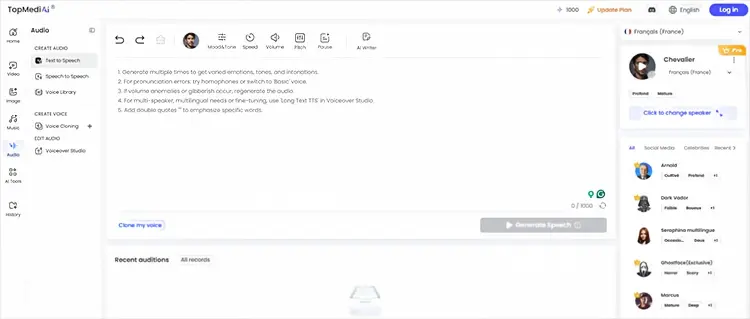
Open TopMediai Text to Speech, enter your text, and select a voice and language.
-
Adjust the voice settings, such as speed, pitch, or volume, if needed, then click "Generate" to create the speech.
-
Preview the generated audio and download it when you're satisfied with the result.
FakeYou vs. TopMediai Text to Speech
| Feature | FakeYou | TopMediai |
|---|---|---|
| Online TTS | Yes | Yes |
| Voice library | 3,500+ community voices | 3,200+ AI voices |
| Languages & accents | Varies by model | 190+ |
| Character-style voices | Strong | Strong |
| Voice quality consistency | Varies by model | More standardized |
| Speed/pitch adjustment | More limited/model-dependent | Available |
| MP3/WAV output | Available depending on access | Available |
| Voice cloning | Yes | Yes |
| Best for | Character voices and experimentation | Voiceovers and multilingual content |
Part 7. FAQs About FakeYou Text to Speech
Q1. Is FakeYou Text to Speech safe to use?
FakeYou is an established online AI voice platform with a public website, community, pricing information, and API documentation. However, "safe" also depends on how you use the generated voices.
You should avoid using generated voices to impersonate real people for fraud, deception, harassment, or other harmful purposes. You should also check the applicable rights and platform terms before using recognizable character or public-figure voices commercially.
For ordinary experimentation and creative projects, FakeYou can be used through its official website.
Q2. Why is FakeYou Text to Speech not working?
There are several possible reasons. First, the selected voice model may be experiencing heavy demand or temporary processing problems. Community-created models can also behave differently from one another. You can try:
- Refreshing the page.
- Selecting another voice.
- Shortening your text.
- Adding clearer punctuation.
- Checking your internet connection.
- Trying again later if generation is stuck.
If the generated audio sounds like nonsense or "babbling," FakeYou's own guide recommends adding ending punctuation and, in some cases, commas to introduce pauses.
Q3. Is FakeYou illegal?
FakeYou itself is not generally considered illegal simply because it provides AI voice generation. However, the legality of using a particular voice depends on how the generated audio is created and used. Character or public-figure-style voices may raise copyright, trademark, publicity-rights, impersonation, or other legal concerns, especially when used commercially or in a misleading way. Therefore, users should check the rights associated with a specific voice and avoid using generated content in ways that violate applicable laws or another person's rights.
Q4. Can I use FakeYou voices for commercial projects?
You should not assume that every FakeYou voice can be used commercially. The fact that a voice can be generated does not automatically mean that you have unrestricted commercial rights to use that voice, especially when it resembles a real person or copyrighted character.
Before monetizing videos, advertisements, or other commercial content, check FakeYou's current terms and the rights associated with the particular voice and your intended use.
In a Nutshell
FakeYou Text to Speech is a fun and flexible option for users who want to experiment with thousands of community-created character and celebrity-style voices without paying for basic access. Its biggest advantage is the sheer variety of voices, while its main drawbacks are inconsistent voice quality, generation limitations, and potential usage-rights concerns.
For casual memes, character dialogue, gaming content, and creative experiments, FakeYou is worth trying. But if you need more consistent AI voices, 190+ languages and accents, adjustable speed and pitch, and downloadable voiceovers for content creation, TopMediai Text to Speech is a more practical alternative.
Related Articles
Goku Text-to-Speech: 3 Best Tools for Goku Voice in 2026
5 Best Hindi Text to Speech Tools for Natural AI Voice Creation
Oddcast Text to Speech Review: Features, Pros & Cons, and Best Alternative