TL;DR:
Looking for the best Quandale Dingle text-to-speech generator? Discover 4 tools to create funny meme voices, generate custom narration, and find ready-made sound clips. Compare TopMediai, FakeYou, Uberduck, and 101 Soundboards to find the right option for your TikTok videos, YouTube Shorts, and gaming edits.

TopMediai AI Music, Video & Voice Studio


Have you ever heard a funny voice saying, "Goofy ahh", or delivering a ridiculous meme-style introduction? The viral Quandale Dingle meme is famous for its exaggerated humor, unusual facial expressions, and distinctive text-to-speech (TTS) voice. Whether you want to create funny TikTok videos, YouTube Shorts, gaming clips, Discord jokes, or meme compilations, a Quandale Dingle text-to-speech generator can help you recreate a similar comedic effect.
In this guide, we'll introduce Quandale Dingle, explore four tools for creating Quandale Dingle-style text-to-speech, and compare their advantages and disadvantages. We'll also explain how to choose the right tool for your meme projects.
Part 1. Who Is Quandale Dingle?
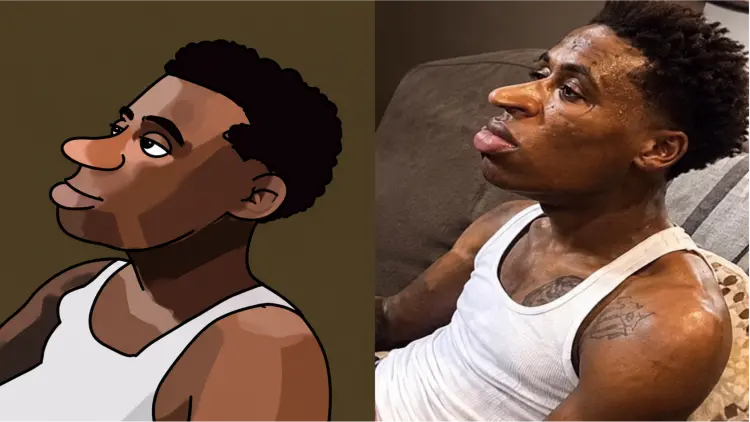
Quandale Dingle is an internet meme character whose popularity began in 2021 after a screenshot of a football player's computer login screen displaying the name “Quandale Dingle” went viral. The unusual name quickly inspired meme creators to produce exaggerated reaction images, distorted portraits, and humorous voiceovers.
The meme later became associated with absurd captions, exaggerated sound effects, and text-to-speech narration. Videos often feature deliberately ridiculous introductions, mock warnings, and increasingly chaotic descriptions of fictional situations.
Part 2. 4 Best Quandale Dingle Text-to-Speech
If you want to generate a Quandale Dingle-style voice, here are four options worth exploring. Here is a comparison of the four Quandale Dingle text-to-speech tools.
| Tool | Main Features | Pros | Cons | Best For |
|---|---|---|---|---|
| TopMediai | AI text-to-speech, 3,200+ voices, 190+ languages and accents, adjustable speed, pitch, and volume | Dedicated Quandale Dingle TTS page; customizable voice settings; MP3/WAV export options | Premium features may require payment; exact voice availability may vary | Creating custom Quandale Dingle-style voiceovers |
| FakeYou | Community-created AI voice models and text-to-speech generation | Wide variety of character voices; supports custom scripts; browser-based | Voice quality varies; generation queues; some features require payment | Exploring community-created meme voices |
| Uberduck.ai | AI speech generation and multiple voice options | Useful for experimenting with different narration styles; online access | The original Quandale Dingle voice may be unavailable; features and access can change | Trying alternative AI voices |
| 101 Soundboards | Ready-made Quandale Dingle sound effects and TTS recordings | Quick audio previews; convenient for meme edits; no need to generate existing clips | Limited custom text generation; clip availability and usage rights vary | Finding existing meme sounds for videos |
1. TopMediai Text to Speech Online
TopMediai Text to Speech Online is an online AI voice generator that converts text into natural-sounding speech. It offers customizable settings, including speaking speed, volume, and pitch, allowing you to adjust the output to suit your needs. With support for multiple languages, TopMediai is useful for creating voice-overs for presentations, videos, and social media content.
Key features of TopMediai Text to Speech Online:
- Support 3,200+ AI voices for creating narrations, character dialogue, and meme-style audio.
- Offer 190+ languages and accents, including English, Mandarin, Cantonese, and Taiwanese Mandarin.
- Allow users to customize speaking speed, volume, and pitch to achieve different voice effects.
- Generate speech online without software installation.
- Provide audio previews and MP3/WAV downloads.
How to Use TopMediai Quandale Dingle Text-to-Speech:
-
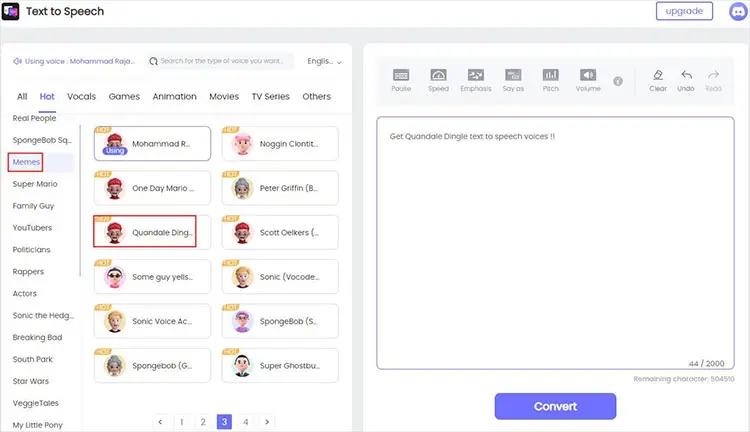
Visit TopMediai Text to Speech and enter your text in the input box.
-
Select "Quandale Dingle" as the voice, then click "Convert" to generate the audio.
-
Preview and download your Quandale Dingle text-to-speech audio file.
- Support a wide range of accents, including British English.
- Offer a free trial to explore its features before upgrading.
- Generate natural-sounding, realistic voices.
- Provide text-to-speech and speech recognition features.
- Include customizable audio settings for greater control over voice output.
- Premium voices and some advanced features require a paid subscription.
2. FakeYou
FakeYou is an online AI voice generation platform that allows users to convert text into speech using community-created voice models. It offers a variety of character and celebrity-style voices, making it useful for creating memes, funny audio clips, and entertaining social media content.
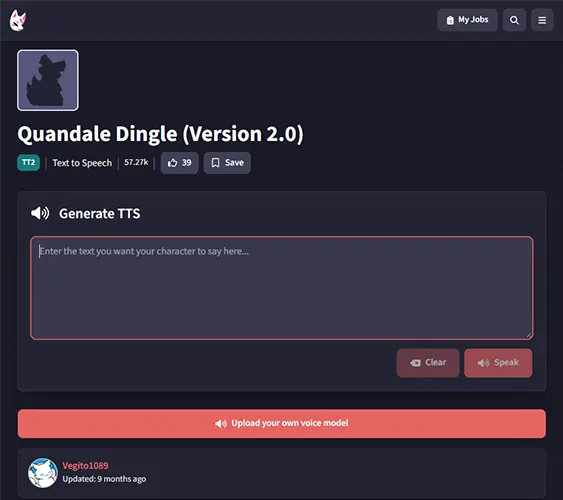
If you want to generate a Quandale Dingle-style voice, you can visit the FakeYou Quandale Dingle voice page and check whether the voice model is currently available. Enter your text, generate the audio, and listen to the result. Since FakeYou relies on community-created models, voice quality and availability may vary.
- Offer a large library of community-created character and celebrity-style voices.
- Provide text-to-speech functionality for generating entertaining voice clips.
- Allow users to try basic voice generation without immediately paying for a subscription.
- Let users listen to generated audio and download or share results.
- Work online, so you don't need to install desktop software for basic voice generation.
- Voice quality varies by model, and some generated speech may sound unnatural or mispronounce words.
- Free generations may take longer during busy periods because of the processing queue.
- Free-tier features and audio-length limits may restrict longer projects.
- Some advanced features, faster processing, and private voice models require a paid plan.
- Voice models may not always be available, and users should respect applicable voice rights and usage restrictions, especially for commercial content.
3. Uberduck.ai
Uberduck is another platform associated with AI-generated voices, character impressions, and creative audio production. Its current text-to-speech service supports a variety of languages and voice options, making it worth exploring if you want to create humorous narration for memes, gaming videos, or social content.
Uberduck has historically been associated with meme voices, including Quandale Dingle-related experiments. However, historical availability does not guarantee that the original voice model remains accessible today. Community discussions have reported changes to its older voice library, so you should check the current interface before relying on it for a specific voice.
- Support AI speech generation for creative audio and video projects.
- Offer multiple voice and language options.
- Can be useful for experimenting with alternative meme narration styles.
- Work as a browser-based option for users who do not want a dedicated desktop application.
- May suit creators who need more than a single meme voice.
- The original Quandale Dingle voice may no longer be available.
- Its current voice selection may differ significantly from older tutorials.
- Access, generation limits, and export features may depend on the current service and plan.
- Finding a suitable replacement voice may require trial and error.
- It is less convenient if your only goal is to play a specific, already-recorded Quandale Dingle sound.
4. 101 Soundboards
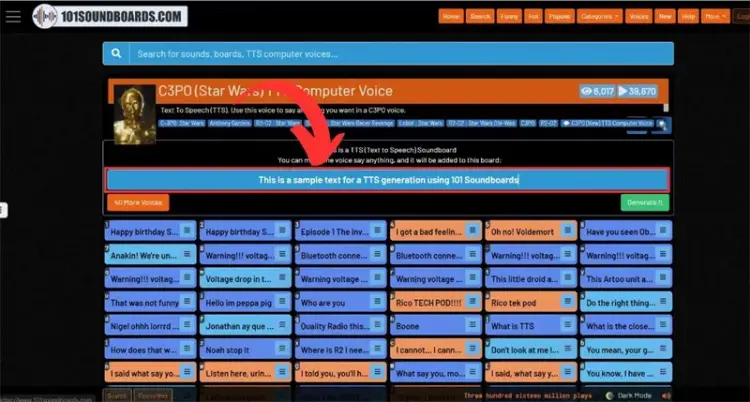
101 Soundboards takes a different approach from the first three tools. Instead of primarily generating speech from newly entered text, it provides collections of existing sound clips, including Quandale Dingle sound effects and TTS recordings. Its Quandale Dingle sound-effects page lists numerous clips, while related boards include recordings labeled as Quandale Dingle text-to-speech.
This makes 101 Soundboards useful if you want a familiar meme sound for a quick video edit, reaction, or gaming montage. You can browse the available recordings, play individual clips, and look for download options on the relevant sound page.
- Provide ready-made Quandale Dingle sound effects and meme recordings.
- Let you preview clips before deciding which one to use.
- Useful for short reactions, gaming edits, and meme compilations.
- Avoid waiting for AI speech generation when an existing clip meets your needs.
- Can complement a TTS generator when you want to add recognizable reactions to custom narration.
- You generally cannot make a fixed recording say arbitrary new text.
- Available clips may not contain the exact phrase you need.
- Audio quality, volume, and recording length can vary between uploads.
- Download availability and account requirements may differ by clip or feature.
- You should check the rights and permitted uses of each recording before using it commercially.
Part 3. FAQs on Quandale Dingle Text-to-Speech
Q1. Is there a free Quandale Dingle text-to-speech generator?
Some platforms offer free access, limited generations, or free sound clips. TopMediai and FakeYou are worth checking for text-to-speech generation, while 101 Soundboards can be useful for finding existing recordings. However, free access does not necessarily mean unlimited downloads or unrestricted commercial use. Check the current pricing, usage limits, and licensing terms before choosing a tool.
Q2. Can I use Quandale Dingle text-to-speech on TikTok or YouTube?
Yes, you can use generated meme narration in TikTok videos, YouTube Shorts, and other social content, provided you follow the platform rules and have the necessary rights to use the audio. If you plan to monetize your content, review the voice generator's commercial-use terms and check whether the selected voice or recording has additional restrictions. Also, avoid presenting synthetic audio as an authentic recording of a real person.
Q3. Why does my Quandale Dingle TTS sound different from the original meme?
There are several possible reasons. The original meme may use a real person's voice, a particular AI model, a voice conversion effect, or additional audio editing. Different TTS engines also interpret pronunciation, punctuation, and sentence structure differently. To get closer to the sound you want, try a different available voice model, shorten your sentences, adjust punctuation, and experiment with playback speed or audio effects where supported.
Q4. Can I download Quandale Dingle text-to-speech audio as an MP3?
That depends on the tool. TopMediai, FakeYou, and Uberduck may provide audio export options depending on their current interfaces and plans. On 101 Soundboards, individual recordings may have their own download options. If MP3 export is unavailable, you can check whether WAV or another downloadable format is supported and convert it with an audio converter if necessary. Always check the applicable usage terms before reusing downloaded audio.
Last Words
Quandale Dingle text-to-speech is a fun way to create meme narrations, gaming jokes, parody announcements, and short-form videos. The best tool depends on whether you want to generate original dialogue or reuse familiar sounds.
- TopMediai is our recommended starting point for generating custom Quandale Dingle-style narration, thanks to its dedicated TTS page and straightforward workflow.
- FakeYou is worth exploring if you enjoy experimenting with community-created AI voices.
- Uberduck.ai is an alternative for AI speech generation, although you should verify whether the specific voice you need is still available.
- 101 Soundboards is a practical choice for finding ready-made Quandale Dingle sound effects and recordings.
Overall, we recommend trying TopMediai first if you want to turn your own text into meme-style speech. Enter a short script, generate a sample, and listen to the result before creating a longer voiceover. If the available voice does not match the original meme closely enough, try another voice model or combine a suitable TTS recording with sound effects in your video editor.
TopMediai AI Music, Video & Voice Studio
Related Articles
5 Best Chinese Text-to-Speech Tools for Natural AI Voices
ChatGPT Text-to-Speech Guide: Everything You Need to Know
Goku Text-to-Speech: 3 Best Tools for Goku Voice in 2026
5 Best Hindi Text to Speech Tools for Natural AI Voice Creation