TL;DR:
Looking for the best Chinese text-to-speech tool? This guide compares 5 popular options. The right Chinese text-to-speech tool depends largely on what you want to create.
- TopMediai is suitable for creators who want many AI voices, Chinese regional options, and creative voice customization.
- ElevenLabs focuses strongly on expressive, natural AI speech and advanced voice capabilities.
- NaturalReader is better suited to reading Chinese documents and accessibility-focused use cases.
- TTSMaker is a practical option for users who want a simple Chinese text-to-speech free online workflow.
- Narakeet stands out for users who need Cantonese, Taiwanese Mandarin, and Chinese voiceovers for video projects.

TopMediai AI Music, Video & Voice Studio


Looking for a reliable Chinese text-to-speech tool for videos, memes, podcasts, e-learning, or social media content? Modern AI voice generators can convert Chinese text into natural-sounding speech while supporting different voices, accents, and regional varieties, including Mandarin, Cantonese, and Taiwanese Mandarin. In this guide, we compare five popular Chinese text-to-speech tools to help you choose the right option for your specific needs.

Part 1. What Is Chinese Text to Speech?
Chinese Text to Speech is a technology that uses AI and speech synthesis to automatically convert written Chinese text into spoken audio. Users typically only need to enter or paste Chinese text, choose a suitable Chinese voice and speaking speed, and then generate the corresponding audio file.
Common applications of Chinese TTS include:
- Creating Chinese video voiceovers and short-form video narration.
- Converting articles into Chinese audio content.
- Creating online courses and educational materials.
- Adding Chinese narration to podcasts.
- Producing product presentations and marketing videos.
- Supporting Chinese language learning.
- Generating character voices for games, animations, or social media content.
Mandarin vs. Cantonese vs. Taiwanese Chinese
Before choosing a Chinese text-to-speech voice, check which variety you actually need.
- Mandarin Chinese text-to-speech is generally used for Standard Mandarin and is suitable for audiences in Mainland China and many other Mandarin-speaking regions.
- Cantonese Chinese text-to-speech is designed for Cantonese pronunciation and is particularly useful for audiences in Hong Kong, Macau, Guangdong, and Cantonese-speaking communities.
- Taiwanese Chinese text-to-speech usually refers to Taiwanese Mandarin rather than Taiwanese Hokkien.
Part 2. 5 Best Chinese Text-to-Speech Tools Recommended
Different Chinese text-to-speech generators vary in voice quality, language support, AI features, and how they can be used. Below, we introduce five popular tools for Chinese text-to-speech.
| Tool | Chinese Support | Languages & Voices | Platform | Best Chinese TTS For | Why Choose It |
|---|---|---|---|---|---|
| TopMediai Text to Speech | Mandarin, Cantonese, Taiwanese | 190+ languages, 3,200+ voices | Web | Videos & voiceovers | Many Chinese voices and customization options |
| ElevenLabs | Chinese | 30+ languages | Web | Natural narration | Realistic and expressive AI voices |
| NaturalReader | Mandarin, Cantonese, Taiwanese | 100+ languages | Web, Windows, iOS, Android, Chrome Extension | Reading & accessibility | Easy document-to-speech experience |
| TTSMaker | Chinese | 100+ languages | Web | Free Chinese TTS | Simple and accessible online TTS |
| Narakeet | Mandarin, Taiwanese Mandarin, Cantonese | 100+ languages, 900+ voices | Web | Chinese narration & videos | Multiple Chinese variants and many voice options |
1. TopMediai Text to Speech
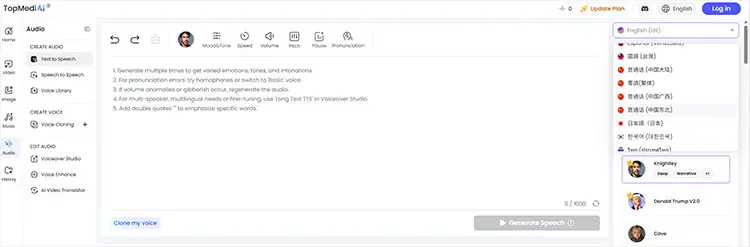
TopMediai Text to Speech is an online Chinese text-to-speech AI platform designed for creators who need a large selection of voices and languages. Its current platform advertises more than 3,200 AI voices and 190+ languages and accents, including Mandarin, Cantonese, and Taiwanese Chinese. It also provides controls for speed, pitch, volume, pauses, emphasis, and pronunciation.
Creators can use different Chinese voices for funny videos, memes, character dialogue, advertisements, or narration. If you are searching for a funny Chinese text-to-speech voice rather than a formal narrator, having many voice styles can make it easier to experiment. TopMediai also supports voice cloning, which can be useful when you want a more consistent voice identity across multiple pieces of content.
Key features of TopMediai Text to Speech:
- 3,200+ AI voices with different tones and speaking styles.
- Support 190+ languages and accents, including English, Chinese, Cantonese, Japanese, Korean, Spanish, and more.
- Offer natural and expressive AI-generated speech for videos, podcasts, narration, and character dialogue.
- Let users adjust voice speed, pitch, volume, pauses, emphasis, and pronunciation.
- Support AI voice cloning for creating personalized voices.
- Provide multiple voices for character conversations and dialogue.
- Support long-text conversion for longer scripts.
- Allow generated audio to be downloaded in formats such as MP3 and WAV.
- Work online without requiring desktop software installation.
How to Use TopMediai Text to Speech:
-
Open TopMediai Text to Speech and enter or paste your Chinese text into the text box.
-
Select a Chinese voice. TopMediai supports Mandarin, Cantonese, and Taiwanese Chinese voices, so choose the voice that best fits your content. Adjust the voice settings, such as speed, pitch, volume, pauses, and emphasis, to make the Chinese speech sound more natural.
-
Click "Generate" or "Audition" to convert the Chinese text into speech and preview the result. If the result sounds right, download the generated audio.
- Support Mandarin, Cantonese, and Taiwanese Chinese.
- Offer 3,200+ AI voices across 190+ languages and accents.
- Work online without requiring desktop software installation.
- Support MP3 and WAV output.
- Provide voice customization options.
- Suitable for videos, podcasts, e-learning, advertisements, and social media.
- Free usage is limited.
- Some advanced voices and heavier usage require a paid plan.
- The large voice library may take time to explore.
- Voice quality and customization options may vary between voices.
2. ElevenLabs
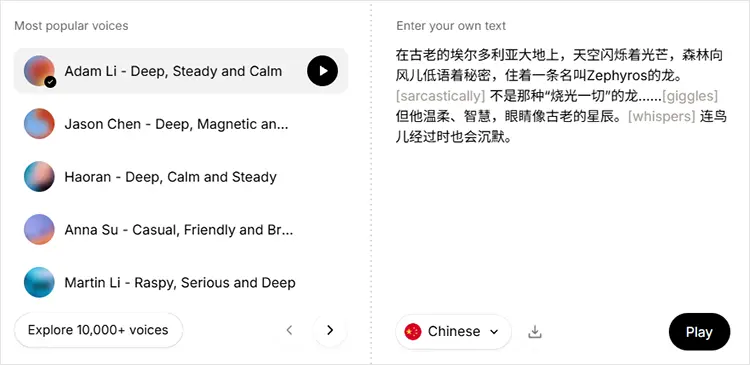
ElevenLabs is an AI voice platform known for expressive synthetic speech. Its Chinese TTS supports Chinese and Mandarin Chinese, and its current models cover multiple languages for multilingual voice generation. The platform lets users enter Chinese text, select a voice, adjust parameters such as speed and style, and generate downloadable audio.
It can be particularly useful for creators who care about natural Chinese text-to-speech rather than simply converting text into understandable audio. Its platform is designed for use cases including podcasts, audiobooks, games, video voiceovers, accessibility, and AI applications.
- Highly expressive AI voices.
- Focus on natural-sounding speech.
- Support Chinese and Mandarin.
- Support multilingual voice generation.
- Offer voice cloning and voice design features.
- Suitable for long-form content, podcasts, games, and video narration.
- Provide API and SDK options for developers.
- Offer a free plan with a monthly character limit.
- Free usage is limited.
- Advanced features require a paid plan.
- Commercial usage rights depend on the selected plan.
- Check specific Chinese regional voice support before choosing a voice.
3. NaturalReader
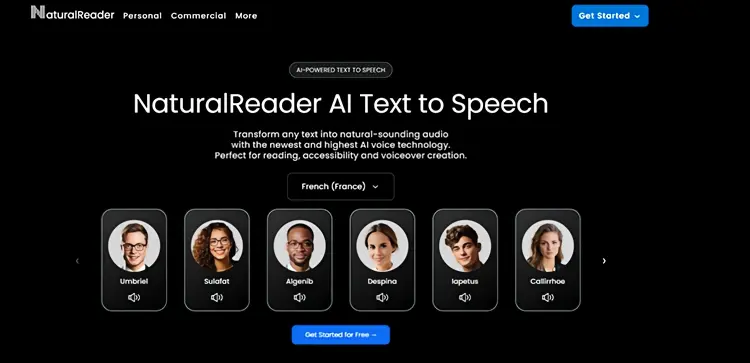
NaturalReader is a text-to-speech platform available online and through mobile applications. It focuses heavily on reading documents, webpages, and other written content aloud. Unlike some AI voice generators that are mainly designed for content creators, NaturalReader is also useful for students, language learners, researchers, and people who want to listen to written content instead of reading it manually.
Its voice options include Chinese variants such as Mandarin, Taiwanese Chinese, and Cantonese. This makes it useful for people who want to listen to different forms of Chinese rather than only Standard Mandarin. NaturalReader also provides AI voices and pronunciation-related settings. Users can control playback speed and use the platform for studying, proofreading, accessibility, and language learning.
- Available online and on mobile devices.
- Support Mandarin Chinese.
- Support Taiwanese Mandarin and Cantonese voiceovers.
- Useful for reading documents and web pages.
- Support adjustable playback speed.
- Helpful for accessibility and language learning.
- Suitable for students and people who frequently read long-form content.
- Some advanced AI features require a subscription.
- It is not primarily designed for funny memes or entertainment.
- Usage limits vary depending on the voice and plan.
- Regional Chinese pronunciation options may vary between voices.
4. TTSMaker
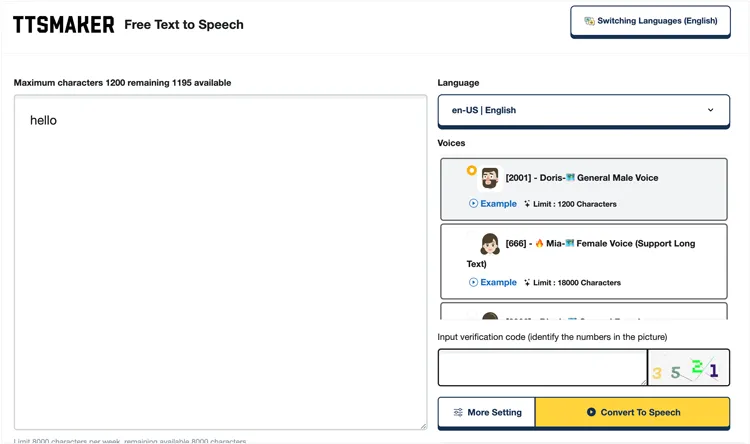
TTSMaker is an online text-to-speech service that is particularly attractive to users searching for a Chinese text to speech free or Chinese text to speech free online solution. Its main advantage is simplicity. Instead of setting up a complicated voice production workflow, you can enter text, choose a supported voice, generate speech, and obtain an audio file. This makes it suitable for short Chinese voiceovers, pronunciation practice, simple narration, and users who do not need advanced voice cloning or detailed AI voice design.
For basic projects, this simplicity can actually be an advantage. You do not need to learn complicated audio-production software just to convert a paragraph of Chinese into speech.
- Simple browser-based interface.
- Suitable for quickly generating Chinese TTS.
- Good for free or low-cost voice generation.
- Require no professional audio editing skills.
- Suitable for short scripts and simple narration.
- Support multiple languages.
- Ideal for users who want to test Chinese TTS before investing in advanced software.
- Many voices have free character limits.
- Voice quality varies between different voices.
- Does not focus on advanced voice cloning technology.
- Voice and language availability may vary.
- Offer fewer creative voice effects than dedicated AI voice platforms.
5. Narakeet
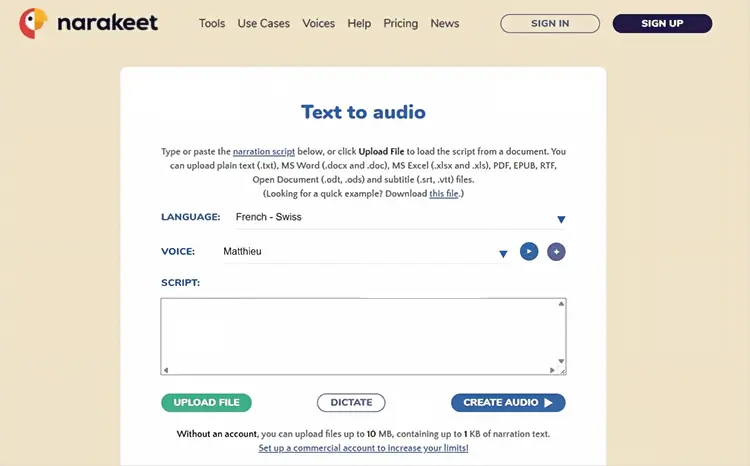
Narakeet is an online text-to-speech and video creation platform with a particularly broad selection of Chinese regional voices. It supports Mandarin Chinese as well as Taiwanese Mandarin and Cantonese. This makes it especially useful for users who need a specific regional Chinese pronunciation instead of simply selecting a generic Chinese voice. Narakeet provides different male and female Chinese voices, and some Chinese voice options also include different age groups and voice styles. The platform is particularly useful for presentations, educational videos, video narration, training materials, and other projects where users need to turn scripts into spoken content.
Its Cantonese support is another notable feature. Users who specifically need Cantonese Chinese text-to-speech can choose dedicated Cantonese voices instead of relying on a Mandarin voice. Narakeet also supports multilingual workflows, which can be useful for creators producing the same video or presentation in several languages.
- Strong Mandarin support.
- Support Taiwanese Mandarin.
- Offer Cantonese voiceovers.
- Provide multiple male and female voices.
- Include different voice styles.
- Useful for video narration.
- Suitable for presentations and educational content.
- Support multilingual content creation.
- Some advanced production features require a paid plan.
- The large selection of voices can make choosing the right one time-consuming.
- Focus more on narration and video production than character voice customization.
- Regional pronunciation should be tested with your actual text.
- Free usage may not be sufficient for large projects.
Part 3. How to Make Chinese Text-to-Speech Sound More Natural?
Even when using a high-quality AI TTS tool, the way you write your text can affect the final voice output. Try the following tips:
1. Use Proper Punctuation
Chinese punctuation marks, such as commas, periods, and question marks, can help AI determine where to pause. Text with clear punctuation generally produces more natural pauses than long blocks of text without punctuation.
2. Avoid Overly Long Sentences
If a sentence contains too much information, the generated speech may sound rushed. Try breaking long sentences into shorter ones to create a more natural speaking rhythm.
3. Choose a Voice Based on the Content
Different types of content work better with different voice styles:
- Tutorials: Clear and steady voices.
- News: Formal and composed voices.
- Short videos: Natural and energetic voices.
- Stories: Expressive voices.
- Advertisements: Lively and engaging voices.
4. Adjust the Speaking Speed and Pitch
If the tool supports adjustments for speaking speed, pitch, or pauses, fine-tune these settings based on your content. Tutorials and educational content usually work better at a moderate pace, while short-form video narration can be slightly faster.
Part 4. Frequently Asked Questions About Chinese Text-to-Speech
Q1. Can Chinese TTS help visually impaired users?
Yes. Chinese TTS converts written content into speech, making reading, browsing, and learning more accessible. It can also support daily communication and accessible video content.
Q2. Can I convert English to Chinese text-to-speech?
Yes, but translation and text-to-speech are generally two separate processes. First, convert the English content into Chinese. Then enter the Chinese text into a Chinese TTS generator and select the appropriate Chinese voice.
Therefore, English to Chinese text to speech does not necessarily mean that a TTS tool will automatically translate English into Chinese.
Q3. Can Chinese text-to-speech generate Cantonese or Taiwanese Chinese?
Yes, but support varies significantly between platforms.
Narakeet specifically provides Cantonese Chinese TTS and lists Taiwanese Mandarin voices. TopMediai also advertises Mandarin, Cantonese, and Taiwanese Chinese options among its supported Chinese voices.
When choosing a regional Chinese voice, do not rely only on the language label. Listen to a preview first because pronunciation, accent, speaking style, and vocabulary preferences can affect how natural the final recording sounds.
Final Thoughts
Choosing the right Chinese text-to-speech tool depends on your voice, language variety, and content needs. Whether you need natural Mandarin, Cantonese, Taiwanese Chinese, or expressive AI voices, the right TTS platform can make your videos, podcasts, courses, and social content more engaging. For a flexible all-in-one option, TopMediai Text to Speech offers a large voice library, multiple Chinese voice options, and customizable speech settings, making it a convenient choice for creating natural Chinese AI voices online.
Related Articles
Goku Text-to-Speech: 3 Best Tools for Goku Voice in 2026
5 Best Hindi Text to Speech Tools for Natural AI Voice Creation
7 Best French Text to Speech Tools for Natural AI Voices
Oddcast Text to Speech Review: Features, Pros & Cons, and Best Alternative