

TL;DR:
Looking for the best Alexa voice generator to create realistic Alexa-style voiceovers without recording your own voice? We tested 4 online AI voice tools to help you find the right one.
- TopMediai: Best overall for its extensive voice library, multilingual support, and customizable speech settings.
- Fish Audio: Best for generating Alexa-style speech with a dedicated community-created voice model.
- FineVoice: Best for users who want Alexa-style voices alongside a wide range of AI voice and audio tools.
- NiceVoice: Best for quick, simple Alexa-style voice generation and MP3 downloads.
If you want to generate an Amazon Alexa-style voice for video narration, short-form video voiceovers, virtual assistant demos, or social media content, an Alexa voice generator might be just what you need. Thanks to advances in AI voice synthesis, you no longer need to buy an Echo smart speaker or record your own voice to create natural-sounding speech. With the right AI voice generator, you can easily produce voiceovers that sound similar to Alexa.
In this article, we'll introduce four AI voice generators worth trying, including TopMediai, Fish Audio, FineVoice, and NiceVoice. Each tool has its own strengths, helping you find the best AI Alexa voice generator for your needs and budget.
To help you choose the right tool, here's a quick comparison of the four best Alexa voice generators based on their key features, voice options, customization capabilities, and free usage.
| Tool | Best For | Voice Library / Language Support | Customization | Free Usage |
|---|---|---|---|---|
| TopMediai | Best overall AI Alexa voice generator | 3,200+ AI voices; 190+ languages and accents | Speed, pitch, volume, pauses, emphasis | Free usage with limitations |
| Fish Audio | Dedicated Alexa-style voice generation | Community-created Alexa AI voice model | Speed, pitch, emotion | Free access available |
| FineVoice | Versatile Alexa voice generator online | 2,000+ AI voices; 154+ languages and accents | Speed, pitch, pauses | Free monthly credits |
| NiceVoice | Quick and simple Alexa voice generation | Dedicated Alexa-style voice and other AI voices | Limited customization | Free basic generation |
1. TopMediai Text to Speech
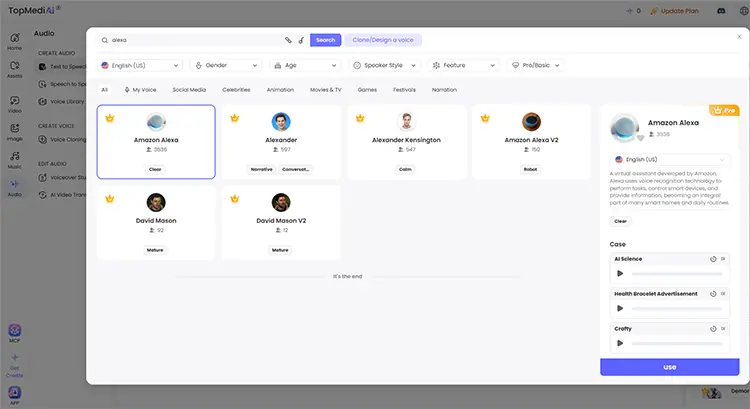
TopMediai Text to Speech is an online AI voice generator that turns written text into natural-sounding speech in just a few clicks. If you're looking for an AI Alexa voice generator to create virtual assistant-style announcements, video narration, tutorials, or short voice clips, this tool is worth trying.
It features a library of over 3,200 AI voices in more than 190 languages and accents, giving you plenty of options to find a voice that matches the Alexa-inspired style you're after. You can also fine-tune the speech speed, pitch, volume, pauses, and emphasis to make the generated voice sound clearer and more conversational. Best of all, everything works directly in your browser, so there's no need to record your own voice or install desktop software.
Key Features:
- Explore thousands of AI voices with different tones, accents, and speaking styles.
- Customize speech by adjusting speed, pitch, volume, pauses, and emphasis for a more natural, virtual assistant-style delivery.
- Generate speech in multiple languages and regional accents.
- Create a personalized voice model through voice cloning with the required voice recordings and authorization.
- Convert text into speech directly in your browser without installing desktop software.
How to Use TopMediai Text to Speech to Generate Alexa Voice:
-
Visit TopMediai Text to Speech and enter the script you want to convert into speech.
-
Choose the Amazon Alexa AI voice model and adjust the speed, pitch, volume, and pauses if needed.
-
Click "Generate" to create your voiceover. Preview the result and download the audio once satisfied.
- Work online without requiring complicated software installation.
- Easy to use, making it suitable for beginners.
- Offer a wide selection of AI voices.
- Support not only Alexa-style voice generation but also other types of voiceovers.
- A good option for video creators and social media users.
- Not all available voices closely resemble the actual Alexa voice.
- Some advanced voices and features may require a paid subscription.
- The free version may have limitations on the number of generations, downloads, or usage rights.
2. Fish Audio
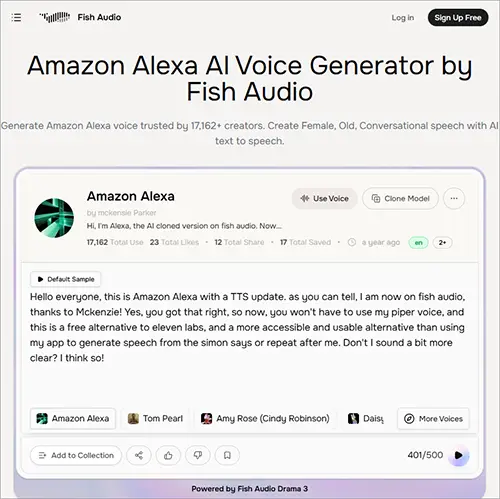
If you're looking for an Alexa voice generator online, Fish Audio is worth trying. It offers a dedicated Amazon Alexa AI voice model that lets you convert written text into Alexa-style speech directly in your browser. You can enter your own script, generate speech, and preview the results without installing additional software.
Fish Audio also provides an Advanced Playground where you can adjust settings such as speed, pitch, and emotion, as well as download generated audio in MP3 or WAV format. It is a convenient option for creating Alexa-style voiceovers for videos, presentations, tutorials, and other creative projects.
- Offer a dedicated Alexa AI voice model instead of relying solely on generic female AI voices.
- Work online, so there's no need to install additional software.
- Allow users to try the voice generator for free without a credit card.
- Provide adjustable speed, pitch, and emotion for more personalized speech.
- Support MP3 and WAV downloads.
- Suitable for creating Alexa-style narration, video voiceovers, and virtual assistant demonstrations.
- The Alexa voice is a community-created AI voice model, not an official Amazon Alexa voice.
- The default voice preview may offer fewer customization options than the Advanced Playground.
- Longer text generation and audio downloads may require additional access or a paid plan.
- Voice customization options may require opening the Advanced Playground.
- Generated speech may not perfectly reproduce Alexa's original voice or pronunciation.
3. FineVoice
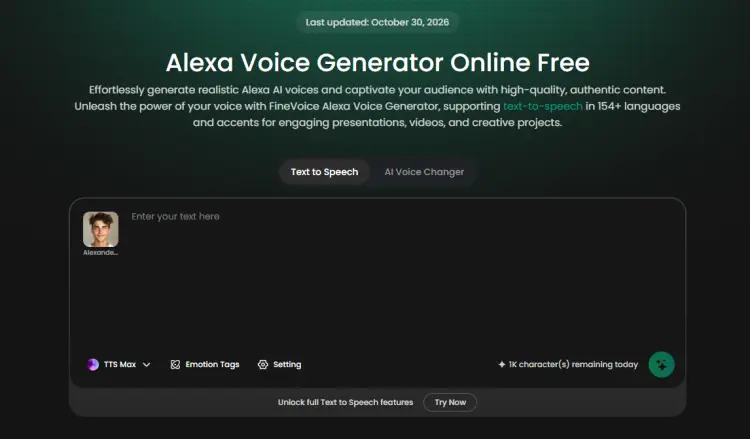
FineVoice is an online AI voice generation platform developed by FineShare that converts written text into natural-sounding speech. Its FineVoice Alexa voice generator allows users to create Alexa-style AI voiceovers directly in their browser without downloading or installing desktop software.
With a library of over 2,000 AI voices and support for more than 154 languages and accents, FineVoice offers plenty of options for text-to-speech projects. Users can simply enter their text, choose an available Alexa-style voice, and adjust settings such as pitch, speaking speed, and pauses to customize the generated audio. It also supports importing TXT, DOCX, and SRT files, making it convenient to create voiceovers for videos, presentations, educational content, and other projects.
Beyond its AI Alexa voice generator, FineVoice provides a variety of AI voices and audio creation tools, making it a flexible choice for users who want to create different voice styles rather than just smart assistant-style speech.
- Work online without requiring desktop software installation.
- Simple text-to-speech workflow suitable for beginners.
- Offer a large collection of AI voices beyond Alexa-style voices.
- Support over 154 languages and accents.
- Allow users to customize voice speed, pitch, and pauses.
- Support importing TXT, DOCX, and SRT files.
- Provide free monthly credits for trying its voice generation features.
- Not every available AI voice sounds exactly like Amazon Alexa's original voice.
- Free usage is limited by monthly credits.
- Some advanced features and additional usage may require payment.
- Voice generation results may vary depending on the selected voice, language, and text.
- Commercial usage depends on the voice's licensing category; community voices should not be assumed to be commercially usable.
4. NiceVoice
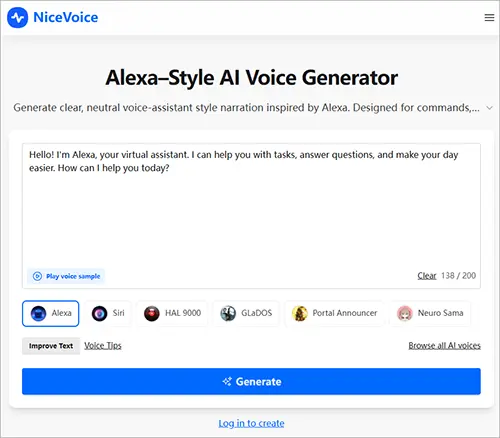
NiceVoice is an online AI voice generation platform that allows users to create Alexa-style voiceovers from text directly in a browser. Its Alexa AI voice generator is designed to produce clear, neutral, and professional-sounding assistant voices, making it suitable for smart assistant demonstrations, tutorial videos, UI prompts, and system notifications.
Users simply enter the text they want to convert, select the Alexa voice, and click Generate to create audio. The generated audio can be downloaded as an MP3 file without installing desktop software. NiceVoice also offers other AI voice options, including Siri, HAL 9000, and GLaDOS.
- Online tool that requires no software installation.
- Easy to use, even for beginners.
- Generate clear and neutral Alexa-style AI voiceovers.
- Support MP3 audio downloads.
- Offer several other AI voice styles besides Alexa.
- Provide free access to basic voice generation features.
- Require users to log in before generating audio.
- The Alexa-style voice has limited emotional expression.
- Not ideal for storytelling, dramatic narration, or character acting.
- The generated voice is Alexa-inspired rather than an official Amazon Alexa voice.
- Premium options may be required for extended usage.
- Voice customization options appear relatively limited compared with more advanced AI voice platforms.
FAQs on Alexa Voice Generator
Q1. Is there a free Alexa voice generator?
Some AI voice generators offer free usage credits, allowing users to try their text-to-speech features. For example, certain online platforms provide free previews, limited voice generation credits, or basic voices at no cost.
However, free versions usually come with certain limitations, such as character limits, download restrictions, a limited selection of voices, or reduced audio quality.
Q2. Can I use an Alexa voice generator for commercial purposes?
Whether you can use AI-generated Alexa-style voices for commercial purposes depends on the licensing terms of the voice generator you choose. Some tools allow commercial use, while others may impose restrictions based on the voice model, subscription plan, or type of content.
Before using generated audio in advertisements, monetized videos, or other commercial projects, carefully review the platform's licensing agreement and terms of use. Also, keep in mind that an Alexa-inspired voice is not necessarily an official Amazon Alexa voice, and commercial usage rights should not be assumed.
Q3. Can I customize the generated Alexa voice?
Yes. Many Alexa voice generators provide customization options that let you adjust settings such as pitch, speaking speed, and volume to match your preferences. Some advanced tools also allow you to modify the emotional tone, add emphasis, and fine-tune speech delivery to make the generated voice sound more natural and engaging. Available options may vary depending on the platform.
Q4. Can I generate Alexa-style voices in different languages?
Yes. Many AI voice generators support multiple languages and accents, allowing you to create Alexa-style voiceovers for different audiences. This feature is especially useful for businesses, developers, and content creators who want to produce multilingual audio for international users. However, language availability and voice quality can vary between platforms.
Conclusion
Choosing the best Alexa voice generator depends on your needs, budget, and desired voice quality. Fish Audio, FineVoice, and NiceVoice are all worth trying if you want to create Alexa-style voiceovers quickly online. However, if you're looking for a more versatile AI voice generator with a larger voice library, broader language support, and flexible speech customization, TopMediai Text to Speech is our recommended choice. It not only helps you create Alexa-inspired voiceovers but also offers plenty of other AI voices for video narration, tutorials, presentations, and social media content.
Give TopMediai a try and create your own AI voiceovers in just a few clicks.
Related Articles
4 Best British Text-to-Speech Tools for Natural AI Voices
7 Best Elmo Voice Generator Tools to Try for Free in 2026