

TL;DR:
Looking for the best British text-to-speech tool? Discover 4 top AI voice generators—TopMediai, ElevenLabs, Narakeet, and Murf AI—to create realistic British voiceovers, compare free options, and find the perfect fit for your videos, podcasts, or professional projects.
Looking for a British voice that sounds natural, not like a robot reading from a script? Whether you're making YouTube videos, creating TikTok content, working on a podcast, or simply curious about how your words sound in a British accent, a good British text-to-speech tool can make the whole process much easier. Instead of recording your own voice or hiring a voice actor, you can simply type your text and let AI do the talking. Even better, some tools let you try a British text-to-speech for free online, so you can test different voices before spending any money.
But with so many options out there, which one is actually worth your time? We've rounded up four British accent voice generators, including TopMediai Text to Speech, ElevenLabs, Narakeet, and Murf AI, to help you compare their features, explore their free options, and find the best British text-to-speech tool for your next project.
Part 1. 4 British Text-to-Speech Tools Worth Trying
If you are looking for the best British text-to-speech tools, here are 4 options you can try.
1. TopMediai Text to Speech
TopMediai Text to Speech is an online AI voice generator that converts written text into natural-sounding speech, making it a useful option for anyone looking for a British text-to-speech tool. It offers a wide selection of AI voices and supports British English, allowing users to create voiceovers for YouTube videos, podcasts, audiobooks, presentations, and educational content. Users can also adjust settings such as speech speed, pitch, volume, and emphasis to customize the generated audio.
Key Features:
- Generate speech with British English pronunciation for a variety of content creation needs.
- Access over 3,200 AI voices across more than 190 languages and accents.
- Customize voiceovers by adjusting speech speed, pitch, volume, pauses, and emphasis.
- Preview available voice samples to find the most suitable voice for your project.
- Create audio for videos, podcasts, audiobooks, presentations, and e-learning materials.
How to Use TopMediai AI British Text to Speech:
-
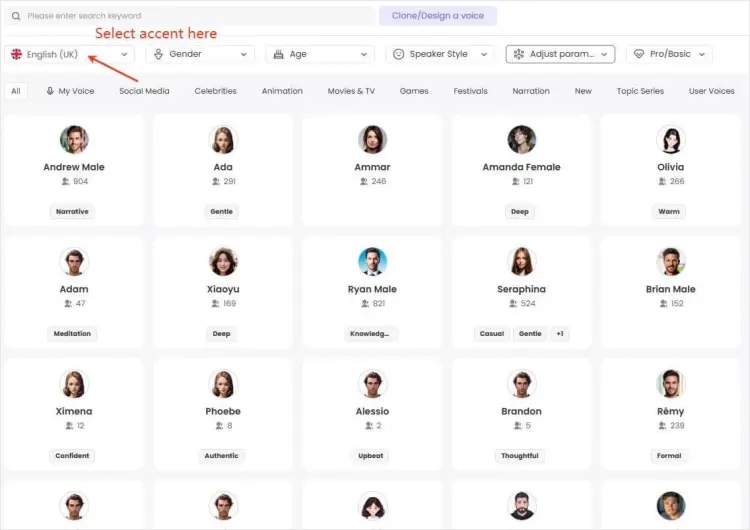
Visit the TopMediai Text to Speech website and enter the text you want to convert into British-accented speech.
-
Select "English (UK)" from the available language or accent options, then choose a voice that suits your project. Preview different voices to find the right fit.
-
Click the "Generate" button to create your audio. Preview the result, adjust the voice settings if needed, and download the audio when you're happy with it.
- Suitable for a variety of voiceover and content creation tasks.
- Convenient online workflow that doesn't require a traditional recording setup.
- Useful for users who want to explore British-accented speech alongside other voice generation options.
- A practical option for beginners and content creators who prefer an accessible interface.
- Free usage may have restrictions on credits, audio length, or available features.
- The naturalness of the British accent depends on the selected voice and available model.
- Advanced voice customization and commercial-use conditions may vary by plan.
2. ElevenLabs
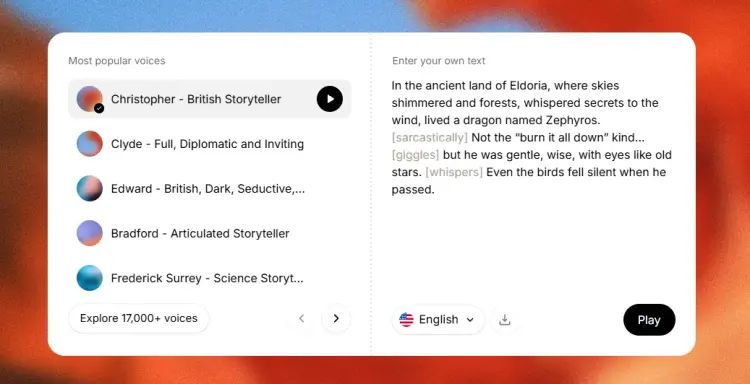
ElevenLabs is a popular AI voice platform known for expressive speech synthesis and realistic voice generation. It is a strong option for creators who want their British text-to-speech output to sound more conversational, with natural pauses, emphasis, and changes in tone.
The platform supports multiple English voice options, including British-accented voices. Depending on the selected model and voice, you can generate narration for audiobooks, podcasts, advertisements, short-form videos, and other projects that benefit from a natural-sounding British voice.
Key Features:
- AI-powered text-to-speech with natural-sounding speech generation.
- British-accented English voices available in its voice library.
- Expressive delivery suitable for storytelling and conversational narration.
- Voice selection and generation options that vary by model and plan.
- Support for content creation workflows, including video narration and audio production.
- Free-tier access for testing, subject to current usage limits.
- Produce highly realistic British English voiceovers.
- Offer a wide selection of voices, accents, and speaking styles.
- Provide flexible voice customization for different content types.
- Support multiple languages and professional audio workflows.
- Have a free plan for trying out its text-to-speech features.
- Free usage is limited, so longer scripts may require a paid subscription.
- Finding the ideal British voice may take some trial and error.
- Advanced customization can take time for beginners to master.
- Commercial usage rights depend on the subscription plan and applicable terms.
3. Narakeet
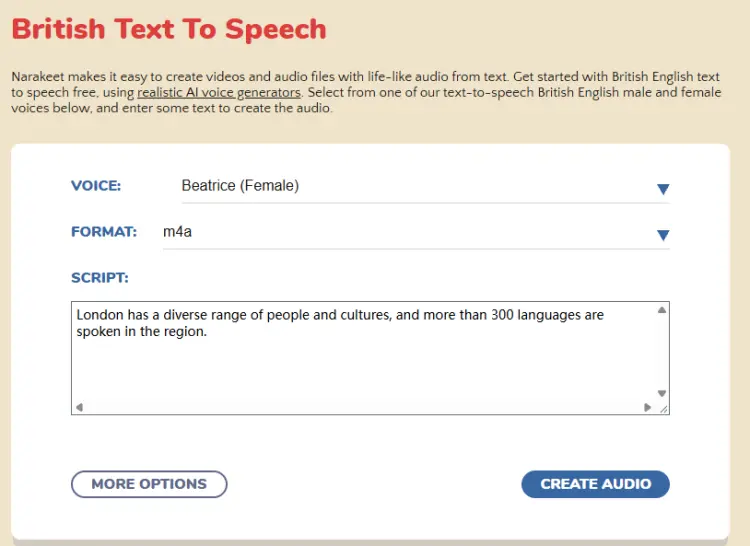
Narakeet is an online text-to-speech and media creation platform with a dedicated British accent generator. It's particularly appealing to users who want to convert written English into British-accented audio without installing software.
Narakeet's British accent page advertises 47 British English voices, including male and female options. Users can enter a script, select a voice, and generate speech for educational videos, presentations, audiobooks, and other voiceover projects. The platform also supports many other languages and regional English variants.
Key Features:
- Dedicated British accent text-to-speech generator.
- Multiple British English male and female voices.
- Browser-based speech generation without desktop installation.
- Voiceover creation for presentations, tutorials, and educational videos.
- Support for additional languages and regional accents.
- Free usage options, with restrictions depending on the tool and account type.
- A wide selection of British English voices for different content styles.
- Simple online workflow with no software installation required.
- Support audio generation as well as narrated video creation.
- Allow users to preview voices and adjust speech settings.
- Offer a free trial without requiring registration to get started.
- Voice quality and naturalness may vary between different voice options.
- Users looking for highly expressive, conversational speech may need to test several voices before finding a suitable match.
- Its extensive video creation features may feel unnecessary for users who only need basic text-to-speech conversion.
- Free usage may be limited, so regular or large-scale projects may require a paid plan.
4. Murf.AI
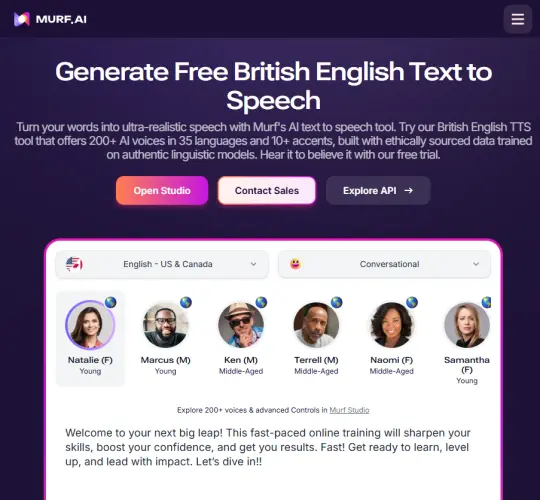
Murf.AI is an AI-powered text-to-speech platform that turns written text into natural-sounding voiceovers, including British English narration. It offers a range of British English AI voices for different purposes, from professional presentations and e-learning courses to YouTube videos, podcasts, and marketing content. Users can preview voices, adjust speech speed and pitch, emphasize specific words, and customize pronunciation to create audio that better matches their needs. With its browser-based editing studio and multilingual voice options, Murf.AI is a practical choice for creators who want polished British-accent voiceovers without hiring a voice actor.
Key Features:
- Dedicated British accent text-to-speech functionality.
- AI voices with different styles and tonalities.
- Voiceover creation for presentations, e-learning, training, and marketing.
- Adjustable pronunciation and speech settings.
- Browser-based studio for managing voiceover projects.
- Free access for testing, with usage and export limitations.
- Offer a dedicated British English text-to-speech tool with multiple voice options.
- Provide useful controls for speech speed, pitch, emphasis, and pronunciation.
- Produce professional-style voiceovers for educational, business, and marketing content.
- Support multiple languages and accents in one platform.
- Include a free plan for trying its basic features.
- The free plan has limited voice-generation time and does not include audio downloads.
- Some advanced voice customization features require a paid subscription.
- Choosing the most suitable British voice may take some trial and error, depending on your content and preferred speaking style.
- Users who only need occasional, short audio clips may find a paid plan less cost-effective.
Part 2. Comparison of British Accent Text-to-Speech
Not sure which British text-to-speech generator fits your needs? Compare these four popular options by their standout capabilities, pricing considerations, and ideal use cases to find the right AI voice solution for your next project.
| British Text-to-Speech Tool | Standout Advantage | Free Plan / Trial | Ideal Use Case |
|---|---|---|---|
| TopMediai | Broad voice selection and flexible voice settings | Available with usage limits | All-in-one AI voice generation |
| ElevenLabs | Expressive, lifelike AI narration | Free tier with limits | Storytelling and realistic voiceovers |
| Narakeet | Straightforward online voice and video creation | Free trial options | Fast audio generation and narrated presentations |
| Murf AI | Studio-style voiceover editing | Free access with restrictions | Business, training, and marketing content |
Part 3. FAQs on British Text-to-Speech
Q1. How can I make AI British text-to-speech sound more natural?
To make AI British text-to-speech sound more natural, start by selecting a voice that matches your audience and content. Then follow these tips:
- Choose the right accent: Select a British English voice rather than assuming any English voice will produce British pronunciation.
- Use natural punctuation: Commas, full stops, and paragraph breaks help establish a more natural speaking rhythm.
- Adjust the speaking speed: Avoid setting the voice too fast, especially for educational content or longer narration.
- Check pronunciation: Review place names, technical terms, abbreviations, and words that may be pronounced differently in British and American English.
- Preview before exporting: Listen to the generated audio and revise sentences that sound awkward or overly mechanical.
If the platform supports emphasis, pauses, or emotional controls, experiment with those settings to improve the final result.
Q2. Can I use a British accent voice generator for YouTube and commercial projects?
Yes, you can use AI-generated British voices for YouTube videos, podcasts, ads, and other commercial content, provided the tool's license allows it. Check the platform's terms, as free and paid plans may have different usage rights. Always get proper authorization when using cloned or imitated voices.
Q3. Can I use a British voice generator to create audio in other languages?
Some British voice generators support multiple languages, but voice quality and pronunciation accuracy can vary. For the most natural results, choose a tool that specializes in your target language.
Wrapping Up
Choosing the best British text-to-speech tool depends on what you need, whether it's creating natural-sounding voiceovers, making videos more engaging, or practicing British English pronunciation. ElevenLabs is worth trying for expressive narration, Narakeet offers a simple way to generate British-accented audio online, and Murf AI is a solid option for professional voiceover projects.
If you're looking for a versatile and beginner-friendly option, TopMediai Text to Speech is a great place to start. Its wide range of AI voices and convenient online workflow make it easy to explore different voice styles and create audio for various projects. Give it a try, test a few British voices, and see which one brings your script to life!
Related Articles
5 Best Chinese Text-to-Speech Tools for Natural AI Voices
Goku Text-to-Speech: 3 Best Tools for Goku Voice in 2026
5 Best Hindi Text to Speech Tools for Natural AI Voice Creation