


If you feel complex to manage files on your iPhone or iPad, that's because you don't have your best file manager for iPhone and iPad. Unlike a traditional PC or Mac, iOS/iPadOS is designed with a sandbox structure, meaning apps generally keep their data isolated.
However, efficient file management is crucial for productivity, organization, and device maintenance. This article explores why a file manager is necessary and reviews some of the best options available for your iPhone 17 and other iOS devices.

Part 1: Why Need an iPhone File Manager
The primary need for a dedicated file manager on iOS stems from its unique architecture. While the built-in operating system is highly secure, it doesn't offer the immediate, universal file access that users might be accustomed to.
- Centralized Access: Without a file manager, accessing a document stored by App A for use in App B can be tedious. A file manager provides a single, centralized location to view, organize, and move files across different apps, cloud services, and your local device.
- System Organization: File managers allow users to create a logical folder hierarchy, rename files, tag items, and quickly search through large amounts of data, preventing digital clutter.
- External and Cloud Integration: Many files are stored on cloud services (like OneDrive or Dropbox) or network drives (like an SMB server). A good file manager acts as a gateway, seamlessly bridging your iOS device with these external storage locations.
- Advanced Operations: For power users, features like file compression/decompression (ZIP/RAR), security locking, media playback, and document annotation become essential, all of which are offered by comprehensive file management apps.
- Transfer Efficiency: File managers simplify the process of transferring files between your device and a computer, often replacing the need for complex syncing software.
Part 2: Best File Manager for iPhone and iPad
Whether you prefer a built-in solution or a powerful third-party tool, there is an iOS file manager for every need.
2.1 Files (Built-in App)
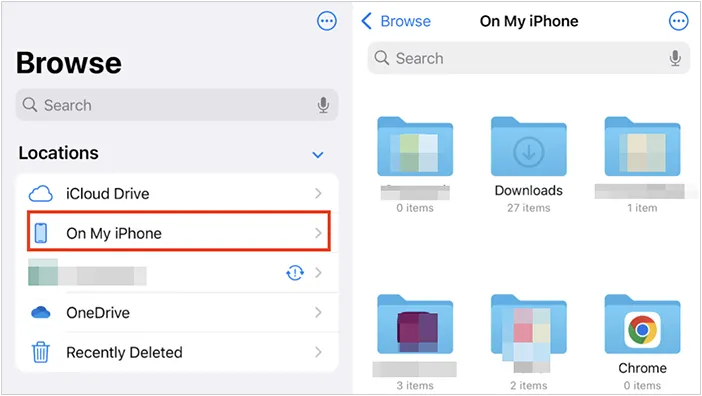
Apple's official file browser is the most fundamental choice. It integrates natively with iCloud Drive and allows access to files stored locally within various app folders (via "On My iPhone/iPad") and connected cloud services (like Dropbox or Google Drive) through the "Locations" feature. It's excellent for basic viewing, sharing, and organization.
Main features:
* Native file browser for iOS and iPadOS.
* Access to files stored locally within apps (On My iPhone/iPad).
* Deep integration with iCloud Drive.
* Support for connecting third-party cloud services (like OneDrive, Dropbox) via "Locations".
* Support basic file operations: move, copy, rename, tag, search.
* Built-in ZIP/Unzip functionality.
Pros:
+ Completely free and built into the operating system, ensuring seamless integration.
+ Highly secure, following Apple's privacy and sandbox architecture.
+ Excellent drag-and-drop support, especially on iPad.
+ Allows quick sharing and opening of files in other compatible apps.
Cons:
- Limited access to the underlying iOS file system (system files remain inaccessible).
- Feature set is basic compared to power-user third-party alternatives.
- Lacks advanced network connection protocols (like FTP, SFTP) without external app support.
2.2 iReaShare iPhone Manager
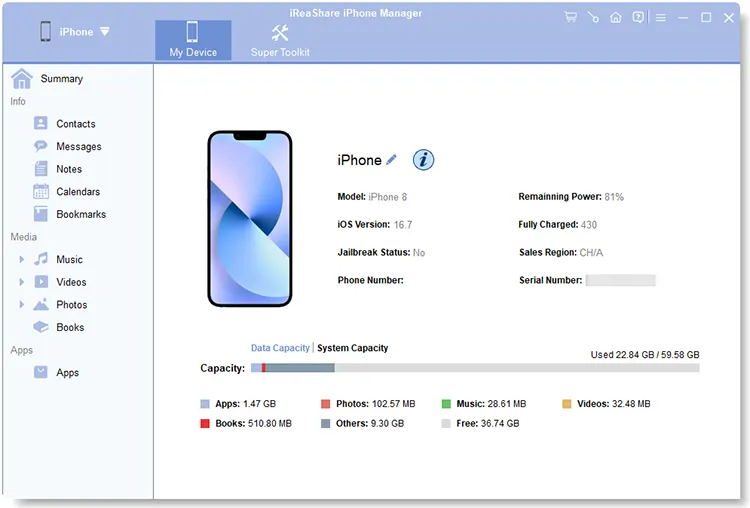
iReaShare iPhone Manager is a comprehensive file manager that goes beyond just organizing files. It allows you to transfer files between iOS devices and computers. One of its standout features is its ability to manage contacts, messages, and media, making it ideal for people who need to manage more than just documents. It's particularly useful for backing up and restoring data and offers advanced features for managing your iPhone's internal storage.
Main features:
* Comprehensive iOS device backup and restore (often as an iTunes alternative).
* Selective data transfer (media, messages, contacts) between iOS device and computer.
* Detailed app data management and application removal.
* Enables you to access iOS files on a PC or Mac.
* Connects and manages multiple iOS devices simultaneously.
* Compatible with the iOS devices running iOS 5.0 or later, including iOS 26.
Pros:
+ Provides flexible control over the iOS device's content from a desktop environment.
+ Facilitates efficient transfer of large batches of files.
+ Useful for managing backups and restoring data without relying on iCloud or iTunes.
+ Supports most iOS devices, including iPhone 17/Air/16/15/14/13/12/11/X/8/7, iPad Pro, iPad Air, iPad mini, etc.
Cons:
Requires a computer to function; it is not a standalone mobile file manager.
Not totally free to use.
Lacks of Wi-Fi connection.
Download iReaShare iPhone Manager.
Download for Win Download for Mac
Watch the video guide to transfer files from an iPhone or iPad to a computer:
2.3 ES File Explorer
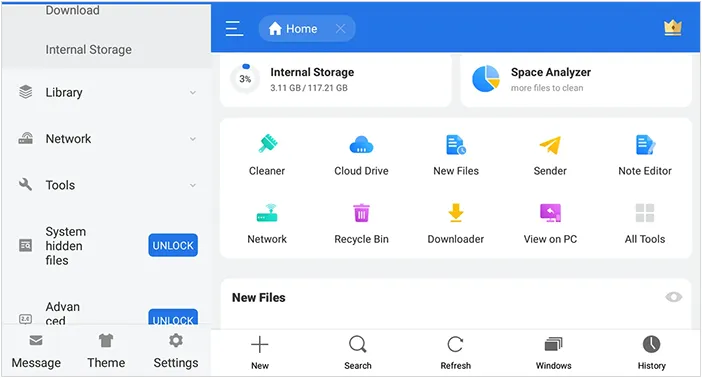
Once a popular option on Android, ES File Explorer now offers its services on iOS as well. It allows users to manage files across multiple platforms, making it an excellent choice for users who need access to files stored on cloud services like Dropbox or Google Drive, or even across FTP and LAN networks. The app offers basic file management tools, such as cut, copy, paste, and delete, and also provides file compression and extraction features.
Main features:
* Local file management and organization (move, copy, rename, delete).
* Supports for network protocols like SMB, FTP, WebDAV.
* Integrated document viewer and media player.
* Wi-Fi transmission for transferring files between the mobile device and a computer.
* Recycle Bin for temporarily storing deleted local files.
Pros:
+ Offers strong, comprehensive file operations and organization tools.
+ Excellent network connectivity for accessing file servers and NAS drives.
+ Supports popular iPad features like split-screen and drag-and-drop.
Cons:
- Requires a subscription (Pro version) for full access to advanced features like automatic backup.
- Some users report privacy concerns due to data collection for tracking and analytics.
- Interface design can sometimes feel less native or polished than dedicated iOS apps.
2.4 AirDroid Web
AirDroid Web is a web-based file manager that connects your iPhone to a PC or Mac via Wi-Fi. It offers wireless file transfer, enabling you to access your device's files from any web browser. The AirDroid web interface allows you to manage media, documents, apps, and more. Although it's more of a file transfer tool than a traditional file manager, it's an excellent choice for users who want to wirelessly manage their files across devices.

Main features:
* Web-based interface for managing files on the iOS device from any computer's browser.
* Wireless file transfer between mobile device and computer.
* Basic device management and monitoring (e.g., battery status).
* Remote photo and video access/streaming.
Pros:
+ No cables or proprietary desktop software are needed for transfer.
+ Works across different computer operating systems (Windows, Mac, Linux).
+ Good for quick, ad-hoc file sharing and media access.
Cons:
- Heavily reliant on a strong, stable Wi-Fi connection.
- Primarily a bridge to a computer, not a robust local file manager.
- The free version often has limitations on file size or session duration.
2.5 File Manager & Browser
File Manager & Browser is an all-in-one solution for managing files and browsing the web. It lets you organize your documents, images, and videos, and also offers browser capabilities so you can download files directly to your device. With a built-in media player and PDF reader, this app offers a range of features, making it a versatile tool for everyday file management tasks.

Main features:
* Integrated web browser with file download capabilities.
* Local file organization (folders, rename, zip/unzip).
* Built-in viewers for documents (PDF, MS Office) and media.
* Passcode protection for securing files within the app's sandbox.
* Support for cloud services (Dropbox, OneDrive) in many versions.
Pros:
+ Excellent tool for downloading files of all types directly from the web into a secure location.
+ The private browser mode enhances data privacy.
+ Supports quick file organization and viewing of numerous file formats.
Cons:
- The generic name can make it difficult to identify a specific quality app.
- May have limited or inconsistent support for advanced network protocols.
- Some free versions are heavily ad-supported.
2.6 OneDrive
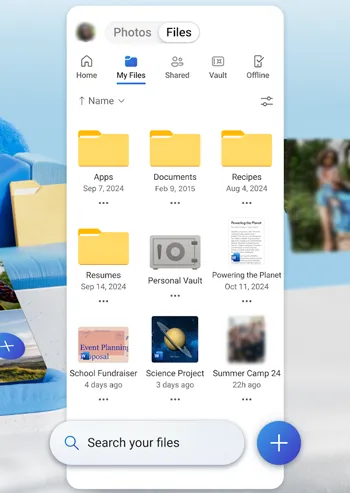
OneDrive is more than just a cloud storage service - it's an excellent file manager for iOS as well. With OneDrive, you can easily store, access, and share your files across all your devices. It integrates with the Files app, allowing you to view and manage your OneDrive files seamlessly.
OneDrive also supports file sharing and collaboration, making it ideal for work or academic use. Additionally, OneDrive offers 5GB of free storage with the option to upgrade for more space.
Main features:
* Dedicated Microsoft cloud storage service.
* Automatic photo and video backup (Camera Upload).
* Seamless integration with Microsoft 365 (Word, Excel, PowerPoint).
* "Files On Demand" for accessing files without downloading them.
* Personal Vault for enhanced security of sensitive files.
Pros:
+ The best option for Microsoft users and corporate environments using SharePoint.
+ Robust features for security, version history, and file recovery.
+ Offers a massive amount of storage when bundled with a Microsoft 365 subscription.
Cons:
- Primarily a cloud-centric service; its local file management is limited to its own sync folder.
- Requires a paid subscription for substantial storage capacity.
- The user interface can sometimes feel complex or busy with notifications.
2.7 Dropbox
Dropbox is another popular cloud storage service that doubles as a file manager for iPhone and iPad. You can upload files to Dropbox, organize them into folders, and access them from any device. Dropbox also integrates well with other apps, allowing you to open, edit, and share files directly from the app. Whether you're working with documents, images, or videos, Dropbox makes it easy to keep your files organized and accessible.

Main features:
* Veteran cloud storage and synchronization service.
* Automatic camera uploads and document scanning (to PDF).
* File version history and "Rewind" feature for rolling back changes.
* Ability to preview over 175 file types without other software.
* Secure sharing with password and expiration date options.
Pros:
+ Extremely reliable and fast file synchronization across all platforms.
+ Excellent for professional collaboration and sharing large files easily via links.
+ Strong history and reputation as a secure cloud solution.
Cons:
- Limited free storage (typically 2GB or less).
- Advanced features like version history and large storage require a paid plan.
- Synchronization logic can sometimes be less intuitive than purely local file managers.
2.8 File Explorer on Windows
This refers to using the native Windows file explorer to interact with your iPhone or iPad when connected via a cable. While limited primarily to photo and video imports from the Camera Roll, it serves as a basic file access point for media transfer.

Main features:
* Allows access to the iPhone's Camera Roll folder when connected via USB.
* Basic ability to copy and import photos and videos to the PC.
Pros:
+ Completely free and built into the Windows operating system.
+ The simplest way to manually extract media from the device's photo library.
Cons:
- Extremely limited functionality; cannot access documents, app data, music, or other internal folders.
- Requires a physical cable connection.
- Not a true file management solution.
2.9 Documents by Readdle
Considered by many to be the best third-party option, Documents is a full-featured iPhone file manager app, media player, PDF reader, and browser downloader all in one. It seamlessly connects to all major cloud services and network drives, making it a productivity powerhouse.

Main features:
* Full-featured file manager with folder organization, copy, move, and compression (ZIP/Unzip).
* Integrated web browser and powerful file downloader.
* Seamless connectivity to all major cloud services (Dropbox, OneDrive, etc.).
* Advanced document handling, including robust PDF viewing and annotation.
* Built-in media player and text editor.
* Connection to network drives (FTP, WebDAV, SMB) via add-ons.
Pros:
+ Often considered the best all-in-one productivity app for iOS/iPadOS file management.
+ Clean, highly polished, and intuitive user interface.
+ Powerful PDF features and media playback.
Cons:
- The most advanced editing features (e.g., pro PDF editing) are part of a paid subscription (Documents Plus/Pro).
- The multitude of features can be overwhelming for casual users.
2.10 FileBrowser
FileBrowser specializes in connecting your iOS device to computers and servers (SMB, FTP, SFTP, WebDAV). It is designed specifically for users who need to access files on corporate networks or home servers, offering secure and fast remote access.

Main features:
* Specializes in connecting to remote file servers: SMB (Windows/NAS), FTP, SFTP, WebDAV.
* Accesses local folders and cloud services.
* Bi-directional folder synchronization (e.g., backing up local files to a server).
* Built-in viewers for documents and media streaming directly from the server.
* Secure storage of passwords in the iOS Keychain.
Pros:
+ Top choice for professional users needing secure access to corporate networks and file servers.
+ Strong focus on privacy and security (data does not go through their own servers).
+ Ultra-fast browsing of remote network locations.
Cons:
- Usually a one-time purchase (no free trial), which is a higher upfront cost.
- The interface and setup can have a steeper learning curve for network novices.
2.11 FE File Explorer Pro
FE File Explorer Pro is a powerful file manager with support for local and network storage, as well as cloud services like Dropbox and Google Drive. The app allows you to browse, transfer, and manage files across multiple devices, including PC, Mac, and NAS servers.
One unique feature of FE File Explorer Pro is its support for connecting to remote servers and FTP, making it a solid choice for tech-savvy users and businesses that need to manage large file systems.

Main features:
* Comprehensive network support: SMB, WebDAV, FTP, SFTP.
* Integration with cloud services (Google Drive, Dropbox, OneDrive, Box).
* "Edit-in-Place" for saving changes directly back to remote storage.
* Built-in media player with subtitle support.
* Archive support for ZIP, RAR, and 7zip files.
* File synchronization between remote storage and the device.
Pros:
+ Robust and versatile tool for accessing and transferring files between any two locations.
+ High-quality video player with subtitle functionality.
+ Reliable for complex network environments (supports Windows Domain, Active Directory).
Cons:
- Primarily a paid app (Pro version required for full features).
- Users sometimes report minor glitches or setup issues after major app or OS updates.
2.12 FileMaster
FileMaster is an easy-to-use file manager that's perfect for people who need a simple yet effective solution for managing their files. With support for cloud storage services, file encryption, and the ability to organize files into folders, FileMaster makes it easy to keep everything organized. It's a good choice for people who need a basic file manager without too many bells and whistles.

Main features:
* Local file manager, document viewer, and media player.
* Strong privacy features including a master passcode, TouchID/FaceID lock, and hidden folders.
* Wi-Fi and USB file transfer methods for PC connection.
* Built-in text editor.
* Resume download functionality.
Pros:
+ Excellent choice for users whose main priority is privacy and securing personal files.
+ The simple file organization is easy to use for new file manager users.
+ Reliable download manager with resume capabilities.
Cons:
- May lack the advanced productivity features (e.g., high-end PDF annotation) of competitors.
- Focus is heavily on local and secure storage, with less emphasis on network connectivity.
Part 3: Q&A About Best File Manager for iPhone and iPad
Q1: Is the built-in Files app enough for most users?
Yes, for most users, the Files app is sufficient. It allows you to organize, search, and share files, and integrates well with cloud services like iCloud, Google Drive, and Dropbox. It also supports quick file previews and can scan documents directly into your storage.
However, if you need advanced features like data backup and restore on a computer, importing books and bookmarks, PDF annotation, network drive access, or offline document editing, the apps like iReaShare iPhone Manager, Documents by Readdle, File Manager & Browser, etc., might be a better fit.
Q2: Are file managers secure on iPhone?
Most reputable file managers, such as Documents by Readdle and Files, provide robust security features like password protection, encryption, and secure cloud storage integration. If you don't want to use a network to manage your files, you can try iReaShare iPhone Manager. It allows you to transfer and manage iOS files on a PC or Mac without a network. However, it's important to download an app from a secure website.
Q3: Can file managers handle large files or media like videos and music?
Yes. Many file managers, including iReaShare iPhone Manager, Documents by Readdle, and Files, can handle large files like videos and music. iReaShare is good at bulk transfer, Documents by Readdle allows you to play media files directly within the app.
Conclusion
The need for an iPhone and iPad file manager is clear: it helps bridge the gap between Apple's sandboxed environment and the user's need for centralized, organized, and efficient file access. While the Files app provides a solid foundation, powerful third-party options like iReaShare iPhone Manager, Documents by Readdle, OneDrive, FE File Explorer Pro, etc., unlock advanced capabilities for backup and restore and robust organization.
Choosing the right tool depends on your primary needs—whether it's simple cloud access or complex corporate network file transfers.
Download for Win Download for Mac
Related Articles
Best File Manager for Android: 9 New Options Better Than Built-In
Transfer Files from iPhone to Mac Without Effort (6 Solutions)
Transfer Data from Android to iPhone After Setup Without Data Loss
Easily Print Text Messages from iPhone via 4 Methods (Latest)