

TL;DR:
If you are looking for Shreddit Data Eraser for Android alternatives, several tools offer different ways to remove personal information from Android devices. iReaShare Android Data Eraser is a desktop-based option for wiping existing and deleted data with three erasure levels and detailed reports. Dr.Fone and BitRaser provide broader device-erasure solutions, while iShredder, Data Eraser: File Shredder, and Ashes focus more on on-device file shredding and free-space wiping. The right choice depends on whether you want to erase selected files, clean an entire phone before resale, or manage multiple devices.
Shreddit Data Eraser is an Android application designed to securely delete selected files by overwriting their data. It supports internal and external storage, multiple shredding methods, and free-space wiping. However, its file-focused approach may not meet everyone's needs, especially if you want to erase an entire Android phone, remove more types of personal information, or generate a detailed erasure report.
Fortunately, several Shreddit Data Eraser for Android alternatives are available for different privacy requirements. Some work directly on Android devices, while others use a computer to perform more comprehensive data erasure. Below, we compare six options, including their main features, advantages, limitations, and pricing, to help you find a suitable replacement.
Comparison of 6 Shreddit Alternatives at a Glance
The table below compares six Shreddit alternatives by their erasure capabilities, computer requirements, and pricing options.
| Tool | Erasure Type | Computer Required | Pricing |
|---|---|---|---|
| iReaShare Android Data Eraser | Device data wiping | Yes | Free trial/Paid |
| Dr.Fone Data Eraser | Full-device wiping | Yes | Free trial/Paid |
| iShredder | File and free-space shredding | No | Free/In-app purchases |
| Data Eraser: File Shredder | File shredding | No | Free/In-app purchases |
| BitRaser Mobile Eraser | Mobile data erasure | Yes | Paid |
| Ashes | File and data shredding | No | Free |
1. iReaShare Android Data Eraser
If you need more than an Android file shredder, iReaShare Android Data Eraser is worth considering. Unlike Shreddit, which focuses on selected files and storage space, this desktop program is designed to erase a wider range of information from an Android phone or tablet, including existing files, previously deleted data, private app data, and system settings.
It offers three erasure levels - Low, Medium, and High - so you can choose an appropriate wiping option according to your privacy requirements. After the process, you can also export an erasure report for your records. It is particularly useful when preparing an old Android device for resale, donation, or transfer.
Download for Win Download for Mac
Key Features of iReaShare Android Data Eraser
- Three erasure levels: Choose Low, Medium, or High according to your data-erasure requirements.
- Broad data coverage: Erase personal files, photos, videos, messages, contacts, private app data, system caches, settings, and previously deleted items.
- Storage overwriting: Overwrite data after deletion to make it more difficult for data recovery software to retrieve.
- Erasure reports: Generate a report containing device information, erasure results, methods, and overwrite-pass details.
- Wide compatibility: Support Android 6.0 through Android 17 and various devices from Samsung, Huawei, Xiaomi, OPPO, vivo, Motorola, and other manufacturers.
- Provides three erasure levels for different privacy requirements.
- Handles both existing and previously deleted data.
- Covers more data categories than a basic file-shredding application.
- Generates an exportable erasure report.
- Supports both Windows and Mac computers.
- Requires a computer to perform data erasure.
- You need to connect your Android device before starting.
- High-level erasure can take longer than lower-level options.
Best For
Android users who want to erase a wider range of personal information, choose different wiping levels, and keep a record of the erasure process.
Price
iReaShare Android Data Eraser starts at $9.95 for a 1-month license covering 1 PC. Other plans are available for different license durations and numbers of computers, with prices varying by plan.
How to Use iReaShare Android Data Eraser to Wipe Android Data
Before starting, back up your Android phone because the erasure process cannot be undone. Also, keep your Android device connected throughout the operation.
-
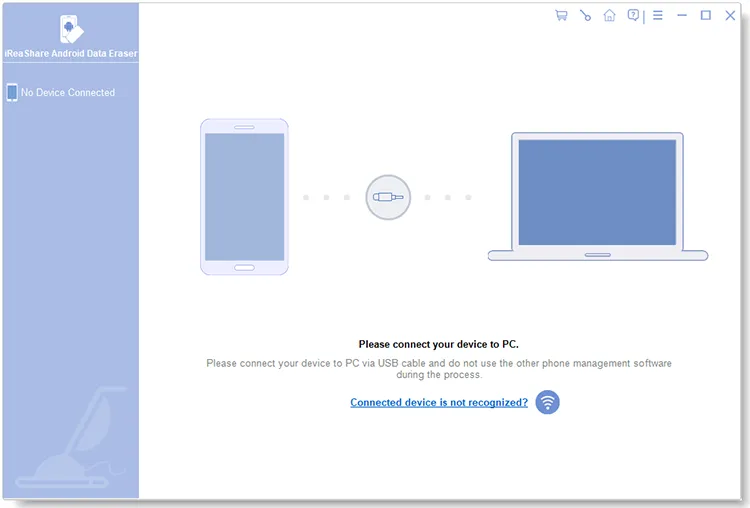
Download and install iReaShare Android Data Eraser on your Windows PC or Mac. Launch the program and connect your Android phone using a USB cable or Wi-Fi. Follow the connection instructions to let the software recognize your device.
-
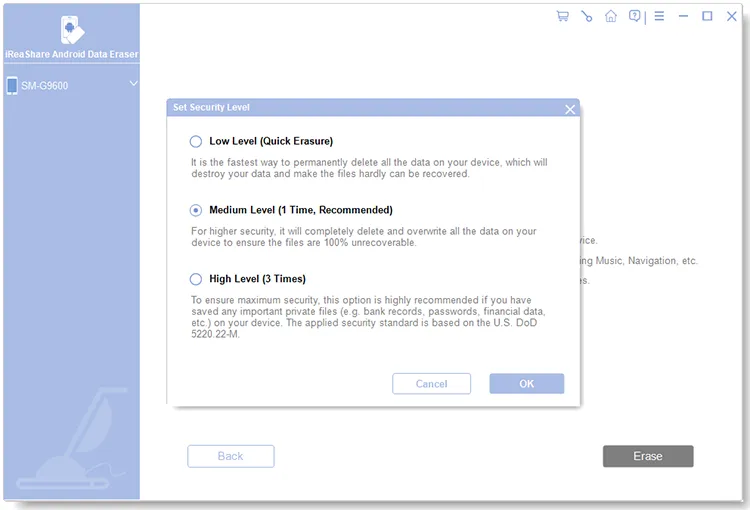
After the connection is established, click "Continue" on the interface. Select an erasure level and click "OK" to confirm your choice.
-
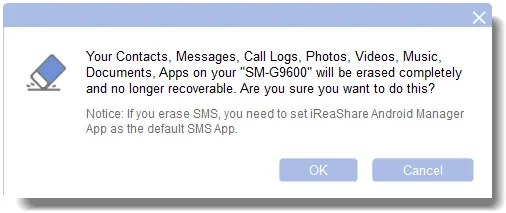
Type "delete" in the confirmation box, click "Erase", and then click "OK" in the pop-up window to proceed.
-
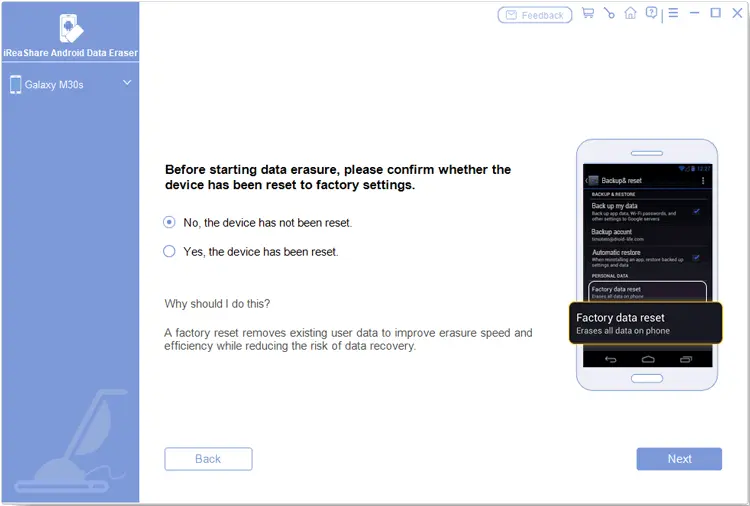
If the program indicates that your device has not been factory reset, complete the reset by following its instructions. Set up your phone again and reconnect it to the computer. If it has already been reset, follow the corresponding confirmation prompts to continue.
-
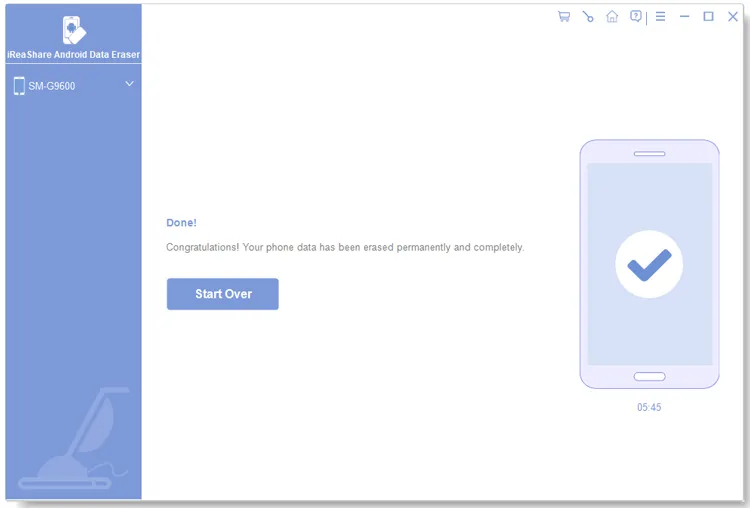
Allow the program to scan and erase your Android data. Do not disconnect the phone while the process is running. Once it is complete, click "Save Report" to export the erasure report to your computer.
Video Guide
2. Dr.Fone Data Eraser
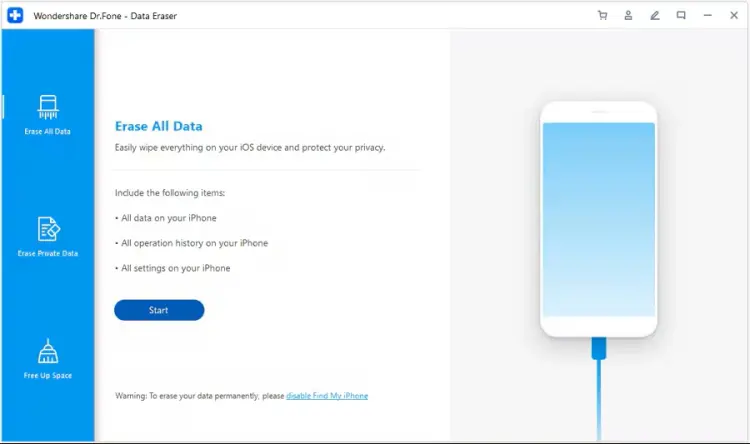
Dr.Fone Data Eraser, developed by Wondershare, is another desktop-based alternative for users who want to erase an entire Android device. It is part of the Dr.Fone toolkit and supports data erasure on both Android and iOS devices. (How to delete everything on iPhone?)
Unlike Shreddit, which allows you to shred selected files, Dr.Fone's Android data erasure function focuses on wiping the entire device. This makes it more suitable for people who plan to sell, trade in, or give away an old phone. It also generates a data-erasure report after the operation.
Key Features of Dr.Fone Data Eraser
- Complete data erasure: Wipe all data from supported Android and iOS devices.
- Cross-platform support: Provide data-erasure functionality for both Android and iOS.
- Erasure reports: Generate a report documenting the completed data-erasure process.
- Desktop operation: Manage the erasure process through a computer.
- Integrated toolkit: Work alongside other Dr.Fone utilities for mobile device management, recovery, and repair.
- Suitable for wiping an entire Android device before resale or transfer.
- Supports both Android and iOS devices.
- Provides an erasure report.
- Integrates with other mobile management tools.
- Does not currently offer selective erasure of individual Android file types through its Data Eraser function.
- Requires a computer and a compatible device connection.
- Some additional Dr.Fone utilities require separate paid licenses.
Best For
Users who want a computer-based solution to erase an entire Android or iOS device rather than selectively shred individual files.
Price
Dr.Fone Data Eraser offers three license options: a monthly plan for $12.95, an annual plan for $15.95, and a perpetual plan for $19.95. Actual prices may vary depending on your region and available promotions.
3. iShredder
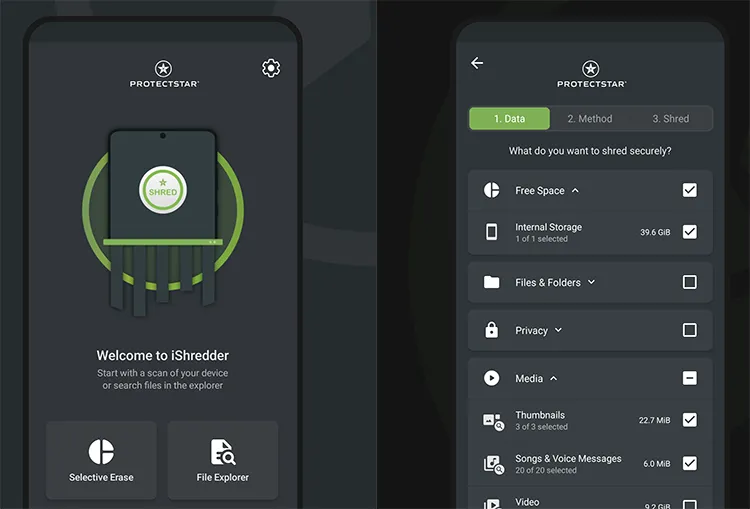
If you prefer to erase selected data directly on your Android phone, iShredder by Protectstar is another option to consider. Rather than requiring a desktop program to manage the entire device, it provides an Android app with a built-in file manager, allowing you to choose specific files, folders, and storage areas for secure erasure. It also supports wiping free space, helping remove traces that may remain after ordinary file deletion.
Key Features of iShredder
- Selective file shredding: Select individual files, folders, photos, and videos for secure erasure.
- Free-space wiping: Overwrite available storage space to address remnants of previously deleted files.
- Multiple erasure methods: Choose from different wiping algorithms and recognized erasure standards.
- Built-in file explorer: Browse your Android storage and select files directly within the application.
- Erasure reports: Generate records of completed operations, with reporting options depending on the edition.
- Allows you to select individual files and folders for erasure.
- Works directly on Android without requiring a computer for ordinary file shredding.
- Supports free-space wiping and external storage.
- Provides exportable erasure reports.
- Advanced algorithms and functions require a paid edition.
- Some multi-pass erasure methods may take longer.
- Available features vary by edition and Android device.
Best For
Android users who prefer an on-device file shredder with multiple erasure methods and optional reporting features.
Price
You can install iShredder at no cost, then purchase additional features within the app. Its in-app purchase options are priced between $1.49 and $39.99, depending on the edition and features you choose.
4. Data Eraser: File Shredder
Data Eraser: File Shredder, developed by cb innovations, is another Android application worth considering if you mainly want to remove individual files and photos. It is designed to securely erase selected content rather than provide a complete desktop-based device-wiping solution.
One feature that distinguishes it from basic file deletion utilities is its support for digitally signed deletion reports. This can be useful if you want a record of completed file-erasure operations. The application is available through Google Play and can be used directly on an Android device.
Key Features of Data Eraser: File Shredder
- File and photo erasure: Securely delete supported files and photos from Android storage.
- Deletion reports: Generate digitally signed reports documenting deletion operations.
- On-device operation: Perform supported file-erasure tasks directly from your Android phone.
- Mobile-focused design: Provide a dedicated utility for users who want to remove selected content without using desktop software.
- Does not require a computer for its main operations.
- Focuses on securely removing files and photos.
- Provides digitally signed deletion reports.
- Offers a free download through Google Play.
- Focuses on file and photo erasure rather than comprehensive device wiping.
- Some features may require in-app purchases.
- Its functions may not be sufficient if you want to erase all personal information before selling your phone.
Best For
Android users who need a straightforward file-erasure application with deletion reports rather than a full-device data eraser.
Price
The app is free to download, with optional in-app purchases ranging from $5.49 to $9.49, depending on the item selected.
5. BitRaser Mobile Eraser
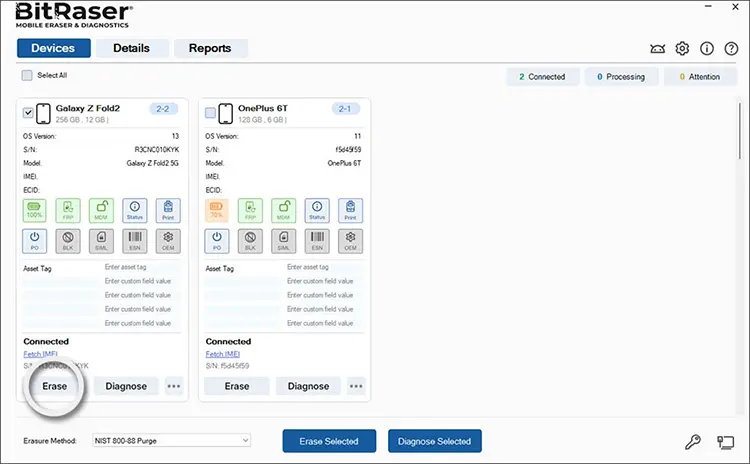
For businesses, mobile retailers, and device refurbishers, BitRaser Mobile Eraser & Diagnostics offers a more comprehensive solution than a typical Android file shredder. Developed by Stellar, it is designed to erase and diagnose mobile devices, including Android phones, iPhones, and iPads.
Besides wiping device data, BitRaser supports 14 international erasure standards and generates verifiable erasure reports and certificates. It also provides more than 50 diagnostic tests to help evaluate device conditions before resale or reuse. Another notable feature is its ability to process up to 40 mobile devices simultaneously on one workstation.
Key Features of BitRaser Mobile Eraser
- Complete mobile data erasure: Wipe data from supported Android and iOS devices.
- Multiple erasure standards: Support 14 global standards, including NIST 800-88, IEEE 2883:2022, and DoD 5220.22-M.
- Erasure reports and certificates: Generate verifiable records in PDF, CSV, and XML formats.
- Device diagnostics: Perform more than 50 tests to check components such as batteries, cameras, microphones, and connectivity.
- Batch processing: Erase or diagnose up to 40 mobile devices simultaneously on one workstation.
- Cloud management: Manage licenses, users, and erasure reports through a centralized console.
- Supports both Android and iOS device erasure.
- Offers multiple international erasure standards.
- Generates verifiable erasure reports and certificates.
- Combines data wiping with mobile device diagnostics.
- Supports batch processing for multiple devices.
- Its extensive features may be unnecessary for individual Android users.
- Requires a computer and an internet connection for its cloud-based license and report management.
- The licensing model may be less convenient for occasional use because licenses are consumed per device and process.
- Its minimum license purchase requirement can make it costly for personal use.
Best For
Businesses, mobile retailers, and refurbishment companies that need to erase and diagnose multiple Android or iOS devices.
Price
According to its official purchase page, pricing starts at $50 for 10 devices. BitRaser follows a per-process licensing model, meaning each erasure process consumes one license.
6. Ashes
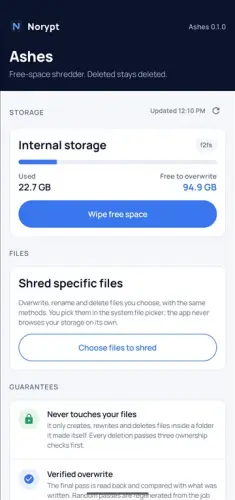
Ashes, developed by Norypt, is a free and open-source Android file shredder and free-space wiper. It provides another option if you prefer a lightweight mobile application without a paid subscription or a desktop connection.
The application supports 12 data-sanitization standards and verified overwriting. It also does not require root access or network permissions, which may appeal to privacy-conscious users. Unlike tools that focus on wiping an entire device, Ashes is mainly designed to shred selected files and overwrite available storage space.
Key Features of Ashes
- File shredding: Select files and securely overwrite their contents before removing them.
- Free-space wiping: Overwrite available storage space to address traces of previously deleted files.
- Multiple sanitization standards: Choose from 12 wiping standards and different pass configurations.
- Verified overwriting: Check the results of the wiping process and review what was overwritten.
- No root required: Run the application on supported Android devices without rooting them.
- Open-source design: Use a GPL-3.0-licensed application without an account or network permission.
- Free and open source.
- Does not require root access.
- Supports both file shredding and free-space wiping.
- Offers multiple sanitization standards.
- Provides overwriting verification.
- Does not request network permission.
- Supports Android 8.0 and later rather than older Android versions.
- Focuses on file-level and free-space erasure instead of full-device data management.
- Its current release is relatively new, so long-term compatibility and maintenance are still worth monitoring.
- Requires manual APK installation from its official website rather than a conventional Google Play installation.
Best For
Privacy-conscious Android users who want a free, open-source file shredder with verified overwriting and no root requirement.
Price
Ashes is completely free and open source under the GPL-3.0 license.
Conclusion
To sum up, Shreddit is not the only option for securely erasing Android data. The alternatives above offer different approaches, from simple file shredding to more comprehensive device wiping. Consider your erasure needs, ease of use, and budget before making a final decision. If you want a more comprehensive way to clear personal data before passing on your phone, iReaShare Android Data Eraser is worth considering.
Download for Win Download for Mac
Related Articles
SafeWiper for Android Alternative: 6 Tools to Consider for Secure Android Data Erasure
8 Android Data Eraser Software and Apps Comparison in 2026
How to Delete Data from Android Phone Permanently (Practical Solutions)
How to Permanently Delete Photos from Android Device (Proven)