

TL;DR:
If SafeWiper for Android does not meet your requirements, several other tools can help you erase personal information before selling or giving away an Android device. iReaShare Android Data Eraser is a desktop-based option for users who need different erasure levels and detailed reports. Dr.Fone, Jihosoft Mobile Privacy Eraser, and TunesBro DroidWiper provide other computer-based solutions, while iShredder and Shreddit are suitable for users who prefer to shred files directly on their Android devices.
SafeWiper for Android is designed to erase personal information from Android phones and tablets, including contacts, messages, photos, videos, and app data. It offers different wiping modes and supports various Android devices. However, you may want to explore other options if you need more flexible erasure settings, a different connection method, or a tool that better matches your device and privacy requirements.
Fortunately, several Android data erasers are available for both computers and mobile devices. In this article, we will introduce six SafeWiper for Android alternatives, compare their main features, and discuss their advantages and limitations to help you choose a suitable tool.
Comparison of 6 Best SafeWiper for Android Alternatives
To help you compare the available options at a glance, the table below summarizes six SafeWiper for Android alternatives, their supported platforms, main erasure functions, and pricing.
| Software | Platform | Main Erasure Functions | Pricing |
|---|---|---|---|
| iReaShare Android Data Eraser | Windows / Mac | Erase existing and deleted data; 3 erasure levels | From $9.95 |
| Dr.Fone Data Eraser | Windows / Mac | Complete Android and iOS data erasure | From $12.95 |
| iShredder | Android | File shredding and free-space wiping | Free; in-app purchases ($1.49-$39.99) |
| Jihosoft Mobile Privacy Eraser | Windows | Erase all data, existing data, or deleted data | From $39.95 |
| TunesBro DroidWiper | Windows | Erase all data, private data, and app data | From $29.95 |
| Shreddit Data Eraser | Android | File shredding and free-space wiping | Free; in-app purchases ($2.49-$28.99) |
Alternative 1. iReaShare Android Data Eraser
If you are looking for a desktop-based alternative to SafeWiper for Android, iReaShare Android Data Eraser is worth considering. It is designed for people who want to prepare their Android phones or tablets for resale, donation, or recycling without leaving their personal information behind. You can operate it through a computer and follow a guided process to erase your device. It also provides different erasure settings to accommodate varying privacy requirements.
Key Features of iReaShare Android Data Eraser
- Three erasure levels: Offer Low, Medium, and High options to accommodate different data-wiping requirements.
- Storage overwriting: Overwrite storage sectors to make erased information difficult to retrieve with data recovery tools.
- Detailed erasure reports: Generate reports containing device information, erasure results, and the number of overwrite passes.
- Broad data coverage: Handle personal files, media, private app data, system caches, settings, and previously deleted items.
- Wide Android compatibility: Support Android 6.0 through Android 17, including devices from Samsung, Huawei, Xiaomi, OPPO, vivo, Motorola, and other brands.
Download for Win Download for Mac
- Provides different wiping intensities for different privacy needs.
- Helps address both existing and previously deleted information.
- Offers a documented record of completed erasure operations.
- Covers a broad range of Android devices and operating system versions.
- Requires a computer to perform data erasure.
- You need to connect your Android device to the computer before starting the process.
- High-level erasure may take longer than lower-level options.
Best For
Android users who want flexible data-erasure levels, comprehensive wiping options, and an erasure report.
Price
iReaShare Android Data Eraser starts at $9.95 for a 1-month license covering 1 PC. The software also offers different subscription durations and license options for multiple PCs, with prices varying according to the selected plan.
How to Use iReaShare Android Data Eraser to Wipe Android Data
-
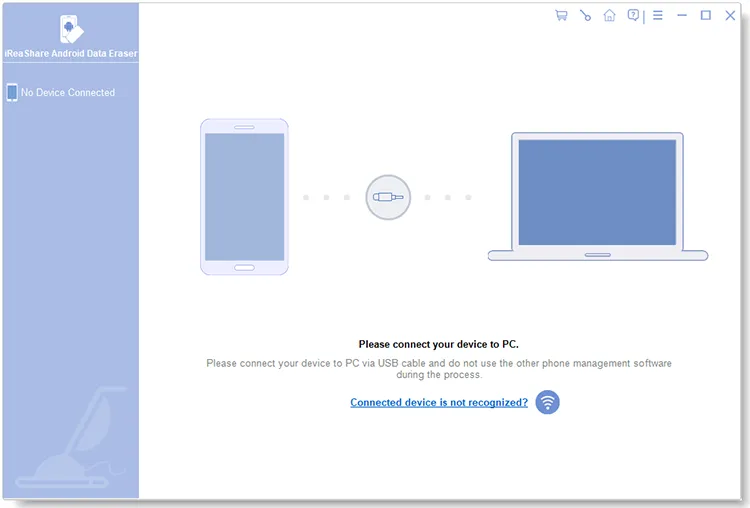
Download and install iReaShare Android Data Eraser on your computer. Launch the program and connect your Android phone using a USB cable or Wi-Fi. Follow the interface instructions to complete the connection.
-
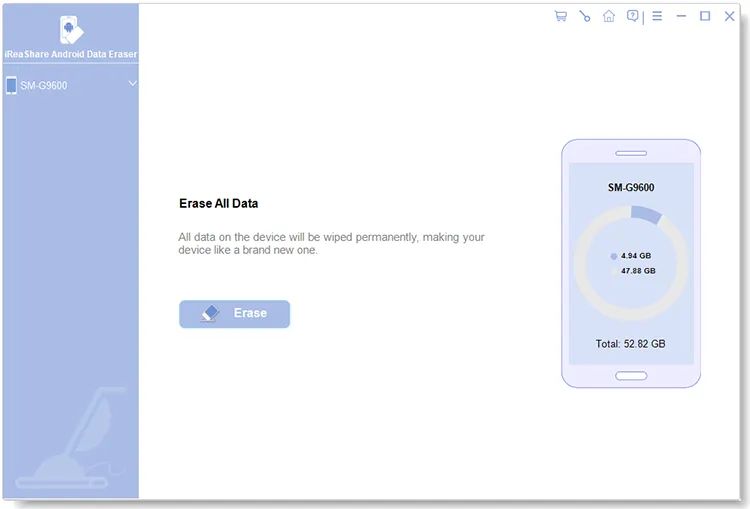
Back up any important files before proceeding because the erasure cannot be undone. Keep your device connected throughout the process, then click "Continue" on the connected interface.
-
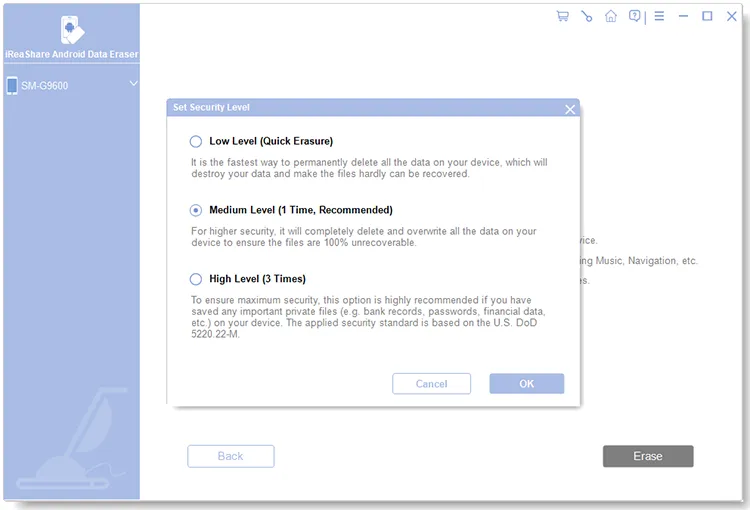
Select an erasure level: Low, Medium, or High, and click "OK". Type delete into the confirmation box, click "Erase", and confirm the operation by clicking "OK" in the pop-up window.
-
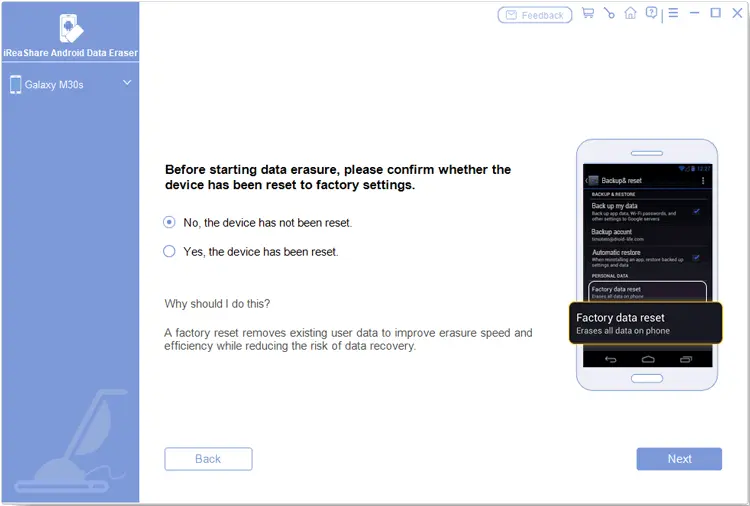
If the program indicates that your phone has not been restored to factory settings, follow the on-screen instructions to perform a factory reset. Complete the initial device setup, reconnect your phone to the computer, and continue with the erasure process. If the device has already been reset, follow the corresponding confirmation instructions.
-
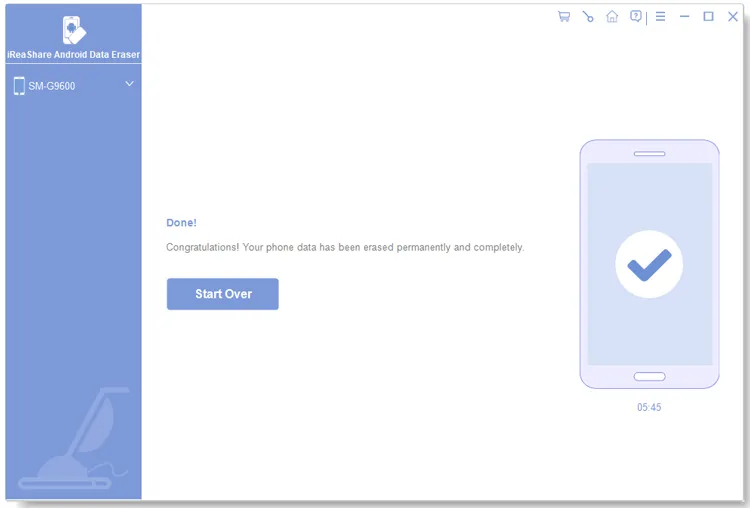
Once your device is ready, the program will scan it and begin erasing its data. Wait until the process finishes without disconnecting your phone. Afterward, click "Save Report" to export a report containing device information, erasure results, and overwrite-pass details.
Video Guide
Alternative 2. Dr.Fone Data Eraser
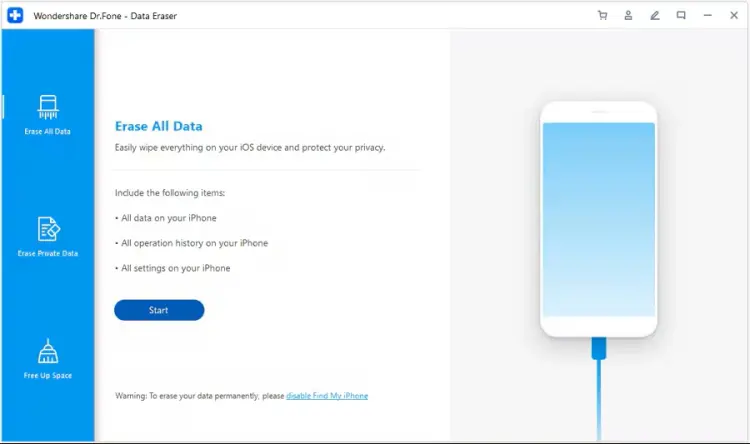
Dr.Fone Data Eraser is a data-wiping utility from Wondershare's Dr.Fone toolkit. It supports complete data erasure on Android and iOS devices, making it an option if you want to manage data erasure across different mobile platforms.
For Android, its main function is to wipe the entire phone rather than selectively erase individual file types. Therefore, it is more suitable when you plan to clear a device before selling, trading it in, or giving it to someone else. The software also provides a detailed data-erasure report after the process.
Key Features of Dr.Fone Data Eraser
- Complete data erasure: Wipe all data from supported Android and iOS devices.
- Cross-platform support: Provide data-erasure functionality for both Android and iOS.
- Erasure reports: Generate a detailed report of the erasure process.
- Desktop operation: Manage the wiping process through a computer.
- Additional mobile utilities: Work as part of the broader Dr.Fone software toolkit.
- Suitable for preparing an entire phone for resale or transfer.
- Offers an option for users who manage both Android and iOS devices.
- Integrates with other mobile management utilities.
- Does not currently support selective erasure of specific Android file types.
- Requires a computer and a compatible connection.
- Some additional functions require separate paid licenses.
Best For
Users who want a desktop-based data eraser for both Android and iOS devices.
Price
Dr.Fone Data Eraser offers monthly, annual, and perpetual plans. Its official store lists a monthly plan at $12.95, an annual plan at $14.95, and a perpetual plan at $19.95 at the time of writing. Prices and regional offers may vary.
Alternative 3. iShredder
iShredder is an Android data-erasure and file-shredding application developed by Protectstar. Unlike desktop-based alternatives, it allows you to perform supported erasure operations directly on your Android device without relying on a computer for routine file shredding.
The application can overwrite selected photos, videos, documents, folders, and available storage space. It also supports multiple erasure algorithms, including recognized standards such as DoD 5220.22-M and NIST SP 800-88. Depending on the edition, you can access additional algorithms, extended reports, and other advanced functions.

Key Features of iShredder
- Selective file shredding: Choose individual files, folders, photos, and videos for secure erasure.
- Free-space wiping: Overwrite available storage space to address remnants of previously deleted files.
- Multiple erasure algorithms: Choose from different wiping methods and standards.
- File explorer: Locate and select files directly within the application.
- Erasure reports: Generate records of completed erasure operations, with reporting features depending on the edition.
- Works directly on Android devices.
- Supports selective file and folder erasure.
- Provides multiple erasure algorithms.
- Offers free-space wiping.
- Includes erasure reporting features.
- Advanced functions depend on the selected edition.
- Some erasure operations may take longer when using multiple overwrite passes.
- Its mobile interface may be less convenient for managing large amounts of data than a desktop utility.
Best For
Android users who prefer an on-device file shredder with multiple erasure methods.
Price
iShredder is free to download, but it offers in-app purchases ranging from $1.49 to $39.99 per item. The available features and prices depend on the selected edition and purchase options.
Alternative 4. Jihosoft Mobile Privacy Eraser
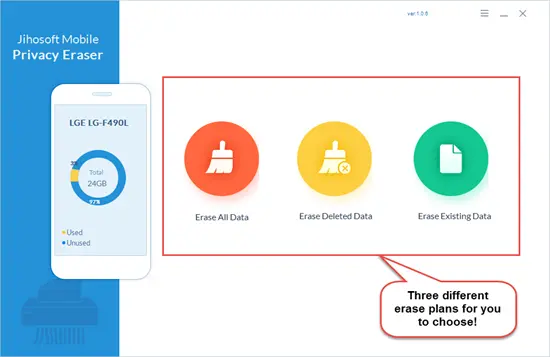
Jihosoft Mobile Privacy Eraser is another desktop-based Android data-wiping program. It provides three main erasure plans: Erase All Data, Erase Deleted Data, and Erase Existing Data. These options allow you to choose whether to wipe the entire device, remove previously deleted information, or clean existing personal files.
The program also provides five erasure algorithms with different security levels. After connecting your Android device to a computer, you can scan its data, preview supported results, and select the information you want to erase. However, device compatibility should be checked carefully because the official supported-device list mainly features older Android models.
Key Features of Jihosoft Mobile Privacy Eraser
- Three erasure plans: Choose Erase All Data, Erase Deleted Data, or Erase Existing Data.
- Five erasure algorithms: Select an erasure method according to your security requirements.
- Data preview: Scan and preview supported data before erasing it.
- Multiple data types: Handle contacts, call logs, messages, photos, videos, and app data.
- Computer-based operation: Connect an Android phone to a Windows computer using a USB cable.
- Allows you to choose between different data-erasure scenarios.
- Provides more control over which information is targeted.
- Offers a preview before confirming data deletion.
- Covers several categories of personal information.
- Requires USB debugging and the corresponding device driver.
- Its officially listed compatible devices are mainly older models.
- The trial version limits erasure to three items per data type.
- The full version is required to erase more data.
Best For
Users with compatible Android devices who want separate options for erasing existing and deleted data.
Price
Jihosoft Mobile Privacy Eraser offers two lifetime license options. The Personal Edition costs $39.95 and supports 1 device and 1 PC, while the Family Edition costs $69.95 and supports up to 5 devices and 5 PCs. Both plans provide lifetime access, allowing you to choose according to your device requirements.
Alternative 5. TunesBro DroidWiper
TunesBro DroidWiper is a desktop Android data eraser that provides several wiping modes for different privacy needs. It allows you to erase all data, remove private information, or clear app-related data from an Android phone or tablet.
One notable feature is its support for different data categories, including contacts, messages, photos, music, and videos. It also provides options for erasing private information from social applications such as WhatsApp, Facebook, and Viber.
The software supports USB and Wi-Fi connection methods according to its user documentation. However, its published technical specifications list older Android versions, so you should verify compatibility before purchasing it for a newer device.
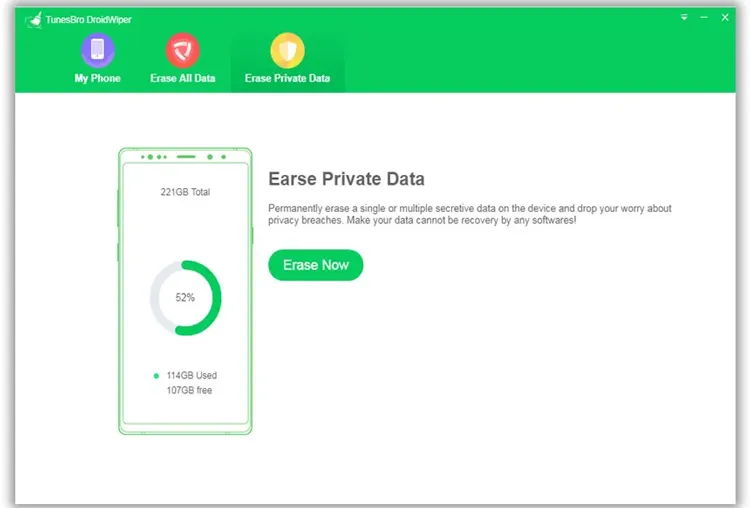
Key Features of TunesBro DroidWiper
- Erase all data: Remove data and settings from an Android device.
- Erase private data: Target personal information such as contacts, messages, photos, call logs, music, and videos.
- Erase app data: Remove supported application data and social network information.
- Data preview: Preview supported data before selecting items for erasure.
- Provides different approaches to handling personal and application data.
- Supports multiple categories of private information.
- Allows you to review supported data before erasure.
- Offers connection flexibility according to its documentation.
- Requires a computer to manage the erasure process.
- Its published compatibility information focuses on older Android versions.
- Some features may not work with newer Android devices.
Best For
Users with compatible older Android devices who want different erasure modes and flexible connection options.
Price
TunesBro DroidWiper offers three lifetime license plans:
- Personal License - $29.95: Supports erasing 2 devices, with unlimited erasure attempts and free lifetime updates.
- Family License - $39.95: Supports erasing up to 8 devices, with unlimited erasure attempts and free lifetime updates.
- Business License - $289.00: Supports erasing an unlimited number of devices, with unlimited erasure attempts and free lifetime updates.
Alternative 6. Shreddit Data Eraser
Shreddit Data Eraser is an Android application designed to shred files directly on a mobile device. It focuses on deleting selected files and overwriting available storage space rather than providing a complete desktop-based phone management solution.
The application supports internal and external storage and uses a shredding algorithm to overwrite selected data. Its newer versions also offer free-space wiping and multiple shredding jobs. If you want a mobile solution and do not want to connect your phone to a computer, Shreddit is worth considering.
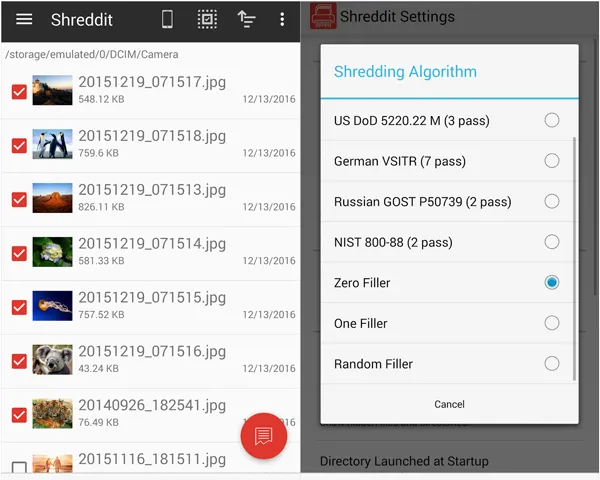
Key Features of Shreddit Data Eraser
- File shredding: Securely delete supported files from Android storage.
- Internal and external storage support: Handle supported data stored in internal memory and external storage.
- Free-space wiping: Overwrite available storage space to address traces of deleted files.
- Multiple shredding jobs: Run more than one shredding operation.
- Additional wiping methods: The newer version includes a Bruce Schneier 7-pass standard.
- Works directly on Android devices.
- Supports internal and external storage.
- Provides free-space wiping.
- Offers multiple shredding options.
- Does not require a desktop computer for its main operations.
- Contains advertisements and in-app purchases.
- Focuses on file shredding rather than comprehensive desktop-based device management.
- The actual erasure coverage depends on the selected files, storage access, and device configuration.
Best For
Android users who want a mobile file-shredding application for deleting selected files and wiping free storage space.
Price
Shreddit Data Eraser is free to download, but it offers in-app purchases ranging from $2.49 to $28.99 per item. The actual cost depends on the selected in-app purchase.
Conclusion
Choosing a suitable SafeWiper for Android alternative depends on your data-erasure requirements, device compatibility, and preferred operating method. iShredder and Shreddit are convenient choices for on-device file shredding, while Dr.Fone, Jihosoft Mobile Privacy Eraser, and TunesBro DroidWiper provide desktop-based options with different wiping functions.
If you want a desktop solution with flexible erasure levels, support for both existing and deleted data, and detailed erasure reports, iReaShare Android Data Eraser is worth considering. It supports Android 6.0 to Android 17 and offers Low, Medium, and High erasure levels, allowing you to choose the appropriate option for your privacy needs.
Download for Win Download for Mac
Related Articles
How to Wipe Android Phone Permanently or Erase All Data Safely
8 Android Data Eraser Software and Apps Comparison in 2026
How to Delete Everything on Your Phone Samsung (5 Solutions)