TL;DR:
Choosing the best hard drive recovery software depends on your recovery needs, technical experience, and budget. Some tools focus on simple recovery processes, while others provide advanced options for complex data loss situations.
- D-Back provides a simple recovery experience for beginners, while Disk Drill offers an intuitive interface with additional disk management features.
- EaseUS Data Recovery Wizard is suitable for everyday file recovery, Recuva is a lightweight free option, and PhotoRec is ideal for users who prefer an open-source recovery tool.
- R-Studio is designed for advanced recovery tasks, Wondershare Recoverit focuses more on multimedia recovery, and Stellar Data Recovery provides professional-level recovery solutions.
Hard drive data loss can happen unexpectedly due to accidental deletion, formatting errors, system crashes, malware attacks, or drive failures. When important files become inaccessible, such as documents, photos, videos, or work-related data, a reliable recovery tool may help scan the drive and restore lost information.
Finding the best hard drive recovery software depends on different factors, including recovery performance, ease of use, supported operating systems, and pricing. Some programs are designed for beginners who need a simple recovery process, while others provide advanced options for handling complex storage problems. In this guide, we compare 8 popular hard drive recovery tools to help you choose a suitable solution for recovering lost files.
Before choosing a recovery tool, it is helpful to compare their main differences. The table below summarizes the key points of the 8 popular hard drive recovery programs covered in this article.
| Software | Rating | Best For | Supported OS | Highlight |
|---|---|---|---|---|
| D-Back | 4.8/5 | Beginners who need simple recovery | Windows, macOS | Easy recovery process with support for various file types and storage devices |
| Disk Drill | 4.6/5 | Users who want a modern recovery experience | Windows, macOS | Supports different storage environments with strong Mac recovery capability |
| EaseUS Data Recovery Wizard | 4.5/5 | Everyday file recovery | Windows, macOS | Guided recovery process for common data loss situations |
| Recuva | 4.2/5 | Free basic recovery | Windows | Lightweight and budget-friendly option |
| PhotoRec | 4.1/5 | Advanced users needing free recovery | Windows, macOS, Linux | Open-source recovery based on file signatures |
| R-Studio | 4.5/5 | Professional recovery tasks | Windows, macOS, Linux | Powerful tools for complex recovery scenarios |
| Wondershare Recoverit | 4.3/5 | Photo and video recovery | Windows, macOS | Focuses on photo and video recovery scenarios |
| Stellar Data Recovery | 4.4/5 | Professional data recovery needs | Windows, macOS | Flexible recovery plans for different user requirements |
1. D-Back
D-Back is a data recovery tool that helps restore lost files from hard drives, external storage devices, and computers. Unlike some recovery programs that focus on professional-level recovery features, it provides a more balanced solution for users who need reliable file restoration without complicated operations.
For those looking for the best hard drive recovery software for everyday data loss situations, D-Back can be a practical choice thanks to its broad device support and convenient recovery features.
Supported OS
- Windows
- macOS
Price
D-Back provides a free version for scanning and previewing recoverable files. For full recovery, it offers several paid plans:
- 1-Month Plan: $49.99/month
- 1-Year Plan: $69.99/year
- Lifetime Plan: $79.99 (one-time purchase)
Pros
- Supports various storage devices, including hard drives and external drives.
- Recovers multiple file types, including photos, videos, and documents.
- Allows previewing recoverable files before restoration.
- Supports different data loss scenarios, such as accidental deletion and formatting.
- Offers a more accessible experience compared with highly technical recovery tools.
Cons
- Full recovery requires a paid license.
- May be unnecessary for users who only need basic free recovery functions.
How to Use D-Back to Recover Hard Drive Data
-
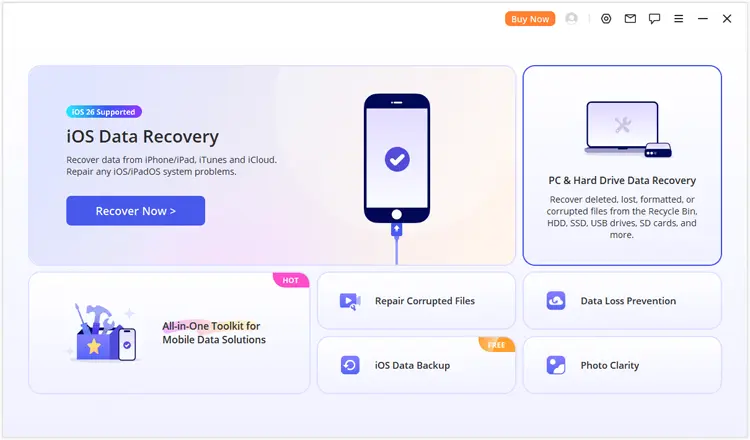
Connect your hard drive to the working computer. Install and open D-Back, choose "PC & Hard Drive Data Recovery".
-
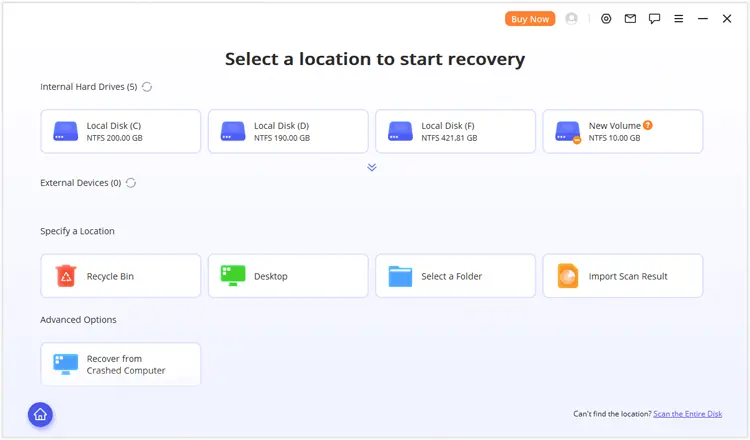
Pick the hard drive or partition for data recovery. If your target partition is not visible, select "Scan the Entire Disk" for a full disk scan.
-
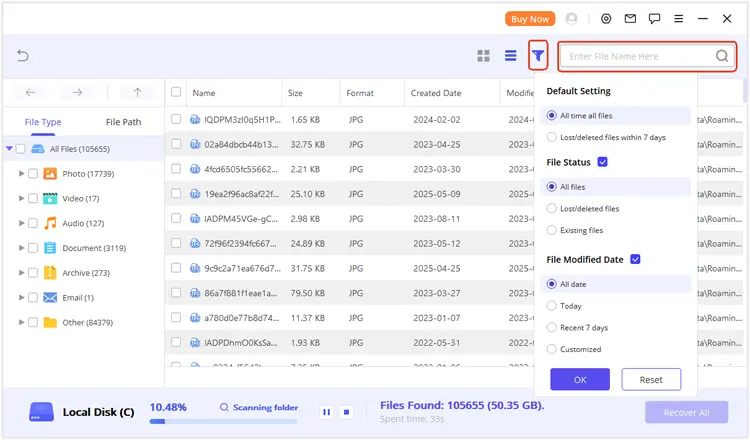
After scanning, browse the found files by file type or file path. You can use the search and filter options to locate specific data, then preview the files before recovery.
Select the files you need and click "Recover" to save them to another location.
If you do not want to recover files immediately, save the scan results and continue the recovery process later without scanning the drive again.
2. Disk Drill
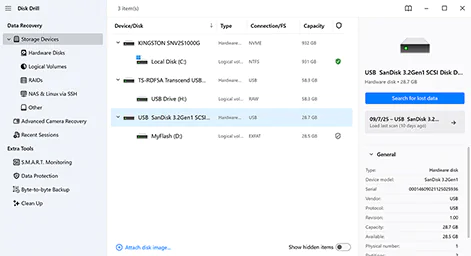
Disk Drill is a comprehensive data recovery program designed for recovering lost files from different storage environments. It supports internal and external hard drives, virtual drives, memory cards, RAID arrays, and other storage sources, making it suitable for users dealing with different types of data loss situations.
Compared with lightweight recovery tools such as Recuva, Disk Drill provides a more complete recovery experience with additional disk-related features. It is also well-known for its performance on Mac, making it a popular choice among macOS users who need to recover personal or business files.
Supported OS
- Windows
- macOS
Price
Disk Drill provides a free version for scanning and previewing recoverable files. Paid plans are available for users who need full recovery capabilities.
- Disk Drill PRO: $89 (One-Year Subscription)
- Disk Drill PRO: $149 (Lifetime License)
Pros
- Supports recovery from RAID arrays and virtual drives.
- Provides extra disk protection and monitoring features.
- Offers a polished experience for Mac users.
- Handles both personal and business file recovery scenarios.
Cons
- Free version has limited recovery capacity.
- The full license costs more than some basic recovery tools.
- Professional users may need more specialized options for complex recovery cases.
3. EaseUS Data Recovery Wizard
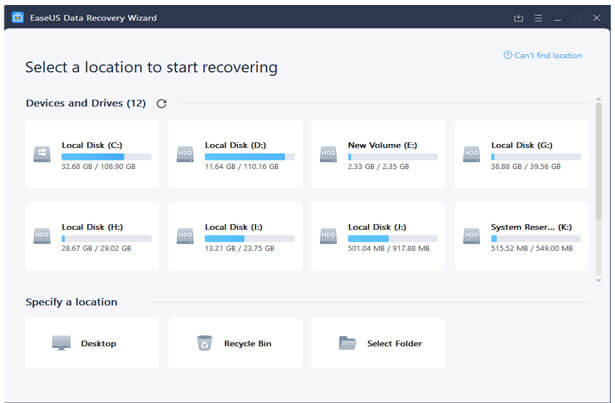
EaseUS Data Recovery Wizard is a widely recognized recovery program that focuses on making lost file restoration accessible for everyday situations. It provides a guided recovery process that helps users locate missing files without requiring advanced knowledge of storage systems.
Unlike lightweight tools designed mainly for simple deletion recovery, EaseUS offers broader recovery coverage, including formatted drives, lost partitions, and different storage devices. It is a suitable option for users who need a practical solution for common personal and work-related data loss. If you are searching for the best hard drive recovery software with a straightforward recovery experience, EaseUS Data Recovery Wizard is worth considering.
Supported OS
- Windows
- macOS
Price
EaseUS Data Recovery Wizard offers a free version with limited recovery capacity. Paid plans are available for users who need full recovery features.
- One-Month: $69.95
- One-Year: $99.95
- Lifetime Upgrade: $149.95
Pros
- Provides a guided recovery process for different data loss situations.
- Supports partition recovery and formatted drive recovery.
- Includes bootable recovery options for inaccessible systems.
- Offers a large file preview capability.
- Suitable for both personal and business-related recovery needs.
Cons
- Monthly subscription plans are relatively expensive.
- The free version has a limited recovery amount.
- Advanced users may find its customization options less flexible than professional tools.
4. Recuva
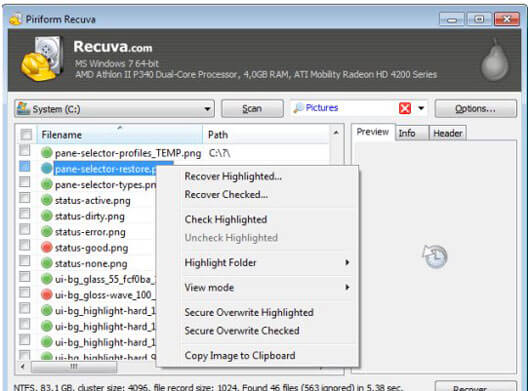
Recuva is a lightweight data recovery program developed for users who need a simple way to restore accidentally deleted files. Compared with feature-heavy recovery solutions, it focuses on providing essential recovery functions without unnecessary complexity.
The software is particularly suitable for basic recovery tasks, such as retrieving deleted documents, photos, or other files from hard drives and removable storage devices. Its small installation size and free version make it a popular choice among users who only need occasional recovery.
For users who need a free and simple option rather than a full-featured recovery suite, Recuva can be a practical alternative among hard drive recovery software.
Supported OS
- Windows
Price
Recuva offers both free and paid versions:
- Recuva Free: Free
- Recuva Professional: $24.95/year
Pros
- Completely free version available.
- Lightweight and requires fewer system resources.
- Affordable upgrade compared with many paid recovery tools.
- Suitable for basic deleted file recovery.
- Simple installation and operation.
Cons
- Only supports Windows systems.
- Lacks some advanced recovery capabilities.
- Not the best choice for severely damaged drives or complex recovery cases.
5. PhotoRec
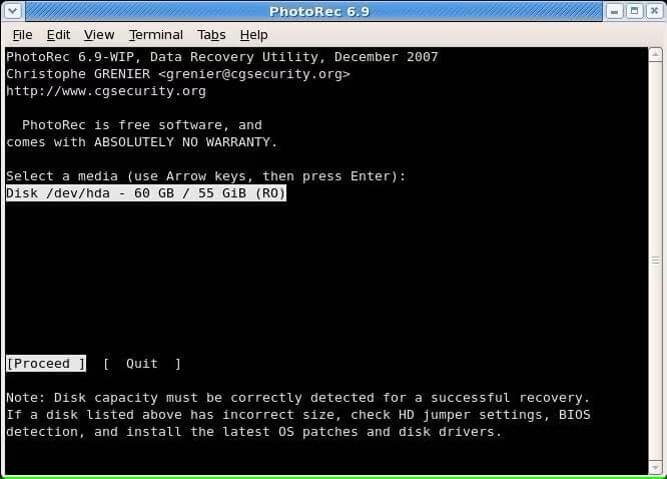
PhotoRec is an open-source recovery tool designed for users who need a free solution for restoring lost files from various storage devices. Unlike many commercial recovery programs that rely on graphical interfaces, PhotoRec focuses on deep file recovery through a more technical approach.
The software works alongside TestDisk and uses file signature-based recovery methods instead of depending entirely on the existing file system structure. This allows it to recover files even in some situations where the original file system has been damaged.
Among the best hard drive recovery software options, PhotoRec stands out mainly because it is completely free and provides advanced recovery capability for experienced users.
Supported OS
- Windows
- macOS
- Linux
Price
- Completely free
Pros
- Free to use without recovery limits.
- Supports a wide range of file formats.
- Works across multiple operating systems.
- Can recover files from damaged or reformatted storage devices.
- Does not require a commercial license.
Cons
- Interface is less beginner-friendly than commercial tools.
- Does not provide file preview before recovery.
- Recovery results may require manual file organization.
6. R-Studio
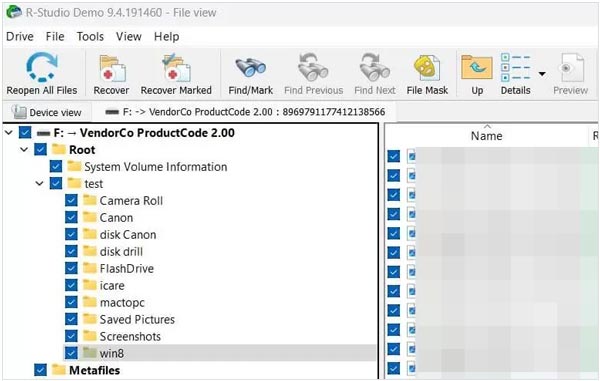
R-Studio is a professional data recovery program designed for users who need more advanced recovery capabilities. Unlike consumer-oriented tools that mainly focus on everyday file restoration, it provides more technical options for handling complicated storage problems.
The software is commonly used in situations involving damaged partitions, RAID environments, and complex file system issues. With its professional-oriented design, R-Studio is better suited for experienced users, IT specialists, and technicians who need greater control over the recovery process.
Supported OS
- Windows
- macOS
- Linux
Price
R-Studio offers different licenses depending on the operating system and usage requirements.
- R-Studio Windows: $49.99
- R-Studio Mac: $79.99
- R-Studio Linux: $79.99
- Technician License: Available for professional recovery services
A demo version is available for scanning and file preview before purchase.
Pros
- Provides advanced recovery controls for experienced users.
- Supports RAID recovery and complex storage configurations.
- Works with multiple file systems.
- Offers disk imaging and recovery-related professional tools.
- Suitable for technical environments.
Cons
- The interface may be difficult for beginners.
- Requires more technical knowledge compared with consumer recovery tools.
- The professional feature set may be unnecessary for basic file recovery needs.
7. Wondershare Recoverit
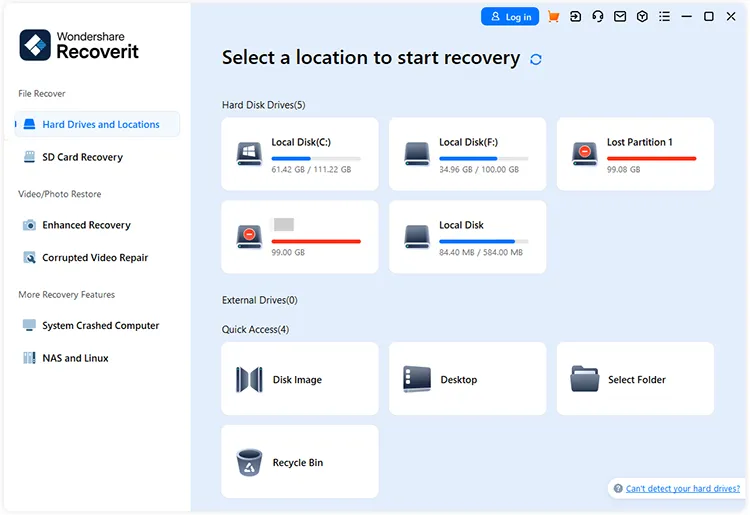
Wondershare Recoverit is a data recovery solution that places particular emphasis on recovering multimedia files, including photos and videos. It is designed for users who need to restore lost content from computers, storage devices, and other media sources.
Compared with traditional recovery programs that mainly focus on general file restoration, Recoverit provides additional features aimed at handling visual content recovery. This makes it a suitable option for photographers, content creators, and users who need to recover large amounts of media files. Among the best hard drive recovery software options, Recoverit stands out for users who prioritize multimedia recovery capabilities.
Supported OS
- Windows
- macOS
Price
Wondershare Recoverit provides several plans based on different recovery requirements.
- Monthly Plan: $64.99
- Annual Plan: $74.99
- Perpetual Plan: $134.99
Pros
- Strong focus on photo and video recovery.
- Provides options for recovering large multimedia files.
- Includes advanced recovery features for complex situations.
- Offers a modern interface with visual file previews.
- Suitable for users working with media-heavy data.
Cons
- Some advanced features are limited to higher-tier plans.
- May provide more functions than needed for simple deleted file recovery.
8. Stellar Data Recovery
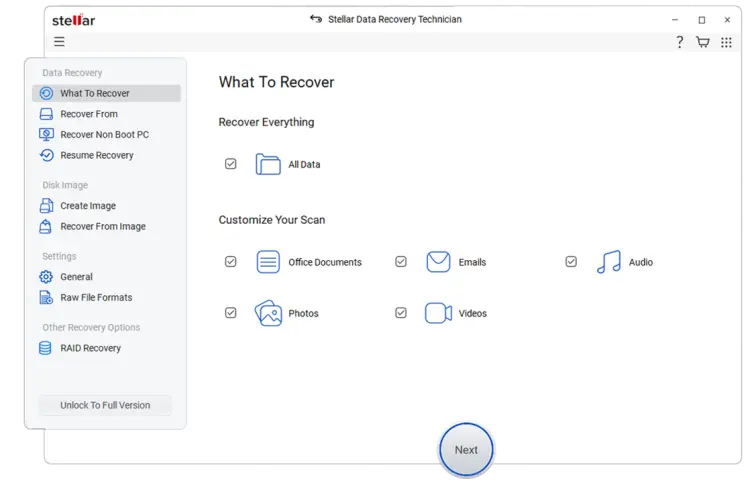
Stellar Data Recovery is a recovery solution that serves both individual users and professional organizations. Unlike tools mainly designed for personal file restoration, Stellar provides different options for users with different recovery requirements, from everyday data recovery to professional recovery services.
It is commonly used for recovering lost files from hard drives and other storage devices, while also offering specialized solutions for business users and situations that require expert assistance. For users comparing the best hard drive recovery software, Stellar Data Recovery is a flexible choice for those who want both software-based recovery and professional recovery support options.
Supported OS
- Windows
- macOS
Price
Stellar Data Recovery provides multiple plans for different recovery needs, from basic personal recovery to professional data recovery services.
- Free: $0
- Standard: $49.99
- Professional: $79.99
- Premium: $89.99
- Technician: $199
- Toolkit: $299
Pros
- Offers solutions for individuals, businesses, and professional recovery cases.
- Provides flexible recovery options based on different needs.
- Supports common hard drive and storage recovery scenarios.
- Includes professional recovery services for severe data loss situations.
Cons
- Advanced options can become expensive.
- Business and lab services may be unnecessary for personal users.
- Some features depend on the selected plan.
Conclusion
Choosing the best hard drive recovery software depends on your specific needs, such as the type of data loss, supported system, budget, and technical experience. Before making a decision, consider whether you need a simple recovery tool for everyday files or a more advanced solution for complex storage issues.
The right recovery software can improve the chances of restoring lost data from hard drives while saving time and effort. Compare the features, pricing, and limitations of each option to find the tool that best fits your situation.
Related Articles
Completely Overwrite Hard Drive on Windows 11/10 PC (Proven)
How to Wipe a Hard Drive Before Selling (Remove Everything Forever)
How to Format Hard Drive on Windows 11/10 PC Effectively
How to Easily Reset a Hard Drive in Windows 11/10 [Step by Step]