


TL;DR:
Want to remove Shutterstock watermarks from images or videos? This guide reviews 4 AI-powered Shutterstock watermark remover tools, including TopMediai, Aiseesoft, Apowersoft, and Media.io. Learn their key features, steps, and limitations to find the best online solution for cleaning images and videos quickly.
Shutterstock is one of the most popular platforms for high-quality stock images and videos. However, downloaded preview files usually contain large Shutterstock watermarks, making them unsuitable for presentations, designs, or personal projects. If you want to remove Shutterstock watermarks online, this guide will introduce several online Shutterstock watermark remover tools, including their features, advantages, and limitations, to help you choose the best solution for your needs.
Note: Before removing any watermark, make sure you have the proper rights to use the content. Watermarks are designed to protect creators' copyrighted work, and removing them from images or videos without permission may violate Shutterstock's licensing terms.
Part 1. How to Remove Shutterstock Watermark from Image Online
Here are the top 2 tools you can use to remove watermarks from Shutterstock images online.
1.1 TopMediai Online Watermark Remover
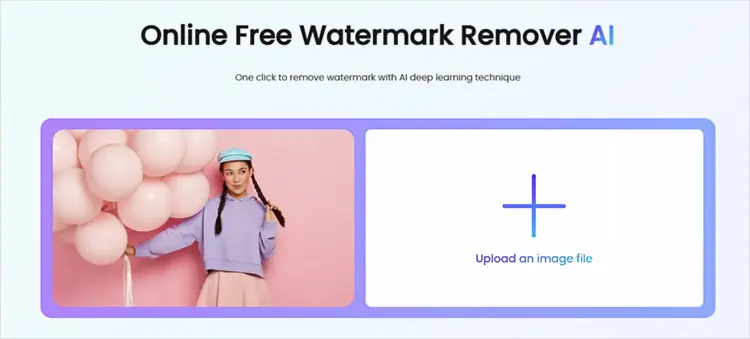
TopMediai is an AI-powered online watermark remover that can help erase unwanted objects, logos, and text from images. It uses AI algorithms to analyze the selected area and fill it with matching background details.
It can be useful when you need to remove Shutterstock watermarks from image previews without installing desktop software.
Key Features of TopMediai Online Watermark Remover:
- AI-powered watermark removal for quickly removing watermarks from images.
- Brush tool with adjustable size for precise watermark selection.
- Remove watermarks, logos, text, and unwanted objects.
- Support JPG, JPEG, PNG, BMP, and TIFF formats.
- Work online without software installation.
- Fast processing with a simple upload-and-download workflow.
- Compatible with desktop and mobile devices.
Steps to Remove Shutterstock Watermark from Image Online with TopMediai:
Step 1. Visit the TopMediai watermark remover online and upload the image containing the watermark you want to remove.
Step 2. Use the brush tool to highlight the Shutterstock watermark area. Adjust the brush size if needed to accurately cover the watermark.
Step 3. Click the "Remove" button to erase the Shutterstock watermark, then download the processed image to your device.
Limitations of TopMediai:
Although AI watermark removal is convenient, the result depends heavily on the image background.
For simple backgrounds, such as walls, skies, or solid colors, the removal quality is usually better. However, images with complex details, patterns, or people may require additional manual editing.
1.2 Aiseesoft Online Watermark Remover
Another popular tool you can use to remove watermarks from Shutterstock images online for free is Aiseesoft Online Watermark Remover. Compared with simple online removers, Aiseesoft focuses more on improving overall image quality while cleaning unwanted objects.
Key Features of Aiseesoft Online Watermark Remover:
- AI-powered technology for quick and accurate watermark removal.
- Remove multiple watermarks, logos, text, and unwanted objects.
- Support manual selection with Brush, Lasso, and Polygonal tools.
- Real-time preview to check the removal effect before saving.
- Keep original image quality and details after watermark removal.
- Support JPG, JPEG, PNG, BMP, TIFF, and other image formats.
- Work online without software installation.
- Simple three-step process: upload image, select watermark area, and remove.
Steps to Remove Shutterstock Watermark from Image Online with Aiseesoft:
Step 1. Visit the Aiseesoft Watermark Remover Online website and click "Upload Image" to import the Shutterstock image with a watermark.
Step 2. Select a watermark removal tool, such as Brush, Lasso, or Polygonal, then highlight the Shutterstock watermark area. You can adjust the selection and use the Eraser tool to refine it if needed.
Step 3. Click "Remove" to process the image and automatically erase the selected watermark. Preview the result, then click "Save" or "Download" to export the edited image.

Limitations of Aiseesoft:
Aiseesoft is a better choice when you need more than basic watermark removal. For example, users who frequently edit images may benefit from additional AI enhancement features.
However, if you only need to remove a small watermark occasionally, a lightweight online tool may be enough.
Part 2. How to Remove Watermark from Shutterstock Video Online
Many Shutterstock videos also contain watermarks, making users wonder how to remove Shutterstock watermarks from videos online. Below are two of the best online Shutterstock watermark remover tools you can try.
2.1 Apowersoft Online Watermark Remover
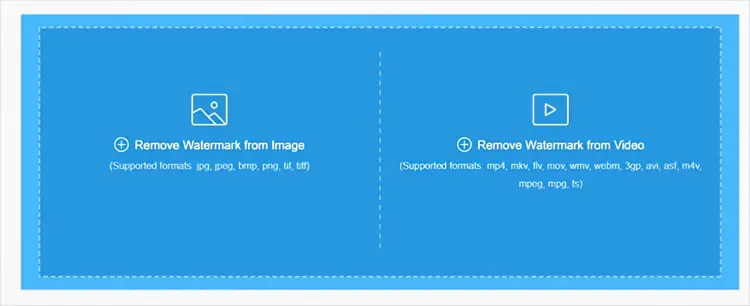
Apowersoft Online Watermark Remover is a browser-based tool designed to remove watermarks, logos, text, timestamps, and other unwanted objects from images and videos. It supports various video formats, including MP4, MKV, MOV, WMV, WebM, AVI, and more. Users can upload a video, select the watermark area, and remove it without installing additional software.
Key Features of Apowersoft Online Watermark Remover:
- Remove watermarks, logos, text, subtitles, and unwanted objects from videos.
- Support multiple video formats, including MP4, MOV, MKV, AVI, and WebM.
- Work directly online without software installation.
- Simple interface suitable for beginners.
- Support selecting watermark areas and removing multiple unwanted elements.
- Maintain original video quality after processing.
- Offer secure file processing with uploaded files automatically deleted from the server.
Steps to Remove Shutterstock Watermark from Video Online with Apowersoft:
Step 1. Open Apowersoft Online Watermark Remover in your browser and select the video watermark removal option. Upload the Shutterstock video that contains the watermark.
Step 2. Select the watermark area in the video preview. Adjust the selection box to accurately cover the Shutterstock watermark, and set the time range if the watermark only appears in certain parts of the video.
Step 3. Click the "Remove" button to process the video. Preview the result, then export the watermark-free video when you are satisfied with the effect.
Limitations of Apowersoft:
Apowersoft works best for simple watermark positions. If the Shutterstock watermark moves, overlaps with important objects, or appears on detailed backgrounds, the final result may not look perfect.
For professional videos, additional manual editing may still be necessary.
2.2 Media.io Watermark Remover
Media.io Watermark Remover is an AI-powered online tool that helps remove watermarks, logos, text, timestamps, and other unwanted elements from images and videos. It works directly in the browser without requiring software installation and provides multiple removal methods, including AI removal, manual brush selection, and blur effects.
Key Features of Media.io Watermark Remover:
- AI-powered watermark removal for images and videos.
- Remove watermarks, logos, text, and timestamps.
- Support manual brush selection and AI-based removal modes.
- Provide a Gaussian Blur option to hide unwanted areas.
- Support common image and video formats.
- Work online without software installation.
- Simple upload, edit, preview, and export workflow.
- Compatible with Windows, Mac, and mobile browsers.
Steps to Remove Shutterstock Watermark from Video Online with Media.io:
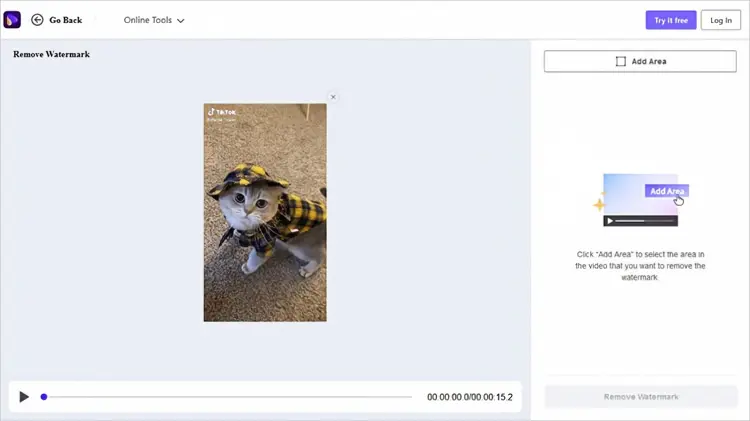
Step 1. Open Media.io Online Watermark Remover in your browser and upload the Shutterstock video containing the watermark.
Step 2. Select the watermark removal mode and highlight the Shutterstock watermark area. You can use the brush tool to mark the watermark or choose other AI removal options based on your needs.
Step 3. Click the remove button to process the video. Preview the result, then download the edited video after confirming the watermark has been removed.
Limitations of Media.io:
AI video processing may require more time for large files. In addition, complex scenes may reduce the accuracy of watermark removal.
Users who regularly edit high-resolution videos may prefer desktop software with more advanced controls.
Part 3. FAQs on Shutterstock Watermark Removers
Q1. Can I remove a Shutterstock watermark for free online?
Yes. Some online watermark remover tools offer free trials or limited free processing. However, free versions may include restrictions such as file size limits, lower output quality, or limited exports.
For frequent editing, a paid tool may provide better results and fewer limitations.
Q2. Is it legal to remove a Shutterstock watermark?
Removing a Shutterstock watermark from preview images or videos without purchasing the proper license may violate Shutterstock's copyright and usage policies.
If you need to use Shutterstock content commercially, the safest option is to download the licensed version without a watermark.
Q3. Which is the best Shutterstock watermark remover online?
The best tool depends on your needs:
- For quick image watermark removal: TopMediai is a convenient AI option.
- For image editing with additional enhancement features: Aiseesoft is a better choice.
- For simple video watermark removal: Apowersoft works well for basic cases.
- For AI-based online video editing: Media.io is a practical option.
Q4. Why does AI watermark removal sometimes fail?
AI tools work by predicting and rebuilding areas covered by the watermark. Results may be less accurate when:
- The watermark covers important objects.
- The background contains complicated details.
- The video has moving scenes.
- The watermark changes position frequently.
In these cases, professional editing software or manual retouching may achieve better results.
Q5. Can I remove a Shutterstock watermark from mobile?
Yes. Many online watermark remover tools work through mobile browsers, allowing you to upload and edit images or videos directly from smartphones.
However, desktop tools may provide better performance for large files or high-resolution videos.
Final Thoughts
Removing a Shutterstock watermark online is possible with AI-powered tools, but the best method depends on whether you are editing images or videos. For simple image cleanup, tools like TopMediai and Aiseesoft provide convenient solutions. For videos, Apowersoft and Media.io can help remove unwanted marks without complicated editing software.
However, always make sure you have the legal right to use the content before removing any watermark. Purchasing the proper Shutterstock license is the recommended way to access clean, high-quality stock materials.
Related Articles
How to Remove TikTok Watermark from Videos: 5 Practical Methods
How to Remove Background from Picture on Computer and Mobile Devices
AZ Screen Recorder Guide and 9 Practical Alternatives and Review
Best Screen Recording Software in 2026: Top 16 Screen Recorders

