


TL;DR:
Looking for the best free hard drive wipe software for Windows 10/11? Compare 8 tools to securely erase HDDs, wipe entire drives, and shred deleted files. Find the right option for your needs, from free built-in utilities like DiskPart to dedicated tools like ShredOS and iReaShare Data Wipe.
As old computers are replaced, hard drives are upgraded, and personal devices are resold, permanently removing personal data from a hard drive has become a concern for many users. Simply deleting files, emptying the Recycle Bin, or performing a quick format does not mean that the data is permanently gone. Professional hard drive wiping software can help reduce the risk of deleted files being recovered through data overwriting, secure erasure, and other wiping methods.
So, what are the best free hard drive wipe software options available? In this article, we introduce 8 tools worth considering and compare their features, supported operating systems, wiping methods, and limitations to help you choose the right software based on your hard drive type and specific needs.
- Part 1. 8 Best Free Hard Drive Wipe Software
- 1. DiskPart - Best Built-in Free Windows Solution
- 2. ShredOS - Best Overall Free Bootable Disk Wiper
- 3. DBAN - Best for Older HDDs
- 4. Eraser - Best for Secure File and Free-Space Deletion
- 5. Disk Wipe - Best for Portable Windows Disk Erasure
- 6. iReaShare Data Wipe - Best for All-in-One Windows Data Erasure
- 7. Active@ KillDisk - Best for Basic Multi-Platform Disk Erasure
- 8. HDShredder - Best Free Option for Larger Drives
- Part 2. FAQs on Best Free Hard Drive Wipe Software
Part 1. 8 Best Free Hard Drive Wipe Software
The following table summarizes the main differences between these tools, including their operating systems, erasure capabilities, and free-version limitations.
| Software | Platform | Main Function | Free Version |
|---|---|---|---|
| Diskpart | Windows | Full-disk zero overwriting | Free |
| ShredOS | Bootable OS | Full-drive wiping | Free |
| DBAN | Bootable OS | HDD overwriting | Free |
| Eraser | Windows | File and free-space wiping | Free |
| Disk Wipe | Windows | Volume and disk wiping | Free |
| iReaShare Data Wipe | Windows | Drive, file, and free-space wiping | Limited trial |
| KillDisk | Windows/Linux | Full-drive wiping | One-pass zeros |
| HDShredder | Windows/Bootable | Full-drive wiping | Free for private use |
1. DiskPart - Best Built-in Free Windows Solution
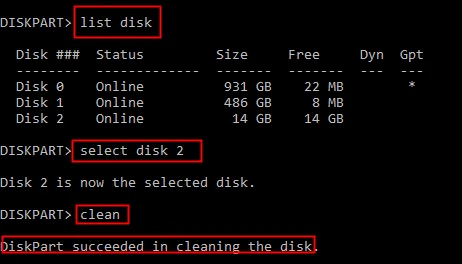
If you are looking for free software to wipe a hard drive in Windows 10 without downloading additional applications, Windows DiskPart is worth considering. DiskPart is a command-line disk management utility included with Windows that allows users to manage partitions, volumes, and storage devices.
Although DiskPart is not a dedicated third-party data-wiping application, it includes a particularly useful command called "clean all". Unlike the standard "clean" command, which removes partition and volume formatting information, clean all writes zeros to every sector of the selected disk. This makes it a practical option for users who want to perform a basic full-disk overwrite before reusing or disposing of a traditional HDD.
Key Features:
- Built into Windows without additional downloads.
- Provide disk and partition management commands.
- Support full-disk zero overwriting through clean all.
- Work with supported HDDs and connected storage devices.
- Can be launched through Command Prompt or recovery environments.
- Does not require a separate software installation.
- Completely free with Windows.
- No additional installation or registration required.
- Can overwrite every addressable sector with zeros.
- Useful for erasing secondary HDDs.
- Suitable for users comfortable with command-line operations.
- Can be accessed from Windows recovery environments.
- Command-line interface may be intimidating for beginners.
- Selecting the wrong disk can cause irreversible data loss.
- Does not offer multiple customizable wiping algorithms.
- No built-in erasure certificate or detailed reporting.
- Standard Windows operation cannot erase the active system disk.
- Zero overwriting is not a substitute for SSD firmware-level sanitization.
Best For: Windows 10 users who want a completely free, built-in method to overwrite a secondary hard drive without installing third-party software.
2. ShredOS - Best Overall Free Bootable Disk Wiper
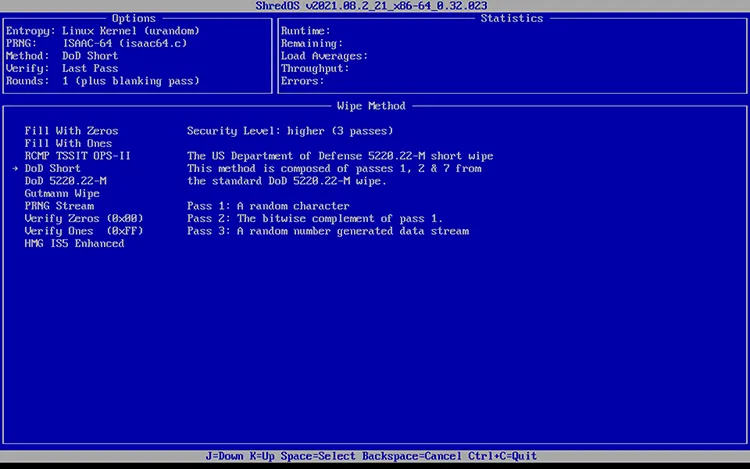
ShredOS is a bootable disk-wiping operating system that uses nwipe, a utility based on DBAN, to erase entire hard drives. It runs independently of Windows, allowing you to create a bootable USB drive, start your computer from it, and wipe the system disk before selling or disposing of an old PC. ShredOS supports both BIOS and UEFI boot modes, multiple overwriting methods, and simultaneous erasure of multiple drives.
However, ShredOS is not particularly beginner-friendly. Creating bootable media and selecting the correct disk require some technical knowledge. Erasing SSDs and NVMe drives may also require additional commands instead of standard overwriting methods.
Key Features:
- Bootable USB environment that operates independently of Windows.
- Support BIOS and UEFI booting.
- Use nwipe to erase entire hard drives.
- Provide multiple data-overwriting methods.
- Support wiping multiple storage devices simultaneously.
- Include additional utilities for HDD, SSD, and NVMe management.
- Offer PDF erasure certificates and operation logs.
- Completely free and open source.
- Suitable for wiping system drives without running Windows.
- Better compatibility with modern computers than legacy DBAN.
- Support multiple erasure methods and simultaneous disk operations.
- Include additional tools for advanced storage management.
- Require creating a bootable USB drive.
- The interface and configuration may be difficult for inexperienced users.
- Incorrect disk selection can permanently destroy important data.
- SSD and NVMe secure erasure may require additional manual commands.
- Does not provide the same enterprise-level auditing capabilities as dedicated commercial solutions.
Best For: Users who need a free, actively maintained bootable utility to wipe entire HDDs on modern computers.
3. DBAN - Best for Older HDDs
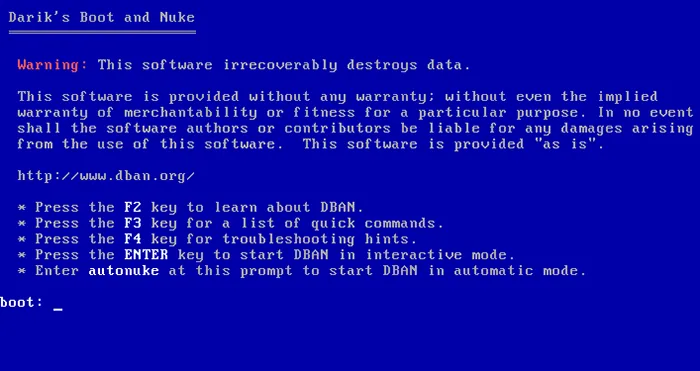
DBAN (Darik's Boot and Nuke) is a free hard drive wiping tool designed for traditional HDDs. It runs from bootable USB drives or CDs, allowing you to erase an entire disk, including the Windows system drive, without starting Windows.
DBAN offers several wiping methods, such as Quick Erase, PRNG Stream, DoD 5220.22-M, and Gutmann, with different overwrite patterns and pass counts. These options give users more control over HDD data erasure, especially when preparing an old computer for resale or disposal.
Key Features:
- Bootable disk-erasure environment.
- Support multiple HDD overwriting methods.
- Include zero-fill and pseudorandom data erasure.
- Can erase an entire system hard drive.
- Does not require Windows to be installed or running on the target disk.
- Designed for personal data-erasure needs.
- Completely free to use.
- Well-known and widely used for traditional HDD erasure.
- Can wipe the Windows system drive.
- Provide several predefined data-overwriting methods.
- Does not require installing software on the computer.
- Does not reliably support SSD erasure.
- Development has been inactive for years.
- May not boot on newer UEFI-only computers.
- Require creating bootable media.
- Does not provide certified erasure reports.
- Not suitable for users who need modern hardware compatibility or ongoing software support.
Best For: Users who have older computers with traditional HDDs and need a simple, free bootable disk-wiping utility.
4. Eraser - Best for Secure File and Free-Space Deletion
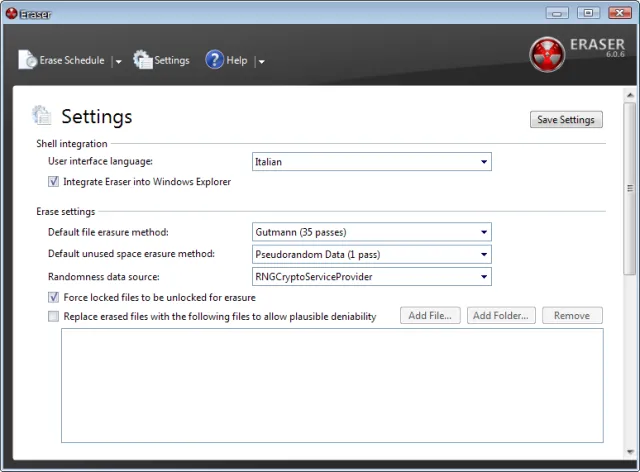
Eraser is a free, open-source Windows tool for securely deleting individual files, folders, and previously deleted data. It overwrites selected data using predefined patterns and can also wipe unused disk space to reduce the chances of recovering deleted files. Additional features include scheduled erasure tasks and Windows Explorer integration for easier access.
However, Eraser is not designed to wipe entire physical drives or the active Windows system disk. Its traditional overwriting methods are also less reliable on SSDs because of wear-leveling technology, which may prevent all copies of old data from being overwritten.
Key Features:
- Securely deletes individual files and folders.
- Wipe unused disk space on supported storage devices.
- Support multiple predefined overwriting methods.
- Integrate with the Windows Explorer context menu.
- Provide scheduled automatic deletion tasks.
- Offer customizable data-erasure settings.
- Free and open source.
- Easy access to file and folder deletion functions.
- Useful for removing remnants of previously deleted files.
- Support automated wiping tasks.
- Does not require creating bootable media.
- Provide more flexibility than ordinary Windows deletion.
- Not a complete whole-disk wiping solution.
- Cannot erase the currently running Windows system drive.
- Traditional overwriting is not a reliable SSD sanitization method.
- Some advanced settings may confuse beginners.
- Does not provide enterprise-grade erasure certificates.
Best For: Windows users who want to securely delete selected files, folders, and previously deleted data rather than erase an entire physical hard drive.
5. Disk Wipe - Best for Portable Windows Disk Erasure
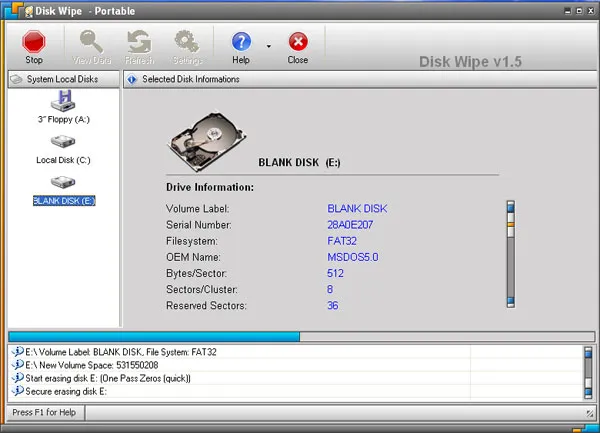
Disk Wipe is a free, portable Windows utility for erasing data from hard drives and removable storage devices. It features a simple graphical interface that lets you select a storage volume, choose an overwriting method, and start wiping without creating bootable media.
The software supports NTFS, FAT, and FAT32 file systems, as well as USB flash drives and SD cards. It offers multiple overwriting algorithms, including DoD 5220.22-M, and requires no traditional installation, making it convenient to carry on a USB drive and use across different Windows computers.
Key Features:
- Portable Windows application without traditional installation.
- Support NTFS, FAT, and FAT32 file systems.
- Provide multiple data-overwriting algorithms.
- Support hard drives, USB flash drives, and SD cards.
- Offer a graphical interface for selecting storage volumes.
- Can overwrite existing data to reduce the possibility of recovery.
- Free for personal and commercial use according to its licensing information.
- Portable and lightweight.
- Easy-to-understand graphical interface.
- Support several common Windows file systems.
- Work with different types of removable storage.
- Offer multiple overwriting methods.
- Require Windows to run.
- Cannot conveniently erase the currently running system volume.
- Traditional overwriting is not ideal for SSD sanitization.
- The wiping process can take considerable time on large drives.
- Does not provide the advanced reporting features found in professional tools.
Best For: Users who want a lightweight, portable Windows utility to erase secondary HDDs, external drives, and removable storage devices.
6. iReaShare Data Wipe - Best for All-in-One Windows Data Erasure
iReaShare Data Wipe is a Windows-based data destruction tool that lets users erase entire drives, individual files, and previously deleted data through one interface. Unlike bootable wiping utilities, it runs directly in Windows with a simple graphical interface.
Its Drive Wiper offers Quick Erase and Deep Erase, with the latter using multiple overwriting passes based on the DoD 5220.22-M(E) method. File Shredder securely deletes selected files and folders, while Free Space Wiper overwrites unused disk space to make previously deleted data harder to recover.
The software supports HDDs, SSDs, external hard drives, and other storage devices, making it more versatile than a basic file shredder.
Key Features:
- Permanently shred selected files and folders to make data recovery more difficult.
- Completely wipe internal hard drives and external storage devices, removing all stored data.
- Overwrite unused disk space on hard drives and external devices to prevent the recovery of previously deleted files.
- Offer two data erasure modes: Quick Erase for faster deletion and Deep Erase for more thorough overwriting.
- Compatible with Windows 11, 10, 8, and 7.
How to Use iReaShare Data Wipe to Wipe a Hard Drive:
-
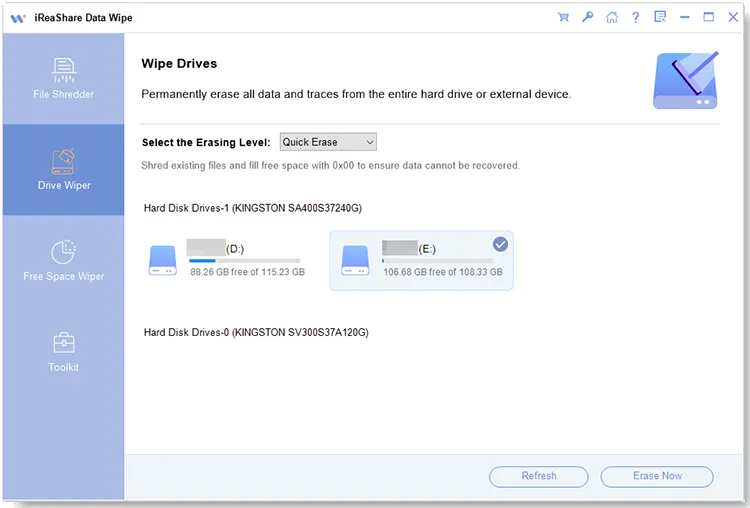
Download, install, and launch iReaShare Data Wipe on your Windows computer. Connect the hard drive you want to erase and select "Drive Wiper" from the left panel.
-
Choose the target hard drive from the list and select an erasing mode: "Quick Erase" or "Deep Erase". Make sure you select the correct drive before proceeding.
-
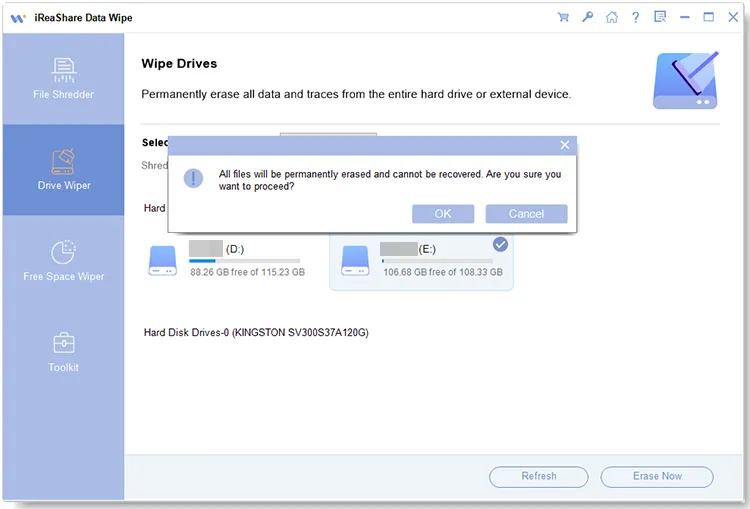
Click "Erase Now" and confirm the operation by clicking "OK". Wait for the process to finish. Once completed, the selected hard drive will be wiped.
Here is a video guide:
- Combine full-drive wiping, file shredding, and free-space cleaning.
- Easy-to-navigate graphical interface.
- Offer different erasure modes for different requirements.
- Support external storage devices.
- Does not require creating bootable media.
- More versatile than tools that only erase individual files.
- Not completely free for unrestricted use.
- Require software installation.
- Limited to Windows computers.
- Advanced erasure capabilities may require a paid license.
- Does not replace manufacturer-level SSD sanitization.
- Does not offer the same independent boot environment as ShredOS or DBAN.
Best For: Users who prefer a graphical Windows application that combines entire-drive erasure, file shredding, and free-space cleaning in one place.
7. Active@ KillDisk - Best for Basic Multi-Platform Disk Erasure
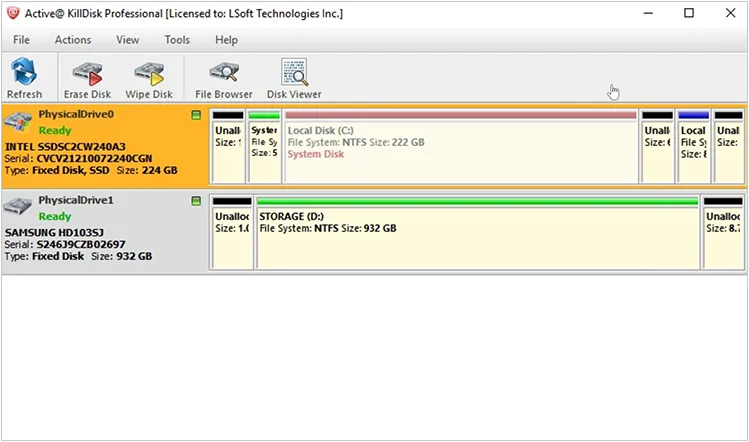
Active@ KillDisk is a disk-wiping tool that erases data from HDDs, SSDs, USB drives, and memory cards. It is useful for preparing storage devices for reuse, resale, or disposal.
Its free edition supports one-pass zero overwriting, replacing existing data with zeros. KillDisk offers Windows and Linux versions, as well as bootable media options, making it possible to erase system drives or inaccessible disks.
Key Features:
- Erase data from HDDs, SSDs, USB drives, and memory cards.
- Support one-pass zero overwriting in the free edition.
- Provide Windows and Linux versions.
- Include bootable disk-erasure options.
- Support additional international erasure standards in paid editions.
- Offer more advanced disk-management and reporting functions in professional versions.
- Provide a free option for basic disk erasure.
- Simple one-pass zero-overwriting method.
- Support different storage device types.
- Offer Windows and Linux versions.
- Bootable options can help erase system drives.
- Suitable for basic personal data-clearing tasks.
- Free edition supports only one-pass zero overwriting.
- No post-erasure verification in the free version.
- Advanced erasure algorithms require a paid upgrade.
- Professional reporting and customization are restricted.
- SSD sanitization requires careful consideration of the drive's underlying technology.
- May not meet business requirements for certified data destruction.
Best For: Users who need a basic, free one-pass disk-wiping utility and do not require advanced erasure standards or professional reporting.
8. HDShredder - Best Free Option for Larger Drives
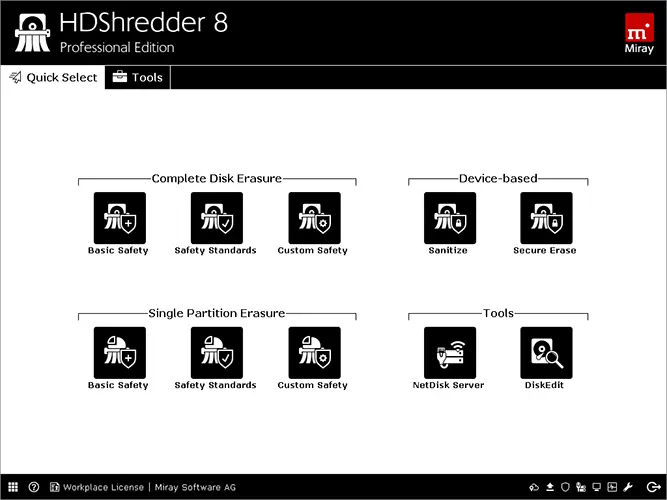
HDShredder is a disk-wiping tool developed by Miray Software that erases data directly from storage devices without relying on file systems or operating systems. It supports HDDs, SSDs, and other storage media, including drives containing an installed Windows system.
The software offers both Windows-based and bootable versions, allowing users to erase drives within or outside Windows. Its Free Edition supports drives up to 4 TB, with advertised erasure speeds of up to 150 MB/s, depending on hardware and storage conditions.
Key Features:
- Erase entire hard drives and supported storage devices.
- Provide Windows and self-booting versions.
- Work independently of the file system and operating system.
- Support HDDs, SSDs, and flash storage.
- Free Edition supports drives up to 4 TB.
- Advertised free-edition speeds of up to 150 MB/s.
- Offer additional erasure methods and reporting in paid editions.
- Genuine freeware for private users.
- Support relatively large drives in its free edition.
- Can erase drives independently of their file systems.
- Offer both Windows and bootable operation.
- Support multiple storage technologies.
- Does not require purchasing a license for basic private-use erasure.
- Free Edition has fewer erasure options than paid versions.
- Advanced erasure standards are not included in the free edition.
- Professional erasure reports require an upgrade.
- Some hardware and advanced operations may require higher editions.
- Advertised performance depends on the storage device and connection.
- Not intended as a free commercial-use solution.
Best For: Home users who need to erase larger HDDs or supported storage devices using a free, dedicated disk-erasure application.
Part 2. FAQs on Best Free Hard Drive Wipe Software
Q1. Does formatting a hard drive permanently erase data?
No. Quick formatting removes file system information but does not overwrite all stored data. Specialized recovery tools may still retrieve some files.
Before selling or disposing of a hard drive, use a full-drive wiping method instead of ordinary formatting.
Q2. Is DBAN still worth using in 2026?
DBAN remains useful for traditional HDDs on older computers. However, its latest version dates back to 2015, and it has limited support for SSDs and modern UEFI-only systems.
For newer computers, ShredOS is generally a better bootable alternative.
Q3. How long does it take to wipe an entire hard drive?
It depends on the drive's capacity, connection speed, hardware, and erasure method. A single overwrite pass is usually faster than multiple passes, while wiping a large external HDD may take several hours.
Keep the drive connected until the process is complete.
Q4. Is one-pass overwriting enough to wipe a hard drive?
For many personal data-disposal scenarios, one complete overwrite pass is sufficient for modern magnetic HDDs. Performing 7, 20, or 35 passes generally offers little additional benefit.
However, SSDs and other flash-based storage devices require different sanitization methods.
Sum Up
Overall, the best free hard drive wipe software depends on your storage device and erasure needs. ShredOS is suitable for wiping entire drives, DiskPart offers a built-in solution for Windows users, and Eraser is useful for deleting individual files and free space. DBAN, Disk Wipe, KillDisk, and HDShredder provide additional options for different hardware and usage scenarios.
If you prefer a graphical tool with multiple erasure functions, iReaShare Data Wipe is worth considering, although some features require a paid license. Always choose an appropriate wiping method for your HDD or SSD and verify the target drive before erasing.
Related Articles
Select Free Drive Wiper to Erase a Disk Without Any Hassle
5 Best Windows Cleaner Tools in 2026: Safe Junk Removal & Deep Data Erasure
7 Best DBAN Alternatives Available to Wipe Hard Drive Completely
Best Data Wipe Software: Top 9 Tools to Securely Erase Your Data