


TL;DR:
Standard file deletion does not permanently erase data, making specialized data wipe software essential for protecting privacy when selling, donating, or recycling storage devices. Depending on your technical needs, the top tools in the market can be broadly categorized into three distinct types:
- Full-System Cleaners (Bootable Utilities): Tools like ShredOS and DBAN run outside the main operating system to completely purge entire drives, making them ideal for full computer decommissioning.
- Daily Maintenance & Privacy Tools: Software such as iReaShare Data Wipe, Eraser, BleachBit, and PrivaZer operate directly within Windows/Linux to selectively shred individual files, wipe free space, or clear hidden tracking footprints without affecting the whole system.
- Specialized & Hardware-Specific Suites: Tools like Samsung Magician (for brand-specific SSD Secure Erase) and DiskWipe or DiskGenius provide targeted hardware optimization, portability, or broader disk partition management alongside secure erasing.
When you need to ensure that sensitive financial records, corporate data, or personal photos are gone for good, standard operating system tools fall short. This is where data wipe software becomes essential. By overwriting storage sectors with random patterns or specific data destruction algorithms, these tools ensure that your information is unrecoverable.
Below, we explore when you need these tools, review nine of the top data wipe software options available, and answer critical questions about data destruction.
Part 1: When Do We Need Data Wipe Software?
Data eraser software is necessary whenever you want to ensure data cannot be recovered by anyone else. Common scenarios include:
* Selling or Donating Old Hardware: Before handing over a computer, external hard drive, or USB flash drive to a stranger, a complete data wipe prevents identity theft and data leaks.
* Recycling and E-Waste Disposal: Even broken or outdated drives can sometimes be repaired enough to extract data. Wiping them before disposal is a crucial security practice.
* Returning a Company Laptop: When leaving a job or upgrading corporate hardware, wiping personal or sensitive company data prevents unauthorized internal access.
* Repurposing Storage Devices: If you are handing a drive down to a family member or coworker, a clean wipe ensures they don't accidentally stumble upon your private files.
* Malware Decontamination: Some advanced malware or ransomware can hide deep within unallocated space. A total drive wipe ensures a completely clean slate before reinstalling an operating system.
Part 2: Top 9 Data Wipe Software
Here are 9 options for data wipe software. You can learn about their pros and cons before making your decision.
| User Needs | Recommended Tool | Main Benefit |
|---|---|---|
| Users who need to wipe an entire computer, including the primary operating system (C: drive), on modern 64-bit UEFI hardware. | ShredOS | Boots independently from a USB drive to completely erase all data on modern systems without operating system interference. |
| Everyday Windows users and beginners who want a straightforward graphical interface to wipe specific files, folders, partitions, or an entire drive. | iReaShare Data Wipe | Offers a highly intuitive, step-by-step visual menu that makes advanced data sanitization safe and easy for non-technical users. |
| Users looking for a lightweight, no-installation utility to quickly sanitize external hard drives or USB flash drives on the go. | Disk Wipe | Runs completely as a portable executable file with zero installation, leaving no registry footprints on the host computer. |
| Desktop users who want to permanently destroy specific files or folders on demand during their daily workflow. | Eraser | Integrates seamlessly into the Windows right-click context menu and features a built-in automation scheduler for recurring wipes. |
| Windows and Linux users who want a privacy tool that cleans system junk files while permanently shredding previously deleted file remains. | BleachBit | Provides completely open-source transparency while wiping unallocated "free space" to ensure old files cannot be recovered. |
| IT technicians or users looking to repurpose very old, legacy computers utilizing traditional magnetic hard drives (HDDs). | DBAN | A time-tested, historically reliable industrial-grade standard for bulk data purging on older, legacy hardware environments. |
| Owners of Samsung solid-state drives who want to safely reset their drive to factory-fresh performance and cleanliness. | Samsung Magician | Performs a hardware-level Secure Erase via voltage adjustment that safely cleans the drive instantly without causing physical wear to the flash memory cells. |
| Advanced users who need a combination of partition management, disk diagnostics, data recovery, and targeted sector erasing. | DiskGenius | An all-in-one disk management powerhouse that offers surgical, low-level sector control over storage media. |
| Privacy-conscious users who want to find and permanently erase hidden digital footprints, tracking cookies, and residual registry traces. | PrivaZer | Offers incredibly deep system scans to uncover hidden activity traces and automatically optimizes its wiping method to protect SSD lifespans. |
2.1 ShredOS
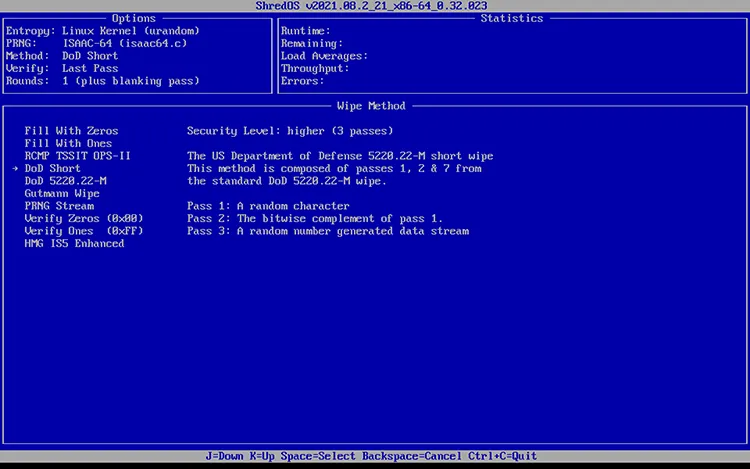
ShredOS is a specialized, open-source bootable program designed specifically to wipe the entire contents of a hard drive. It is a modern revival of the classic DBAN utility, built to run on newer 64-bit UEFI computers as well as older legacy systems. Because it boots from a USB drive independently of your operating system, it can wipe your main system drive (C: drive) with ease using advanced sanitization methods like DoD 5220.22-M.
- Built on an updated Linux kernel that natively supports 64-bit UEFI architectures, modern NVMe SSDs, and legacy computers.
- Boots directly from a USB flash drive, enabling it to wipe the host system's primary operating system (C: drive) without software interference.
- Supports trusted military-grade data destruction standards, including DoD 5220.22-M and the random data patterns of the Mersenne Twister generator.
- Features a text-based, terminal-like command interface that does not support mouse inputs, which can intimidate beginner users.
- Cannot be downloaded and clicked to run; users must manually burn the ISO file to a flash drive using third-party tools like Rufus.
- Because it targets disks at a raw, low-level architecture, choosing the wrong drive by mistake will instantly destroy data beyond recovery.
2.2 iReaShare Data Wipe
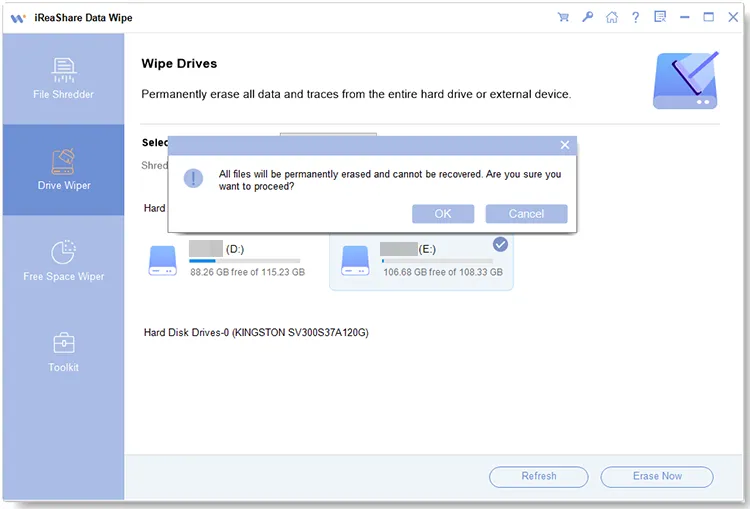
iReaShare Data Wipe is a user-friendly, Windows-based software tailored for both tech-savvy users and beginners. It features an intuitive graphical user interface (GUI) that allows users to wipe specific files, folders, or entire partitions safely. It provides multiple security levels, balancing speed and security according to the user's specific privacy needs.
- Designed with a clean, straightforward graphic menu layout that guides non-technical users safely through data erasure tasks.
- Allows users to pick specific folders, individual files, hidden private fragments (like keyboard caches), or entire storage partitions rather than forcing a whole-drive wipe.
- Provides three clear security levels (Quick and Deep) utilizing standards like DoD 5220.22-M to help users balance sanitization depth with time efficiency.
- Can erase different storage devices like USB drives, hard drives, SD cards, etc.
- Wipes the free space of an SSD without erasing your existing files.
- Because it operates inside the Windows desktop environment, it is restricted by OS protections and cannot overwrite the live operating system files.
- Unlike open-source counterparts, full operational access to the tool requires a premium license fee.
- Currently, only the Windows version is available.
Download iReaShare Data Wipe.
Here's how to use it to wipe your data on a PC:
-
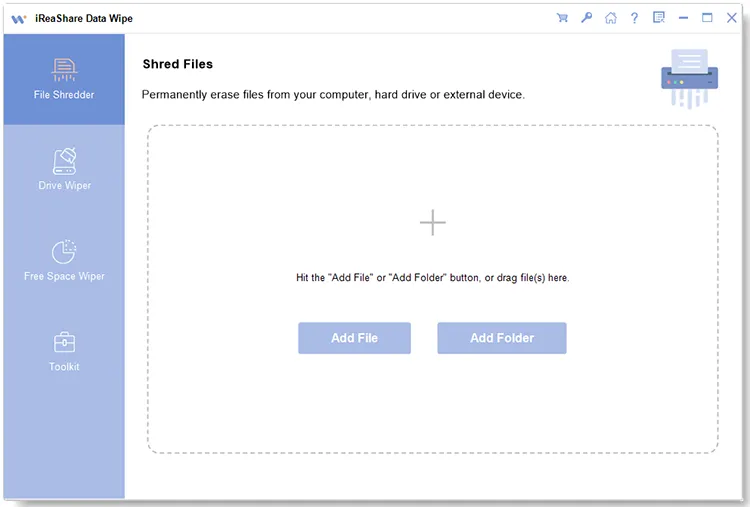
Download and install the software on a Windows PC, and then open it. Then select a mode that you need.
-
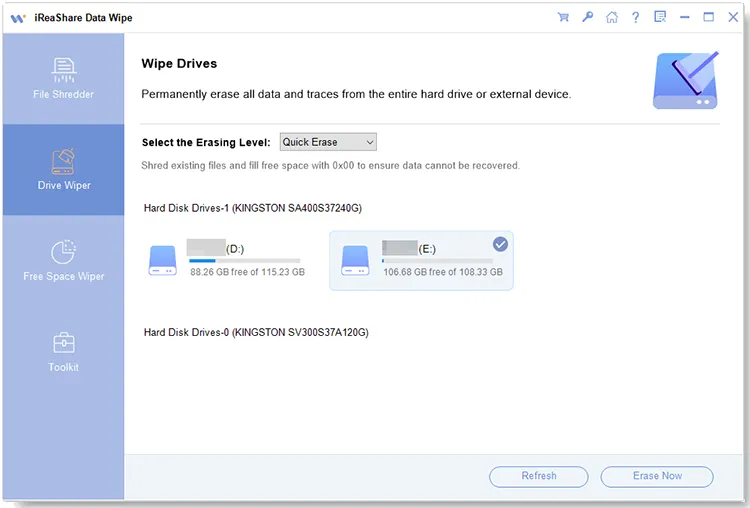
If you want to shred specific files or folders, choose "File Shredder"; if you want to erase everything from a whole drive or an external disk, please choose "Drive Wiper".
-
Choose your files, or select an erasing level and your target drive. Then click "Erase Now" > "OK" to wipe your data. After that, all the files will be removed and overwritten permanently.
You can watch the video guide to use this data wipe software:
2.3 Disk Wipe
Disk Wipe is a free, portable Windows application designed for volume formatting and data destruction. Because it is portable, it requires no installation and can be run directly from a USB stick. It supports a variety of file systems (NTFS, FAT32, FAT) and employs several advanced overwriting algorithms, making it an excellent choice for wiping external storage drives quickly.
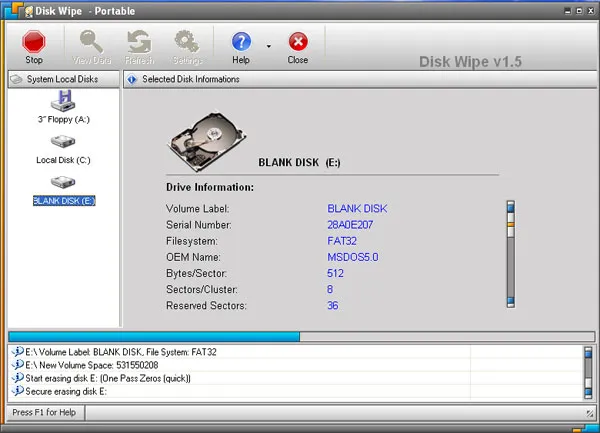
- Runs completely standalone as a single executable file with zero installation, meaning it leaves no permanent footprints or registry modifications on the host PC.
- Capable of formatting and sanitizing a massive range of drive formats, including modern NTFS, older FAT32, exFAT, and raw storage volumes.
- Offered as an entirely free utility for personal and commercial deployment without hidden bloatware, tracking cookies, or locked feature restrictions.
- The application's core framework has not received modern patches in years, raising stability concerns on modern Windows updates.
- Because it is tightly coupled to standard Windows Explorer management, large volume wipes can cause the application or Windows interface to temporarily stop responding.
- Optimized strictly for volume and partition formatting; it cannot be used to securely shred isolated individual files without clearing the entire drive.
2.4 Eraser
Eraser is a highly popular, open-source security tool for Windows that allows you to completely shred specific files and folders rather than wiping an entire drive. It integrates directly into the Windows File Explorer context menu, meaning you can simply right-click any file and select "Eraser" to permanently destroy it. It also features a robust scheduler for automated, recurring wipes of your Recycle Bin or temporary folders.
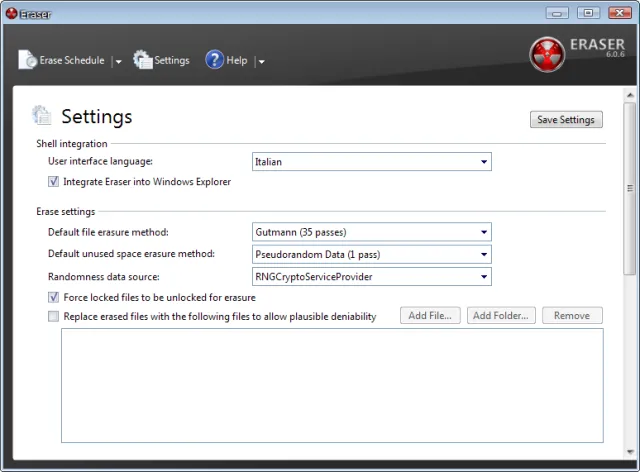
- Adds a custom action directly into the Windows right-click context menu, allowing users to safely shred files instantly during routine workflow.
- Includes a native queue and schedule manager that runs automated background wipes on the Recycle Bin, web browser caches, or specific folders at set times.
- Allows advanced users to build their own custom overwriting sequence patterns alongside built-in choices like Gutmann or DoD standards.
- Requires a continuous Windows background service thread to manage schedules, which constantly consumes random access memory (RAM).
- Users frequently experience confusing "Completed with errors" alerts caused by locked system files or hidden file names that are too long for the algorithm to index.
- Struggles to wipe multiple drives or heavy directories concurrently, bottlenecking speeds since tasks are handled sequentially.
2.5 BleachBit
BleachBit is a powerful, open-source system cleaner and privacy tool available for both Windows and Linux. While it functions similarly to a cache cleaner, it includes advanced shredding capabilities. Beyond deleting internet history and temporary logs, BleachBit can shred individual files and "wipe free space" to ensure that previously deleted files are permanently overwritten and unrecoverable.
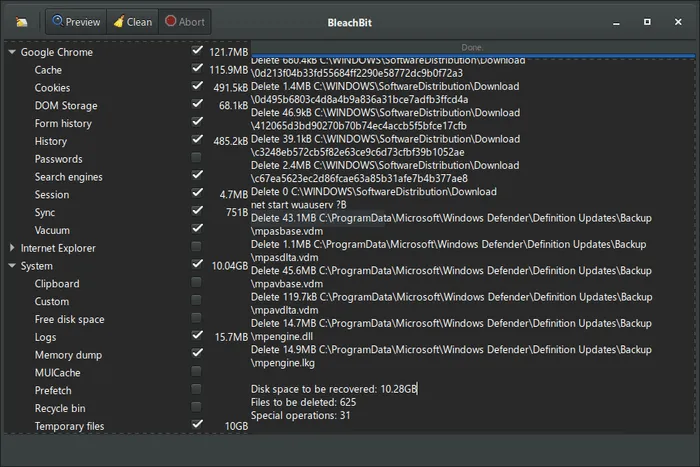
- Combines deep junk file cleaning (cache, cookies, logs) with military-grade shredding algorithms in a single interface.
- Completely open-source engine available on both Windows and Linux, giving users total code transparency with zero commercial tracking.
- Features a "Wipe Free Space" tool that scrubs the empty storage gaps on a drive to destroy traces of previously deleted files without affecting active files.
- Wiping free space on high-capacity mechanical drives can take several hours, significantly drawing down CPU resources during the process.
- Checking the wrong deep-cleaning boxes (like broken shortcuts or localized OS translations) can accidentally delete system preferences or cache files needed by active apps.
- Built predominantly as an endpoint privacy cleaner rather than a tool to clear and format external secondary drives for resale.
2.6 DBAN
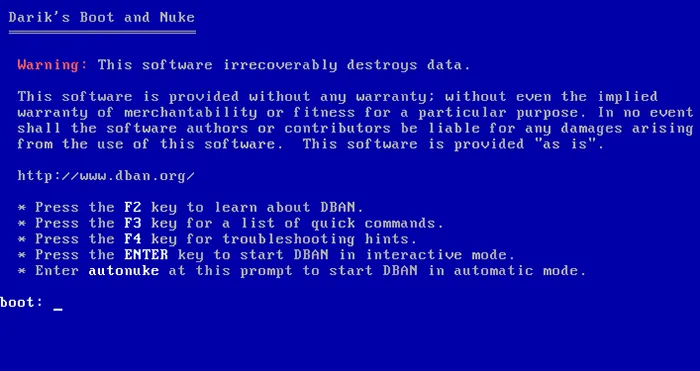
DBAN is the historic gold standard for bulk data destruction. Like ShredOS, it is a bootable standalone utility that runs completely outside of Windows. However, DBAN has not been updated in years and lacks native support for modern UEFI systems, NVMe SSDs, and newer hardware. It remains a reliable, excellent choice for older, legacy desktop and laptop systems utilizing traditional magnetic hard drives (HDDs).
- Historically recognized by IT professionals and international compliance boards as a premier standard for thorough industrial-grade hard drive purging.
- Boots completely from outside Windows via a self-contained environment to erase all local data, file headers, partition boundaries, and root drives.
- The utility fits into a minimal file package, allowing it to boot quickly even on severely outdated computers with minimal hardware specs.
- Development has officially stopped; the software has not received hardware support updates or driver adjustments in years.
- Cannot boot on modern computers out of the box without changing BIOS firmware configuration settings to "Legacy Compatibility Mode".
- Does not recognize or safely communicate with Solid-State Drives (SSDs), NVMe drives, or advanced hardware RAID arrays.
2.7 Samsung Magician
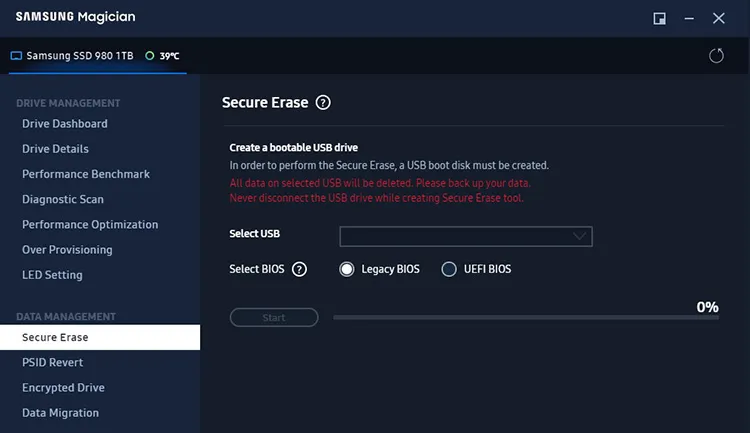
Samsung Magician is a proprietary management suite designed specifically for Samsung brand solid-state drives (SSDs). Unlike traditional wiping tools—which can prematurely wear out an SSD—Samsung Magician features a dedicated Secure Erase function. This sends a hardware-level command to the SSD controller, flashing the voltage to all memory cells simultaneously to securely reset the drive to factory default speeds and cleanliness in seconds.
- Sends a direct electronic command to the internal controller chip rather than grinding down storage memory blocks with repetitive software writes.
- Wipes cells in fractions of a second using voltage drops, preventing the premature wear and tear that software overwrites cause on flash drives.
- Includes extra drive utilities such as diagnostics scans, real-time temperature tracking, benchmark testing, and official firmware updates.
- The advanced security and sanitization tools only function if the computer contains an authentic Samsung brand SSD.
- Executing the Secure Erase function on an active boot drive requires users to format a separate bootable USB from inside the app menu first.
- The underlying system operations are completely hidden behind intellectual property protection, preventing independent security verification.
2.8 DiskGenius
DiskGenius is an all-in-one disk management, data recovery, and partition control utility. While widely known for recovering lost partitions, it includes a robust "Erase Sectors" feature. This allows users to select any disk or partition and overwrite the data sectors multiple times, making it a highly versatile tool for users who want disk diagnostics and data destruction in a single package.
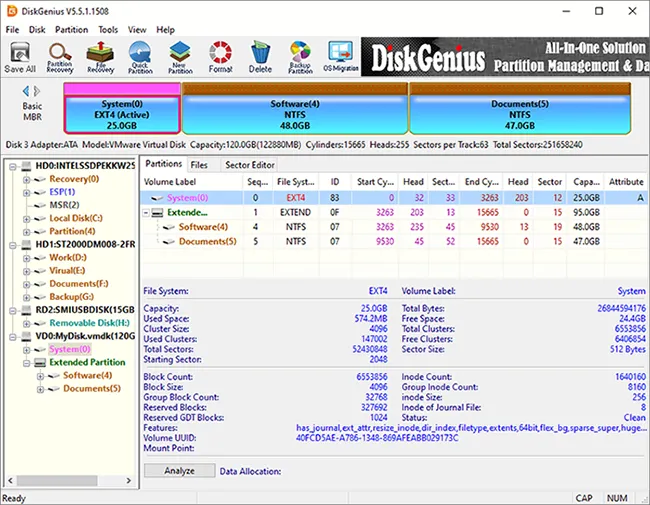
- Merges file data recovery, partition rebuilding, hex editing, and data sanitization into a single desktop interface.
- Offers fine-tuned sector control, allowing users to overwrite specific mechanical sector numbers manually for surgical data destruction.
- Checks for bad storage sectors and structural errors across connected media before initiating an overwrite script.
- The sheer volume of technical options, graphs, and sector data maps can easily confuse or paralyze a standard everyday user.
- While fundamental disk checking tools are free, advanced recovery and heavy sector data sanitization modes require upgrading to expensive Pro licenses.
- Running full sector wipes inside a multi-tool can occasionally cause partition mismatches if standard Windows storage paths are interrupted.
2.9 PrivaZer
PrivaZer is a comprehensive PC cleaner and privacy tool that excels at finding and destroying hidden traces of activity on your computer. It goes beyond simple file deletion by scanning your registry, MFT (Master File Table), and free space for residual data. PrivaZer allows you to visualize exactly what traces remain on your system and securely overwrites them using recognized data destruction algorithms.
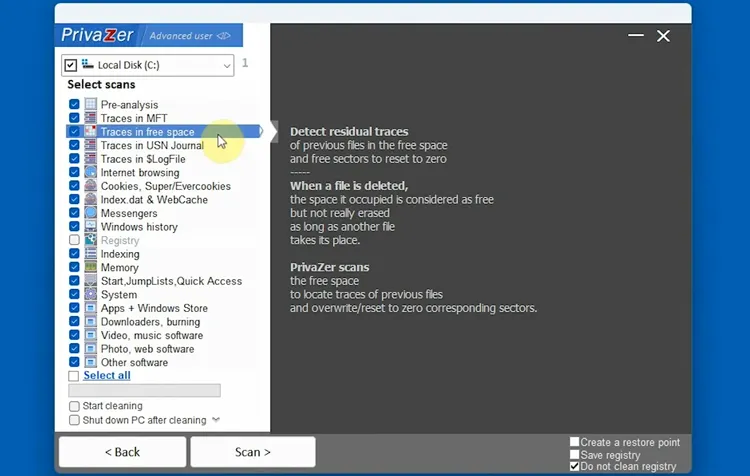
- Specializes in hunting down and scrubbing hidden user track artifacts embedded deep within system registry keys, index.dat files, and MFT chains.
- Intelligently detects flash storage media and automatically switches to specialized TRIM-mapped overwriting commands to avoid drive degradation.
- Generates detailed visual reports categorized by data types, allowing users to audit exact tracking traces before permanently executing a wipe command.
- The tracking optimization scanner can take quite a while to completely analyze system storage before the actual cleanup phase begins.
- Can accidentally clear useful operational parameters, like saved website layout cookie states or persistent application window positions.
- Designed as an optimized maintenance cleaner; it lacks the core options needed to execute a clean wipe of an external partition for formatting purposes.
Part 3: Q&A About Data Wipe Software
Q1: How do I know which disk wipe software is best for me?
The best disk wipe software depends on your specific needs:
- If you need a free open-source solution, consider ShredOS, Eraser, or BleachBit.
- If you want a user-friendly tool with comprehensive wiping features, iReaShare Data Wipe or DiskGenius may be good choices.
- If you need to wipe an entire hard drive before disposal, DBAN is a popular option.
- If you own a Samsung SSD, Samsung Magician offers optimized secure erase functions.
Consider factors such as ease of use, supported storage devices, wiping standards, and budget before making a decision.
Q2: Can I use a data wipe tool to erase my smartphone after connecting to my PC via USB?
Generally, no. PC-based data wipe software treats connected devices as mass storage drives (assigning them a drive letter like E: or F:). Modern smartphones connect to PCs using MTP (Media Transfer Protocol) rather than standard mass storage mode, which prevents low-level sector overwriting tools from accessing the storage directly.
To completely erase a phone, it is generally recommended to use the device's built-in factory reset function or phone data erasure tools like iReaShare Android Data Eraser.
Q3: What would happen if I used data wipe software to directly wipe the C drive on my computer?
If you attempt to do this from within your running Windows operating system, the software will block the action. Windows protects its core system files and will not allow an active application to delete or overwrite the drive it is currently running from.
However, if you bypass Windows by using a bootable tool (like ShredOS or DBAN via a USB drive), the software will successfully wipe the C drive. The result is the absolute, permanent destruction of your operating system, programs, and personal files. Once completed, the computer will fail to boot and will display an error message like "No bootable device found" until you reinstall an operating system.
Conclusion
Data wipe software plays a critical role in protecting privacy and preventing unauthorized data recovery. Whether you're preparing a device for resale, disposing of old storage media, or meeting business security requirements, using a reliable data erasure tool is one of the most effective ways to safeguard sensitive information.
From open-source options like ShredOS and Eraser to specialized solutions, there are tools available for virtually every use case. Among them, iReaShare Data Wipe stands out as the top choice for users who prioritize both simplicity and thoroughness. With its clean, intuitive interface, even non-technical users can permanently erase data in just a few clicks - no complicated setup or technical knowledge required. Let's try it.
Related Articles
How to Format SD Card on Different Devices Effectively (Full Guide)
How to Permanently Delete PDF Files on Computer (Solved)
Solved: How to Erase Data from Sony XQD Card Permanently
How Do I Make Deleted Data Unrecoverable? (Viable Solutions and Tips)