


Are you using a Sony XQD card on your digital camera and now want to erase the card? Whether you are preparing to sell your card or simply need a fresh, optimized storage solution, you need to understand how to erase data from a Sony XQD card permanently. We'll cover the card erasure on both Windows and Mac computers, which is convenient for all users.
Check the advantages and disadvantages of the 3 methods:
| Method | Pros | Cons |
|---|---|---|
| 1. iReaShare Data Wipe | 1. Erase the card completely and the data is permanently unrecoverable. 2. The Deep Erase Mode will overwrite data 3 times. 3. Ideal for sensitive data or before selling/donating the card. 4. Enables you to erase specified files and folders. |
1. Requires installing software on a PC. 2. No Mac version at present. 3. The full features need a license. |
| 2. Windows Full Format | 1. Good balance of speed and thoroughness. 2. Checks the card and marks bad sectors. 3. Uses built-in OS tools (no extra software needed). |
1. Data is often still recoverable using forensic tools (less secure than a dedicated wipe). 2. Slower than a Quick Format. |
| 3. Mac Disk Utility Erase (Standard) | 1. Very fast and easy using built-in macOS tools. 2. Offers secure erase options within the utility for increased security (if needed). |
1. Standard erase (one pass) is not forensically secure. 2. Using the secure erase options significantly increases the processing time. |
Part 1: How to Erase Data from Sony XQD Card Permanently via iReaShare Data Wipe
If you need to completely and permanently erase data from your Sony XQD card, standard file deletion or formatting will not suffice. There are data recovery tools that can easily recover files even after they have been deleted or formatted. To prevent any chance of data recovery, using specialized software like iReaShare Data Wipe is essential. This tool can overwrite existing and deleted data entirely.
Main features of iReaShare Data Wipe:
* Completely erase an external storage a like Sony XQD card, making all data unrecoverable.
* Provide two erasing modes: Quick Erase (shred existing files and fill with 0*00) and Deep Erase (follow US DoD 5220.22-M(E) standard).
* Support erasing micro SD cards, USB flash drives, and more.
* Wipe hard drives on Windows computers thoroughly.
* Erase the free space only without removing any existing data.
* Can run on Windows 11/10/8/7.
Download iReaShare Data Wipe.
Here's how to erase data from a Sony XQD card permanently via this program:
-
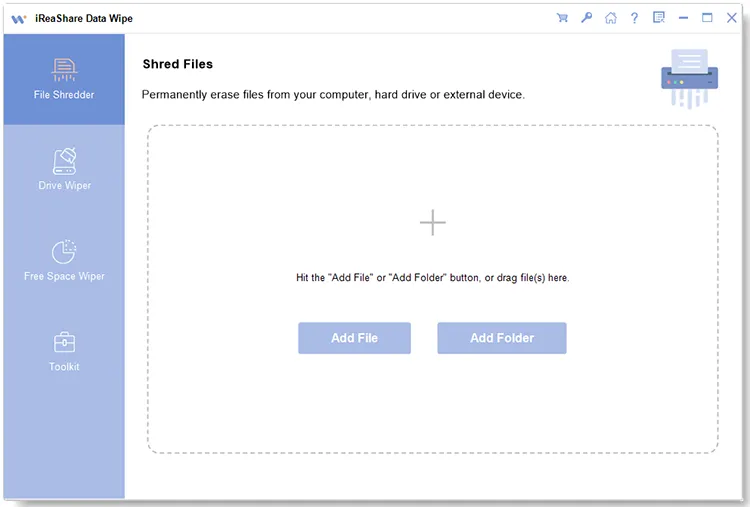
Please install iReaShare Data Wipe on a Windows PC after downloading it. Then launch it on the computer.
-
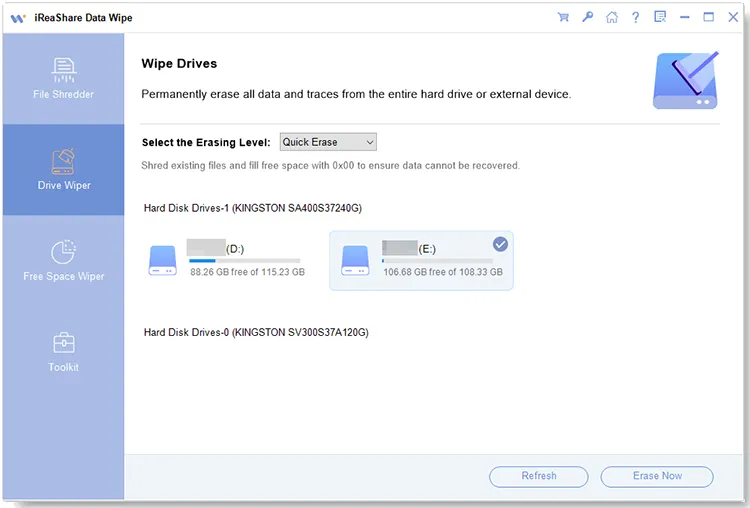
Connect your Sony XQD card to your computer using an XQD card reader. Make sure your computer detects the card. Then choose the "Drive Wiper" tab on the left panel. Then opt for your XQD card.
-
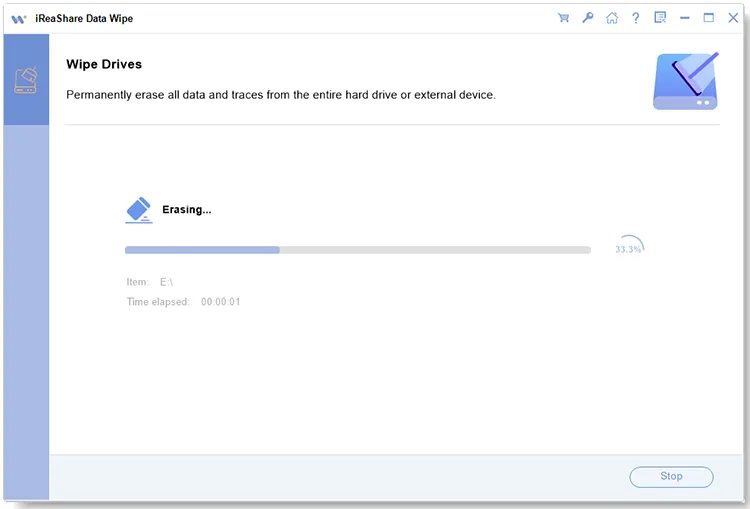
Now, select an erasing level, and click "Erase Now". On the popup, choose "OK" to activate the process. After finishing, safely remove your card from the PC.
Part 2: How to Format Sony XQD Card on a Windows PC (Full Format)
Formatting your Sony XQD card on a Windows PC is a straightforward process. If you want to wipe your Sony XQD card completely, you can choose the Full Format mode. The Quick Format mode cannot make your data unrecoverable.
To format a Sony XQD card on a Windows PC with Full Format:
-
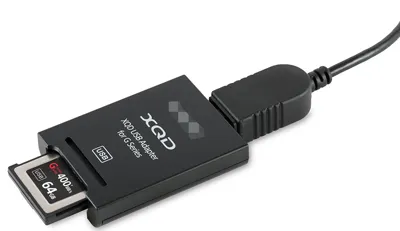
Connect your XQD card to your PC with a card reader, press the "Windows" key + "E" to open "File Explorer", and then navigate to "This PC". Locate the XQD card listed under "Devices and drives".
-
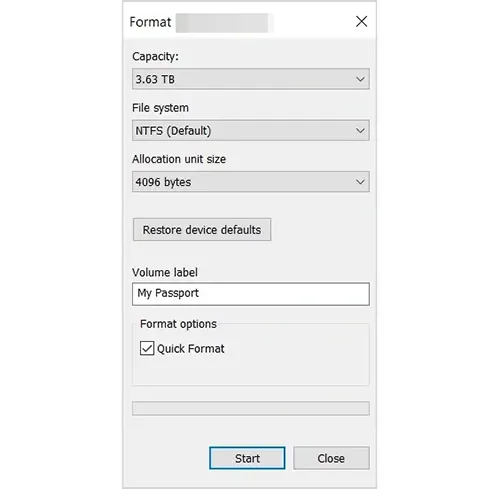
Right-click on the XQD card and select "Format...". Then select "exFAT". This is the recommended file system for high-capacity memory cards used in modern digital cameras.
-
Leave this as "Default allocation size", and enter a name for your card (e.g., "SONY XQD"). Then uncheck the "Quick Format" option to perform a "Full Format".
-
Click "Start". You will receive a warning that formatting will erase all data. Click "OK" to proceed. Wait for the process to complete. A pop-up window will inform you when the formatting is finished.
Part 3: How to Erase Data from Sony XQD Card via Mac Disk Utility Erase
Mac users can also format or securely erase their Sony XQD cards directly from their macOS devices. macOS provides an easy-to-use tool, Disk Utility, to format and erase storage devices. However, if you're looking to securely erase all data, it's recommended to follow the steps for secure erasure.
Here's how:
-
Insert your Sony XQD card into the card reader, then connect it to your Mac. Launch Disk Utility from the "Applications" > "Utilities" folder.
-
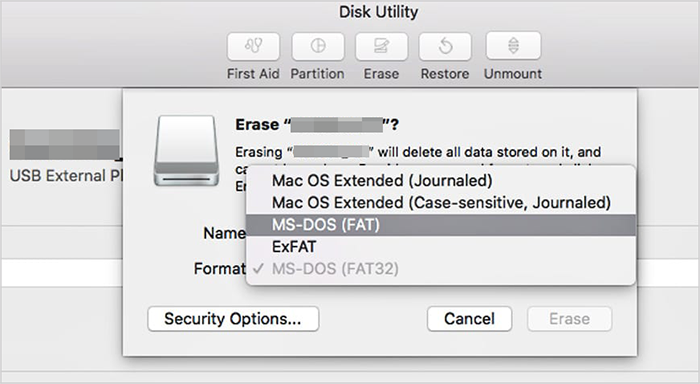
In the left sidebar of Disk Utility, find your Sony XQD card under the "External" section. Select the "Erase" tab at the top of the window. You'll be presented with options for formatting the card.
-
For secure data erasure, click on the "Security Options" button before confirming the erasure. Here, you can choose different levels of security, ranging from a single pass of overwriting data to multiple passes for extra security.
-
After selecting your preferred options, click "Erase" to begin the process. The software will overwrite the data on the card and make it unrecoverable.
Part 4: Q&A About Erasing Data from Sony XQD Card
Q1: Is formatting an XQD card the same as deleting files?
No. Formatting the card erases the entire file structure, including all files and any hidden data. Deleting files individually does not erase the file system structure or recover all space efficiently, especially if data needs to be overwritten. Formatting is the cleaner, more thorough option.
Q2: Is it safe to format an XQD card in any device?
It depends. It's generally safe to format an XQD card in a camera, but formatting in other devices (like a computer or another card reader) could potentially make the card incompatible with your camera or device, especially if it's formatted with a file system that the camera does not recognize. It's always safest to format within the camera that you use most often.
Q3: Can I recover data after erasing it from an XQD card?
Possibly. After formatting or deleting data from an XQD card, it is still possible to recover the data using data recovery software, as the files are often not truly deleted until they are overwritten. If you use iReaShare Data Wipe to erase your card, you cannot recover the data because it will overwrite all the data.
Conclusion
It's crucial to erase data from your Sony XQD card securely when you handle sensitive information. Using specialized software like iReaShare Data Wipe is the most reliable method to ensure complete data destruction, while simple formatting works for general use. If you want to use a computer to format your card completely, you can use the Full Format on a Windows PC and the Disk Utility on Mac.
Related Articles
Select Free Drive Wiper to Erase a Disk Without Any Hassle
How to Factory Reset PC Windows 10 or 11 Easily (3 Ways)
How to Delete Everything Except Windows 10 OS on PC (Useful Tips)
How to Wipe a Thumb Drive Without Effort? (3 Solutions)