TL;DR:
Looking for reliable software to recover deleted or lost files from an SD card? Different recovery tools offer different levels of performance, ease of use, and pricing options depending on your needs.
- D-Back and Disk Drill provide beginner-friendly recovery experiences with simple workflows.
- Stellar Data Recovery, UFS Explorer, and R-Studio offer advanced recovery features for more complex data loss situations.
- PhotoRec and Recuva are free options for users who need basic SD card recovery.
- DMDE provides a balance between affordable pricing and flexible recovery functions for more experienced users.
SD cards are widely used in digital cameras, smartphones, drones, and other devices because they provide a convenient way to store photos, videos, and documents. However, accidental deletion, formatting errors, corruption, or unexpected damage can make important files disappear. In these situations, the right SD card recovery software can help scan the card and restore recoverable data.
Choosing the best SD card recovery software is not always easy, as different tools focus on different needs. Some are designed for beginners with simple interfaces, while others provide advanced recovery features for damaged partitions and complex data loss situations. This guide compares 8 popular SD card recovery tools to help you find a suitable option for recovering lost files.
Best SD Card Recovery Software at a Glance
| Software | Best For | Usability | Recovery Performance | Compatibility | Price |
|---|---|---|---|---|---|
| D-Back | Overall SD card recovery | Easy | Excellent | Windows, macOS | Starts at $49.95 |
| Disk Drill | Beginners and simple recovery | Easy | Good | Windows, macOS | Starts at $89 |
| Stellar Data Recovery | Advanced recovery options | Medium | Good | Windows, macOS | Starts at $49.99 |
| PhotoRec | Free SD card recovery | Medium | Good | Windows, macOS, Linux | Free |
| UFS Explorer | Professional recovery | Difficult | Good | Windows, macOS, Linux | Starts at $69.95 |
| DMDE | Technical users | Medium | Good | Windows, macOS, Linux | Starts at $20 |
| Recuva | Basic deleted file recovery | Easy | Average | Windows | Starts at $24.95 |
| R-Studio | Professional data recovery | Difficult | Good | Windows, macOS, Linux | Starts at $49.99 |
1. D-Back
D-Back is a data recovery tool designed to help retrieve lost files from various storage devices. For SD card recovery, it provides a straightforward solution for restoring important files after accidental deletion, formatting, or unexpected data loss. Its simple workflow makes it suitable for users who want to recover files without complicated technical steps.
Key Features
* Recover deleted or lost data from SD cards, hard drives, PCs, and other storage devices.
* Support more than 1,000 types of files, including photos, videos, documents, and archives.
* Recover data from formatted, deleted, or inaccessible storage media.
* Scan storage devices and preview recoverable files before restoration.
* Allow selective recovery instead of restoring all detected files.
* Support Windows and macOS systems.
Pros
+ Offers a more beginner-friendly recovery process than advanced tools such as UFS Explorer and R-Studio.
+ Supports a wide range of recovery scenarios, making it suitable for different SD card data loss situations.
+ Provides a lifetime license option, which can be more cost-effective for long-term use.
Cons
- More expensive than completely free tools such as PhotoRec and Recuva.
- May not provide as many professional-level disk analysis features as advanced recovery software.
Price
D-Back provides the following plans:
- 1-Month Plan: $49.99/month
- 1-Year Plan: $69.99/year
- Lifetime Plan: $79.99 (one-time purchase)
How to Recover Files from an SD Card with D-Back
-
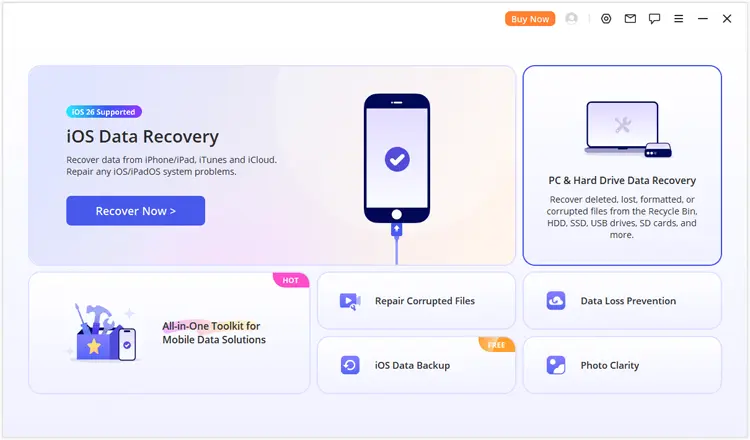
Insert your SD card into the computer with a card reader. Open D-Back and choose "PC & Hard Drive Data Recovery" to enter the SD card recovery mode.
-
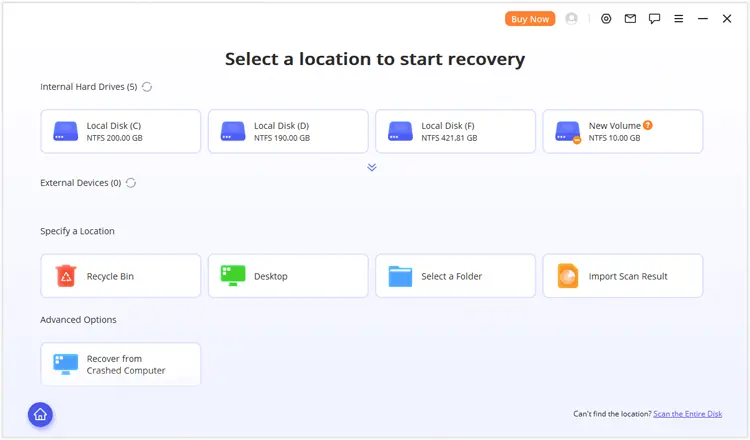
Select the SD card or its partition from the available storage devices. If you cannot find the target partition, choose "Scan the Entire Disk" to perform a complete scan of the storage media.
-
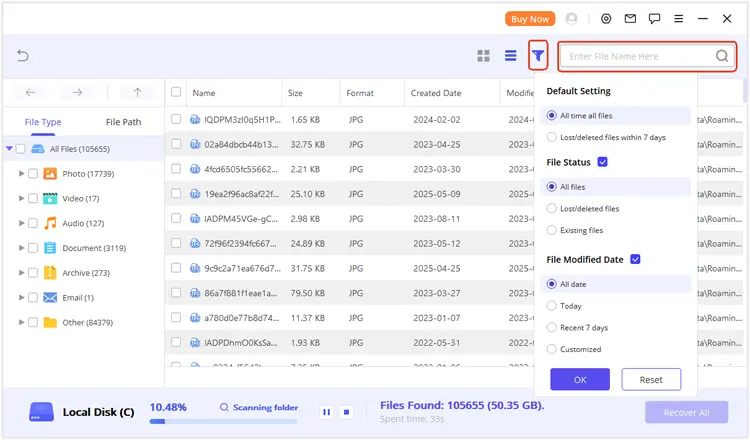
After scanning finishes, check the recovered results by file type or file path. You can use the search and filter options to locate specific files and preview them before recovery.
Select the files you need and click "Recover" to save them to another location.
2. Disk Drill
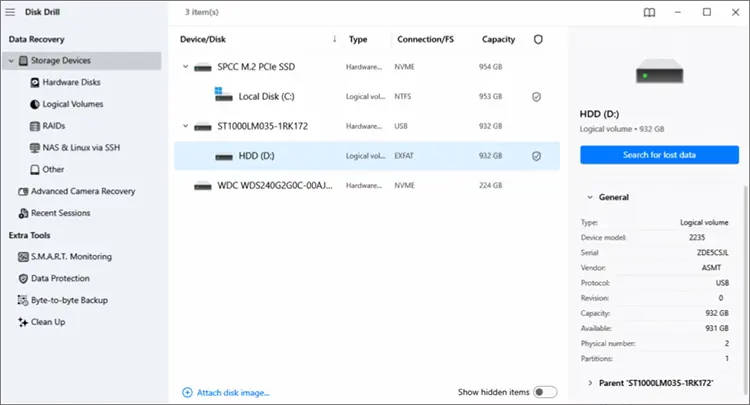
Disk Drill is a data recovery application developed for users who want a simple way to restore lost files from SD cards and other storage devices. It is especially suitable for beginners and everyday users who need to recover accidentally deleted photos, videos, or documents without dealing with complicated recovery settings.
Key Features
* Recover deleted files from SD cards, USB drives, hard drives, and other storage media.
* Support various file systems, including FAT32, exFAT, NTFS, and HFS+.
* Provide Quick Scan and Deep Scan modes for different data loss situations.
* Recover files from formatted or damaged storage devices.
* Create byte-to-byte backups of storage devices for safer recovery attempts.
* Organize recovery results by file type for easier file management.
Pros
+ Has a modern and intuitive interface that is easier to navigate than many technical recovery tools.
+ Provides additional disk protection and monitoring utilities beyond standard recovery functions.
+ Suitable for users who prefer a guided recovery process instead of complex manual settings.
Cons
- The free version comes with recovery limitations.
- The full version is relatively expensive compared with some competitors.
- Professional recovery features may not be as extensive as specialized tools designed for advanced users.
Price
Disk Drill provides the following plans:
- Basic Plan: Free
- Pro Annual Plan: $89/year
- Pro Lifetime Plan: $149 (one-time purchase)
- Enterprise Plan: Custom pricing
3. Stellar Data Recovery
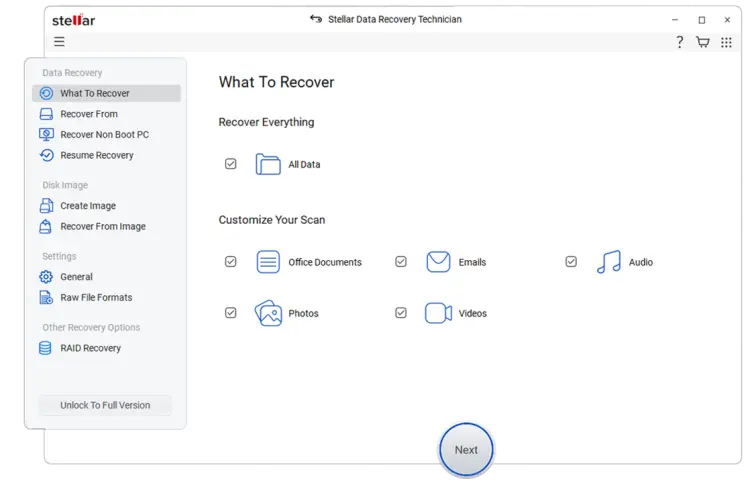
Stellar Data Recovery is a well-known recovery program that provides solutions for individuals, professionals, and businesses. It offers different editions based on recovery needs, making it suitable for users who want a flexible option for recovering files from SD cards and other storage devices.
Key Features
* Recover lost files from SD cards, hard drives, SSDs, and external storage devices.
* Restore photos, videos, documents, emails, and other data categories.
* Recover files from deleted, formatted, or corrupted storage media.
* Allow users to select specific file categories before starting a scan.
* Create disk images for recovery from unstable storage devices.
* Provide advanced options in higher-tier versions.
Pros
+ Offers multiple editions for different user groups.
+ Has a long-standing reputation in the data recovery market.
+ Provides more customization choices than many entry-level recovery applications.
Cons
- The number of available editions may be confusing for beginners.
- Higher-tier versions can be costly for users who only need basic SD card recovery.
- Some advanced functions are restricted to premium plans.
Price
Stellar Data Recovery offers multiple editions for different recovery needs:
- Standard: $49.99
- Professional: $79.99
- Premium: $89.99
- Technician: $199
- Toolkit: $299
4. PhotoRec
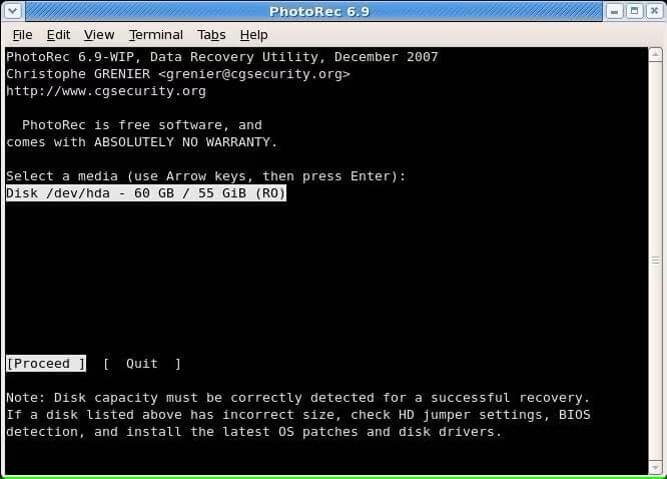
PhotoRec is a free and open-source data recovery tool designed for users who need to recover lost files without purchasing commercial software. It is commonly used for restoring photos and other files from SD cards, especially when the original file system has been damaged or formatted.
Key Features
* Recover files from SD cards, memory cards, hard drives, and other storage devices.
* Use file carving technology to locate lost data based on file signatures.
* Support a wide range of file formats.
* Work with multiple operating systems, including Windows, macOS, and Linux.
* Recover files even when the storage device has file system problems.
Pros
+ Completely free with no paid upgrade requirements.
+ Works well for users who need a lightweight recovery solution.
+ Open-source nature allows experienced users to inspect and modify the software.
Cons
- The command-line interface can be difficult for beginners.
- Recovered files may lose their original names and folder structure.
- The overall experience is less convenient than commercial recovery programs.
Price
Free
5. UFS Explorer
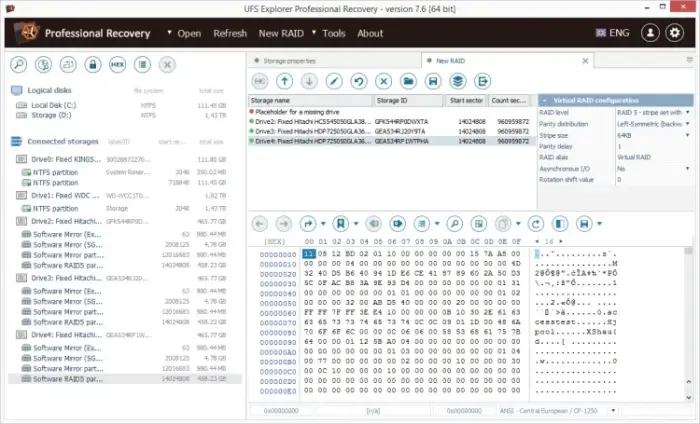
UFS Explorer is a professional data recovery solution designed for users who need advanced recovery capabilities. It is mainly used in more complex situations, such as damaged partitions, unusual file systems, or professional data restoration tasks.
Key Features
* Recover data from various storage devices, including SD cards and external drives.
* Support multiple file systems used across different operating systems.
* Work with disk images and virtual storage environments.
* Provide advanced scanning and analysis functions.
* Handle complex data loss scenarios involving damaged storage structures.
Pros
+ Provides powerful tools for experienced recovery specialists.
+ Supports more complex recovery situations than many consumer-focused programs.
+ Offers different editions for different professional requirements.
Cons
- The interface and features may feel overwhelming for casual users.
- Requires more technical knowledge compared with beginner-oriented recovery software.
- Professional editions can be expensive.
Price
UFS Explorer provides different editions for personal and professional recovery needs:
- Standard Recovery: Starts at $69.95
- RAID Recovery: Starts at $149.95
- Network RAID: Starts at $229.95
- Professional Recovery: Starts at $699.95
- Technician: Starts at $469.95
6. DMDE
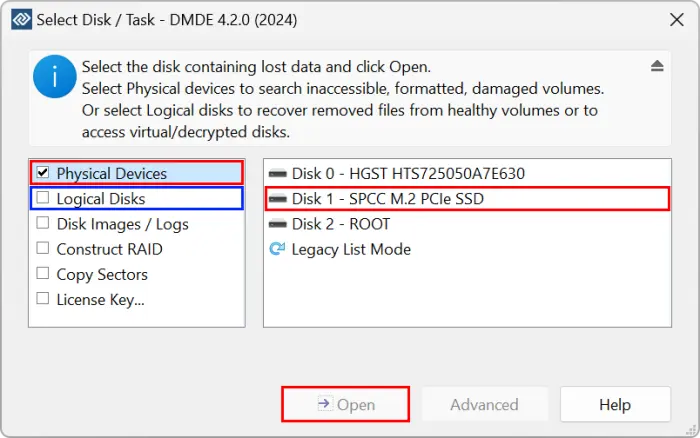
DMDE (DM Disk Editor and Data Recovery Software) is a data recovery tool that combines file recovery features with disk editing capabilities. It is designed for users who need more control over the recovery process and is often used for recovering files from damaged partitions, memory cards, and other storage devices.
Key Features
* Recover lost files from SD cards, hard drives, USB drives, and other storage media.
* Support partition recovery and disk structure analysis.
* Provide tools for searching, editing, and managing disk data.
* Recover files from deleted, damaged, or missing partitions.
* Support various file systems used by different storage devices.
* Allow users to work with disk images during recovery operations.
Pros
+ Offers powerful recovery capabilities at a lower price than many professional tools.
+ Provides a portable version that does not require a complicated installation process.
+ Gives experienced users more control over recovery operations.
Cons
- The interface is less beginner-friendly compared with consumer-focused recovery software.
- Some recovery functions require technical knowledge to use effectively.
- Free version limitations may not meet the needs of users with large recovery tasks.
Price
DMDE provides the following editions:
- Express Edition: $20/year
- Standard Edition: $48 (one-time purchase)
- Professional Edition: $95 (one-time purchase)
7. Recuva
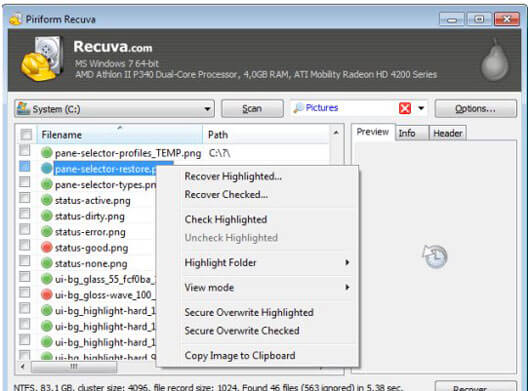
Recuva is a lightweight data recovery program developed for users who need a simple way to restore accidentally deleted files. It is mainly aimed at basic recovery tasks, such as retrieving photos, documents, and other files from SD cards, computers, and external storage devices.
Key Features
* Recover deleted files from SD cards, hard drives, USB drives, and memory cards.
* Provide standard scanning and deep scanning options.
* Restore files from damaged or formatted storage devices.
* Support file preview before recovery.
* Include a secure overwrite feature to permanently delete sensitive files.
* Offer a portable version for convenient use.
Pros
+ Provides a free version that is sufficient for many basic recovery needs.
+ Has a smaller installation size compared with many full-featured recovery tools.
+ Offers an affordable upgrade option for users who need additional features.
Cons
- Recovery performance may be limited for severely damaged or heavily overwritten storage devices.
- The interface and design feel outdated compared with newer recovery applications.
- It lacks some advanced recovery functions available in professional software.
Price
Recuva provides the following plans:
- Free Version: Free
- Recuva Professional: $24.95
8. R-Studio
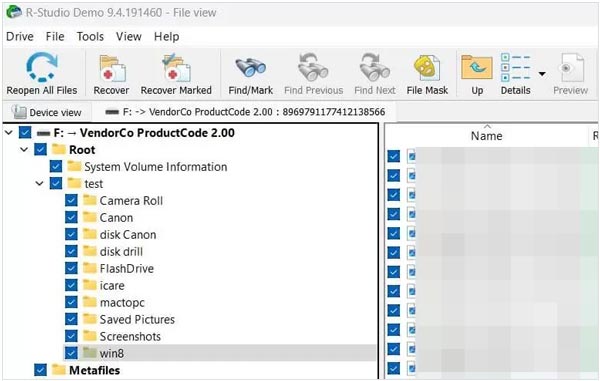
R-Studio is a professional data recovery application designed for advanced users who need detailed control over the recovery process. It is commonly used by technicians and experienced users for handling complex data loss situations involving SD cards, hard drives, and other storage devices.
Key Features
* Recover data from SD cards, hard drives, SSDs, and removable storage devices.
* Support recovery from deleted partitions and damaged storage media.
* Provide advanced scanning and file recovery algorithms.
* Create and work with disk images for safer recovery operations.
* Support RAID recovery and network recovery functions.
* Offer hexadecimal editing and detailed disk analysis tools.
Pros
+ Provides extensive recovery controls for experienced users.
+ Handles complex recovery tasks that may be beyond the scope of basic recovery software.
+ Offers versions for multiple operating systems.
Cons
- The learning curve is higher than most consumer recovery tools.
- The interface may appear complicated for users without technical experience.
- Some advanced functions are unnecessary for simple SD card recovery scenarios.
Price
R-Studio provides the following licenses:
- R-Studio for Windows: $49.99
- R-Studio for Mac: $79.99
- R-Studio for Linux: $79.99
- R-Studio Technician: Custom pricing
Conclusion
Choosing the best SD card recovery software depends on your recovery needs, technical experience, and budget. Some tools focus on simple recovery with an easy interface, while others provide advanced features for handling complex data loss situations.
For most users, D-Back offers a balanced recovery experience with an easy workflow and comprehensive recovery options. Advanced users who need deeper control may prefer professional solutions such as UFS Explorer or R-Studio, while free tools like PhotoRec and Recuva can be useful for basic file recovery tasks.
Before starting any recovery process, avoid writing new data to the SD card, as new files may overwrite the lost data and reduce the chance of successful recovery.
Related Articles
Best Hard Drive Recovery Software to Recover Lost Data in 2026
Wondershare Recoverit Review: Highlights, Weaknesses and Details [Latest]
How to Erase SD Card Completely (Comprehensive Guide in 2026)
How to Erase SanDisk SD Card: Remove All Data Permanently