


TL;DR:
WhatsApp last seen tells you when someone last used the app, but it doesn't confirm whether they read your messages or who they were chatting with. You can manage its visibility through WhatsApp privacy settings, while WhatsApp Tracker provides another way to view WhatsApp last seen and Status anonymously on a device you are authorized to monitor.
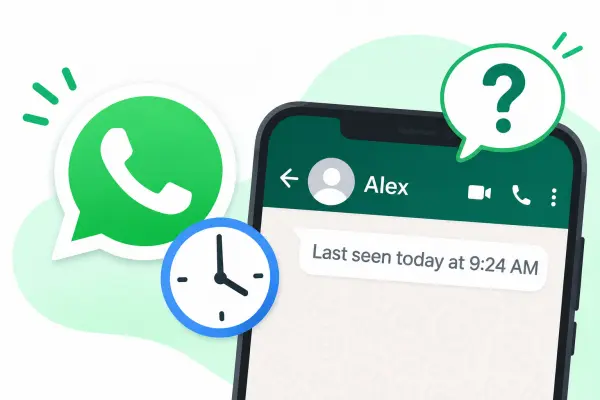
Have you ever opened a WhatsApp chat and noticed a timestamp like "Last seen today at 9:30 AM" under someone's name? You may wonder what this information means and whether it indicates that the person has read your messages or is ignoring you. In fact, WhatsApp last seen is an activity indicator that shows when someone last used the app.
However, this feature can be affected by privacy settings, which means you may not always be able to see another person's activity. So, what does last seen on WhatsApp mean, how is it different from Online, and can you view it anonymously? This article will explain everything you need to know and introduce a tool that can help you check WhatsApp activity more conveniently.
- Part 1. What Does Last Seen on WhatsApp Mean?
- Part 2. What Is the Difference Between Last Seen and Online on WhatsApp?
- Part 3. Why Can't I See Someone's Last Seen on WhatsApp?
- Part 4. How to Hide Your Last Seen on WhatsApp?
- Part 5. How to View WhatsApp Last Seen Anonymously?
- FAQs About WhatsApp Last Seen
Part 1. What Does Last Seen on WhatsApp Mean?
Last seen on WhatsApp indicates the last time a person used WhatsApp. You can usually find this information directly below their name at the top of a chat. For example, if it displays "Last seen today at 9:30 AM", it means the person last used WhatsApp around that time.
This timestamp helps you understand when someone was last active on the app. However, it doesn't tell you what they were doing, who they were talking to, or whether they read your message. Whether you can see this information also depends on the person's privacy settings and your own visibility settings.
Part 2. What Is the Difference Between Last Seen and Online on WhatsApp?
Last seen and Online are two different WhatsApp activity indicators. Although both help you understand someone's app activity, they show different information.
- Last Seen: Shows the last time someone used WhatsApp. It refers to past activity and usually appears as a date or time.
- Online: Indicates that someone currently has WhatsApp open on their device and is connected to the internet. It reflects their current app status rather than their previous activity.
Here is a quick comparison:
| Feature | Last Seen | Online |
|---|---|---|
| Meaning | Shows when someone last used WhatsApp | Shows that someone currently has WhatsApp open and connected to the internet |
| Time information | Past activity | Current activity |
| Display | A date or time, such as "Last seen today at 9:30 AM" | The word "Online" |
| Message reading | Does not confirm that a message has been read | Does not necessarily mean a message has been read |
| Privacy control | Can be hidden or limited through privacy settings | Can be controlled separately through privacy settings |
For example, if you see "Online" under someone's name, it means they currently have WhatsApp open and are connected to the internet. Once they leave the app, their last seen may update to reflect their latest activity.
Neither indicator confirms that someone has read your message. To check whether a message has been read, you need to look at its read receipts, such as the two blue check marks when read receipts are enabled.
Part 3. Why Can't I See Someone's Last Seen on WhatsApp?
If you cannot see someone's last seen on WhatsApp, it doesn't necessarily mean they have blocked you or stopped using the app. Several factors may explain why this information is unavailable.
1. They Have Hidden Their Last Seen
WhatsApp allows users to control who can see their last seen information. If someone selects "Nobody" or excludes you through the "My contacts except..." option, you won't be able to see their activity timestamp.
2. You Have Hidden Your Own Last Seen
WhatsApp also applies a reciprocal privacy rule. If you don't share your last seen, you generally cannot see other people's last seen either. Therefore, check your own privacy settings before assuming the other person has hidden their activity.
3. You Haven't Saved Each Other as Contacts or Started a Chat
WhatsApp's visibility rules also consider whether you have saved each other as contacts or exchanged messages before. If you haven't interacted with someone or saved their number, their last seen may not be visible to you, even if they haven't deliberately hidden it.
4. They May Have Blocked You
Being blocked is another possible reason you cannot see someone's last seen. However, this isn't definitive proof of blocking because privacy settings and contact-related restrictions can produce similar results.
5. There Is a Temporary Connection Issue
Sometimes, a network problem or temporary WhatsApp glitch may prevent activity information from appearing correctly. You can try switching your internet connection, closing and reopening WhatsApp, or checking again later.
Part 4. How to Hide Your Last Seen on WhatsApp?
If you don't want other people to know when you last used WhatsApp, you can hide your last seen through the app's privacy settings. WhatsApp also lets you control who can see when you're online.
Follow these steps:
Step 1. Open WhatsApp on your phone and go to "Settings".
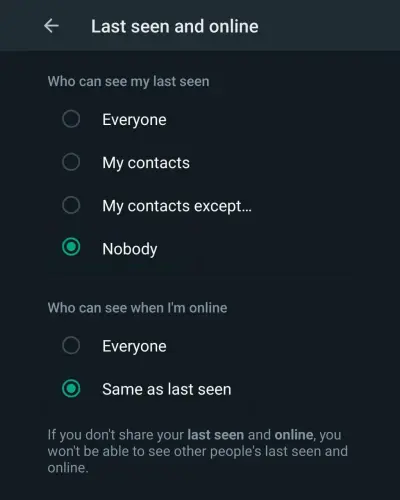
Step 2. Tap "Privacy" and select "Last seen and online".
Step 3. Under "Who can see my last seen", choose one of the following options:
* Everyone: Anyone who meets WhatsApp's visibility requirements can see your last seen.
* My contacts: Only your saved contacts can see it.
* My contacts except...: You can exclude specific contacts from seeing it.
* Nobody: No one can see your last seen.
Step 4. Under "Who can see when I'm online", select either "Everyone" or "Same as last seen" according to your preference.
If you want to hide both indicators from other people, select "Nobody" for last seen and "Same as last seen" for online.
Keep in mind that WhatsApp applies reciprocal visibility restrictions. If you choose not to share your last seen or online status, you won't be able to see these indicators for other users either.
Part 5. How to View WhatsApp Last Seen Anonymously?
WhatsApp's built-in privacy settings are useful for controlling your own activity visibility. However, they also limit what you can see about other people's activity. If you want to check WhatsApp activity on a family member's device with their knowledge and appropriate authorization, a dedicated monitoring tool may be worth considering.
WhatsApp Tracker is a professional WhatsApp monitoring solution. It allows you to view WhatsApp last seen information anonymously, so you can check when the monitored account was last active without revealing your viewing activity. It also lets you view WhatsApp Status updates anonymously and monitor other WhatsApp activities through an online dashboard after completing the required device setup.
Key Features of WhatsApp Tracker
- Check someone's WhatsApp last seen information without revealing your viewing activity.
- View WhatsApp Status updates, including text, photos, and videos, without appearing in the viewer list. You can also check available deleted or expired Status updates.
- Read incoming, outgoing, and deleted WhatsApp messages.
- Check WhatsApp call logs and listen to available call recordings.
- Remotely listen to recorded WhatsApp voice and video calls.
- View shared photos, videos, voice messages, and documents.
- Automatically capture screenshots of WhatsApp activity on the monitored device.
How to Use WhatsApp Tracker to View Last Seen?
-
Visit the WhatsApp Tracker official website and create an account. Choose a suitable subscription plan.

-
Select the available monitoring method for the device you are authorized to monitor. Follow the official setup guide to install or connect the service. For example, the WhatsApp Web method requires access to the target phone to link the account through WhatsApp's "Linked Devices" feature.

-
Once the setup is complete, log in to your dashboard from your computer or browser.
-
Open the relevant WhatsApp monitoring section and check the available activity records. You can view last seen information and WhatsApp Status updates anonymously, along with other collected data.

FAQs About WhatsApp Last Seen
1. Does last seen on WhatsApp mean they are talking to someone?
No. Last seen only shows the last time someone used WhatsApp. It doesn't indicate whether they were chatting with someone, reading messages, making calls, or performing another activity. You cannot determine who they were talking to from this timestamp alone.
2. Can someone see my last seen if I don't have their number saved?
It depends on your WhatsApp privacy settings and interaction history. If you set last seen to "My contacts", people who haven't been saved in your address book generally cannot see it. However, WhatsApp also considers whether you have previously messaged or called someone. Therefore, not saving a person's number doesn't automatically guarantee that they cannot see your activity.
3. Does last seen mean someone has read my message?
No. Last seen and message read receipts are separate WhatsApp features. Last seen tells you when someone last used the app, while read receipts indicate whether they have opened and read a message. If read receipts are enabled, two blue check marks generally mean the message has been read. Otherwise, you cannot use last seen to confirm that someone has read your message.
Conclusion
WhatsApp last seen helps you know when someone last used the app, but it doesn't reveal what they were doing or whether they read your messages. If you cannot see someone's last seen, their privacy settings, contact restrictions, or blocking settings may be the reason. You can also adjust your own privacy settings to decide who can view your activity.
If you want to check someone's WhatsApp last seen anonymously, WhatsApp Tracker is worth considering. It lets you view last seen information and WhatsApp Status updates anonymously through an online dashboard after the required device setup, providing a convenient way to review available WhatsApp activity on a device you are authorized to monitor.
Related Articles
How to Send Fake Location on WhatsApp [Informative Guide]
Top 7 Parental Control Apps: Side-by-Side Comparison (2026)
Best Snapchat Profile Viewer Tools in 2026: Reviews & How to Use