TL;DR:
Parental control apps help you manage screen time, block inappropriate content, monitor app usage, and track your child's location. This article reviews 7 popular parental control apps, including ClevGuard, Qustodio, Bark, Aura Parents, Norton Family, Net Nanny, and Google Family Link. Each app is evaluated based on features, supported platforms, pricing, and limitations to help you find a suitable option.
With smartphones and tablets becoming an important part of children's daily lives, managing online activities has become a growing concern for many parents. Excessive screen time, inappropriate content, unsafe websites, and online risks can affect children's digital habits and safety. A reliable parental control app can help you create a safer digital environment by providing tools for monitoring, filtering, and managing device usage.
However, different parental control apps focus on different areas. Some provide advanced activity monitoring and location tracking, while others specialize in screen time management, web filtering, or social media protection. To help you make a better choice, this article reviews the best parental control apps based on their features, supported devices, pricing plans, and potential drawbacks.
Top 7 Parental Control Apps Comparison
| App | Best For | Supported Devices | Number of Devices | Starting Price |
|---|---|---|---|---|
| ClevGuard | Detailed phone activity monitoring and parental control | Android, iOS, Windows, macOS | 1 device at a time | $25.33/month |
| Qustodio | All-around parental control across multiple platforms | Android, iOS, Windows, macOS, Chromebook, Kindle | Up to 5 or unlimited devices depending on plan | $59.95/year |
| Bark | AI-powered online safety alerts | Android, iOS, Chromebook, Windows, macOS | Unlimited kids and devices | $14/month |
| Aura Parental Controls | Content filtering and digital wellbeing management | iOS, Android (Safe Gaming by Kidas supports Windows PC) | Multiple devices depending on plan | $99.99/year |
| Norton Family | Screen time control and online activity supervision | Android, iOS, Windows | 1 device (Norton Family plan) | $49.99/year |
| Net Nanny | Real-time internet filtering | iOS, Windows, macOS | 1, 5, or 20 devices depending on plan | $39.99/year |
| Google Family Link | Free parental controls for Android families | Android, iOS (parent app), Chromebook | Multiple child accounts and compatible devices | Free |
App 1. ClevGuard
ClevGuard is a parental control and monitoring solution designed to help parents keep track of children's digital activities. Its parental control product, KidsGuard, provides tools for managing screen time, blocking websites and apps, tracking location, and viewing activity reports.
Unlike basic parental control tools, ClevGuard focuses more on detailed monitoring, allowing parents to get insights into phone usage, online activities, and device behavior from a centralized dashboard.
Main Features
* Monitor app usage and screen time.
* Block specific apps and websites.
* Track real-time GPS location.
* Set location boundaries with geofencing.
* View browsing history and activity reports.
* Capture screenshots remotely.
* Filter calls and monitor device activities.
Please register an account first, then download or purchase from your member center to enjoy exclusive discounts.Supported Devices
ClevGuard supports major platforms, including:
* Android
* iOS
* Windows
* macOS
Number of Devices
Supports monitoring 1 device at a time. The monitored device can be changed during the active subscription period.
Pricing
The pricing depends on the specific ClevGuard product and subscription plan.
For KidsGuard parental control, plans include:
* Monthly plan: $49.99/month
* Yearly plan: $11.66/month
* Quarterly plan: $25.33/month
Drawbacks
- Some advanced monitoring features require a paid subscription.
- Parents should consider privacy and transparency when using monitoring features.
How It Works
Follow the steps below to set up ClevGuard KidsGuard and start managing your child's device activities.
How to pause Snapchat location without them knowing?
-
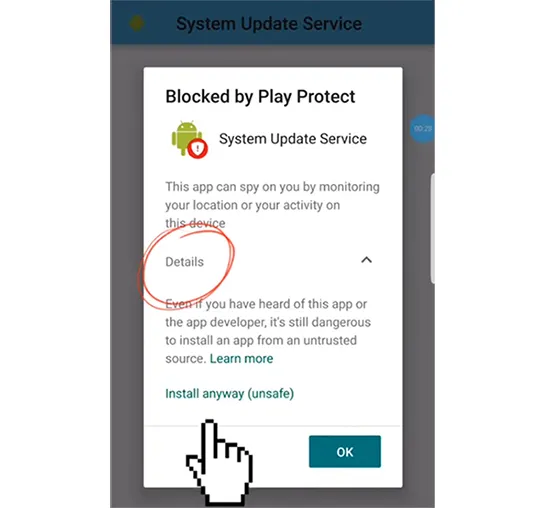
After subscribing to a suitable KidsGuard plan, download the APK file on the target Android device. Open File Manager, locate the downloaded file, and install the app. If your device displays a security warning, tap "Details" and then select "Install anyway" to complete the installation.
-
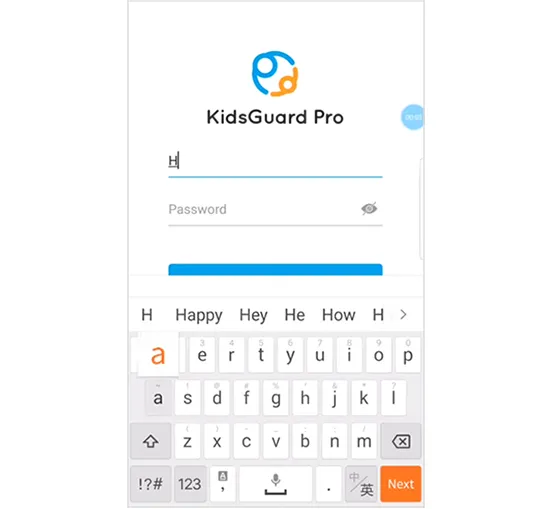
Launch the app and sign in with your ClevGuard account. Provide basic information about your child, including their name and age, and grant the necessary permissions so the app can access the required device features.
-
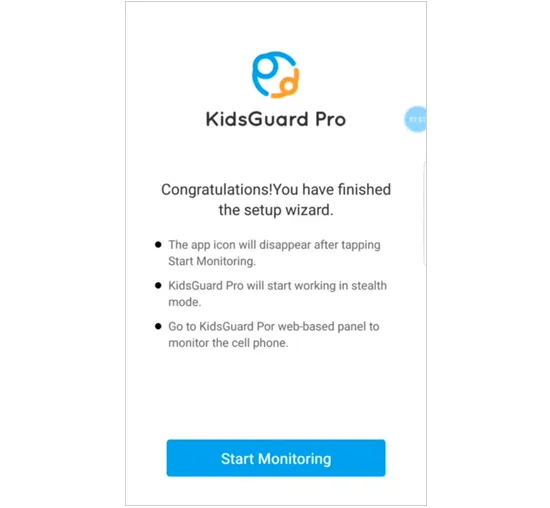
Adjust the device settings by disabling Google Play Protect and enabling access to the information you want to manage. Once everything is configured, tap "Start Monitoring" to activate the parental control features.
App 2. Qustodio
Qustodio is one of the most recognized parental control apps that combines screen time management, website filtering, app blocking, and location tracking. It is designed for families that need to manage multiple devices across different platforms.
With its user-friendly dashboard, you can view your child's digital habits, set daily usage limits, and create customized rules for different devices.

Main Features
* Screen time scheduling and daily limits.
* Website filtering and inappropriate content blocking.
* App monitoring and blocking.
* Location tracking and location alerts.
* Activity reports.
* Calls and SMS monitoring on supported devices.
Supported Devices
Qustodio supports:
* Android
* iOS
* Windows
* macOS
* Chromebook
* Kindle devices
Number of Devices
* Free plan: 1 device.
* Premium plans: Up to 5 or unlimited devices depending on the subscription.
Pricing
Qustodio offers both free and premium plans.
Typical premium plans include:
* Basic plan: around $59.95/year
* Complete plan: around $104.95/year
Drawbacks
- Some useful features are limited to premium subscriptions.
- Advanced social media monitoring is not as extensive as some specialized apps.
- The price can become higher for larger families with many devices.
App 3. Bark
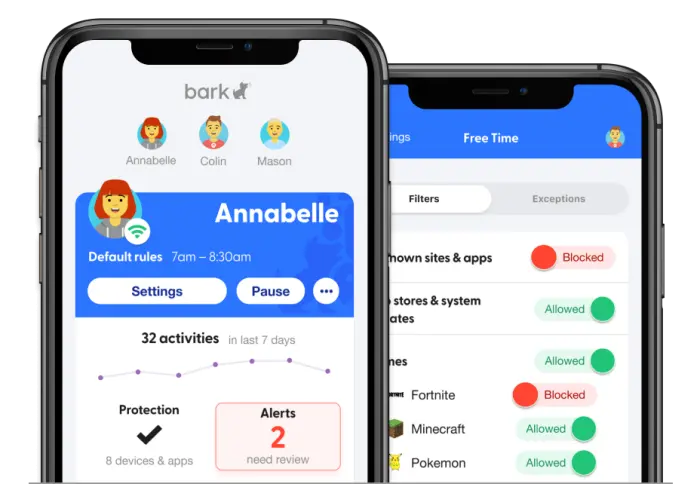
Bark is a parental control app that focuses on protecting children from online risks through AI-powered monitoring and alerts. Instead of showing every activity record, it analyzes texts, emails, social media interactions, web searches, and other online activities to detect potential issues such as cyberbullying, inappropriate content, and online threats.
It is a suitable choice for parents who want to understand their children's digital safety without constantly checking every message manually.
Main Features
* AI-powered monitoring for texts, emails, and social media.
* Alerts for cyberbullying, online predators, and other potential risks.
* Screen time management.
* Website and app blocking.
* Location tracking and location alerts.
* Activity insights and safety reports.
Supported Devices
Bark supports:
* Android
* iPhone/iPad
* Chromebook
* Windows
* macOS
Number of Devices
Bark Premium allows you to add unlimited kids and connect unlimited devices under one subscription.
Pricing
Bark Premium plans include:
* Monthly plan: $14/month
* Annual plan: $99/year
If you purchase a Bark Phone, Bark Premium is included with the monthly subscription. Bark Phone plans range from $29/month to $79/month depending on the selected plan.
Drawbacks
- It focuses on sending alerts for potential risks instead of providing a complete record of all monitored activities.
- Some monitoring features may require specific setup steps or account connections.
- Certain iOS monitoring capabilities are limited due to Apple's system restrictions.
App 4. Aura Parental Controls
Aura Parental Controls is part of the Aura digital safety platform, combining parental controls with broader family protection features. It helps parents manage children's screen time, filter harmful content, and monitor online activities from one dashboard.
It is designed for families looking for a complete digital safety solution rather than only a basic screen-time management tool.

Main Features
* Content filtering for apps, games, and websites.
* SafeSearch protection for Google, Bing, and DuckDuckGo.
* YouTube Restricted Mode to block mature and harmful content.
* Online activity history tracking.
* Internet usage monitoring across connected devices.
* AI Chat App Alerts for potential online risks.
* Digital wellbeing insights for healthier screen habits.
Supported Devices
Aura Parental Controls is available on mobile devices:
* iOS
* Android
For gaming safety features, Aura also provides Safe Gaming by Kidas, which is available on Windows PCs.
Number of Devices
Aura's family plans generally support multiple devices under one subscription, allowing parents to manage children's phones, tablets, and computers within the same household.
Pricing
Aura Parents: $99.99/year
Drawbacks
* It requires relatively newer operating systems, such as iOS 16+ and Android 12+.
* Some features are only available through Safe Gaming by Kidas on Windows PCs.
* It may not be the best choice if you only need basic screen time controls.
App 5. Norton Family
Norton Family is a parental control app designed to help parents monitor and manage their children's online activities. It provides tools for setting screen time limits, supervising websites and videos, tracking location, and receiving activity reports.
With Norton Family, you can create healthier digital habits by controlling access to inappropriate content, limiting distractions, and staying informed about your child's online behavior.
Main Features
* Screen time limits and scheduling.
* Location supervision.
* Website blocking and monitoring.
* YouTube video supervision.
* Mobile app monitoring.
* Search supervision.
* School Time mode.
* Activity reports.
* Alerts and communication tools.
Supported Devices
Norton Family supports:
* Android
* iPhone/iPad
* Windows 10 (except Windows 10 in S mode)
Number of Devices
The Norton Family plan supports 1 device per subscription.
However, Norton also offers multi-device security plans that include parental control features:
* Norton 360 Deluxe: up to 5 devices
* Norton 360 with LifeLock Select: up to 10 devices
The available device coverage depends on the selected Norton subscription.
Pricing
Norton Family plans include:
* Norton Family Premier: $49.99/year (about $4.17/month)
Other Norton security bundles with parental control features include:
* Norton 360 Deluxe: $49.99 for the first year (regularly $124.99/year).
* Norton 360 with LifeLock Select: $99.99 for the first year (regularly $159.99/year).
Drawbacks
- Mac devices are not supported.
- Some features are only available on specific platforms.
- The standalone Norton Family plan supports only one device, which may not be enough for larger families.
- Advanced security features require upgrading to broader Norton security packages.
App 6. Net Nanny
Net Nanny is a parental control app focused on real-time internet filtering and online activity management. It helps parents protect children from inappropriate content by analyzing websites, blocking harmful materials, and providing tools for screen time management and app control.
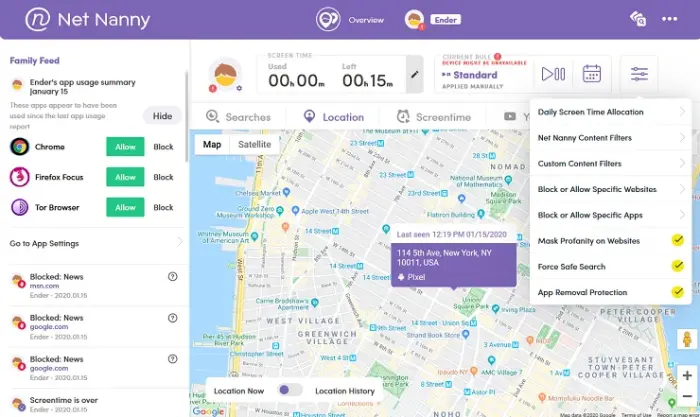
With its dynamic content filtering technology, Net Nanny allows you to customize restrictions based on each child's needs while keeping track of online activities through the Parent Dashboard and Family Feed.
Main Features
* Real-time internet filtering.
* Screen time management.
* Website blocking and monitoring.
* App blocking.
* Location tracking.
* Alerts and reporting.
* Family Feed for online activity insights.
* Parent Dashboard for device management.
* YouTube monitoring.
Supported Devices
Net Nanny supports:
* iOS
* Windows
* macOS
Number of Devices
Net Nanny offers different device limits depending on the selected plan:
* 1 Desktop plan: 1 device
* 5 Devices Family Protection Pass: 5 devices
* 20 Devices Family Protection Pass: 20 devices
Pricing
Net Nanny annual plans include:
* 1 Desktop: $39.99/year
* 5 Devices Family Protection Pass: $54.99/year
* 20 Devices Family Protection Pass: $89.99/year
Drawbacks
- It does not currently support Android devices.
- The supported macOS versions are limited compared with newer operating systems.
- It focuses mainly on web filtering and activity management rather than advanced message monitoring.
- A subscription is required, as there is no free version for full parental control features.
App 7. Google Family Link
Google Family Link is a free parental control app developed by Google that helps parents manage their children's digital habits. It allows you to set screen time limits, approve or block apps, manage content restrictions, and check your child's device location.
Unlike third-party parental control apps, Family Link is deeply integrated with Google services, making it a convenient choice for families using Android devices and Chromebooks.

Main Features
* Screen time limits and downtime schedules.
* App approval and blocking.
* App activity monitoring.
* Content filtering for Google services.
* Location tracking for compatible devices.
* Google Play purchase approval.
* Device lock and battery status checking.
* Privacy and account management controls.
Supported Devices
Google Family Link supports:
Parent devices:
* Android devices
* iPhone/iPad running iOS 16 or later
Child devices:
* Android devices
* Chromebooks with compatible ChromeOS versions
* Compatible Fitbit devices
Number of Devices
Google Family Link does not charge based on the number of devices. You can use one parent account to manage multiple supervised child accounts and compatible devices.
Pricing
* Free
Drawbacks
- It works best with Android and ChromeOS devices.
- iOS child devices cannot receive full supervision features.
- It lacks advanced monitoring features such as social media monitoring or detailed message tracking.
- Content filtering mainly applies to Google services rather than the entire internet.
Conclusion
Choosing the right parental control app depends on what you want to manage and the devices your family uses. If you need detailed phone monitoring, ClevGuard provides more advanced activity tracking features. For families looking for balanced control across multiple platforms, Qustodio, Bark, and Norton Family offer comprehensive tools for managing screen time, apps, and online safety.
For content filtering and healthier digital habits, Aura Parental Controls and Net Nanny provide useful solutions, while Google Family Link is a practical free option for Android-focused families. Before choosing an app, consider the supported platforms, device limits, required features, and subscription costs to find the option that best fits your family's needs.
Related Articles
How to Hide Location on iPhone with 6 Effective Ways
Best iPhone Transfer Software in 2026: Top 5 iTunes Alternatives Compared
How to Fake Location on Find My iPhone/Friends Without Hassle
How to Fake GPS on Android Without Mock Location (Proven Guide)