

TL;DR:
A Special Trade in Pokémon GO lets you exchange certain Pokémon, including Legendary, Shiny, and unregistered Pokémon, with eligible friends. However, these trades have stricter requirements, higher Stardust costs, and daily limits. To complete one successfully, you need to meet the friendship requirements, check your Stardust balance, and select an eligible Pokémon. You can also use Location Changer to explore different Pokémon GO locations without physically traveling.
Trading is one of the most exciting features in Pokémon GO, allowing Trainers to exchange Pokémon and complete their Pokédex with the help of friends. However, not all exchanges follow the same rules. Some Pokémon require a Special Trade, which works differently from a regular trade and comes with additional restrictions.
If you want to exchange a rare Pokémon with another Trainer, understanding how Special Trade in Pokémon GO works is essential. What makes a trade special, and what should you know before exchanging your Pokémon? Let's take a closer look.

Part 1. What Is a Special Trade in Pokémon GO?
A Special Trade is a type of Pokémon exchange in Pokémon GO that involves certain rare or unregistered Pokémon. Unlike regular trades, these exchanges require more Stardust and are subject to a daily limit. They also require both Trainers to reach at least the Good Friends level before trading.
Special Trades are particularly useful when you want to obtain a Legendary Pokémon, a Shiny Pokémon, or a Pokémon with a form that you have not registered in your Pokédex. However, not every rare Pokémon can be traded. Some Pokémon, such as Mythical Pokémon like Mew, are not eligible for trading at all.
To better understand how Special Trade differs from a regular exchange, check the comparison below:
| Feature | Regular Trade | Special Trade |
|---|---|---|
| Eligible Pokémon | Most tradable Pokémon | Legendary, Shiny, unregistered Pokémon, and other eligible special categories |
| Stardust Cost | Generally lower | Generally higher |
| Daily Limit | No specific daily limit for regular trades | Limited daily allowance |
| Friendship Requirement | Good Friends or higher | Good Friends or higher |
| Lucky Pokémon | May result in a Lucky Pokémon | May result in a Lucky Pokémon |
Part 2. What Counts as a Special Trade?
Not every Pokémon exchange is considered a Special Trade. Pokémon GO classifies certain Pokémon based on their rarity, Pokédex registration status, and unique features. If either Trainer offers a Pokémon that falls into one of these categories, the exchange is treated as a Special Trade.
The following Pokémon generally count as Special Trades:
Legendary Pokémon: Pokémon such as Mewtwo, Lugia, and Rayquaza are classified as Legendary Pokémon and require a Special Trade.
Shiny Pokémon: Any Shiny Pokémon you exchange is considered a Special Trade, including Shiny Pokémon that the receiving Trainer has already registered.

Unregistered Pokémon: If the receiving Trainer has not registered a particular Pokémon species in their Pokédex, trading it will count as a Special Trade.
Ultra Beasts: Pokémon such as Nihilego, Buzzwole, and Kartana also fall into this category.
Unregistered Pokémon Forms: Different forms that have not been registered in the receiving Trainer's Pokédex may require a Special Trade. Examples include certain regional forms, Unown letters, and costumed Pokémon.
Pokémon with Special Features: Certain Pokémon with unique features, such as Location Cards, also qualify for Special Trades.
Part 3. What Are the Special Trade Limits in Pokémon GO?
Although Special Trade gives you an opportunity to exchange rare Pokémon, you cannot complete unlimited special exchanges whenever you want. Pokémon GO imposes several restrictions involving daily trading allowances, friendship levels, and Stardust costs.
1. Daily Special Trade Limit
Under normal gameplay conditions, each Trainer can complete one Special Trade per day. This limit applies regardless of whether you exchange a Legendary Pokémon, a Shiny Pokémon, or an unregistered species.
However, Pokémon GO sometimes introduces event bonuses that increase the daily Special Trade allowance. For example, certain events may allow Trainers to complete two or more Special Trades per day. These bonuses are usually temporary, so check the event details before planning multiple exchanges.
Remember that the daily allowance applies to each Trainer. Both participants must have an available Special Trade opportunity to complete the exchange.
2. Friendship Requirements
You cannot complete a Special Trade with just any Trainer on your Friends List. Both participants must reach at least the Good Friends level.
You can increase your Friendship Level by interacting with another Trainer through activities such as sending and opening Gifts, participating in Raids, battling together, and trading Pokémon.
Higher Friendship Levels also provide additional benefits when trading:
- Good Friends: Unlocks Special Trades.
- Great Friends: Provides a small reduction in Stardust costs.
- Ultra Friends: Provides a medium reduction in Stardust costs.
- Best Friends: Provides a larger reduction in Stardust costs.
Therefore, building a higher Friendship Level before exchanging rare Pokémon can help you save Stardust.
3. Stardust Cost
Special Trades generally require considerably more Stardust than regular trades. The exact amount depends on several factors, including the Friendship Level between the two Trainers and whether the receiving Trainer has already registered the Pokémon or its relevant form.

For example, exchanging an unregistered Legendary Pokémon or Shiny Pokémon can require significantly more Stardust than trading a Pokémon that the recipient already has in their Pokédex.
Your Stardust requirement may also decrease as your Friendship Level increases. Therefore, if you plan to exchange an expensive Pokémon, consider waiting until you become Ultra Friends or Best Friends with the other Trainer.
Before confirming a trade, check the Stardust amount displayed in the trading interface. Make sure you have enough Stardust to complete the exchange, as the cost can vary considerably depending on the Pokémon and trading conditions.
Part 4. How to Do a Special Trade in Pokémon GO?
Once you have an eligible Pokémon and meet the friendship requirements, you can complete a Special Trade through the in-game trading feature. Follow these steps:
Step 1. Open Pokémon GO: Launch the game on your device and tap your Trainer profile.
Step 2. Select a Friend: Go to the "Friends" tab and choose a Trainer who is nearby and eligible for trading.
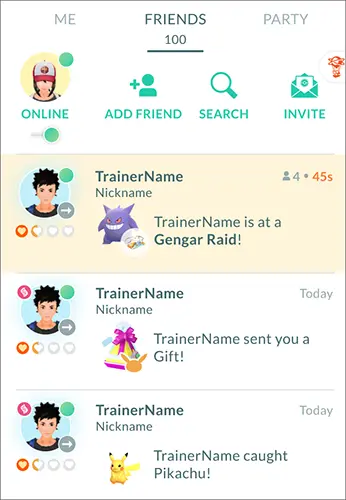
Step 3. Start a Trade: Tap the "Trade" option on your friend's profile to enter the trading screen.
Step 4. Choose a Pokémon: Select the Pokémon you want to exchange. If it qualifies as a Special Trade, the game will indicate the applicable Stardust cost.
Step 5. Review the Trade: Check the selected Pokémon and the required Stardust. Make sure both Trainers are happy with the exchange.
Step 6. Confirm the Exchange: Tap "Confirm" to complete the trade and receive the Pokémon offered by your friend.
Both Trainers must meet the game's trading requirements, including the minimum Trainer Level and Friendship Level. You must also be within the required trading distance for an in-person exchange. If you have already used your daily Special Trade allowance, you may need to wait until the next day unless an event provides additional opportunities.
FAQs About Special Trade in Pokémon GO
1. Are Special Trades always lucky?
No. A Special Trade does not guarantee that you will receive a Lucky Pokémon. Whether a trade results in a Lucky Pokémon depends on the game's Lucky Trade mechanics.
However, if you and your friend are Lucky Friends, your next completed trade is guaranteed to result in Lucky Pokémon for both Trainers. This also applies when you exchange Legendary or Shiny Pokémon through a Special Trade. Keep in mind that becoming Lucky Friends does not remove the usual Special Trade requirements or Stardust costs.
2. Can you do a Special Trade remotely in Pokémon GO?
Yes, but there is an important distinction between Special Trades and Remote Trades. Pokémon GO allows Trainers who become Forever Friends to exchange eligible Pokémon remotely, regardless of their physical distance. You can become Forever Friends by earning 180 Friendship Points together.
However, Remote Trades do not count as Special Trades, even if you exchange Legendary or Shiny Pokémon. Therefore, completing a Remote Trade will not use your daily Special Trade allowance.
After using your first Remote Trade, you need to earn another 90 Friendship Points together to unlock the next one. Remote Trades also have separate eligibility restrictions, so not every Pokémon can be exchanged remotely.
3. Why can't I do a Special Trade in Pokémon GO?
If you cannot complete a Special Trade in Pokémon GO, one or more trading requirements may not be met. Here are some common reasons:
- Insufficient Friendship Level: You and the other Trainer must be at least Good Friends to unlock Special Trades.
- Daily Limit Reached: You may have already used your available Special Trade allowance for the day.
- Not Enough Stardust: Special Trades require more Stardust than regular exchanges. Check whether you have enough for the selected Pokémon.
- Pokémon Is Not Eligible: Some Pokémon cannot be traded, including Mythical Pokémon such as Mew and Pokémon that have previously been traded.
- Trading Distance Requirement: For an in-person Special Trade, both Trainers must be within the game's required trading distance.
- Trainer Level Requirement: Trading is available only to Trainers who have reached Level 10 or above.
Check these conditions before trying again. If an event is active, you should also review its trading bonuses to see whether additional Special Trade opportunities are available.
Bonus: How to Change Your Location in Pokémon GO Without Moving
If you enjoy trading Pokémon with friends, exploring different areas in Pokémon GO can give you more opportunities to discover Pokémon and connect with other Trainers. However, traveling to distant locations just to explore the game is not always convenient. In this case, a GPS location changer like Location Changer can offer another way to explore the game without physically moving.
Location Changer supports Android and iOS devices and lets you change your virtual GPS location through a Windows or Mac computer. It also offers different movement modes, allowing you to simulate travel between selected locations in Pokémon GO. Its main features include:
- Change your virtual location to another place on the map.
- Control your simulated movement direction and speed.
- Create a route between two selected locations.
- Set multiple destinations to simulate a longer journey.
- Provides a dedicated mode for supported location-based games, including Pokémon GO.
If you want to change location in Pokémon GO, follow these general steps:
-
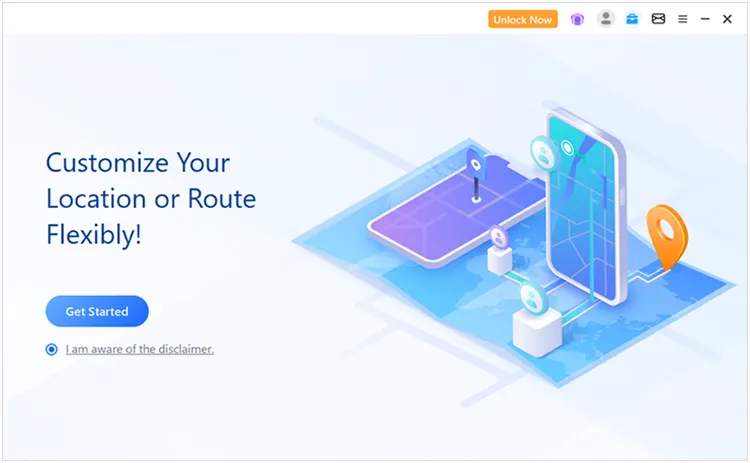
Download and launch Location Changer on your Windows or Mac computer. Click "Get Started" on the main screen to enter the setup process.
-
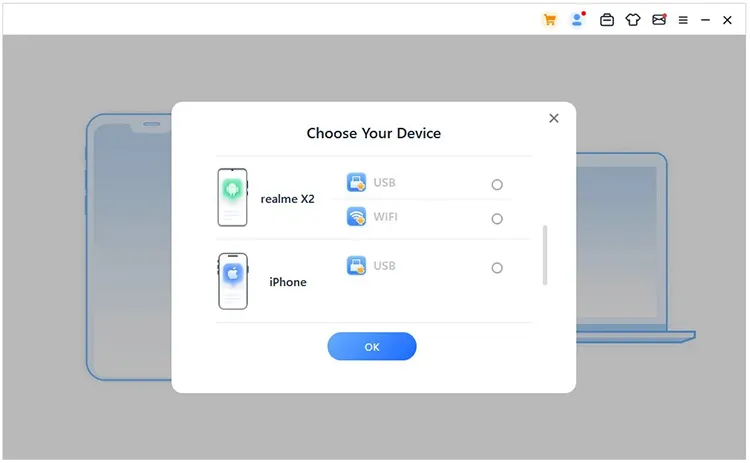
Connect your Android phone or iPhone to the computer using a USB cable or another supported connection method. Follow the program's instructions to complete the connection and make sure your device is recognized.
-
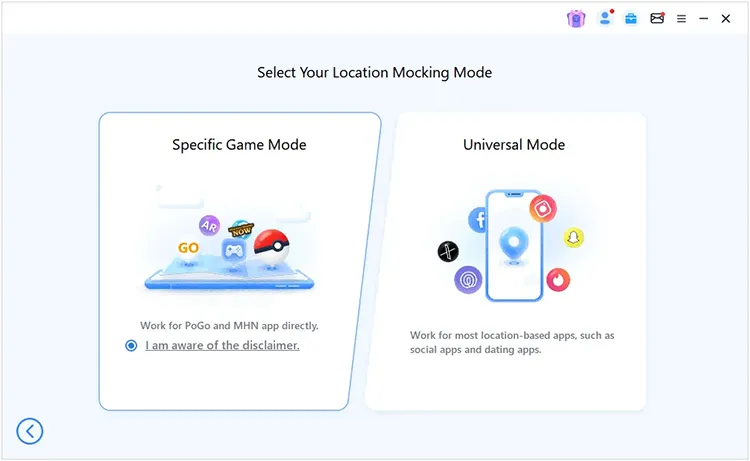
Once your device is connected, go to the mode selection screen and select "Specific Game Mode". This mode is designed for supported location-based games, including Pokémon GO.
-
When the map loads, select an appropriate movement mode and enter your preferred destination. Apply the location change, then open Pokémon GO to explore the selected virtual area and discover its available in-game content.
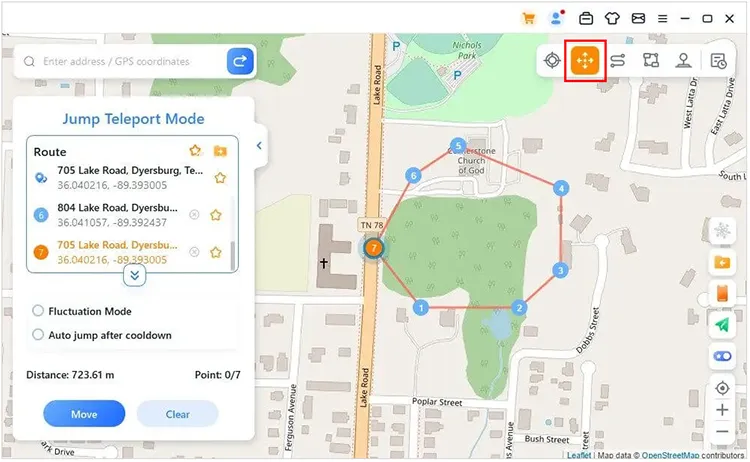
Location Changer changes your device's virtual GPS location; it does not directly provide Pokémon, increase your Special Trade allowance, reduce Stardust costs, or unlock Remote Trades. It also cannot bypass the game's friendship or trading restrictions. Using third-party location-changing tools may carry risks of warnings or account restrictions under Pokémon GO's rules. Always review the game's Terms of Service and use location-based features responsibly.
Conclusion
Making the most of Special Trade in Pokémon GO is not just about finding a rare Pokémon to exchange. It also takes a little planning to choose the right trading partner, save enough Stardust, and make each exchange worthwhile. Whether you are looking to complete your Pokédex or obtain a Pokémon you have always wanted, knowing how the trading system works can make the experience more rewarding.
For more ways to explore Pokémon GO, Location Changer can help you discover different virtual locations and simulate movement without physically traveling. Explore the game at your own pace, connect with other Trainers, and enjoy more of what Pokémon GO has to offer.
Related Articles
How to Get Rare Candy in Pokémon GO? Tips & Tricks
A Comprehensive Guide to Kangaskhan in Pokémon GO (2026)