


TL;DR:
Want to destroy a hard drive and make your data unrecoverable? These 3 methods can help you permanently protect sensitive information before selling, recycling, or disposing of an old drive:
- iReaShare Data Wipe: Best for securely wiping entire drives, shredding files, and erasing free disk space without physically damaging the drive.
- Physical Destruction: Uses shredding, crushing, or drilling to damage storage components and prevent data recovery.
- Degaussing: Uses powerful magnetic fields to destroy data stored on compatible HDDs, but does not work on SSDs.
Choose the right method based on your drive type and security needs, and don't rely on ordinary file deletion or formatting to protect your privacy.
Ever wondered whether deleting files or formatting your hard drive is enough to keep your personal data safe? Unfortunately, it's not! Your photos, passwords, financial records, and other sensitive files may still be recoverable even after you think you've wiped everything clean. So, if you're planning to sell, donate, recycle, or throw away an old hard drive, it's worth taking a few extra steps to protect your privacy.
In this guide, we'll show you how to destroy a hard drive and make a hard drive unrecoverable using three practical approaches: professional data wiping software, physical destruction, and degaussing. We'll also compare their pros and cons to help you find the safest way to get rid of your data for good.
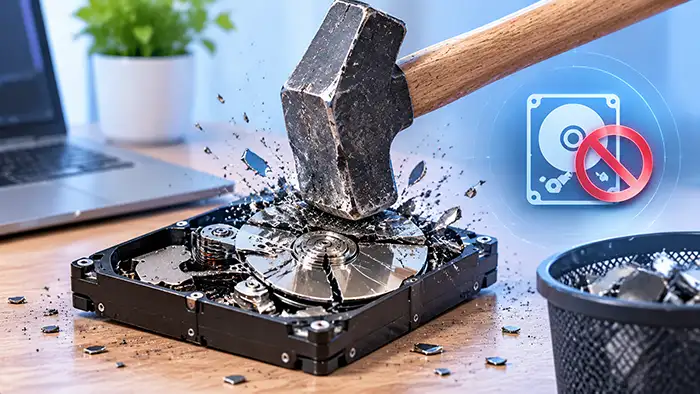
Part 1. Why Do You Need to Destroy a Hard Drive Completely?
A hard drive can contain much more sensitive information than you might expect. Simply deleting files or performing a quick format does not guarantee that the original data is gone.
Here are several reasons why completely destroying or securely wiping a hard drive matters.
- Protect Personal Information: Prevent others from recovering your photos, passwords, emails, and financial records.
- Prevent Data Theft: Reduce the risk of identity theft, account breaches, and privacy leaks.
- Protect Business Data: Keep customer records, employee details, and confidential files secure.
- Meet Security Requirements: Comply with applicable data protection and storage disposal policies.
- Ensure Safe Disposal: Prevent data exposure when recycling, selling, or discarding old drives.
Part 2. How to Destroy a Hard Drive and Make a Hard Drive Unrecoverable
There are three main approaches to destroy a hard drive, making hard drive data unrecoverable. Let's examine each method in detail.
Once you wipe or physically destroy a hard drive, data recovery may be impossible. Before proceeding, back up all important files to a USB drive or another storage device.
Method 1. Use Professional Hard Drive Wiping Software: iReaShare Data Wipe
If your hard drive is still functional and you want to make its data unrecoverable without physically damaging it, professional data wiping software is a practical option.
Unlike ordinary file deletion or quick formatting, secure wiping software overwrites stored information to make previous data much harder to recover. One option is iReaShare Data Wipe, a Windows-based data erasure program designed to wipe hard drives, external storage devices, individual files, and free disk space.
Key features of iReaShare Data Wipe:
* Permanently shred files and folders to prevent data recovery.
* Wipe entire internal and external drives to make stored data unrecoverable.
* Overwrite free disk space to remove traces of previously deleted files.
* Offer two wiping modes: Quick Erase and Deep Erase.
* Support Windows 11/10/8/7.
How to Use iReaShare Data Wipe to Make a Hard Drive Unrecoverable?
-
Download and install iReaShare Data Wipe on your Windows computer. Launch the program and select "Drive Wiper" to erase your internal or external hard drive.
-
Choose "Quick Erase" or "Deep Erase", then select the drive you want to wipe.
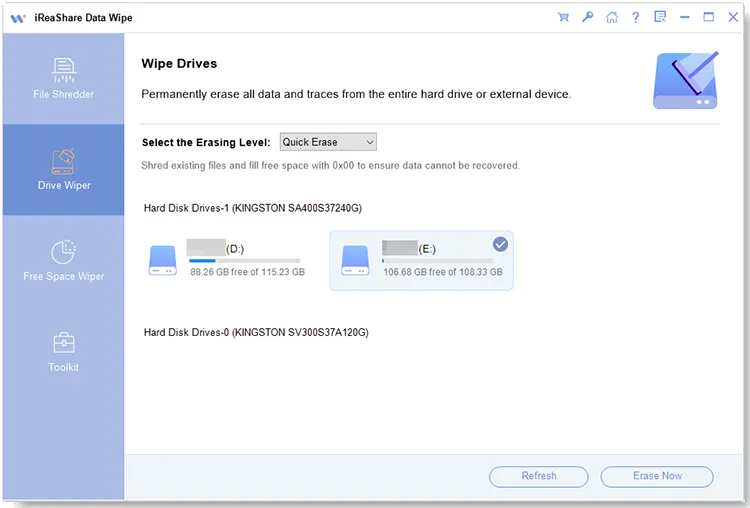
-
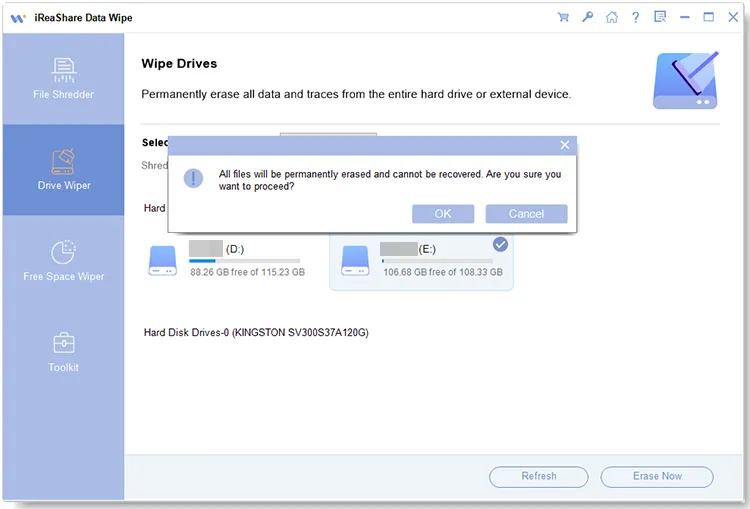
Click "Erase Now" and confirm by clicking "OK". The software will start wiping the selected drive to prevent data recovery.
Here is a video guide:
Method 2. Physically Destroy the Hard Drive Platters
If you no longer need the hard drive and want to make data recovery extremely difficult, physical destruction is another option. There are several ways to physically destroy hard drive platters.
Comparison of Different Physical Hard Drive Destruction Methods
| Physical Destruction Method | HDD | SSD | Recommendation |
|---|---|---|---|
| Shredding | Yes – destroys magnetic platters | Yes – destroys NAND flash chips | Highly Recommended |
| Crushing | Yes – deforms platters and damages internal components | Partially – may damage chips, but some may remain intact | Recommended with specialized equipment |
| Drilling | Partially – damages platter surfaces, but some data may remain recoverable | Limited – may not damage all NAND flash chips | Not Recommended for highly sensitive data |
| Burning | Yes – extreme heat can damage magnetic platters | Yes – extreme heat can damage flash memory chips | Not Recommended for DIY |
| Melting | Yes – may destroy platters and internal components | Yes – may damage NAND flash chips | Not Recommended due to safety and environmental risks |
1. Shredding
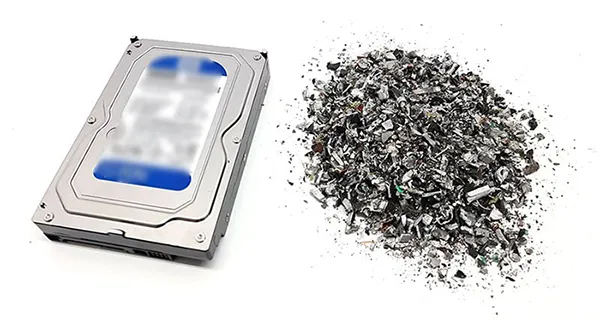
Shredding is one of the most effective physical destruction methods when performed using equipment designed for data-bearing media. A specialized hard drive shredder breaks the entire drive into small pieces, destroying its casing, platters, and internal components.
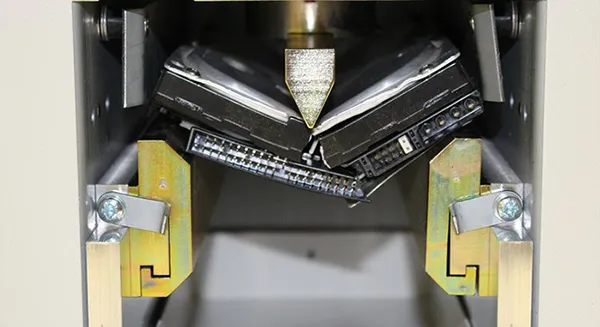
2. Crushing
Crushing is another way to physically damage a hard drive. A specialized hard drive crusher applies substantial mechanical force to deform the drive and damage its internal components. For an HDD, crushing can bend the platters, damage the spindle, and destroy the read/write head assembly.
However, crushing the outer casing does not automatically guarantee that all data-bearing surfaces have been destroyed. Some drives may remain partially intact even after significant external damage. If you choose this method, use a purpose-built hard drive crusher rather than attempting to crush the device with household tools.
3. Drilling
Drilling is a commonly discussed DIY method for damaging a hard drive. It involves creating holes through the drive's internal platters to damage the surfaces where magnetic data is stored.
However, drilling through the external metal casing alone is not sufficient. The drill must actually damage the data-bearing platters.
For an HDD, several holes distributed across the platter area can cause substantial physical damage. Nevertheless, a single hole may leave large portions of the original magnetic surface intact.
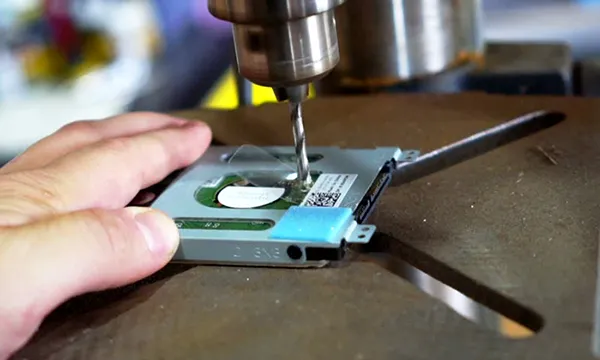
Drilling can produce sharp metal fragments, dust, and flying debris. Do not drill into a sealed drive while it is connected to power. For sensitive information, professional destruction is a safer and more reliable choice.
4. Burning
Melting is another industrial method that can destroy a hard drive by exposing its components to temperatures high enough to break down their physical structure. When the data-bearing materials are completely melted or otherwise irreversibly destroyed, recovering the original information becomes impractical.
However, different hard drive components are made from different materials, so they may not all melt or break down at the same temperature. For this reason, simply exposing a hard drive to high heat does not guarantee complete destruction.
Melting should only be handled by qualified industrial facilities. It is not a practical or safe household method for destroying a hard drive.
5. Melting
Melting a hard drive involves using highly corrosive chemicals to destroy its internal components and outer casing. While this method can cause severe damage to a hard drive, it is extremely dangerous and generally not recommended. The process may involve strong acids, such as hydrochloric acid and nitric acid, which can cause serious chemical burns and release hazardous fumes. These substances can also contaminate the environment if handled or disposed of improperly.
Due to the significant health, safety, and environmental risks, chemical melting should only be considered in specialized industrial settings with proper equipment and professional supervision.
Method 3. Use a Degausser to Destroy Magnetic Data
A degausser is a specialized device that generates a powerful magnetic field to disrupt the magnetic patterns used to store data.
Because traditional HDDs store information magnetically on rotating platters, degaussing can destroy their magnetic data without requiring you to open or physically shred the drive.

Degaussing is not a universal solution for every storage device. It is designed for magnetic media, including compatible HDDs and magnetic tapes. It cannot reliably erase NAND flash memory in SSDs, USB flash drives, or memory cards.
Part 3. Frequently Asked Questions
Q1. Will soaking a hard drive in water destroy it?
No. Water can cause corrosion, electrical damage, and mechanical failure, but it does not reliably erase stored data. Even if the HDD stops working, its platters may remain intact, allowing professional data recovery.
To make data unrecoverable, use a proper data sanitization method or professional physical destruction instead.
Q2. Can a magnet destroy a hard drive?
A sufficiently strong magnetic field can disrupt data on traditional HDDs, but ordinary household magnets are not powerful enough to reliably erase them.
Professional degaussers generate controlled magnetic fields designed to destroy data on compatible magnetic media. However, they cannot erase SSDs because SSDs use flash memory rather than magnetic storage.
Q3. Will bleach damage a hard drive?
Bleach may corrode the hard drive's casing and metal components, but it cannot reliably erase stored data. Information may remain recoverable from the platters or flash memory chips.
Bleach is also hazardous and can cause chemical burns or release toxic gases when mixed with other substances. It is not a safe or effective hard drive destruction method.
Q4. Does drilling a hole in a hard drive make it unreadable?
Drilling through an HDD's platters can damage its magnetic storage surface and make the drive unusable. However, a single hole may leave large portions of the platters intact, allowing some data to be recovered.
Professional shredding or validated data sanitization provides stronger protection.
For SSDs, drilling the casing is even less effective because data is stored in separate NAND flash chips. These chips must be properly sanitized or physically destroyed.
Q5. Does degaussing work on all types of hard drives?
No. Degaussing works on traditional HDDs because they store data magnetically, but it cannot effectively erase SSDs, which use flash memory chips.
For SSDs, use a manufacturer-supported Secure Erase tool if you plan to reuse the drive. For highly sensitive data, choose professional physical destruction instead.
Conclusion
Destroying a hard drive and making its data unrecoverable doesn't always mean smashing it into pieces. The right approach depends on whether you want to reuse the drive or dispose of it permanently. If you want a simpler way to protect your data without damaging your storage device, iReaShare Data Wipe is worth trying. It lets you wipe entire drives, shred selected files, and clean free disk space through an easy-to-use interface.
Before selling, donating, or disposing of your old hard drive, take a few minutes to erase your data properly and keep your private information out of the wrong hands.
Related Articles
How to Wipe a Hard Drive on a Dead Computer in 3 Proven Ways
How to Make SSD Data Unrecoverable | Ensure Data Irretrievability
How Do I Make Deleted Data Unrecoverable? (Viable Solutions and Tips)
HDD Wipe Software Reviews: 9 Options Available (Find the Best)