

TL;DR:
If you want to know how to change location on TikTok, the right approach depends on what you want to modify. You can update your account region, change your app language or device settings, switch SIM cards, or use a VPN. For more direct GPS location control, Location Changer lets you select a virtual location on a map. You can also influence your For You Page by interacting with content from your target region.
TikTok uses various location-related signals to determine which regional content and features are relevant to your account. These may include your SIM card region, IP address, device settings, language preference, and GPS information when location services are enabled. As a result, you may continue seeing videos from your current area even when you want to explore content from another country.
If you're wondering how to change location on TikTok, there are several approaches worth trying, whether you've moved abroad, want to discover videos from a different region, or need to adjust your device's location information. However, changing your TikTok account region, modifying your GPS location, and influencing your content recommendations are different things. Understanding these differences will help you choose the most suitable method.
- Method 1. How to Change Location on TikTok by Changing Account Region
- Method 2. How to Change TikTok Location by Changing the App Language
- Method 3. How to Change Region on TikTok by Changing Device Region
- Method 4. How to Change TikTok Region by Switching SIM Cards
- Method 5. How to Change GPS Location on TikTok with a Location Changer
- Method 6. How to Change Location on TikTok Through a VPN
- Method 7. How to Change TikTok For You Page Through the Algorithm
- FAQs on How to Change Location on TikTok
Comparison of 7 Methods to Change Location on TikTok
Before getting started, take a look at the following comparison table to understand what each method changes and whether you need additional tools.
| Method | What It Changes | Third-Party Tool Required | Best For |
|---|---|---|---|
| Change Account Region In-App | TikTok account region | No | Changing your account's country or region |
| Change App Language | TikTok display language and language preference | No | Exploring content in another language |
| Change Device Region | Phone's regional settings | No | Adjusting device region preferences |
| Switch SIM Cards | SIM-based location signal | No (but requires a new SIM) | Providing a different mobile carrier region |
| Use a GPS Location Changer | Device GPS coordinates | Yes | Setting a specific virtual location |
| Use a VPN | Public IP address | Yes | Connecting through another country's network |
| Influence the Algorithm | Content recommendations | No | Seeing more videos from a target region |
Method 1. How to Change Location on TikTok by Changing Account Region
TikTok has an in-app Account Region setting that allows eligible users to change the country or region associated with their accounts. This is the most direct option if you have moved to another country and want your TikTok account to reflect your new region.
However, this option is not available to every account. TikTok may require you to meet certain regional and account-related conditions before allowing a change.
Steps to change your TikTok account region:
Step 1. Open TikTok and tap "Profile" in the bottom-right corner.
Step 2. Tap the "Menu" icon in the top-right corner.
Step 3. Select "Settings and privacy".
Step 4. Tap "Account" and find "User Information".
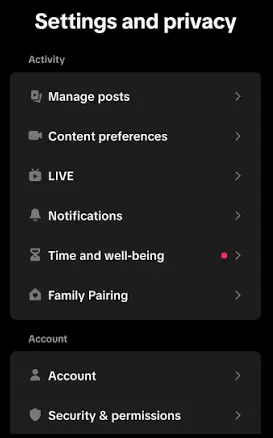
Step 5. Select "Account region".
Step 6. Choose your desired country or region if the option is available, then follow the on-screen instructions.
- Uses TikTok's built-in settings without additional software.
- Directly changes the account's associated region when approved.
- May help align regional account settings with your new location.
- The option may not be available for every account or country.
- TikTok may require you to have been in and active in the target region, meet its age requirements, and settle certain outstanding rewards.
- You may not be able to change your account region again after completing the process.
Method 2. How to Change TikTok Location by Changing the App Language
Changing your TikTok app language is another simple way to adjust your regional content preferences. TikTok considers language preferences when recommending videos, so selecting a different language may help you discover more content created in that language.
For example, if you want to explore French TikTok videos, switching your app language to French may help make French-language content more relevant to your recommendations. However, this does not guarantee that TikTok will show videos from France or change your actual location.
Steps to change the TikTok app language:
Step 1. Open TikTok and navigate to "Profile".
Step 2. Tap the "Menu" icon and select "Settings and privacy".
Step 3. Find and tap "Language".
Step 4. Select "App language".
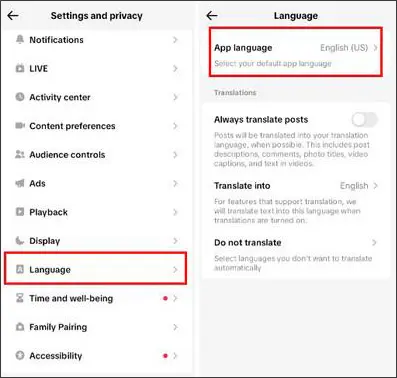
Step 5. Choose your preferred language from the list.
Step 6. Tap "Done" to save the changes.
- Easy to change directly in TikTok.
- No additional software or hardware required.
- May help you discover videos in your preferred language.
- Does not change your GPS location, IP address, or account region.
- Language preferences are only one of several recommendation signals.
- You may still see content from your original region.
Method 3. How to Change Region on TikTok by Changing Device Region
Your phone's regional settings provide another signal that TikTok may use to estimate your location and personalize content. If you want TikTok to recognize a different regional preference, you can try changing the country or region in your device settings.
The process differs slightly between iPhone and Android devices.
On iPhone:
Step 1. Open "Settings" on your iPhone.
Step 2. Tap "General".
Step 3. Select "Language & Region".
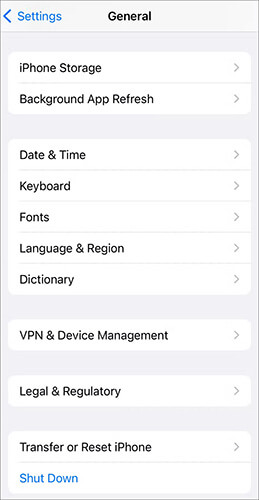
Step 4. Tap "Region".
Step 5. Choose your target country or region.
On Android:
Step 1. Open "Settings" on your Android phone.
Step 2. Go to "System" or "General Management", depending on your device.
Step 3. Find "Languages & region" or a similar regional settings option.
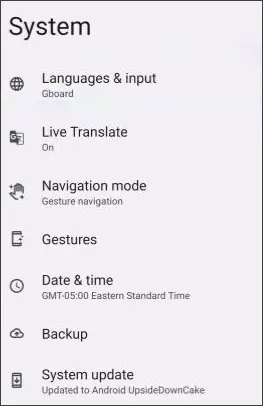
Step 4. Select "Region" if available.
Step 5. Choose your preferred country or region and save the changes.
- Uses built-in phone settings.
- Does not require third-party location-changing software.
- Can align your device's regional preferences with your target region.
- Menu options vary between brands and operating system versions.
- Changing the device region does not change your actual GPS coordinates or IP address.
- TikTok may continue using other location signals to determine your approximate location.
Method 4. How to Change TikTok Region by Switching SIM Cards
TikTok may use your SIM card region as one of the signals to estimate your approximate location. Therefore, switching to a SIM card from another country may help provide different regional information to the app. This method may be useful if you have moved abroad or have access to a SIM card registered in your target country.
Steps to change your TikTok location using a SIM card:
Step 1. Get a SIM card issued by a mobile carrier in your target country.
Step 2. Turn off your phone and remove your existing SIM card.
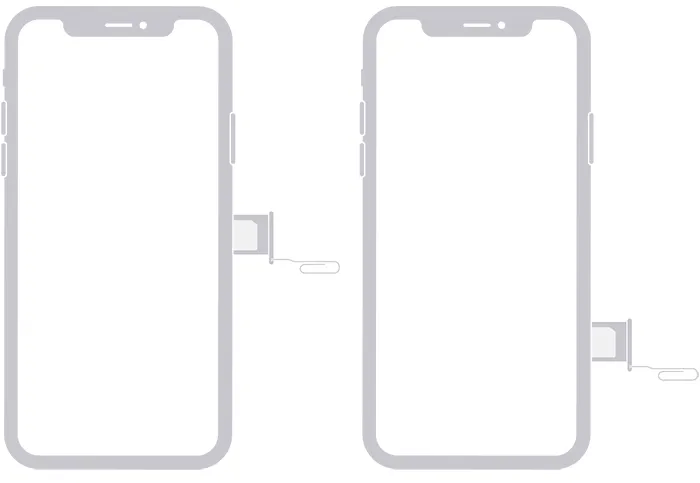
Step 3. Insert the new SIM card and restart your phone.
Step 4. Make sure the new SIM card is active and can connect to the mobile network.
Step 5. Open TikTok and check whether the available regional content changes.
- Provides a different SIM-based regional signal.
- Does not require a separate VPN or GPS changer.
- Can be useful when relocating to another country.
- Requires access to a SIM card from the target country.
- Some phones may not support the SIM card's network bands or carrier.
- Does not automatically change your IP address, GPS coordinates, or TikTok account region.
Method 5. How to Change GPS Location on TikTok with a Location Changer
If changing your TikTok account settings, language, or SIM card is not enough, you can try a GPS location changer. Unlike the previous methods, this type of software allows you to select specific coordinates on a map and set them as your device's virtual GPS location.
One option worth considering is Location Changer, a location-changing tool designed for iOS and Android devices. It allows you to teleport your GPS location to a selected destination without physically traveling there. For example, if you want to set your virtual location to London, you can search for London on the map and use the Teleport feature to change your device's GPS coordinates.
Key Features of Location Changer
- Global GPS Location Changes: Select a location anywhere on the map or enter a specific address or GPS coordinate.
- Multiple Movement Modes: Besides Teleport Mode, it offers Two-Spot, Multi-Spot, and Joystick modes to simulate different movement patterns.
- iOS and Android Compatibility: Supports location changes on compatible iPhones and Android devices.
- No Jailbreak or Root Required: You can change your virtual GPS location without jailbreaking your iPhone or rooting your Android phone.
- Flexible Location Control: Switch between different destinations when you need to use location-based apps.
How to change your TikTok GPS location with Location Changer?
-
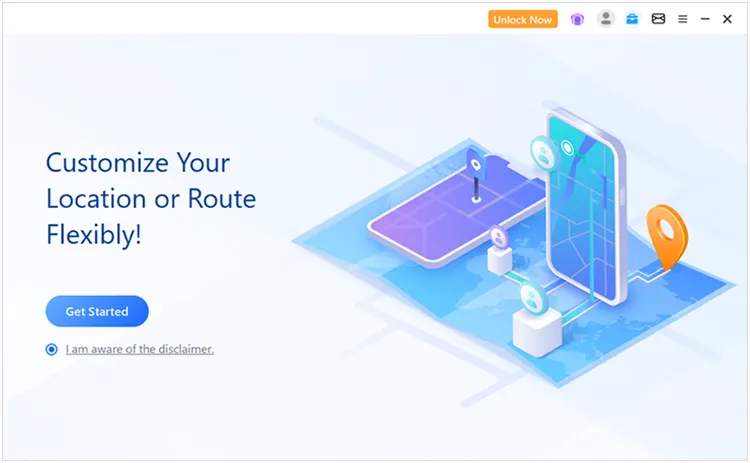
Open Location Changer on your Windows PC or Mac, then click "Get Started" to enter the location-changing interface.
-
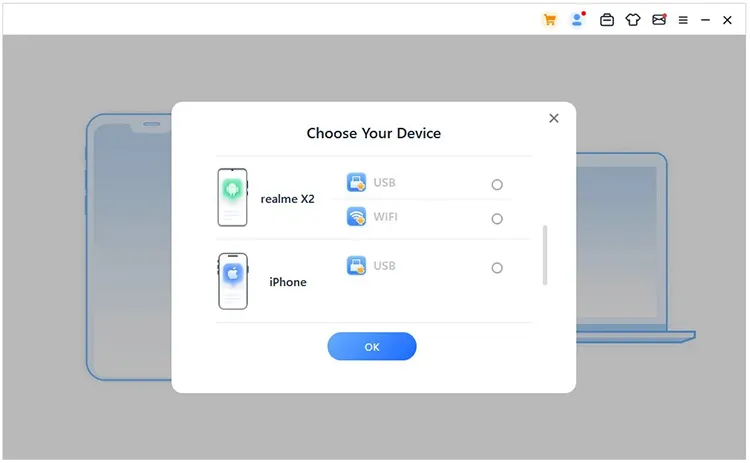
Connect your iPhone or Android phone to the computer by following the on-screen prompts. Make sure the software recognizes your device before proceeding.
-
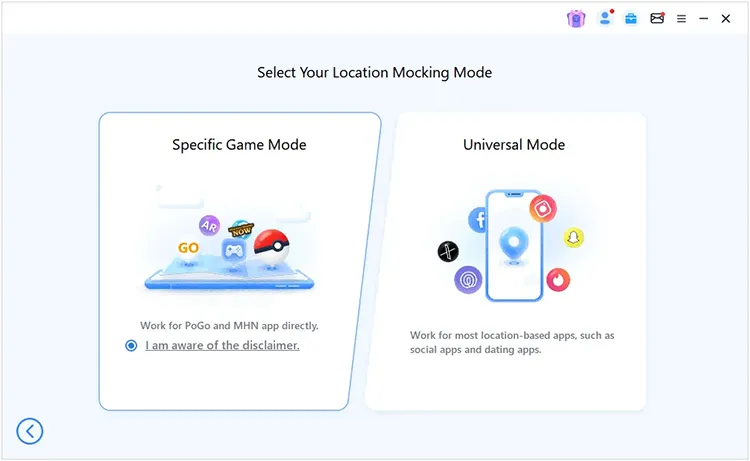
Once your device is connected, select "Universal Mode" to modify its GPS location for TikTok and other location-based apps.
-
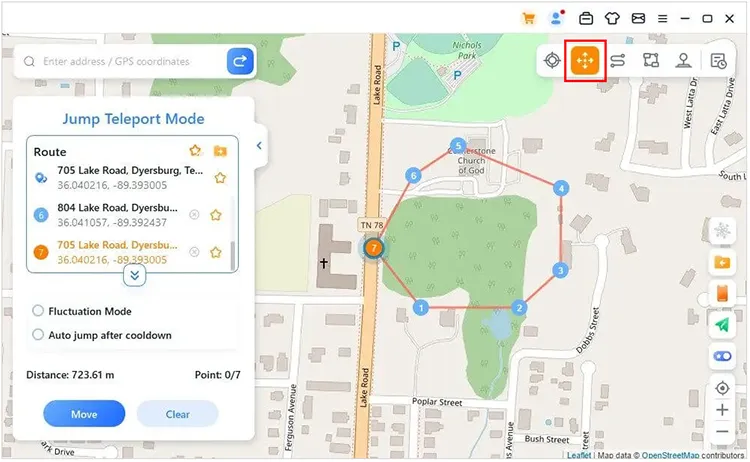
After the map appears, choose a suitable location-changing mode and select your desired destination. Apply the changes to set the virtual GPS location on your device.
- Lets you select a specific city or location rather than only a country.
- Offers multiple location-changing and movement modes.
- Supports compatible iOS and Android devices.
- Does not require physically traveling to the target location.
- Requires additional software and setup.
- Some features may require a paid license.
- Changing GPS coordinates does not change your SIM card region or IP address.
- TikTok may use other signals, so a GPS change alone cannot guarantee a different account region or For You Page.
Method 6. How to Change Location on TikTok Through a VPN
A VPN (Virtual Private Network) is another option if you want TikTok to see an IP address associated with a different country. It routes your internet traffic through a server in your chosen region, making your public IP address appear to come from that location. For example, if you are currently in the United States but want to explore content associated with the UK, you can connect to a UK VPN server before opening TikTok.
Steps to change your TikTok IP location using a VPN:
Step 1. Choose a reputable VPN provider and install its app on your phone.
Step 2. Open the VPN application and sign in if required.
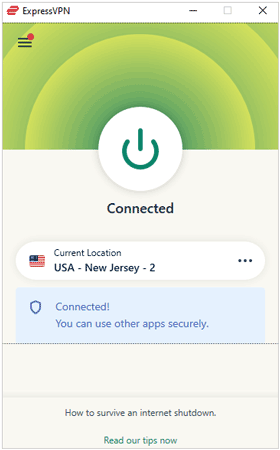
Step 3. Browse the available server locations and select your target country.
Step 4. Tap "Connect" to establish the VPN connection.
- Easy to set up on most smartphones.
- Allows you to connect through servers in different countries.
- Does not require changing your SIM card or phone hardware.
- Some VPN services require a subscription.
- A VPN only changes your apparent IP address, not your GPS location or SIM card region.
- A VPN connection does not guarantee access to region-restricted features or a different For You Page.
Method 7. How to Change TikTok For You Page Through the Algorithm
If your main goal is to see videos from another country rather than change your actual device location, you can try influencing TikTok's recommendation algorithm.
TikTok considers your interactions when deciding what content to recommend. For example, the videos you watch in full, like, share, comment on, and skip can all affect your For You Page. In fact, user interactions generally carry more weight than language preferences and other user information.
Therefore, consistently interacting with videos from your target region may gradually change the type of content TikTok recommends.
Steps to influence your TikTok recommendations:
Step 1. Open TikTok and search for videos related to your target country or region.
Step 2. Use relevant local keywords and hashtags to discover regional creators.
Step 3. Watch videos from those creators instead of immediately skipping them.
Step 4. Like, comment on, and share content that interests you.
Step 5. Follow creators who regularly publish videos from your target region.

Step 6. Repeat these interactions over time to help TikTok understand your preferences.
- Completely free to use.
- Does not require changing your device settings or installing additional software.
- Helps personalize your For You Page based on your interests.
- Takes time and consistent interactions.
- Does not change your actual GPS location, IP address, or account region.
- TikTok does not guarantee that your feed will only show content from your target country.
FAQs on How to Change Location on TikTok
1. Is it legal to change location on TikTok?
Generally, changing your device region, using a VPN, or modifying GPS coordinates is legal in many countries, although local laws may vary. However, you should follow TikTok's Terms of Service and regional eligibility requirements. Changing your apparent location does not automatically qualify you for region-restricted features or services.
2. Why won't TikTok let me change my location?
TikTok may prevent you from changing your location for several reasons:
- Account region restrictions: Your account may not meet TikTok's requirements for changing regions.
- Outdated app version: Some settings may be unavailable in older versions.
- Conflicting location signals: Your SIM card, IP address, device settings, and GPS may indicate different regions.
- Regional limitations: Certain features are only available in selected countries.
3. Does changing location on TikTok change the For You Page?
Not necessarily. TikTok considers multiple signals when recommending videos, including your viewing history, interactions, language preferences, and location information. Changing your GPS or IP address alone does not guarantee a different For You Page. To see more content from another country, regularly watch, like, and follow creators from that region.
Conclusion
There are several ways to change location on TikTok, but the right method depends on your actual goal. If you want to update your account's associated country, start with TikTok's Account Region setting. If you only want to explore videos in another language or region, adjusting your language preferences and interacting with local creators may be sufficient.
For users who specifically want to change their device's GPS coordinates, Location Changer offers a more flexible option. It lets you select a virtual location on a map without physically traveling there. Just remember that no single method guarantees a complete change to your TikTok account region, location signals, and content recommendations.
Related Articles
How to Remove TikTok Watermark from Videos: 5 Practical Methods
How to Hide Location on iPhone with 6 Effective Ways
How to Fake Location on Find My iPhone/Friends Without Hassle
How to Fake GPS on Android Without Mock Location (Proven Guide)